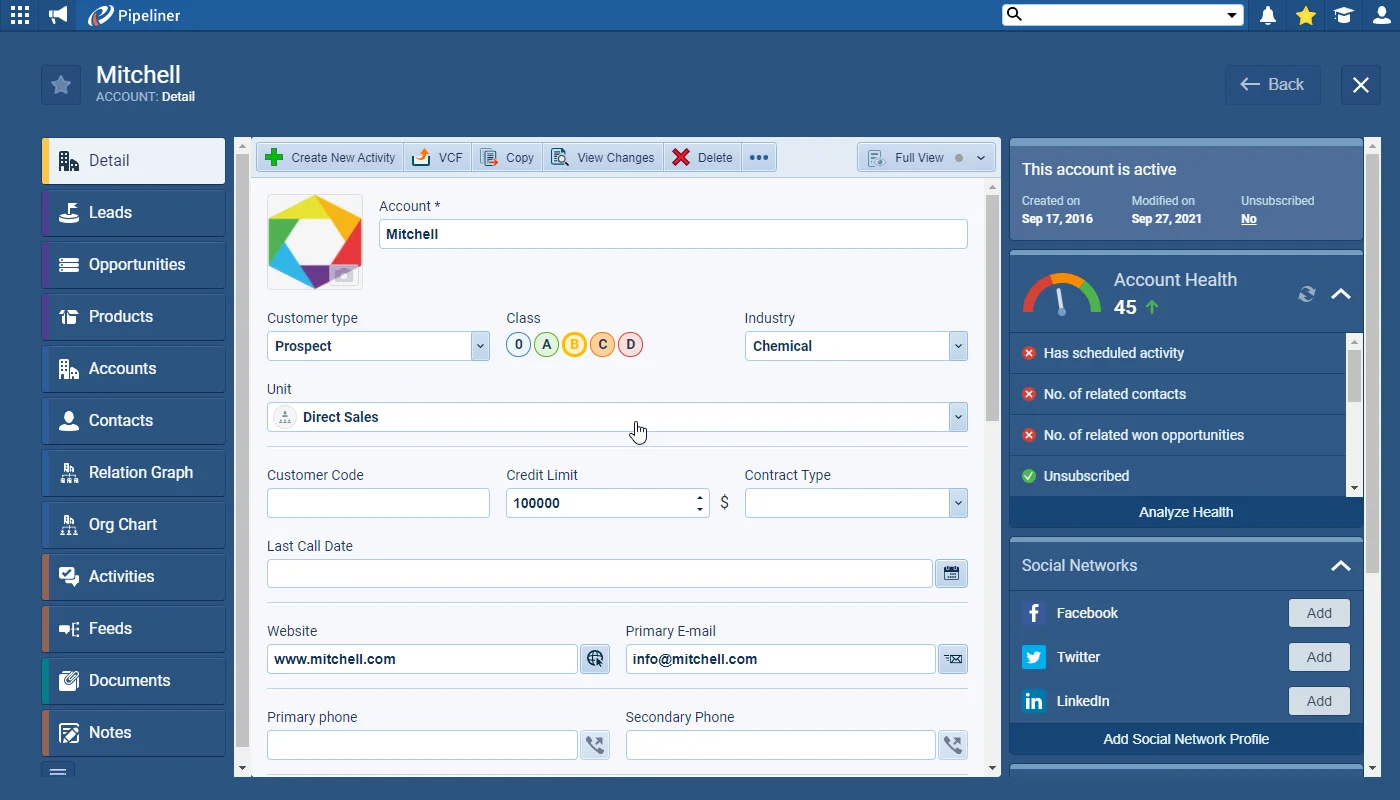
The new, “at a glance” Account Health helps you instantly understand the status of the relationship with Accounts in Coevera. You can view Account Health by using the widget in the right-hand panel for each individual company record.
New Account Health, Email Template Statistics and more
Coevera 4.1.0 introduces Account Health — an at-a-glance read on the status of every Account relationship — adds per-template email statistics, and extends Automatizer with Product Line Item triggers and product-table webhooks.
- Features
- 2
- Improvements
- 5
- Security
- —
Overview
Account Health leads this release. A new at-a-glance widget in the right-hand panel of every company record shows the status of the relationship, health can be analysed over a period with the Analyze Health button, visualised with charts in Reports and Dashboards, or added as a column to the Account List View. Admins switch it on and customise the indicators, categories, and scoring used to calculate it from a new Account Health tab in the Admin Module. Email Template Statistics is the second headline: whenever a template is used to send an Email or Mass Email it is linked to that email, so Coevera can track how many times each template was sent, opened, clicked, replied to, or unsubscribed from — and compare templates within a folder or by type.
Beyond the headline features, Admins can now Remove, Reassign, or Hide the reports, dashboards, profiles, and email templates belonging to Inactive Users; archiving a Lead can auto-complete all Tasks linked to it; and the Navigator target graph adds Unweighted and Won lines for tracking performance against a Target Goal. Automatizer gains two capabilities — triggering a process from a Product Line Item when a product is added to, updated on, or deleted from an Opportunity, and sending an entire Product table to an external system such as an ERP through a webhook.
- Account Health shows the status of each Account relationship at a glance, via a widget in the right-hand panel of every company record.
- The Analyze Health button lets users review Account Health over a period.
- Account Health can be visualised with charts in Reports and Dashboards, or added as a column to the Account List View.
- Admins can switch on Account Health and customise its indicators from a new Account Health tab in the Admin Module.
- Account Health uses four categories — Critical (a default, unmodifiable system category) plus three categories with renamable labels and adjustable scoring ranges.
- Account Health is recalculated automatically overnight and in real time when a record is created or updated, with a manual refresh for related-record changes.
- Email templates are linked to the emails sent from them, tracking sends, opens, link clicks, replies, and unsubscribes per template.
- Template statistics can be compared across multiple templates within a folder or by type (text, HTML) using the Show Statistics button.
- Editing an email that used a template breaks the link and excludes it from the template's statistics; changing a template used in Automatizer triggers a warning.
- Admins can Remove, Reassign, or Hide reports, dashboards, profiles, and email templates for Inactive Users.
- Archiving a Lead can now auto-complete all Tasks linked to it.
- The Navigator target graph adds Unweighted and Won lines to track performance against the Target Goal.
- Automatizer can trigger a process from a Product Line Item when a product is added to, updated on, or deleted from an Opportunity.
- Automatizer can send an entire Product table to an external system, such as an ERP, through a webhook when an Opportunity is Won.

What we're proud of
Know the health of every account
The new at-a-glance Account Health widget shows the status of the relationship on every company record — it can be analysed over a period, charted in Reports and Dashboards, or added to the Account List View, with Admins defining the indicators, categories, and scoring behind the score.
Account Health
Email Template Statistics
From this release, whenever your users use an email template when sending an Email or a Mass Email, the template is “linked” to the email itself and this allows tracking of the statistics for each template — the total number of times it has been sent, opened, links clicked, replied to or where the recipient unsubscribed.
All screenshots
4Various Improvements
Managing Inactive Users
It’s now possible for you to Remove, Reassign or “Hide” reports, dashboards, profiles, email templates etc for your Inactive Users!
Working with Leads
When archiving a Lead, you can now auto-complete all Tasks linked to it.
Automatizer — using Product Line Items as a Trigger
In Automatizer there is a new option to trigger a Process from a Product Line Item. So when a product is added to or update on (or deleted from) an Opportunity, your process could create a task or send an email etc.
Automatizer — Sending Product Table using Webhooks
When the trigger in an Automatizer process is an Opportunity, you now have an option to send the whole Product table to your external system through a webhook. For example, when an Opportunity is Won, send all Products linked to the Opportunity to your ERP system.
Frequently Asked Questions
Related releases
- v6.4.0 · Aug 27, 2026
- Emails Preview Screen with Drafts and Scheduled Conversations
- Voyager AI Assistant Improvements
- Modified By on All Entities
- v6.3.0 · Jul 1, 2026
- Brand New Emails Preview Screen
- Voyager AI Relationship Charts — Buying Center
- v6.2.0 · May 28, 2026
- Brand New Voyager AI Relationship Charts
- AI Smart Field Updates
See it in your own pipeline
Start a free trial and explore what's new in Coevera 4.1.0 for yourself.
No credit card required · Free 14-day trial
