v5.20.0MinorReleased

Brand New AI Automatizer Agent, Target Improvements, New E-Book Library Page, and other Various Improvements…

Coevera 5.20.0 introduces the AI Automatizer Agent — build and manage workflow processes from natural-language prompts — alongside a reworked Target system with new Simulated Targets, a Forecast Setup wizard integration, and a new in-app E-Book Library.

AutomatizerVoyager AIReports
Share
Features
3
Improvements
10
Security
Coming soon

Overview

Two capabilities lead this release. The AI Automatizer Agent brings process creation into the Automatizer through natural language: users describe what they want, and the agent drafts a process — defining the trigger, condition, and action — with a Preview Changes comparison and an approval step before publishing. The Target area is reworked around Simulated Targets, a new target type that models performance from simulated data rather than a user's history, plus a four-step creation wizard, a redesigned progress bar, and the ability to create targets directly from the Forecast Setup wizard.

A set of Various Improvements rounds out the release: a new workflow for applying updated currency exchange rates, a Copy action across list and detail views, numeric-field grouping in Spreadsheet and Pivot reports, AI language pre-selection from a user's profile, filterable Autonumbering patterns, additional mappable system fields, and a bulk product discount on opportunities.

What's in this release
  • AI Automatizer Agent — create, update, and manage processes from natural-language prompts, enabled by default from the Voyager AI Assistant configuration.
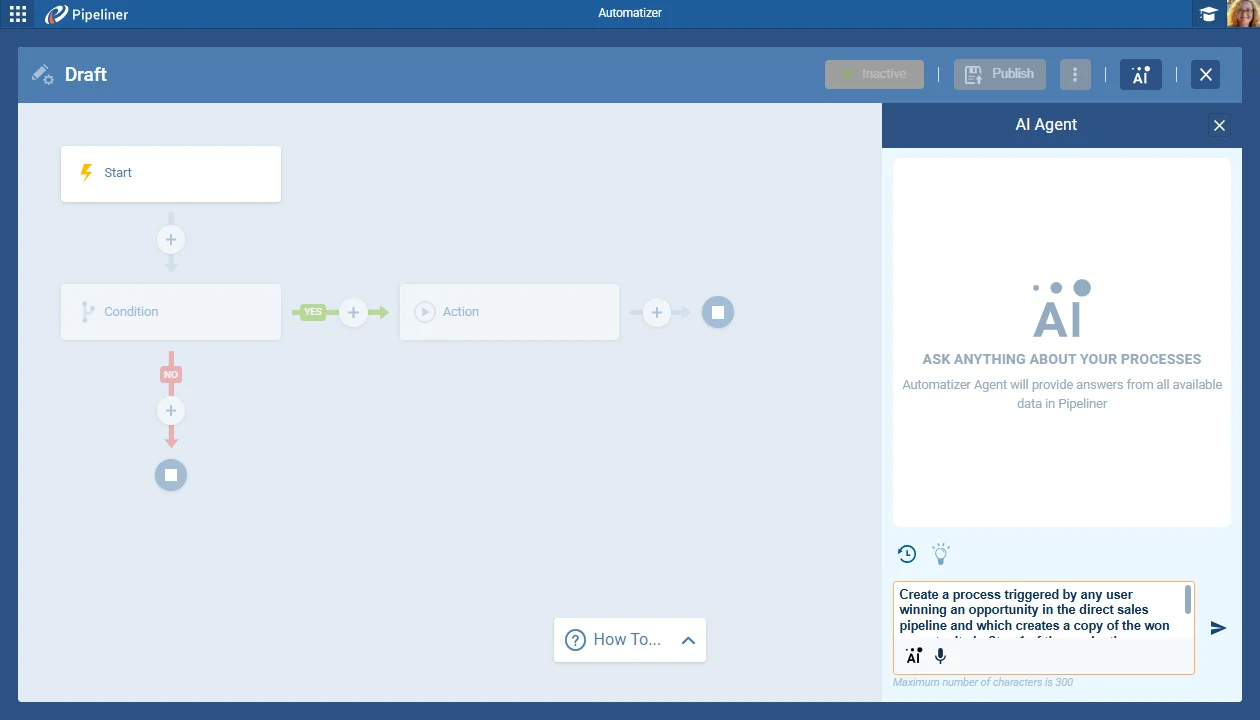
  • A "Create with AI" action in the Automatizer and an "AI Agent" button in the process editor.
  • AI-generated processes require a side-by-side Preview Changes review and approval before they can be published.
  • Manually-created processes can now use Preview Changes before publishing or publishing and activating.
  • An optional backup copy of the current process can be created when publishing (off by default).
  • Simulated Targets — a new target type that models metrics from simulated Lead and Opportunity data instead of historical data.
  • Create User Target and Simulated Target flows use a four-step wizard (Properties, Period, Values, and User or Simulation).
  • A new Target step in the Forecast Setup wizard lets you create User or Group Targets during forecast setup.
  • The Target Detail progress bar gains colored achievability milestones and clearer validation labels.
  • E-Book Library added to the University dropdown menu, opening an in-app PDF viewer for Coevera e-books.
  • Currency exchange-rate updates can be applied to all active records or saved for future records only.
  • Report grouping by numeric fields — Unique Values, Automatic Grouping, or Manual Grouping in Spreadsheet and Pivot reports.
  • A Copy action added across list and detail views for Leads, Opportunities, Accounts, Contacts, and more.
AI Automatizer Agent

What we're proud of

AI that drafts your automations

The new AI Automatizer Agent lets you build and refine workflow processes in plain language, then review every proposed change side by side before it goes live — so the speed of AI comes with a clear approval step you control.

01New · Automatizer

AI Automatizer Agent

AI Automatizer Agent

The new AI Automatizer Agent introduces AI-powered capabilities into the management of workflow processes. This powerful new feature allows users to create, update, and manage processes using natural language prompts. The system provides new UI components for AI interaction, process review and differential analysis before publishing, and enhanced options for saving and copying processes.

All screenshots

13
Documentation#ai-automatizer-agent
02New · Reports

Target

Simulated Targets

In addition to an improved wizard-driven creation process for User and Group Targets, in this release we have added a new Target type, Simulated Targets, which allow sales managers to model and estimate target performance without being tied to a user’s historical data. We’ve also added the ability to create targets directly from the Forecast Setup wizard.

All screenshots

12
Documentation#target
03New · Quotes & Documents

E-Book Library

E-Book Library

We’ve added another new item, “E-book Library,” to the University dropdown menu.

Clicking the “E-book Library” item opens the main library window giving access via a PDF viewer to a comprehensive suite of E-books from the Coevera Library. From the Library, you can also click on buttons to:

Request demo

All screenshots

2
#e-book-library

Various Improvements

As part of our ongoing usability enhancement program, we've updated the following features.

Various ImprovementsAdministration

Managing Exchange Rate Updates

Managing Exchange Rate Updates

A new Admin workflow to apply updated currency exchange rates to all active records, or save them for future records only.

#managing-exchange-rate-updates
Various ImprovementsPipeline

Copy button available in all views

A Copy action added across list and detail views for Leads, Opportunities, Accounts, Contacts, Activities, and more, controlled by role permissions.

#copy-button-available-in-all-views
Various ImprovementsReports

Report Grouping by numeric fields

Report Grouping by numeric fields

Group numeric Value fields by Unique Values, Automatic Grouping, or Manual custom intervals in Spreadsheet and Pivot reports.

All screenshots

4
#report-grouping-by-numeric-fields
Various ImprovementsVoyager AI

Preselect AI default languages by General Language Setting

Preselect AI default languages by General Language Setting

This feature improves the user experience for AI-powered functionalities by automatically pre-selecting the language in various AI tools based on the user's general language setting in their personal profile. This eliminates the need for users to manually select their preferred language each time they use an AI feature.

The system will read the selected language setting from the user's "Personal" settings page and apply the chosen language as the default pre-selected language in the language dropdowns of all specified AI features.

The language pre-selection logic is implemented in the following locations:

  • Speech to Text (Rich Text Editor)
  • Email Generator (Rich Text Email Editor)
  • Online Forms AI Agent
  • Document Summary
#preselect-ai-default-languages-by-general-language-setting
Various ImprovementsAdministration

Translations: Support for more "Owner" markers

Translations: Support for more "Owner" markers

A renamed "Owner" label from Admin Translations now carries through record detail views and the Change Ownership dialog.

All screenshots

3
#translations-support-for-more-owner-markers
Various ImprovementsAdministration

Autonumbering — Custom Patterns

Autonumbering — Custom Patterns

Auto number fields replace the single Structure with filterable Patterns, allowing multiple conditional numbering formats per entity.

All screenshots

6
Documentation#autonumbering-custom-patterns
Various ImprovementsAdministration

Field Mapping — Additional system fields can now be mapped

Field Mapping — Additional system fields can now be mapped

Field mapping and conversion forms can now map the Owner, Share mode, Editors, and Watchers system fields.

#field-mapping-additional-system-fields-can-now-be-mapped
Various ImprovementsPipeline

New Record Detail Form Behavior

  • When these new fields are populated via mapping, conversion, Undo, or Populate actions, they behave like all other form fields.
  • On the record detail view, the "Owner" and "Team" (Editors/Watchers) boxes have been updated to have a yellow pre-filled state to indicate that the values have been populated programmatically before the first save.
#new-record-detail-form-behavior
Various ImprovementsPipeline

Opportunity: Apply a discount to the entire product table

Opportunity: Apply a discount to the entire product table

Apply a percentage-based discount to multiple selected products in an Opportunity's product table at once.

All screenshots

3
#opportunity-apply-a-discount-to-the-entire-product-table

Frequently Asked Questions

It is a new feature that lets you create, update, and manage Automatizer processes using natural-language prompts, with the AI guiding you to define the trigger, condition, and action a process needs.

It is enabled from the Configure options when you select the Voyager AI Assistant in the Automation Hub. The toggle is on by default, which adds the "Create with AI" action in the Automatizer and the "AI Agent" button in the process editor.

Yes. AI-generated processes must be previewed and approved — the Preview Changes dialog shows the published process and the unpublished changes side by side, and the Publish buttons stay disabled until you agree to the changes.

Simulated Targets are a new target type that lets you model and estimate performance by entering simulated Lead and Opportunity data instead of relying on a user's historical data — useful when you are new to Coevera or setting up a target for a new user.

Yes. A new Target step in the Forecast Setup wizard lets you open, create, or pre-fill User and Group Targets for the users in the forecast, provided the Forecast and Target period settings are compatible.

It is added to the University dropdown menu. Clicking it opens the library window with a PDF viewer for Coevera e-books, plus buttons to request a demo, contact support, access Sales POP!, and show more e-books.

Put the AI Automatizer Agent to work

Start a free trial and build your first AI-drafted process in Coevera.

No credit card required · Free 14-day trial

groupsTrusted by clients around the globeverified_userISO 27001 CertifiedshieldGDPR CompliantblockData never used to train AI
