v5.21.0MinorReleased

Major Product Pricing Updates, Mobile SSO Login via QR Code, Centralized Scheduled Reports, and other Various Improvements…

Coevera 5.21.0 brings major Product Pricing updates with a multi-layered pricing engine, adds mobile Sign in with QR Code, introduces a central Manage Schedules view for scheduled reports, and rounds out with a batch of Various Improvements.

Quotes & DocumentsSecurityMobile
Share
Features
2
Improvements
7
Security
1
Coming soon

Overview

Two features lead this release. Product Pricing becomes a multi-layered engine: new admin-level Price Schedules, account-specific Customer Prices, and a Pricing Logic flow that decides which price — from the Price List, a Price Schedule, or a Customer Price — prefills when a product is added to an Opportunity or Quote. The Price List admin area is overhauled with Active, Scheduled, and Expired states, availability rules, and a non-deletable system-default List Price record. Mobile SSO Login adds a Sign in with QR Code method spanning the mobile app, the web User Profile security settings, and a Customer Portal admin toggle.

A set of Various Improvements rounds out the release: a configurable value field for Insights calculations, a central Manage Schedules view for all scheduled reports, custom AND/OR expressions for conditional form fields, a two-pane Email Detail layout, new Subtotal and Total Discount fields on Opportunities and Quotes, editable recurring appointments, and a character counter for AI input prompts.

What's in this release
  • Product Pricing becomes a multi-layered engine with Price Schedules and account-specific Customer Prices, enabled from the Automation Hub.
  • A new Pricing Logic flow prefills the price from the Price List, a Price Schedule, or a Customer Price when a product is added to an Opportunity or Quote.
  • The Price List admin area gains Active, Scheduled, and Expired states, availability rules, and a non-deletable system-default List Price record.
  • Mobile Sign in with QR Code — a new sign-in method across the mobile app, the web User Profile, and the Customer Portal.
  • One-time-use QR codes are displayed for 60 seconds and a new QR sign-in triggers an email notification to the user.
  • Insights adds a configurable 'Calculate Opportunities by' field driving calculations across the Insights, Indicators, and Performance tabs.
  • A new Manage Schedules view lets privileged users view, edit, and delete all scheduled reports across the system.
  • Conditional form fields gain a Custom Expression (AND/OR) option for the Show, Required, and Read-only settings.
  • Activity forms can restrict which entity types users are allowed to link via a new Allowed Entities setting.
  • The Email Detail view is redesigned into a two-pane layout with a thread list on the left and a detail pane on the right.
  • New Product Subtotal, Product Total Discount, and Product Total Discount (%) fields are added to Opportunities and Quotes.
  • Recurring appointments synced from Google/O365 can now have their non-synced fields edited.
  • A dynamic character counter with default, remaining, warning, and error states is added to AI input prompts.
Product Pricing

What we're proud of

One price list becomes a pricing engine

Product Pricing now layers Price Schedules and account-specific Customer Prices behind a single Pricing Logic flow, so the right price prefills automatically the moment a product is added to an Opportunity or Quote.

01New · Pipeline

Product Pricing

Product Pricing

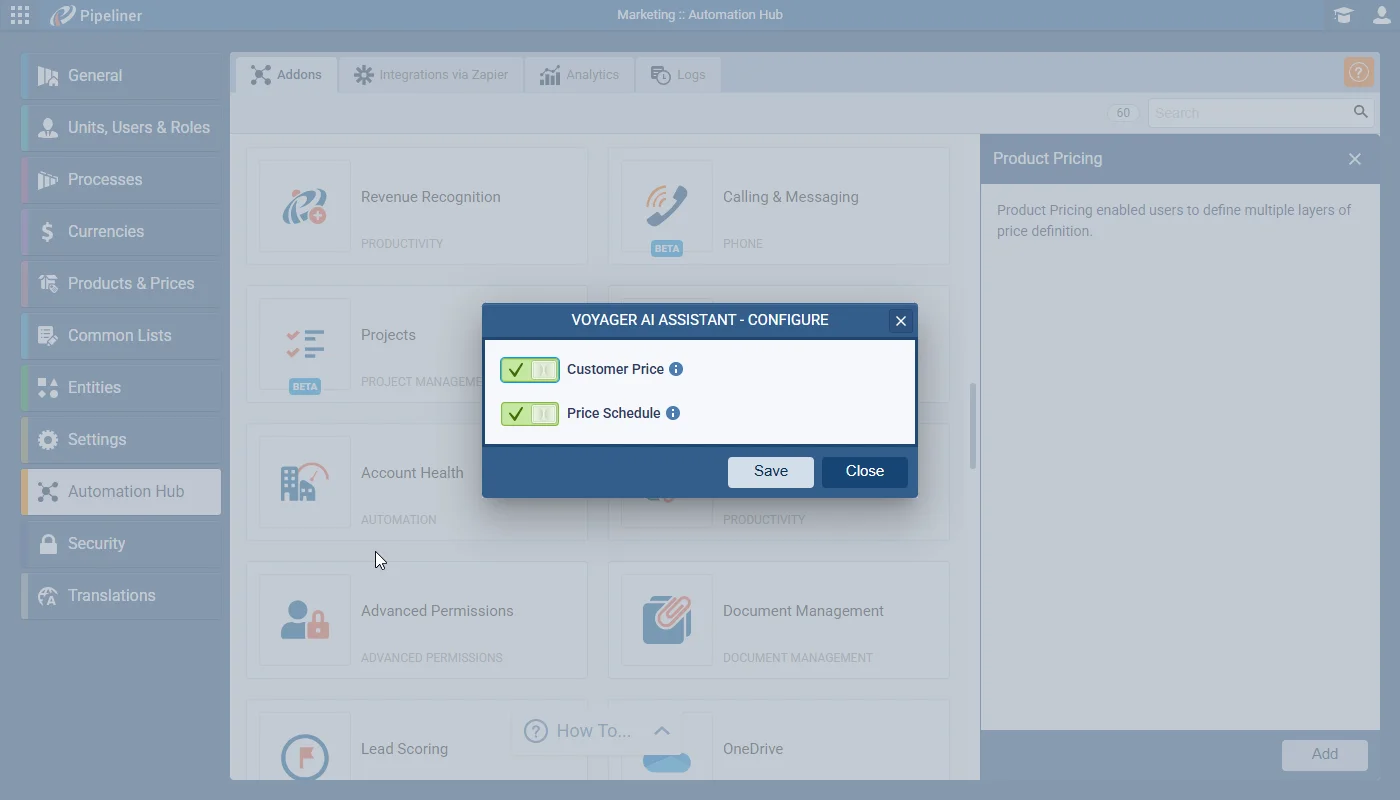
This release includes major updates to Product Pricing, introducing a multi-layered pricing engine for Coevera. This includes new admin-level entities for “Price Schedules” and account-specific “Customer Prices“. A new “Pricing Logic” flow determines which price (from the Price List, a Price Schedule, or a Customer Price) is prefilled when adding a product to an Opportunity or Quote. This update also overhauls the Price List admin area, introducing “Active” states, availability rules, and a new “List Price” system default.

Product Pricing is enabled from the Automation Hub and the Admin can choose to use Customer Price and/or Price Schedule. Note that the selected option(s) control the visibility of other features (e.g., Account tab, Price Schedule admin).

All screenshots

10
Documentation#product-pricing
02New · Security

SSO Login Improvement

Mobile App: 3rd-Party SSO Flow (Android)

This feature overhauls the mobile login experience by introducing a new “Sign in with QR Code” method. This involves changes to the mobile app’s sign-in flow, the web application’s “User Profile Settings” section, and a new administrative toggle in the Customer Portal.

All screenshots

7
#sso-login-improvement

Various Improvements

As part of our ongoing usability enhancement program, we’ve updated the following features.

Various ImprovementsReports

Insights — Configurable “value field”

Insights — Configurable “value field”

Choose which numeric Opportunity field drives calculations across the Insights, Indicators, and Performance tabs, replacing the hard-coded reliance on Opportunity Value.

All screenshots

2
#insights-configurable-value-field
Various ImprovementsReports

Reports — ability to see all scheduled reports

Reports — ability to see all scheduled reports

A central Manage Schedules view lets privileged users view, edit, and delete every user's scheduled reports, not only the ones they created.

All screenshots

2
#reports-ability-to-see-all-scheduled-reports
Various ImprovementsAdministration

Conditional Fields on Forms — Custom Expression

Conditional Fields on Forms — Custom Expression

Adds a Custom Expression (AND/OR) option for conditional form fields and lets admins restrict which entity types can be linked on activity forms.

#conditional-fields-on-forms-custom-expression
Various ImprovementsEmail

Email Detail Improvement — Better Navigation & Overview

Email Detail Improvement — Better Navigation & Overview

Redesigns the email thread view into a two-pane layout with a scrollable list of all emails beside a detail pane for the selected message.

#email-detail-improvement-better-navigation-overview
Various ImprovementsPipeline

Opportunity/Quote — New Fields

Opportunity/Quote — New Fields

Adds Product Subtotal, Product Total Discount, and Product Total Discount (%) rollup fields to Opportunities and Quotes, in base and local currencies.

#opportunity-quote-new-fields
Various ImprovementsIntegrations

Editable Recurring appointments

Recurring appointments synced from Google/O365 can now have their non-synced fields edited, while synced fields stay read-only and one-way.

#editable-recurring-appointments
Various ImprovementsAutomatizer

Count Number Of Remaining Characters — Automatizer Agent Feedback

Count Number Of Remaining Characters — Automatizer Agent Feedback

Based on user feedback for AI features, this task implements a dynamic character counter for all AI-related input prompts. The counter will change its text and color to reflect four distinct states: Default (Max), Remaining, Warning (Last 100), and Error (Over Limit).

  1. Default State:
    • When: The input is empty.
    • Text: “Max [MaxNumberOfCharacters] characters” (e.g., “Max 2000 characters”).
  2. Remaining State:
    • When: User is typing, and more than 100 characters remain.
    • Text: “[CurrentNumberOfCharacters] characters remaining” (e.g., “1906 characters remaining”).
  3. Warning State:
    • When: 100 characters or fewer remain (from 100 down to 1).
    • Text Color: Orange
    • Text: “[CurrentNumberOfCharacters] characters left” (e.g., “100 characters left”).
  4. Error State:
    • When: Character limit is exceeded.
    • Text Color: red.
    • Text: “[CurrentNumberOfCharacters] / [MaxNumberOfCharacters]. Remove [NumberOverLimitCharacters] characters to continue” (e.g., “2,001 / 2,000. Remove 1 character to continue.”).
#count-number-of-remaining-characters-automatizer-agent-feedback

Frequently Asked Questions

Product Pricing is enabled from the Automation Hub, where an admin can choose to use Customer Price and/or Price Schedule. The selected options control the visibility of related features, such as the Account pricing tab and the Price Schedule admin area.

When a product is added to an Opportunity or Quote, Pricing Logic decides which price prefills — checking for an applicable Price Schedule first, then a Customer Special Price, and otherwise applying the Price List price.

A unique, one-time-use QR code is generated in the web User Profile and displayed for 60 seconds. Scanning it in the Coevera mobile app signs the user in, and Coevera emails the user when a new QR sign-in is detected.

Users granted the new 'Allowed management of schedules' right — under Admin › Roles › Features › Reports — see a Manage Schedules button that opens a view to edit, delete, and change access on schedules for all users, not just their own.

The old layout is replaced by a two-pane design: a persistent list of every email in the thread on the left, with the selected email's body shown in a detail pane on the right.

Yes. Recurring appointments, including those synced from Google/O365, can now have their non-synced fields edited. Synced fields such as Subject, Date, Location, and Description stay read-only, and recurring appointments remain non-editable in the mobile app.

See these changes in your own pipeline

Start a free trial and explore what's new for yourself.

No credit card required · Free 14-day trial

groupsTrusted by clients around the globeverified_userISO 27001 CertifiedshieldGDPR CompliantblockData never used to train AI