v5.22.0MinorReleased

Outlook Add-in Improvements, Advanced Sign-In Security Settings, Expanded Automatizer Capabilities, and other Various Improvements…

Coevera 5.22.0 deepens the Outlook Add-in with event-driven record creation, adds Advanced Sign-In Security Settings for IP whitelisting, auto-logout, and mandatory 2FA, refreshes the mobile Leads screen, and ships expanded Automatizer capabilities across 32 improvements.

IntegrationsSecurityAutomatizer
Share
Features
2
Improvements
33
Security
4
Coming soon

Overview

Three features lead this release. The Outlook Add-in gains a Create Record section for event organizers, turning a calendar event into a Lead, Opportunity, Account, Contact, or activity with fields predefined from the event, plus Lookup and Address field support, an editable Owner field, folder-based document saving, and archived-record search control. Advanced Sign-In Security Settings give Subscription Administrators IP whitelisting in CIDR format, Idle, Absolute, and Daily auto-logout timeouts, and subscription-wide 2-Step Verification, all enforced on both the web application and mobile clients. Coevera Mobile reorganizes the Leads preview screen around processes and steps.

A large set of Various Improvements rounds out the release: four Automatizer additions, Product Line Item change auditing, custom entities in the Audit Log, full-text search in Pipeline and Board views, product tables in rich-text emails, email sequence scheduling windows, diacritic-insensitive global search, and more.

What's in this release
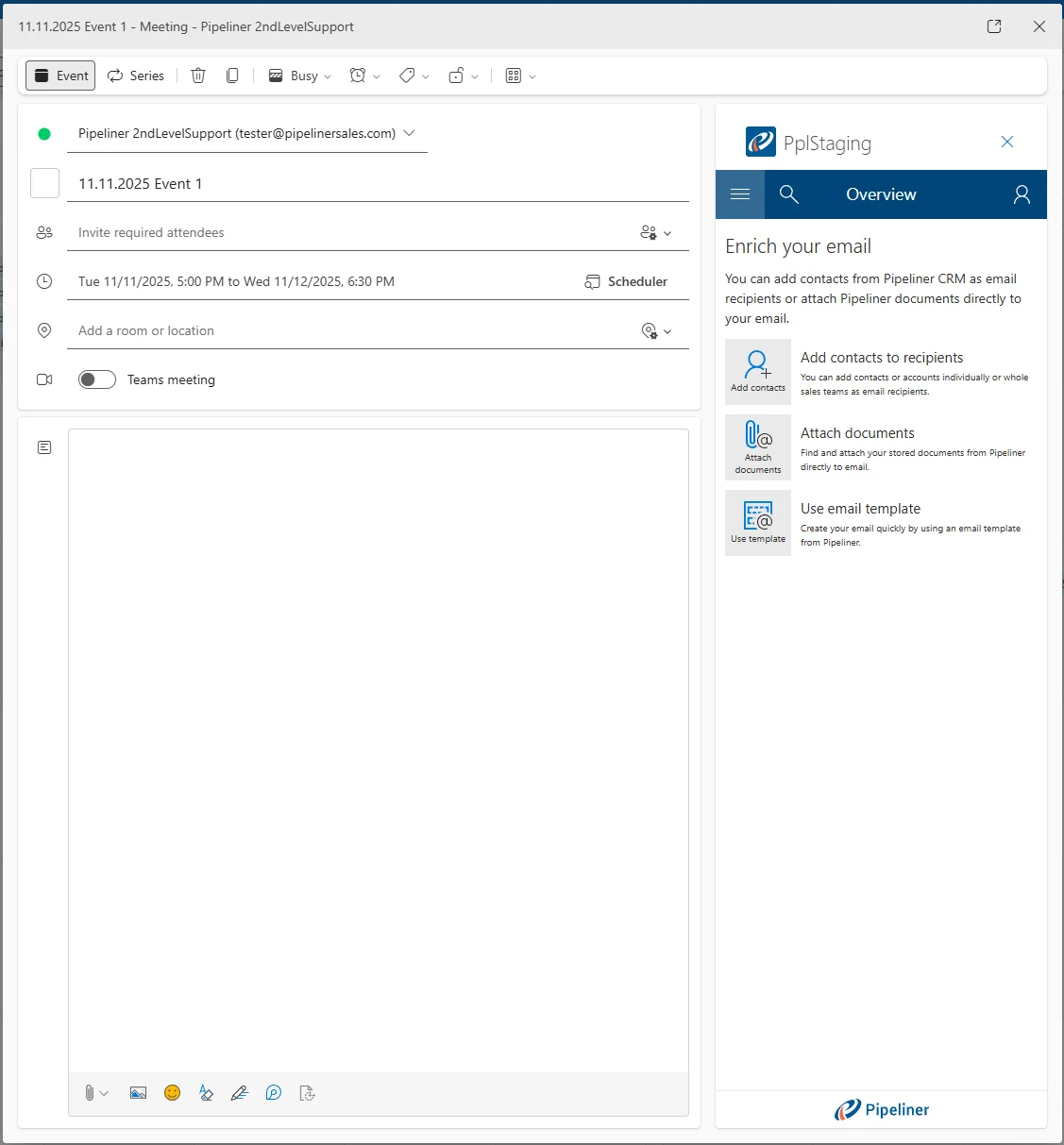
  • Outlook Add-in — create a Lead, Opportunity, Account, Contact, or activity directly from a calendar event you organize, with fields predefined from the event data.
  • Outlook Add-in — Lookup and Address fields, an editable Owner field, and a Sales Step dropdown are now available in the add-in forms.
  • Outlook Add-in — save an email as a document into a chosen folder, and exclude archived records from search by default.
  • Advanced Sign-In Security — restrict access with an IP whitelist in CIDR format (IPv4 and IPv6), with self-lockout prevention on save.
  • Advanced Sign-In Security — Idle, Absolute, and Daily auto-logout timeouts, plus subscription-wide required 2-Step Verification.
  • Advanced Sign-In Security — settings apply to both the web application and mobile clients, with Exempt Users able to bypass the restrictions.
  • Coevera Mobile — the Leads preview screen now groups records by process and step, with per-process tabs and step buttons.
  • Automatizer — a new action reactivates (un-archives) Leads, Opportunities, Accounts, Contacts, and Quotes.
  • Automatizer — update the Opportunity related to a Quote from a Product Line Item trigger, populate Owner from User Lookup fields, and assign Editors/Watchers from the triggered record owner.
  • Audit — a View Changes history for Product Line Items, with export to XLSX or CSV.
  • Audit Log — custom entities are now tracked, and Export Entity Changes adds Record Sales Unit and User Email fields.
  • Full-text search added to the Pipeline View and to the Leads, Quotes, and Activities board views.
  • Product Table can be inserted into rich-text emails and templates; Email Sequences gain start and end active-period dates.
  • Global Search now matches records regardless of accented characters (diacritics).
Event Record Creation (Organizer View)

What we're proud of

Sign-in security, now enforced everywhere

Advanced Sign-In Security Settings let Subscription Administrators enforce IP whitelisting, auto-logout timeouts, and mandatory 2-Step Verification across every user — applied consistently to both the web application and mobile clients.

01New · Integrations

Outlook Add-in Improvements

Event Record Creation (Organizer View)

This release introduces significant enhancements to the Outlook Add-in, focusing on improved integration between Outlook events and Coevera records. Key updates include the ability to create records directly from calendar events with context-aware field mapping, expanded support for Lookup and Address fields, and improved document management capabilities. Additionally, the update streamlines the user interface by allowing the exclusion of archived records from searches and automating the linking of primary accounts during Lead/Opportunity creation.

All screenshots

6
Documentation#outlook-add-in-improvements

02New · Security

Advanced Sign In Security Settings

Advanced Sign In Security Settings

This feature implements enhanced security controls within the Coevera Login tab for Subscription Administrators. It introduces functionality to restrict access to Coevera applications based on IP addresses (Whitelisting), enforce stricter Auto Logout policies (Idle, Absolute, and Daily timeouts), and mandate 2-Step Verification for all users in a subscription. These settings apply to both the web application and mobile clients.

A new section titled Advanced Setting has been added to the Coevera Login tab. This section contains four primary configuration areas: Auto Logout, Require 2-step verification, IP Whitelist, and Exempt Users.

All screenshots

3
Documentation#advanced-sign-in-security-settings

Various Improvements

As part of our ongoing usability enhancement program, we’ve updated the following features.

Various ImprovementsSecurity

Audit: View Changes on Product Line Items

Audit: View Changes on Product Line Items

Track the add, update, and remove history of Product Line Items in a new View Changes window, with export to XLSX or CSV.

All screenshots

4
#audit-view-changes-on-product-line-items
Various ImprovementsAdministration

Import Deduplication: Fields from All Record Types

Import Deduplication: Fields from All Record Types

We’ve enhanced the deduplication logic during the data import process to support custom record types.

Previously the deduplication field list only displayed fields associated with the last selected form type/default record type whereas the system now displays fields from all compatible form types in the deduplication field list. This ensures that users can select unique fields defined in custom record types (e.g., a specific field in a “custom” account type) for deduplication, even if that record type isn’t the default.

#import-deduplication-fields-from-all-record-types
Various ImprovementsPipeline

Task List: Inner Scrolling

Task List: Inner Scrolling

Previously, long task lists would extend until they hit the bottom of the screen/calendar, cutting off access to tasks further down the list. We’ve changed this so the task list container now supports inner scrolling. The scrollbar appears when the number of records exceeds 11.

#task-list-inner-scrolling
Various ImprovementsPipeline

Add Existing Window: Select All Functionality

Add Existing Window: Select All Functionality

A new button labeled “Add all” has been added to the dialog footer or header area in “Add Existing” modal windows when adding records, for example, when adding products to a price list or adding contacts to an Org Chart or adding lookup records.

Clicking the “Add all” button selects all visible records in the current view/search result. If the user attempts to add more than 100 records, a confirmation dialog appears: “You are about to add [X] records. Do you want to continue?

#add-existing-window-select-all-functionality
Various ImprovementsPipeline

Quotes: Product & Services Sections per Form

Quotes: Product & Services Sections per Form

When switching between Quote forms that have different default sections/names, existing products in the Products & Services section are preserved and moved to the top of the new form type structure and all default sections defined for the new form type are appended at the bottom. This refresh logic applies when creating a new quote from scratch or when a new related quote is created from an Opportunity (where Products & Services is initially empty).

#quotes-product-services-sections-per-form
Various ImprovementsAutomatizer

Automatizer: Reactivate Archived Record

Automatizer: Reactivate Archived Record

We’ve added a new Automatizer action to un-archive (or Reactivate) Archived records. This works for Leads, Opportunities, Accounts, Contacts and Quotes. When reactivating Opportunities and Quotes, there’s an additional required date field which sets a new closing date upon reactivation.

#automatizer-reactivate-archived-record
Various ImprovementsAutomatizer

Automatizer: Populate Owner from User Lookup

Automatizer: Populate Owner from User Lookup

When using “Create Record” or “Update Record” actions, the personalization list (accessible via the variable/mapping button) for the Owner field now includes User Lookup fields that have “Primary Record Enabled“. These fields are sourced from:

  • The triggered entity.
  • All related entities of the triggered entity.

This enables scenarios such as assigning a Task to a user defined in a custom “Executive” lookup field on a Contact.

#automatizer-populate-owner-from-user-lookup
Various ImprovementsPipeline

Feeds Tab: Remember Active Filter Preset per Entity

Feeds Tab: Remember Active Filter Preset per Entity

Previously, when using Feeds, the active filter preset in Feeds tab on Record Detail (e.g., “Emails”, “Documents”) was global. Selecting it for one entity applied it to all others. Now, the selected active filter preset is remembered per entity, per user.

Example: A user can have “Emails” active for Opportunities and “Online Forms Responses” active for Contacts simultaneously without them overwriting each other.

#feeds-tab-remember-active-filter-preset-per-entity
Various ImprovementsSecurity

Audit Log: Export Entity Changes — New Fields

Audit Log: Export Entity Changes — New Fields

We’ve added Record Sales Unit (added after the “Record Type” column) and User Email (added after the “User” column) to the fields included in the “Export Entity Changes” output in AdminSecurityAudit Log.

#audit-log-export-entity-changes-new-fields
Various ImprovementsSecurity

Audit Log: Custom entities added to Audit Log

Audit Log: Custom entities added to Audit Log

Custom Entity lifecycle, configuration, and form-management events are now tracked in the Audit Log, with the Form category renamed to Entity.

All screenshots

2
#audit-log-custom-entities-added-to-audit-log
Various ImprovementsAdministration

Admin: Ability to completely remove the recurrence button

Admin: Ability to completely remove the recurrence button

Admins can toggle off recurrence for Opportunity Closing Date and Task Due Date, hiding the Set Recurrence button on web and mobile while preserving existing data.

All screenshots

2
#admin-ability-to-completely-remove-the-recurrence-button
Various ImprovementsReports

Reports Deletion when Folder is Deleted

Reports Deletion when Folder is Deleted

Enhancement of the folder deletion logic in Reports, Documents, and Email Templates to allow for bulk deletion of contents. We've added a cog wheel to every folder with Rename and Delete actions. When Delete is selected, the user will receive a warning message and can select whether to also delete all sub-folders and reports.

The option only applies to items where the user has Owner (Delete) rights. If the user lacks rights for any item, a warning message is displayed: "Unable to delete this folder. One or more items could not be deleted due to insufficient permissions. These items may be private and not visible to you." The system will prevent folder deletion if it contains at least one item that the user cannot delete.

#reports-deletion-when-folder-is-deleted
Various ImprovementsAdministration

Option to Toggle On/Off Gender Assignment Field in Contacts

Option to Toggle On/Off Gender Assignment Field in Contacts

This enhancement provides administrators with the ability to configure or to completely hide the system Gender field on Contact forms to meet specific organizational requirements.

To enable this, the Gender field is now listed in the Contact Form field list in the Admin ModuleEntitiesContactsFields tab.

There is a new Visualization section to the Field settings for Gender with 2 toggles:

  • "Show on Forms" — Completely hides/shows the field in the Record Detail and Edit forms.
  • "Non-Binary option" — Specifically hides/shows the 'Non-Binary' radio selection but "Male" and "Female" remain. If the "Non-Binary option" is OFF, the option is removed from the application filters.

These settings are respected across the Mobile application.

#option-to-toggle-on-off-gender-assignment-field-in-contacts
Various ImprovementsEmail

"Reply All" should not include the sender

"Reply All" should not include the sender

We have modified the "Reply All" functionality to automatically exclude the current user's (sender's) email address from the recipient list. This ensures that a copy of the sent email does not appear in the user's own inbox as a direct recipient.

#reply-all-should-not-include-the-sender
Various ImprovementsAutomatizer

Automatizer: Editors/Watchers Fields — New Triggered Record Owner Option

Automatizer: Editors/Watchers Fields — New Triggered Record Owner Option

Expansion of the Automatizer capabilities to dynamically assign record access based on the owner of the record that triggered the process.

When using the Update Form action, you can choose "Triggered Record Owner" options for Editor/Watcher fields.

  • Replace Existing: Overwrites all current values with the owner of the triggered record.
  • Add to Existing: Appends the owner of the triggered record to the current list.

When using the Create Form action, you can choose "Triggered Record Owner" as a valid value source.

If the triggered record lacks an owner (e.g., a Lead), the action is skipped, and a log entry is created: " record owner is null, value cannot be used in form field ".

If the owner is the same as the watcher or editor — action is skipped. The owner has a higher priority.

#automatizer-editors-watchers-fields-new-triggered-record-owner-option
Various ImprovementsQuotes & Documents

Sales Step Documents — Reordering

Sales Step Documents — Reordering

Admins can drag and drop to set the order of documents attached to a Sales Step in Admin › Processes.

All screenshots

2
#sales-step-documents-reordering
Various ImprovementsEmail

Email Sequences: Added Start Date and End Date

Email Sequences: Added Start Date and End Date

Email Sequences gain a Sequence Active Period with From and To dates, plus new Scheduled and Expired statuses that bound when actions run.

#email-sequences-added-start-date-and-end-date
Various ImprovementsPipeline

Add searching functionality to Pipeline View

Add searching functionality to Pipeline View

We've added full-text search capabilities within visual board views:

  • In the Pipeline View: Added a search field next to Opportunities.
  • In the Board View: Added the search field to Leads, Quotes, and Activities board views.

The search field functions similarly to the existing List view search. Full-text search is done within all fields visible on the opportunity card.

#add-searching-functionality-to-pipeline-view
Various ImprovementsPipeline

Display lookup relations on Activities detail

Display lookup relations on Activities detail

We have introduced a Sidebar on the left side of the Activity window (Tasks & Appointments) which displays related Lookup tabs and a Detail tab to return to the main form in order to simplify access to related data directly from the Activity window using a sidebar interface.

Administrative Settings:

  • Added "Task/Appointment Detail" item in AdministrationEntitiesInterface.
  • Configuration is per Form Type.
  • Toggle "Display Lookup Relation Tabs": Default ON for new forms, OFF for existing forms.

Note that the sidebar is not rendered if no lookup relations are detected.

#display-lookup-relations-on-activities-detail
Various ImprovementsEmail

Product Table is now supported in Rich Text (Emails, Email Templates)

Product Table is now supported in Rich Text (Emails, Email Templates)

A Product Table mapping field can insert the Products & Services grid into emails and templates, with a column picker and optional section rows.

All screenshots

3
#product-table-is-now-supported-in-rich-text-emails-email-templates
Various ImprovementsPipeline

Global Search: Special Characters

Global Search: Special Characters

We've improved search precision by allowing users to find records regardless of accented characters (diacritics).

#global-search-special-characters
Various ImprovementsAdministration

Folder/Accordion Arrows Convention Change

Folder/Accordion Arrows Convention Change

Expand/collapse arrows are standardized: tree structures point right when collapsed and down when expanded, while sections and cards point down when closed and up when open.

All screenshots

2
#folder-accordion-arrows-convention-change
Various ImprovementsPipeline

Add "Sales roles" Option to List View Fields in Leads

Add "Sales roles" Option to List View Fields in Leads

We've established functional parity between Leads and Opportunities by exposing Contact "Sales Roles" as an available field for selection in List Views and custom filters.

#add-sales-roles-option-to-list-view-fields-in-leads
Various ImprovementsAdministration

Option to not display archived records in search when linking records

Option to not display archived records in search when linking records

Admins can now select a new option "List Archived Records" option in AdministrationCard Fields + Linked Items. This option is enabled by default. If turned OFF, archived records are excluded from:

  • Quick search in the CRM Web App.
  • Linked item fields in the MS Outlook Add-in.

This change affects Linked Item fields but not Lookups as they already support similar logic.

#option-to-not-display-archived-records-in-search-when-linking-records
Various ImprovementsIntegrations

Google Drive & One Drive — Error text update

Google Drive & One Drive — Error text update

The error shown when accessing the Google Drive and OneDrive integrations is clarified and reworded as a warning.

All screenshots

2
#google-drive-one-drive-error-text-update
Various ImprovementsPipeline

Large Record Form Rendering Optimization

We've worked on performance optimization for complex forms containing many fields or calculations which has resulted in nearly a second's improvement in rendering and improved overall responsiveness while typing and interacting with form fields.

#large-record-form-rendering-optimization
Various ImprovementsEmail

Email Sequences — Plan events to available date and time

Email Sequences — Plan events to available date and time

We have refined the enrollment logic to ensure that records are scheduled to the closest available date/time slot to help ensure that sequence time settings are strictly respected during the creation of new scheduled records.

#email-sequences-plan-events-to-available-date-and-time
Various ImprovementsEmail

Improve email detail visualization

Aesthetic and usability improvements to the email management interface by updating the default sort order to "Newest -> Oldest". The user's sort selection is now saved to their User Settings.

We've also adjusted the color of the date/description text to improve readability and distinguish it from warning text.

#improve-email-detail-visualization
Various ImprovementsPipeline

Improved price list create and update dialog

Improved price list create and update dialog

This release unifies the behavior of Update Prices and Bulk update buttons. The "Update prices" button is now consistently visible across all price list dialogs and there is an added selection capability to the Create / Copy Pricelist dialog.

#improved-price-list-create-and-update-dialog
Various ImprovementsAdministration

Deactivated User Data Management Updates

Deactivated User Data Management Updates

The Manage User Data modal now includes private records when deleting or reassigning a deactivated user's data, with renamed checkboxes and default-profile conflict resolution.

#deactivated-user-data-management-updates
Various ImprovementsPipeline

Custom dates for snoozing activities

Custom dates for snoozing activities

Users can now select a specific date and time when snoozing activities via a new Custom option added to the end of the snooze list in both Floating Reminders and the Notification Hub.

Selecting Custom opens a Date & Time Picker that allows users to specify a precise return time. Clicking the Set Reminder button applies the snooze time, closes the notification, and removes the activity from the hub.

#custom-dates-for-snoozing-activities
Various ImprovementsMobile

Coevera Mobile

As part of our continuous mobile experience improvements, we’ve updated the following features.

In the Mobile App, Leads now have Process Tabs: tabs per Lead process have been added, where each process has its own tab and records are divided by processes. Note that if only one Lead process exists, process tabs are not shown, and the default selection is the first process in order.

#coevera-mobile

Frequently Asked Questions

When you are the organizer of an Outlook event, a new Create Record section lets you generate a Lead, Opportunity, Account, Contact, or activity with fields predefined from the event. Lookup and Address fields, an editable Owner field, and a Sales Step dropdown are also now available in the add-in forms.

Subscription Administrators can whitelist IP addresses or ranges in CIDR format (IPv4 and IPv6), enforce Idle, Absolute, and Daily auto-logout timeouts, and require 2-Step Verification for every login across the subscription.

Yes. The mobile application fully supports the advanced settings to maintain feature parity and security compliance, with specific error codes signalling access-restricted and forced sign-out conditions.

No. Self-lockout prevention requires the administrator's current IP address to be included in the whitelist before the settings can be saved, otherwise a validation error is shown.

Automatizer gains an action to reactivate archived Leads, Opportunities, Accounts, Contacts, and Quotes; the ability to update the Opportunity related to a Quote from a Product Line Item trigger; Owner values sourced from User Lookup fields; and Editor/Watcher assignment from the triggered record's owner.

Full-text search was added to the Pipeline View and to the Leads, Quotes, and Activities board views, and Global Search now finds records regardless of accented characters (diacritics).

See 5.22.0 in your own pipeline

Start a free trial and explore the new Outlook Add-in, security controls, and Automatizer actions for yourself.

No credit card required · Free 14-day trial

groupsTrusted by clients around the globeverified_userISO 27001 CertifiedshieldGDPR CompliantblockData never used to train AI