v3.11.0MinorReleased

Improved Organization Charts, Compact View › Dashboards and more

Coevera 3.11.0 deepens Account Management with richer Organization Charts — assign Account Roles, rate relationship Strength, and map Influence — extends Compact View › Dashboards with custom charts, and ships a batch of improvements across Opportunities, Reports, Activities, Automatizer, and Calling.

AccountsReports
Share
Features
2
Improvements
6
Security
Coming soon

Overview

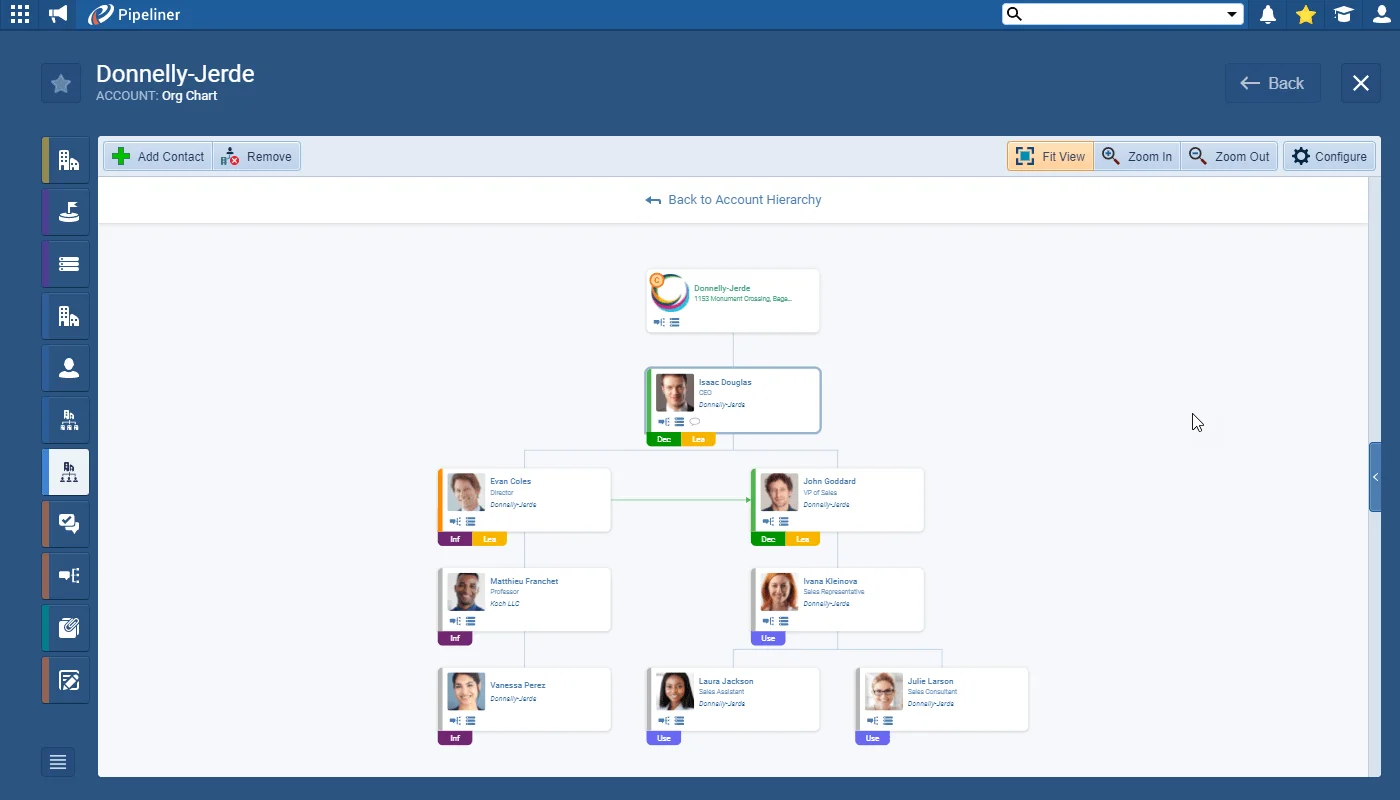
This release continues our Account Management enhancements by adding depth to the Organization Chart. As you build a company's hierarchy, you can assign customizable Account Roles to each person — such as Decision-maker, Influencer, User, and Leaders, or roles your Coevera Admins create for your business — to show how each one shapes the relationship. A simple traffic-light system rates the Strength of each contact relationship from green (strong) through to red (weak), and Influences map who influences whom inside the organization using the same colours, green for a positive influence and red for a negative one. Comments, related Opportunities, and Interactions for any individual are a click away from their card.

Compact View gains further customization: Coevera Admins can now choose which Overview information to include or exclude using Edit Overview in the Interface tab of Fields & Forms, reorder or filter the Lists, and add custom charts to the panel exactly as they would to a Dashboard. A batch of usability improvements rounds out the release — a clearer Opportunities Target Comparison, reassignable report ownership, bulk updates for Activities, editable Automatizer triggers, Call Duration filtering with correct call linking, and an easier field picker across the Power Panel filter, Automatizer, and Email Personalization.

What's in this release
  • Organization Charts let you assign customizable Account Roles to each person in a company hierarchy.
  • Example Account Roles include Decision-maker, Influencer, User, and Leaders — and your Coevera Admins can create their own.
  • A traffic-light system rates the Strength of each contact relationship from green (strong) through to red (weak).
  • Influences map who influences whom within the organization, green for a positive influence and red for a negative one.
  • Each Org Chart card links to the individual's Comments, related Opportunities, and Interactions.
  • Compact View Overview can be customized via Edit Overview in the Interface tab of Fields & Forms.
  • Admins can select, remove, or reorder Lists and change the filters used in the Compact View.
  • Custom charts can be added to the Compact View panel, just like adding a chart to a Dashboard.
  • Opportunities Target Comparison shows how each period compares when you hover over the percentage on the Target icon.
  • Report ownership — and any associated scheduling options — can be reassigned to a colleague using the Ownership button.
  • A Bulk Update option lets you mass-edit all activities linked to an Account, Contact, Lead, or Opportunity.
  • Automatizer lets you change a process's initial Trigger without recreating it from scratch.
  • Calls can be filtered on a new Call Duration field, and calls now link to every record they were triggered from.
  • A new field picker groups fields by area in the Power Panel filter, Automatizer, and Email Personalization.
Organization Charts

What we're proud of

A clearer picture of who's who

Organization Charts now capture the full shape of a customer relationship — customizable Account Roles for every contact, a traffic-light Strength rating, and Influence mapping — so your team can see who decides, who sways them, and exactly where the relationship stands, all from a single card.

01New · Accounts

Organization Charts

Organization Charts

In this release, as the next part of our Account Management enhancements, we’ve focussed on the Organisation Chart and improved the depth of the information it gives you.

When building your hierarchy, you can assign customisable Account Role(s) to each person to show how each one impacts the relationship you have with your customer or prospect. Some examples you might choose to use are:

Your Coevera Admins can create just the roles that work for your business of course!

All screenshots

5
Documentation#organization-charts
02New · Reports

Compact View › Dashboards

Compact View › Dashboards

In our last release, we added the ability to start customising the Compact View for Accounts, Contacts, Leads and Opportunities and we’ve further enhanced that ability in this release. Coevera Admins can now choose which Overview information to include or exclude using “Edit Overview” in the Interface tab in Fields & Forms.

As well as selecting, removing or reordering the Lists and changing the filters used. Admins can now add custom charts to the panel — it works just like adding a chart to a Dashboard!

All screenshots

3
Documentation#compact-view-dashboards

Various Improvements

Various ImprovementsPipeline
Various Improvements

A bundle of usability updates spanning Opportunities Target Comparison, report ownership reassignment, bulk activity updates, editable Automatizer triggers, Call Duration filtering with correct call linking, and a grouped field picker.

All screenshots

3
#various-improvements

Frequently Asked Questions

You can now add more depth to each person in a company's hierarchy — assigning customizable Account Roles, rating the Strength of your relationship with each contact, and mapping who influences whom. You can also jump to an individual's Comments, related Opportunities, and Interactions from their card.

You can assign customizable Account Roles such as Decision-maker, Influencer, User, and Leaders. Your Coevera Admins can also create just the roles that work for your business.

A simple traffic-light system lets you set the Strength of the relationship with each contact, choosing from green for a strong relationship through to red for a weak one.

Influences let you indicate who influences whom within an organization from the perspective of your relationship with the company — using the same traffic-light colours, a positive influence is green and a negative one is red.

Coevera Admins can now choose which Overview information to include or exclude via Edit Overview in the Interface tab of Fields & Forms, select, remove, reorder or filter the Lists, and add custom charts to the panel just like adding a chart to a Dashboard.

Yes. If a report was created on behalf of a colleague, its ownership — and any scheduling options associated with it — can be reassigned using the Ownership button, giving the new owner the rights to modify the report.

See it in your own pipeline

Start a free trial and explore what's new in Coevera 3.11.0 for yourself.

No credit card required · Free 14-day trial

groupsTrusted by clients around the globeverified_userISO 27001 CertifiedshieldGDPR CompliantblockData never used to train AI
