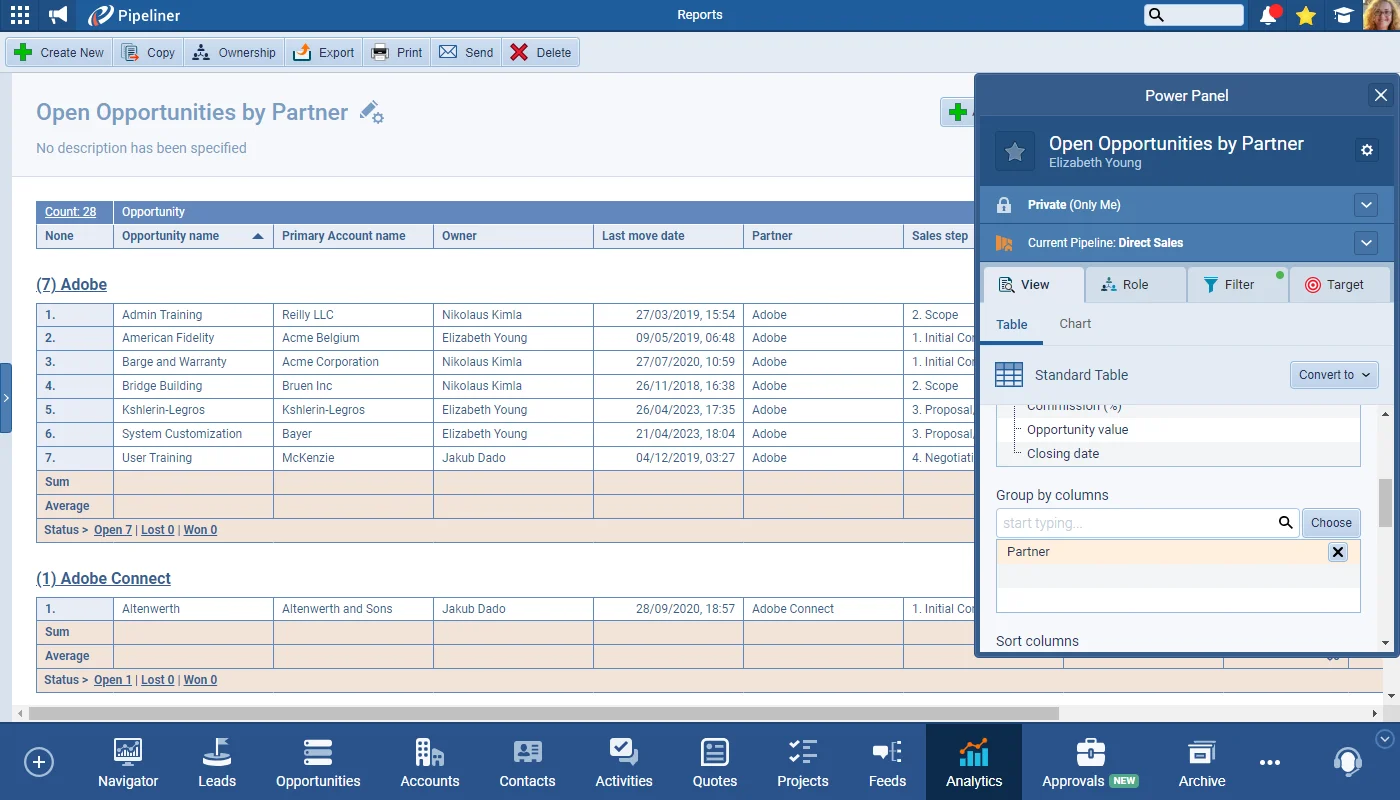
We’ve enhanced support for Lookup fields in Reports. Users will now be able to Group by Lookup Fields as well as use Lookup Fields in Charts.
#reports-enhanced-support-for-lookup-fields
Coevera 4.18.0 adds the Quick Jump feature to the Admin Module for finding a field or section while editing a Form, enhances Reports with support for Lookup fields, and delivers performance upgrades to permission recalculation and bulk operations.
This release centres on the Admin Module. The new Quick Jump feature lets administrators quickly find a field or section while editing a Form: in the Admin Module, click Fields & Forms, select the Entity Type and then the Forms tab, open the Form and choose Edit Form, then use the Search icon in the top right.
Alongside the Admin update, Reports gains enhanced support for Lookup fields — users can now group by Lookup fields as well as use them in charts — while a further round of performance work cuts the time to recalculate permissions by more than 20% and fixes a problem where bulk operations such as Bulk Update or Changing Ownership could affect speed and the saving of records for other users working in the application.
What we're proud of
The new Quick Jump feature in the Admin Module lets administrators search a Form and go straight to the field or section they need while editing it. Open Fields & Forms, pick the Entity Type and the Forms tab, edit the Form, and use the Search icon in the top right.
We’ve enhanced support for Lookup fields in Reports. Users will now be able to Group by Lookup Fields as well as use Lookup Fields in Charts.
We’ve worked on performance speed again as part of our ongoing improvement program:
We’ve added the Quick Jump feature to the Admin Module so that Administrators can quickly find a field or section when editing a Form. In the Admin Module, click on Fields & Forms, select the Entity Type and then the Forms tab. Click on the Form and choose the Edit Form button and then use the Search icon in the top right.
Connect Coevera to your AI assistant and let it do real work across your CRM — always within your permissions, never beyond them.
Start a free trial and see the new Quick Jump feature, the Reports Lookup-field enhancements, and the performance upgrades in Coevera 4.18.0 for yourself.
No credit card required · Free 14-day trial
