v2.0.0MajorReleased

Brand New In-App Notifications, Feeds 2.0, Feed Streams, Improved Preview, Buying Center, Org Chart and more

Coevera 2.0.0 expands the Automation Hub with new Coevera Cloud integrations — MS SharePoint, Slack, Intercom, ActiveCampaign, and a Phone Number Helper — and introduces Feeds 2.0, Feed Streams, and In-App Notifications alongside sortable Pivot Report columns.

AccountsIntegrationsReports
Share
Features
2
Improvements
8
Security
Coming soon

Overview

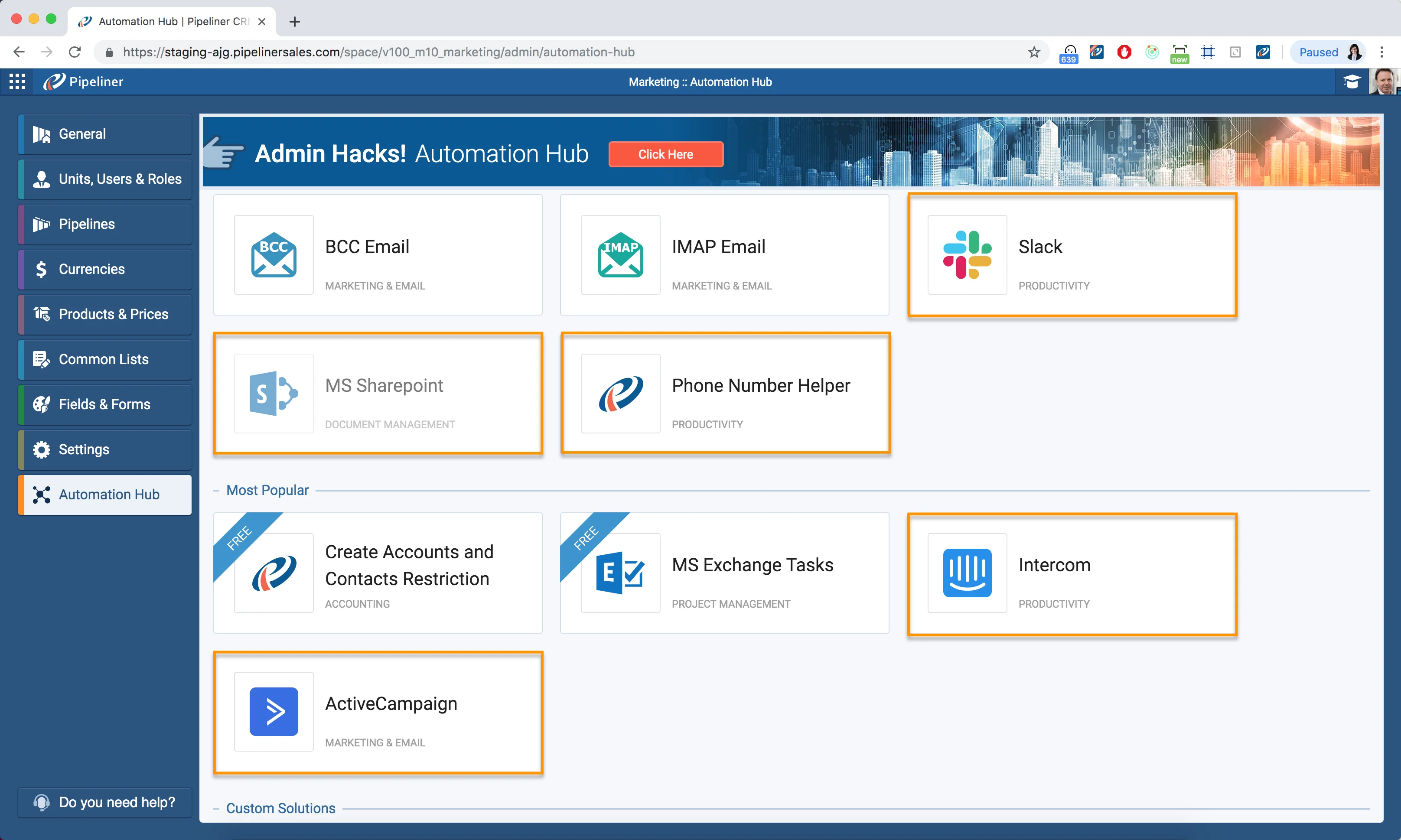
The Automation Hub gains five new integrations in the Coevera Cloud. Coevera now connects to MS SharePoint for working with MS Office 365 documents directly inside the app, Slack for instant Lead and Opportunity updates in a dedicated channel, Intercom for automatically creating a contact when a new user is added, ActiveCampaign for surfacing campaign updates as Feed messages viewable against Contacts, and a Phone Number Helper that corrects entered phone numbers to the U.S. international standard. MS Exchange sync also improves: when syncing Tasks, Appointments, and Contacts you can choose which folder to sync to Outlook, and unidirectional Coevera-to-Exchange contact sync can include every contact you have access to.

Beyond integrations, this release introduces Feeds 2.0 — a complete update of Feeds in Coevera Cloud that lets you choose what appears in a record's feed and view the same activity from related records, with color coding, flags, due dates, and fitness — plus Feed Streams for following groups of records such as Favourites or Hot Opportunities, and In-App Notifications that flag changes to records you own under a new Bell icon. Reports gain sortable Pivot Report columns and a fix for the drag-and-drop columns feature, while the workspace picks up a hideable Agenda sidebar, resizable preview panels in Notes and Activities, quicker Job Title edits in the Buying Center, Account Relations editing in the Org Chart, and general performance optimizations.

What's in this release
  • The Automation Hub adds an MS SharePoint integration for working with MS Office 365 documents directly inside Coevera.
  • A new Slack integration delivers instant Lead and Opportunity updates to a dedicated Slack channel.
  • An Intercom integration automatically creates a Coevera contact when a new user is added to Intercom.
  • An ActiveCampaign integration surfaces campaign updates as Feed messages viewable against Contacts.
  • A Phone Number Helper automatically corrects entered phone numbers to the U.S. international standard.
  • MS Exchange sync lets you choose which folder to sync to Outlook, and unidirectional Coevera-to-Exchange contact sync can include all contacts you have access to.
  • Feeds 2.0 lets you choose what appears in a record's feed and view the same activity from related records.
  • Feed Streams let you follow the feeds of specific record groups such as Favourites or Hot Opportunities.
  • In-App Notifications alert you under the Bell icon when other users change records you own.
  • Pivot Report columns can now be sorted by opening a cell and clicking the column header.
  • The drag-and-drop columns problem in Pivot Reports has been fixed.
  • The Agenda sidebar can be hidden in the Navigator, Activities Task Board, and Calendar view.
  • Preview panels in Notes and Activities can be resized by clicking and holding their edge.
  • Contact Job Titles can be updated from the Buying Center and Account Relations from the Org Chart.
Automation Hub

What we're proud of

Feeds 2.0, reimagined

Feeds 2.0 is a complete update of Feeds in Coevera Cloud: you choose exactly what a record's feed shows — activities, org chart updates, new contacts, documents, emails, and messages — and can see the same interactions from related records, complete with color coding, flags, due dates, and fitness. Feed Streams add a way to follow whole groups of records at once, such as your Favourites or Hot Opportunities.

01New · Integrations

Automation Hub Updates

Automation Hub
  • We have added new integrations to the Coevera Cloud! You can now integrate Coevera with:
    • MS Sharepoint – Work with your MS SharePoint documents directly inside Coevera. This version works with MS Office365.
    • Slack – choose to get instant Lead and/or Opportunity updates into a dedicated Slack channel.
    • Intercom – Automatically create new contacts in Coevera when a new User is added to Intercom.
    • Phone Number Helper – Automatically correct the phone number you enter into Coevera according to the U.S. international standard.
    • and ActiveCampaign – Updates from ActiveCampaign campaigns can now be created in Coevera as Feed messages and viewed against Contacts.
  • MS Exchange Sync Update
    • When connecting your MS Exchange account to sync Tasks, Appointments and Contacts, you can now choose the folder you would like to sync to Outlook.
    • When setting up the sync preferences for MS Exchange Contacts sync, when using Unidirectional Synchronization from Coevera to Exchange, you can select an option to sync all contacts you have access to.
#automation-hub-updates

02New · Reports

Reports Improvements

Pivot Reports Sorting
  • You now have the ability to sort your Pivot Reports columns. Simply open any cell within the Pivot Report and click on the column header to sort it.
  • We have fixed the problem with drag-and-drop columns feature within Pivot Reports.
#reports-improvements

Various Improvements

Various ImprovementsPipeline
In App Notifications

A bundle of workspace updates: Feeds 2.0 with Feed Streams, In-App Notifications, a hideable Agenda sidebar, resizable Notes and Activities preview panels, Buying Center Job Title and Org Chart Account Relations editing, and faster overall performance.

All screenshots

3
#various-improvements

Frequently Asked Questions

Coevera 2.0.0 adds MS SharePoint, Slack, Intercom, ActiveCampaign, and a Phone Number Helper to the Coevera Cloud.

It lets you work with your MS SharePoint documents directly inside Coevera. This version works with MS Office 365.

When syncing Tasks, Appointments, and Contacts you can choose which folder to sync to Outlook, and for unidirectional Coevera-to-Exchange contact sync you can select an option to sync all contacts you have access to.

It is a complete update of Feeds in Coevera Cloud that lets you choose what a record's feed shows and view the same activity from related records, with color coding, flags, due dates, and fitness. Feed Streams also let you follow groups of records such as Favourites or Hot Opportunities.

When other users make changes to records you own, a red badge appears on the Bell icon in the top panel; clicking it opens a sidebar listing updates by most recent, where a Gear icon lets you choose which notifications you receive.

You can now sort Pivot Report columns by opening a cell and clicking the column header, and the problem with the drag-and-drop columns feature in Pivot Reports has been fixed.

See it in your own pipeline

Start a free trial and explore what's new in Coevera 2.0.0 for yourself.

No credit card required · Free 14-day trial

groupsTrusted by clients around the globeverified_userISO 27001 CertifiedshieldGDPR CompliantblockData never used to train AI