v1.3.0MinorReleased

Brand New Records Preview, Productivity Compact View, Reports, Administration Enhancements and more

Coevera 1.3.0 upgrades the Reports Dashboard — convert Standard, Pivot, and Dashboard reports between each other and build Dashboard reports from more entities — and adds Product per Pipeline in Administration plus a batch of usability improvements led by Records Preview.

ReportsAdministration
Share
Features
3
Improvements
4
Security
Coming soon

Overview

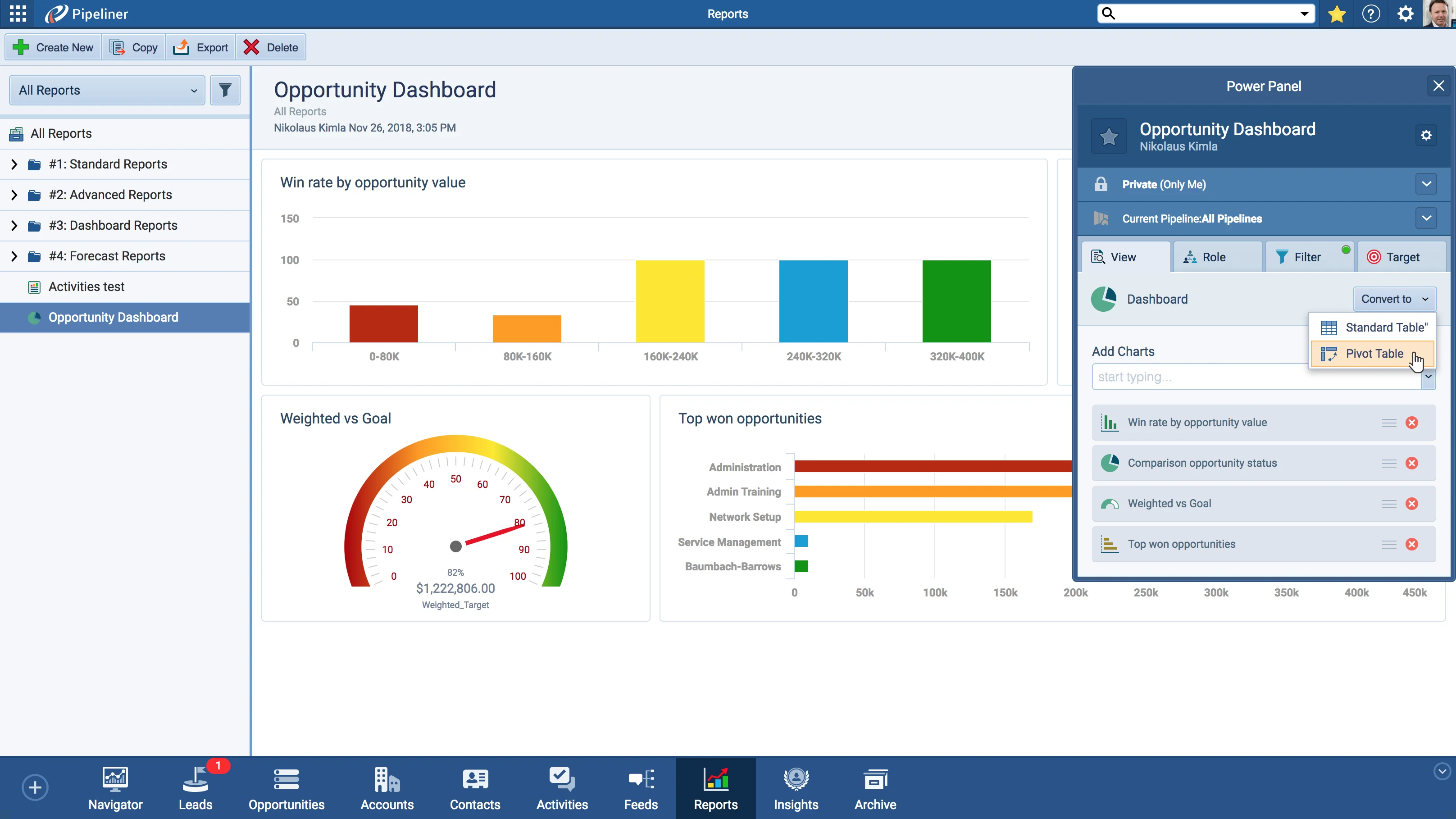
Reports lead this release. The Dashboard functionality in Reports has been updated: you can now convert Standard, Pivot, and Dashboard reports between each other by opening the Power Panel and clicking Convert to, create a new Dashboard Report from Leads, Opportunities, Accounts, Contacts, and Activities with the Create New button, and reach for even more powerful charts. Two further Reports touches let you open an individual Activity Detail by clicking a report built from your Activities, and add Freeze Panes to the Records Power Panel so a chosen row or column stays in place regardless of what part of the spreadsheet is on screen.

Beyond Reports, Administration › Products and Prices gains a Product per Pipeline component, letting you set the Pipelines a product belongs to from its sidebar menu. A batch of usability improvements rounds out the release: Records Preview brings quick preview info to list (grid) view for Leads, Opportunities, Accounts, Contacts, Activities, and Notes; a Compact View enhancement keeps the record you were editing selected when you return to it; Lead and Opportunity detail can now show only primary or all assigned Accounts and Contacts; and paying customers see Payment due information on the top panel.

What's in this release
  • Reports Dashboard can convert Standard, Pivot, and Dashboard reports between each other via the Power Panel's Convert to button.
  • Create a new Dashboard Report from Leads, Opportunities, Accounts, Contacts, and Activities using the Create New button in the top panel.
  • Even more powerful charts are available to use in Dashboard reports.
  • Open an individual Activity Detail by clicking on a report spreadsheet created from your Activities.
  • Freeze Panes added to the Records Power Panel keeps a row or column displayed in place as you scroll the spreadsheet.
  • Administration › Products and Prices adds a Product per Pipeline component, set from the product's Pipelines sidebar menu.
  • Records Preview shows quick preview info for any selected record in list (grid) view.
  • Records Preview works with Leads, Opportunities, Accounts, Contacts, Activities, and Notes (in detail).
  • Compact View enhancement keeps the record you were editing selected when you return from record detail.
  • Lead and Opportunity detail add a dropdown to show only primary or show all Accounts/Contacts assigned to the record.
  • Paying customers see Payment due information on the top panel, including how many days until payment is due.
Converting Reports

What we're proud of

A more flexible Reports Dashboard

You can now convert Standard, Pivot, and Dashboard reports between each other from the Power Panel, build a Dashboard Report directly from Leads, Opportunities, Accounts, Contacts, and Activities, and reach for even more powerful charts.

01New · Reports

Reports Improvements

We have updated the Dashboard functionality in Reports!

  • You now have the ability to convert Standard, Pivot and Dashboard reports between each other. Simply open Power Panel and click on the “Convert to” button.
  • With this new improvement, you can now create new Dashboard Report from Leads, Opportunities, Accounts, Contacts and Activities. Just click on the “Create New” button in the top panel.
  • We added even more powerful charts to use.
#reports-improvements

02New · Reports

Other Reports improvement

Converting Reports

If you have created a report from your Activities you can now open individual Activity Detail simply by clicking on the report spreadsheet.

We have added the Freeze Panes functionality to Records Power Panel. This functionality “freezes” a row or column, so that it is always displayed in place, regardless of what part of the spreadsheet is being displayed.

All screenshots

3
#other-reports-improvement
03New · Administration

Administration Improvements

Product Per Pipeline
  • In Administration › Products and Prices we added a component for products to have Product per Pipeline. Click on the product and select Pipelines in sidebar menu.
#administration-improvements

Various Improvements

Various ImprovementsPipeline
Records Preview

Records Preview brings quick record previews to list (grid) view for Leads, Opportunities, Accounts, Contacts, Activities, and Notes, alongside a Compact View selection enhancement, a show primary or show all toggle for Accounts/Contacts in Lead and Opportunity detail, and Payment due information on the top panel.

All screenshots

2
#various-improvements

Frequently Asked Questions

You can convert Standard, Pivot, and Dashboard reports between each other, create a new Dashboard Report from more entities, and use even more powerful charts.

Standard, Pivot, and Dashboard reports can be converted between each other — open the Power Panel and click the Convert to button.

You can create a new Dashboard Report from Leads, Opportunities, Accounts, Contacts, and Activities using the Create New button in the top panel.

It is a global solution for list (grid) view: select any record and quick preview info is displayed. It works with Leads, Opportunities, Accounts, Contacts, Activities, and Notes (in detail).

Added to the Records Power Panel, it freezes a row or column so it is always displayed in place, regardless of what part of the spreadsheet is being shown.

In Administration › Products and Prices, a product can now be assigned per Pipeline — click on the product and select Pipelines in the sidebar menu.

See it in your own pipeline

Start a free trial and explore what's new in Coevera 1.3.0 for yourself.

No credit card required · Free 14-day trial

groupsTrusted by clients around the globeverified_userISO 27001 CertifiedshieldGDPR CompliantblockData never used to train AI