v4.9.0MinorReleased

New Tagging, Email Sequence Enhancements and more

Coevera 4.9.0 introduces Brand New Tagging to categorise Accounts, Contacts, Leads, and Opportunities, adds email sharing so other users can send from your address, extends Email Sequences with bounce unenrollment and recipient statistics, and adds a Remove existing option to Bulk Update and Automatizer.

EmailAdministration
Share
Features
1
Improvements
3
Security
Coming soon

Overview

Brand New Tagging leads this release. Tags let users flag or categorise Accounts, Contacts, Leads, and Opportunities, with colour-coding, on-the-fly creation where the user role allows, and one-click drill-down from a tag into a list of every record that shares it. Admins configure separate tags per record type in the Admin Module, tags can be imported and bulk-updated, and they work in Filters, Reports, and Automatizer processes. Existing Labels on Opportunities and Leads have been migrated to Tags.

Elsewhere, email configuration gains sharing controls so a user can let other users — as well as Automatizer processes and Email Sequences — send from their personal address, including Mass Emails to All Users or Selected Users. Email Sequences add Global Actions to unenroll and unsubscribe recipients when an email bounces, customisable follow-up Tasks, and a new Recipient Statistics overview you can drill into. A new Remove existing option is added to the multi-select checkboxes used in Bulk Update and Automatizer.

What's in this release
  • Brand New Tagging lets users flag or categorise Accounts, Contacts, Leads, and Opportunities with colour-coded tags.
  • Users whose role allows it can create new tags on the fly from inside the web app.
  • Clicking a tag drills down into a list of every record sharing that tag, actionable directly from the list.
  • Admins set up separate tags for each record type in the Admin Module and control on-the-fly creation at the User Role level.
  • Tags can be imported from CSV, updated with Bulk Update, and used in Filters, Reports, and Automatizer processes.
  • Existing Labels on Opportunities and Leads are migrated to Tags, and Filters built on the Labels field still work.
  • Users can share their personal email address so other users can send email from it.
  • Ticking "When option Record's owner email account is used" lets Automatizer processes and Email Sequences send from a user's address.
  • Mass Emails can be sent from a user's address by All Users or Selected Users.
  • Email Sequence Global Actions can unenroll and unsubscribe recipients when an email bounces.
  • Follow-up Tasks created by Email Sequences can now be customised.
  • A new Recipient Statistics section gives an overview of all recipients in Email Sequence Statistics.
  • You can drill into the underlying data from the Email Sequence Statistic report and open records in the CRM.
  • A new Remove existing option is added to the multi-select checkboxes in Bulk Update and Automatizer.
Brand New Tagging

What we're proud of

Tags come to Coevera

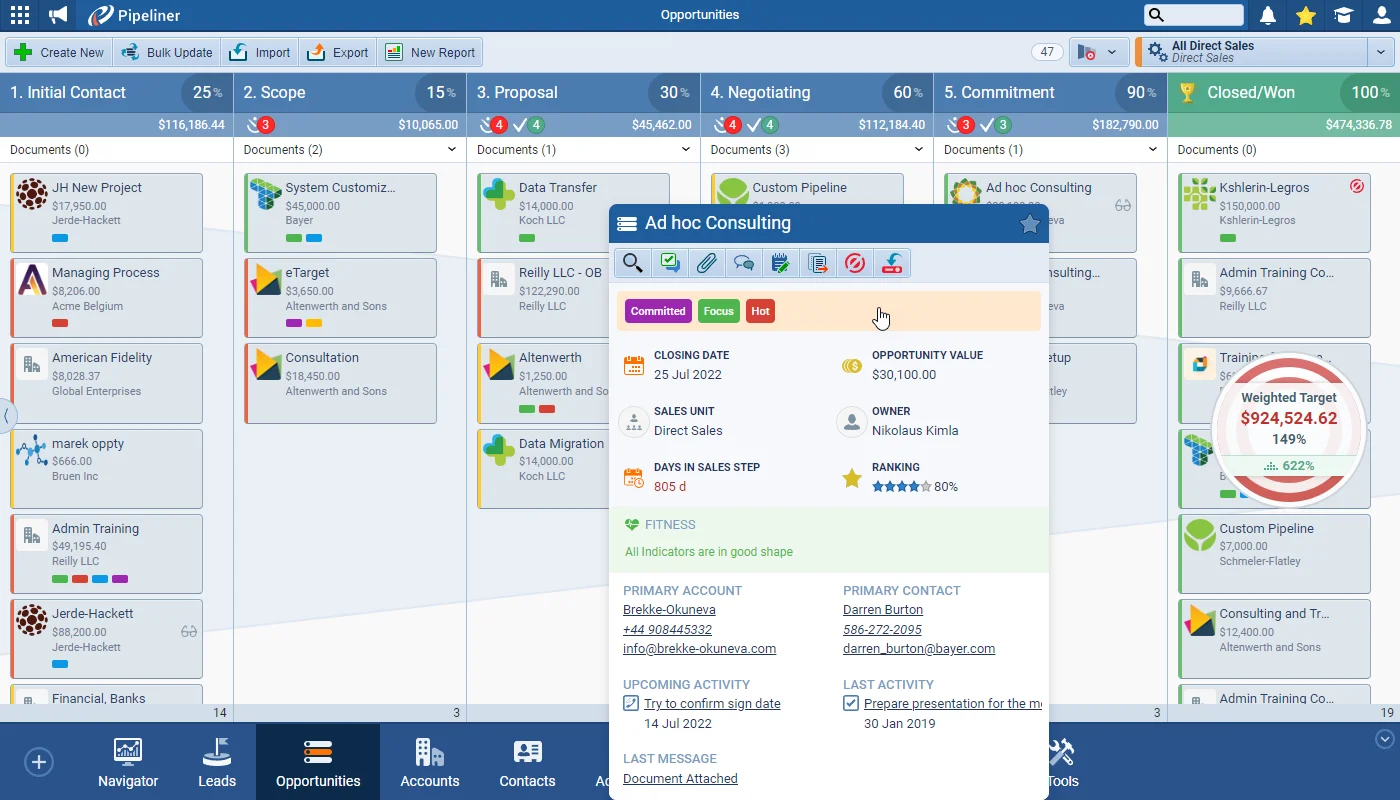
Brand New Tagging gives every Account, Contact, Lead, and Opportunity a flexible, colour-coded label that users can create on the fly. Click any tag to drill straight into a list of every record that shares it, and put tags to work in Filters, Reports, and Automatizer. Existing Labels carry over automatically, so nothing is lost.

01New · Pipeline

Brand New Tagging

Brand New Tagging

Tags are an incredibly useful way to flag — or categorise — Accounts, Contacts, Leads or Opportunities in Coevera. Users can select multiple “Tags” per record as needed and — if their user role allows — can create new Tagson the fly” from inside the web app. Tags can be color-coded when they’re created.

All screenshots

3
Documentation#brand-new-tagging

Various Improvements

Various ImprovementsEmail

Allowing other users to send emails from a user’s email address

Allowing other users to send emails from a user’s email address

Each user can configure their email integration settings to allow access to their personal email to enable it to be used when emails are sent by other users. To allow their email address to be used by Automatizer processes and in Email Sequences, each user should tick the box “When option Record’s owner email account is used

To allow Mass Emails to be sent from their personal email address by other users, tick the “Mass Emails” box and then choose whether “All Users” or “Selected Users” will be able to send the Mass Emails. Most users will probably choose “Selected Users” and then choose from the user list to select the right people.

All screenshots

2
Documentation#allowing-other-users-to-send-emails-from-a-user-s-email-address
Various ImprovementsEmail

Email Sequence Enhancements

Email Sequence Enhancements

We’ve added to the “Global Actions” in the “Email Sequence Settings” to allow recipients to be unenrolled (and unsubscribed) when an email bounces as well as allowing any follow up Tasks created to be customised.

In “Email Sequence Statistics“, the new “Recipient Statistics” section gives an overview of all recipients.

You can now also drill down into the underlying data from the “Email Sequence Statistic” report and click from the list to open it in CRM so you can work with the data e.g. by running an Automatizer process or bulk updating.

Documentation#email-sequence-enhancements
Various ImprovementsAutomatizer

Remove existing (Bulk update, Automatizer)

Remove existing” is a new option added to the multi-select check boxes used during Bulk Update or in Automatizer processes.

#remove-existing-bulk-update-automatizer

Frequently Asked Questions

You can tag Accounts, Contacts, Leads, and Opportunities. Each record can carry multiple colour-coded tags, and users whose role allows it can create new tags on the fly from inside the web app.

Clicking a tag drills down into a list view of every other record that shares the same tag, and you can action that data directly from the list.

Yes. Tags can be imported, updated with Bulk Update, and used in Filters and Reports as well as in Automatizer processes.

Previous system Labels for Opportunities and Leads have been migrated to Tags. Filters set up on the Labels field still work, though we recommend switching those criteria to Tags.

In your email integration settings you can allow access to your personal email so it can be used by other users, by Automatizer processes, and in Email Sequences — including Mass Emails sent by All Users or Selected Users.

Global Actions can now unenroll and unsubscribe recipients when an email bounces and let you customise follow-up Tasks, a new Recipient Statistics section gives an overview of all recipients, and you can drill into the underlying report data and open records in the CRM.

See it in your own pipeline

Start a free trial and explore what's new in Coevera 4.9.0 for yourself.

No credit card required · Free 14-day trial

groupsTrusted by clients around the globeverified_userISO 27001 CertifiedshieldGDPR CompliantblockData never used to train AI
