v5.8.0MinorReleased

Brand New AI Text-to-Speech, Multi-currency Support, Conditional Fields on Forms, Archived & Delete Records Visualization and other Various Improvements…

Coevera 5.8.0 adds Voyager AI › Text-to-Speech so users can listen to notes, emails, and AI summaries instead of reading them, introduces multi-currency support across Users, Forecasts & Targets, Filters, and Reports, and brings conditional fields to entity forms.

ReportsAutomatizerVoyager AI
Share
Features
6
Improvements
5
Security
Coming soon

Overview

Voyager AI leads this release with a new Text-to-Speech option: wherever a rich text toolbar appears — the email editor, notes, rich text fields, and AI tool output — users can click the headphone icon, choose a language and voice, and listen to the entire text, a selection, or from the cursor position, with Amazon Polly handling the conversion once Admins enable it from the Automation Hub. Multi-currency support is the other major addition, letting individual users set a preferred currency in their User Settings and control how values are formatted and converted across Forecasts & Targets, Filters, and Reports. Administrators also gain conditional fields on entity forms, so a field can be shown, required, or made read-only only when specific conditions are met.

Beyond the headline features, Automatizer gains a Copy Record action that duplicates records matching selected parameters, the Gmail add-on has been rewritten to install from the Google Workspace Marketplace, and archived and deleted records are now easier to distinguish through (Archived) and (Deleted) name suffixes and distinct background and font colors. A set of usability improvements rounds out the release: a new AI Key Points summarization for Emails, Messages, and Notes, Sub-sections for form layouts, an upgraded email account selector, and inactive users hidden by default in the Admin Module.

What's in this release
  • Voyager AI › Text-to-Speech lets users listen to notes, rich text fields, the email editor, and AI tool output instead of reading it.
  • Text-to-Speech appears wherever a rich text toolbar is available; users pick a language and voice and play the whole text, a selection, or from the cursor position.
  • Text-to-Speech uses Amazon Polly, with available voices varying by geolocation and the selected language.
  • Coevera Admins enable Text-to-Speech from the Configure button for the Voyager AI Assistant in the Automation Hub.
  • Multi-currency support adds per-user currency options for Users, Forecasts & Targets, Filters, and Reports.
  • Users set a Default Currency in User Settings › Preferences, which overrides the system Base Currency for their own view.
  • Currency Formatting offers Converted Value, Record Value, and Record Value (Converted Value), plus a choice of currency symbols or currency codes.
  • Reports add a Currency sub-tab and a "(Converted)" sibling field for each multi-currency field.
  • Conditional Fields on Forms let admins show, require, or make a field read-only only when specified conditions are met.
  • The Field Settings window replaces checkboxes with switches, grouped under Visibility and Validation sections.
  • Automatizer adds a Copy Record action that creates copies of records matching the selected parameters.
  • The Gmail add-on has been rewritten and now installs from the Google Workspace Marketplace.
  • Archived and deleted records gain (Archived) or (Deleted) name suffixes and distinct colors, and the Delete action returns for Accounts and Contacts.
  • A new AI Key Points option summarizes Emails, Messages, and Notes alongside Summary and Action Points.
New Multi-Currency Support

What we're proud of

Your CRM, now read aloud

Voyager AI › Text-to-Speech turns any note, email, rich text field, or AI summary into audio, so users can listen instead of read. It appears wherever a rich text toolbar is available — click the headphone icon, choose a language and voice, and play the full text, a selection, or from the cursor. Powered by Amazon Polly, the available neural voices adapt to geolocation and language.

01New · Reports

New Multi-Currency Support

New Multi-Currency Support

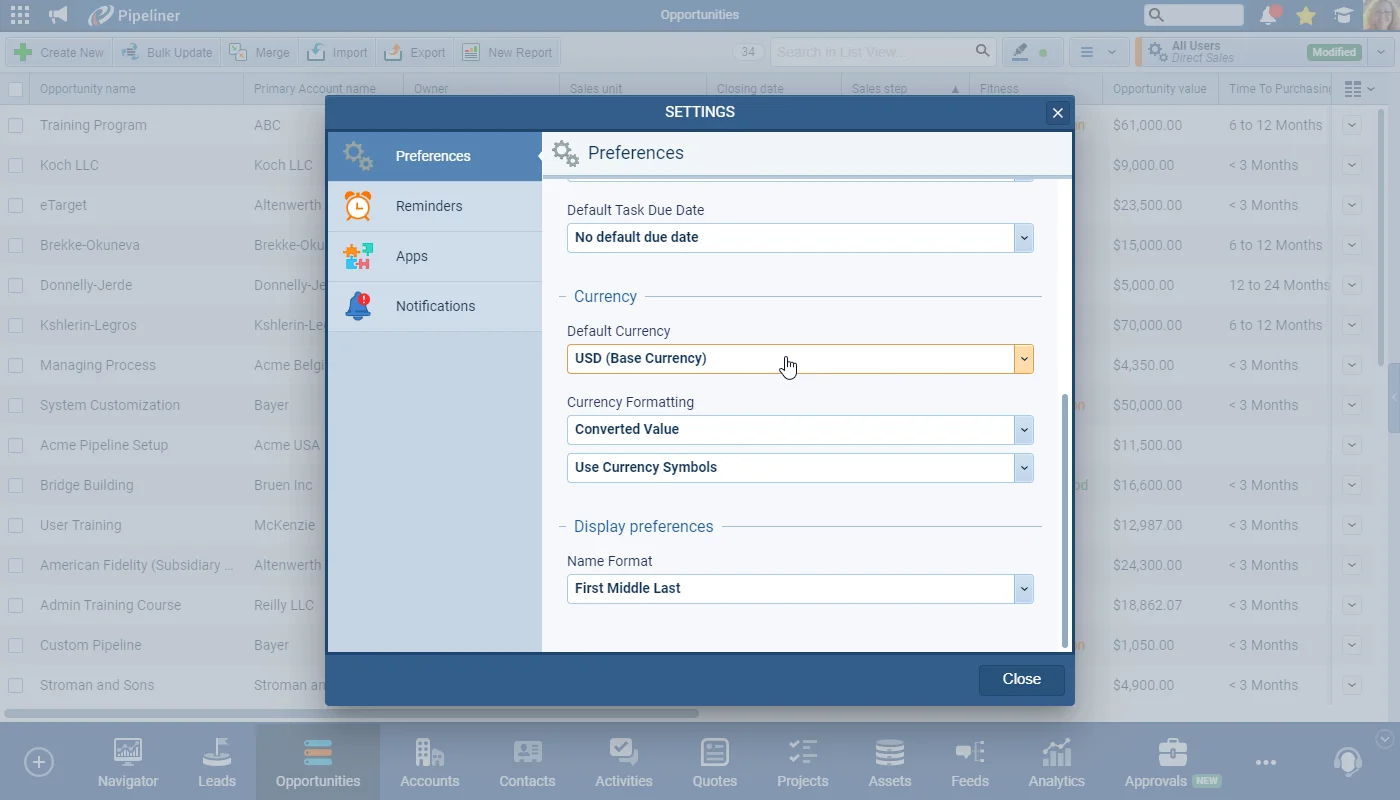
We’ve added additional support for our customers with international teams by adding multi-currency options for individual Users, Forecasts & Targets, Filters and Reports. Previous behavior allowed amounts to be entered in any enabled currency but all visualizations and reports used values converted into the system Base Currency.

Users can now select their preferred currency in their “User Settings › Preferences“.

All screenshots

6
Documentation#new-multi-currency-support

02New · Administration

Conditional Fields on Forms

Conditional Fields on Forms

Administrators are now able to customise the “Form Field Settings” from the Entities menu in the Admin Module to set individual fields to display, be required or be read-only only when specific conditions are met. For example, a field “Customer #” is only relevant when the Account in question is a Customer (rather than a Prospect) so can be hidden until the “Type of Account” is updated to “Customer” but should be required for every customer.

We’ve also updated the “Field Settings(For this Particular Form) window to replace checkboxes with switches and to group relevant options together under the Visibility and Validation sections.

On the Form, the Admin select “Modify Field Form Settings” for a field to access the “Field Settings” window and then switch on “Show field(using Conditions).

All screenshots

4
Documentation#conditional-fields-on-forms
03New · Pipeline

Archived & Delete Records Visualization

Archived & Delete Records Visualization

We’ve improved the visualization of “Archived” and “Deleted” records to make them more easily distinguishable.

A suffix (Archived) or (Deleted) has been added to the name of a record depending on their current status and we’ve also changed the background and font color for archived and deleted records shown in the application.

For Accounts and Contacts, we have also added back the “Delete” action even if the record is not archived.

#archived-delete-records-visualization
04New · Automatizer

Automatizer › Copy Record Action

Automatizer › Copy Record Action

We have added a new Action Type of “Copy Record” to Automatizer. This action will create copies of the records that match the selected parameters. Note that records that were copied via Automatizer will not have the “– Copy” suffix in the record name.

All screenshots

2
Documentation#automatizer-copy-record-action
05New · Voyager AI

Voyager AI Improvement › Text-to-Speech

Voyager AI Improvement › Text-to-Speech

Our latest AI improvement is the addition of a “Text to Speech” option. This is ideal when there is a lot of useful information in notes or other rich text fields or even an AI summary from Feeds as the user can listen rather than needing to read.

Coevera Admins need to enable the option from the “Configure” button for the “Voyager AI Assistant” in the Automation Hub.

All screenshots

2
Documentation#voyager-ai-improvement-text-to-speech
06New · Integrations

Gmail Add-on

Gmail Add-on

Due to Gmail updates, we’ve rewritten our Gmail Addon completely. The addon will need to be installed from the Google Workspace Marketplace.

All screenshots

6
Documentation#gmail-add-on

Various Improvements

As part of our ongoing usability enhancement program, we’ve updated the following features.

Various ImprovementsVoyager AI

AI Feed Tools – Key Points

Key Points — a new type of “summarization” — has been added to the AI Tools options. It works in the same way as “Summary” and “Action Points” but uses a different prompt (AI — AWS Bedrock, model Haiku) to pull together the key points of the Emails, Messages and Notes.

#ai-feed-tools-key-points
Various ImprovementsAdministration

Sub-Sections on Form

Enhancing the ability to customise the layout of Forms, a new form element “Sub-section” has been added. Insert Sub-Sections from the Form Layout Editor in the Entities menu of the Admin Module.

#sub-sections-on-form
Various ImprovementsEmail

Email account selector Improvement

For our customers with many active email accounts, we’ve added an account type icon (allowing users to quickly identify whether an email account is Google, Microsoft 365 or SendGrid) as well as a search bar to quickly find an account by name and a scroll bar.

#email-account-selector-improvement
Various ImprovementsEmail

General Usability Improvements

Updates have been made to field names and labels to improve consistency across Coevera and the “Email Filter” options in Feeds have been reorganized to group incoming and outgoing email options together.

#general-usability-improvements
Various ImprovementsAdministration

Show/Hide inactive users

Filter settings in the “Users” tab in “Units“, “Users & Roles” menu in the Admin Module have been changed. Inactive users are now hidden by default and can be enabled by enabling the new “Show inactive users” switch.

#show-hide-inactive-users

Frequently Asked Questions

It is a new AI option that reads text aloud — notes, rich text fields, the email editor, and AI tool output such as Summarization, Action Points, and Key Points. Users click the headphone icon, choose a language and voice, and listen to the whole text, a selection, or from the cursor position.

Coevera Admins enable it from the Configure button for the Voyager AI Assistant in the Automation Hub. It uses Amazon Polly to convert text to speech, and the available voices can vary based on geolocation and the selected language.

Individual users can now select a preferred currency for Users, Forecasts & Targets, Filters, and Reports. Previously all visualizations and reports used values converted into the system Base Currency; now each user's Default Currency, set in User Settings › Preferences, overrides that for their own view.

Currency Formatting offers three options — Converted Value, Record Value, and Record Value (Converted Value) — plus a choice between currency symbols and currency codes. In Reports, each multi-currency field also gains a "(Converted)" sibling field showing the value in the selected Report Currency.

Administrators can set a field to display, be required, or be read-only only when specific conditions are met — for example, showing a "Customer #" field only once an account's Type is set to Customer. The Field Settings window now uses switches grouped under Visibility and Validation, and conditional rules are set via the Set Rules button. Not all field types are currently supported.

Because of Gmail updates, the Gmail add-on has been completely rewritten and must now be installed from the Google Workspace Marketplace. Automatizer also gains a new Copy Record action that creates copies of the records matching the selected parameters, without adding a "– Copy" suffix to the record name.

Hear what's new in 5.8.0

Start a free trial and explore Voyager AI › Text-to-Speech, multi-currency support, and everything else new in Coevera 5.8.0.

No credit card required · Free 14-day trial

groupsTrusted by clients around the globeverified_userISO 27001 CertifiedshieldGDPR CompliantblockData never used to train AI