v5.1.0MinorReleased

New & Enhanced Custom Entities Reporting & Filtering, Archiving of Accounts & Contacts, Speech to Text, Various Improvements and more

Coevera 5.1.0 delivers enhanced Custom Entities reporting and filtering that pulls fields from linked entities into reports and filters, adds archiving for inactive Accounts and Contacts, and introduces Speech to Text dictation across any rich text field.

ReportsAccountsVoyager AI
Share
Features
4
Improvements
4
Security
Prossimamente

Overview

This release extends the Custom Entities module with new reporting and filtering power. Lookup field creation now always adds a Related Entities tab to the Linked Entity record, and admins can choose whether to also place the Lookup field on the Linked Entity form or rely on the new tab alone. Reports and Filters built on Custom Entities can now include fields from their Linked Entities — for example, filtering a list of Accounts by the Assets linked to them, or building an Account report with columns for all of that Account's related Asset data. Alongside this, inactive Accounts and Contacts can now be archived to clear them from Active views without deleting them.

Two productivity features round out the release. Speech to Text lets users dictate emails, notes, or any rich text field in Coevera — including in Automatizer, online forms, and email sequences — using Amazon Transcribe to stream speech to text in real time; it is on by default for every user, with a 100-minute daily limit. New Quick Add and Advanced Add options streamline linking related records, letting users create, find, or drill into related records, and even add multiple records of different types at once. Smaller improvements cover attaching record documents to emails, twelve new Tag colours, an updated Last Contacted Date, and renaming the Projects entity.

What's in this release
  • Lookup field creation now always adds a Related Entities tab to the Linked Entity record.
  • Admins can add the Lookup field to the Linked Entity form or rely on the new Related Entities tab alone.
  • Reports and Filters based on Custom Entities can now include fields from their Linked Entities.
  • Accounts can be filtered by their linked Custom Entity records — such as Assets — or reported on with related Asset columns.
  • Inactive Accounts and Contacts can now be archived to remove them from Active views without deleting them.
  • Archived Accounts and Contacts appear only in the Archive menu and can be reactivated when they become active again.
  • Accounts and Contacts must now be archived before any user can delete them.
  • An Automatizer process can auto-archive records — for example, after six months with no contact.
  • A new Is Archived field on Accounts and Contacts supports reporting on archived records.
  • Speech to Text lets users dictate into any rich text field in Coevera, powered by Amazon Transcribe.
  • Speech to Text is on by default for all users, with a 100-minute daily limit per user.
  • Quick Add and Advanced Add options streamline linking related records via Add New, Add Existing, and Show All.
  • Add Existing can link multiple records of different entity types at once, while Quick Name still captures unverified Lead details.
  • Record documents can now be attached directly to emails, and Tags support twelve new colours.
New & Enhanced Custom Entities Reporting and Filtering

What we're proud of

Reports that reach across linked entities

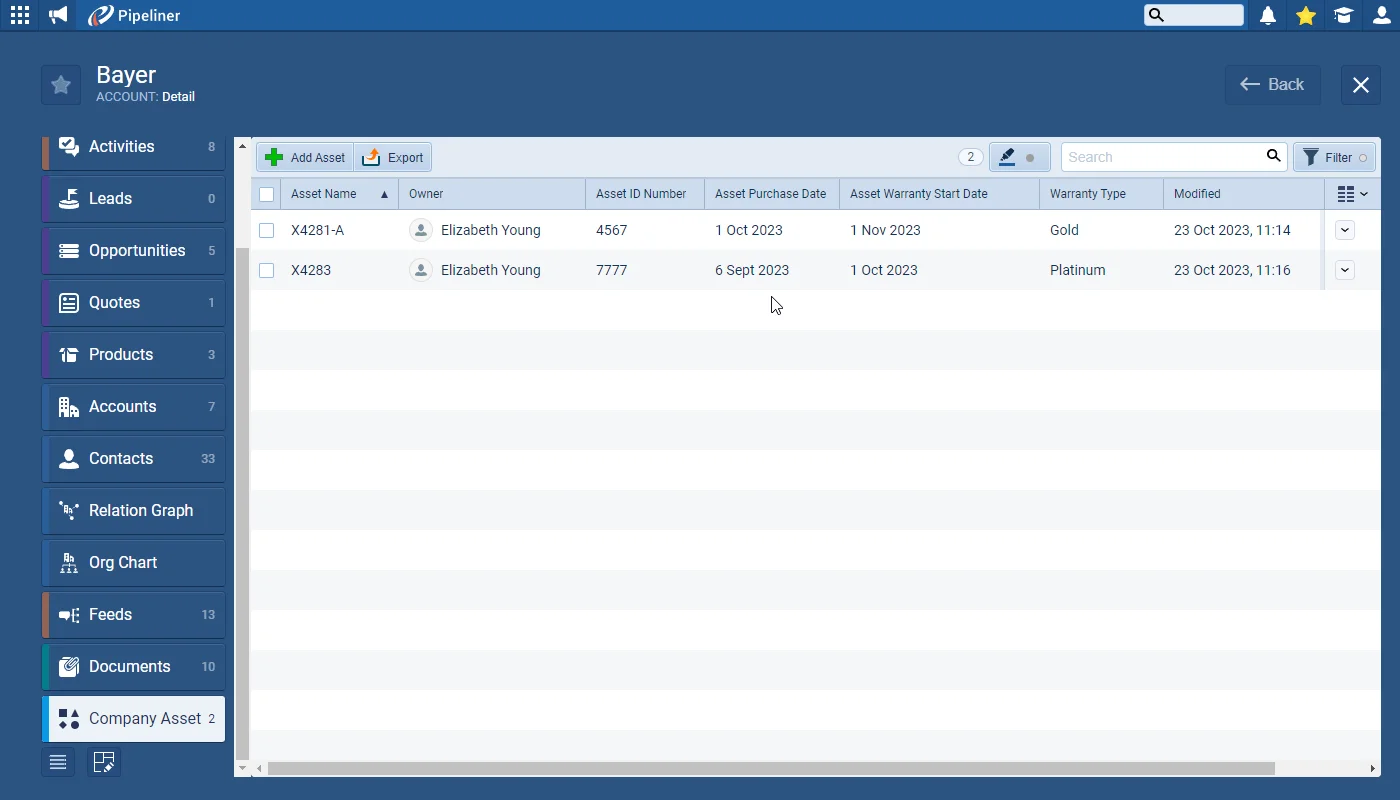
Reports and Filters built on Custom Entities can now pull in fields from the entities they are linked to. Filter a list of Accounts by the Assets linked to them, or build an Account report with columns drawn from each Account's related Asset records — the relationships you model in Coevera now flow straight into your analysis.

01New · Reports

New & Enhanced Custom Entities Reporting and Filtering

New & Enhanced Custom Entities Reporting and Filtering

Lookup field creation has been updated so that a “Related Entities” tab is always created on the “Linked Entity” record. Admins can choose whether to add the Lookup field to the Linked Entity form or just use the new tab to display related data.

All screenshots

2
Documentation#new-enhanced-custom-entities-reporting-and-filtering

02New · Accounts

Archiving of Accounts and Contacts

Archiving of Accounts and Contacts

It is now possible to Archive inactive “Accounts” and “Contacts“. This is a really useful way of removing currently inactive Accounts and Contacts from the “Active” views in the Accounts and Contacts menus without having to delete them. Archived Accounts and Contacts will only be visible from the Archive menu and can be reactivated if their relationship status changes back to active.

Accounts and Contacts must now be Archived first before any user will be able to delete them.

All screenshots

2
Documentation#archiving-of-accounts-and-contacts
03New · Voyager AI

Speech to Text

Speech to Text

After our AI Email Assistant, our next user-focused productivity enhancement is Speech to Text. Users can write emails, notes or update any rich text-enabled field in Coevera simply by speaking!

Documentation#speech-to-text

Various Improvements

Various ImprovementsEmail

Emails › Attaching record documents to emails

Emails › Attaching record documents to emails

We’ve added “Record Documents” to the options available when attaching files to emails so users can access any file related to their selected record and click on it to attach directly to the email they are composing.

Also for Emails, longer emails in email threads can be viewed without scrolling which helps with visibility.

#emails-attaching-record-documents-to-emails
Various ImprovementsAdministration

Tags

Tags

12 new colours are now supported when creating (or updating) Tags.

#tags
Various ImprovementsAccounts

Last Contacted Date for Accounts and Contacts

When a user completes a “Task of Type” Email (one of the system Task Types) and links the task directly to an Account and/or a Contact, the “Last Contacted Date” is now updated to reflect the date of the completed task.

#last-contacted-date-for-accounts-and-contacts
Various ImprovementsAdministration

Rename Projects Entity

Projects can now be renamed from the “Settings” tab in the same way as other “Entities“.

#rename-projects-entity

Frequently Asked Questions

Reports and Filters based on Custom Entities can now include fields from their Linked Entities. For example, you can filter a list of Accounts by the Assets linked to them, or add columns of related Asset data to an Account report.

When a Lookup field is created, a Related Entities tab is now always added to the Linked Entity record. Admins can choose whether to also add the Lookup field to the Linked Entity form, or rely on the new tab alone to display related data.

Archiving removes an inactive Account or Contact from the Active views without deleting it; the record stays available in the Archive menu and can be reactivated if it becomes active again. When archiving, you are also prompted whether to archive or complete related records — related Leads, Opportunities, Contacts, and Quotes can be archived, while linked Activities and Projects can be completed.

Yes. Accounts and Contacts must now be archived before any user can delete them, and admins can set up an Automatizer process to auto-archive records automatically — for example, after six months with no contact.

Speech to Text lets you dictate emails, notes, or any rich text field in Coevera instead of typing, including in Automatizer, online forms, and email sequences. It uses Amazon Transcribe to convert speech in real time, is enabled by default for every user, and supports all languages Amazon Transcribe supports. Each user has a 100-minute daily limit.

When linking related records, the plus icon still quickly adds a single record, while the three-dot menu offers Add New to create a record, Add Existing to pick from a list view, and Show All to drill into linked records. Add Existing can also link multiple records of different entity types at once.

Put 5.1.0 to work

Start a free trial and explore everything new in Coevera 5.1.0 — from Speech to Text to smarter Custom Entities reporting — in your own pipeline.

Nessuna carta di credito richiesta · Prova gratuita di 14 giorni

groupsTrusted by clients around the globeverified_userISO 27001 CertifiedshieldGDPR CompliantblockData never used to train AI