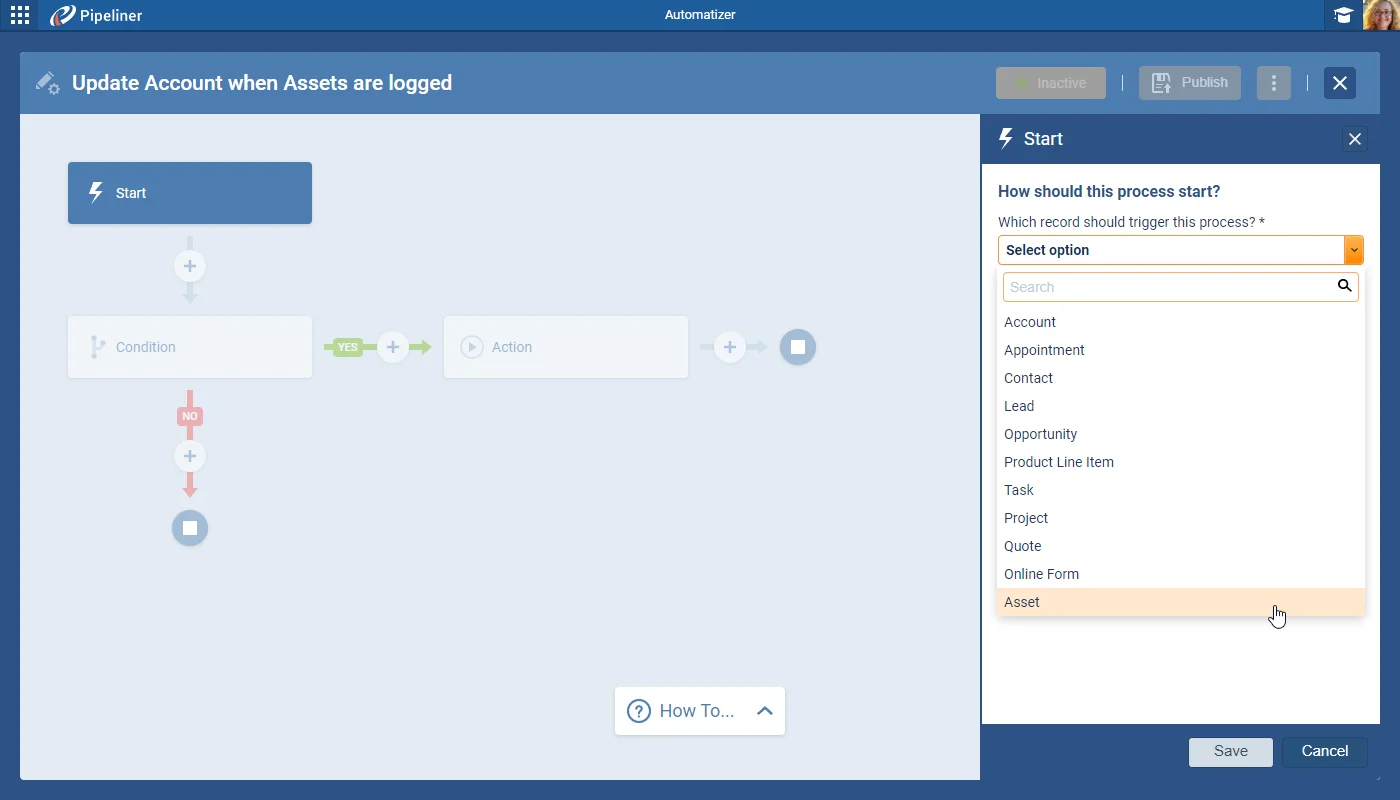
Automatizer processes now fully support “Custom Entities” as triggers, in “Filter Conditions” and in “Actions“.
All screenshots
5Documentation#custom-entities-automatizer-emails-feeds-related-records
Coevera 5.2.0 extends Automatizer to fully support Custom Entities as triggers, conditions, and actions — including related-record updates, emails, and feeds — and adds AND/OR Custom Expressions to Power Panel filters, an AI Assistant for rich-text fields, integration analytics in the Automation Hub, and Portuguese.
The headline of 5.2.0 is full Custom Entity support in Automatizer. Custom Entities can now trigger processes, be used in Filter Conditions, and drive Actions — users can create or update a Custom Entity, create or update its related records defined by lookup fields, and send Emails and Webhooks personalised by Custom Entity data. Custom Entities also gain their own Feeds tab that works like system entities, and emails can be sent to all Account and Contact lookups held on the entity, with the last recipient choice remembered.
Elsewhere, Custom Expressions let users combine filter fields with AND and OR operators and parentheses in the Power Panel › Filter tab, with validation and a friendly readout. The AI Assistant reaches rich text fields and Notes — summarising into bullet points or a paragraph, correcting text, and rephrasing — using the same engine already available for AI in emails. The Automation Hub gains run analytics and logs for addons and integrations, Portuguese joins the application languages, and a dozen improvements land across Reports — running totals, chart image export, and a grand-total fix among them — plus Automatizer, filters, and calendar synchronisation.
What we're proud of
Automatizer now fully supports Custom Entities as process triggers, in Filter Conditions, and in Actions. Users can create or update a Custom Entity and its related records defined by lookup fields, and send Emails and Webhooks personalised by Custom Entity data. Custom Entities also gain their own Feeds tab, working just like system entities.
Users can now build “Custom Expressions” in the “Power Panel › Filter” tab using any combination of “AND” or “OR” operators with parentheses.
Users can access our “AI Assistant” in long text fields in Coevera. Once a user has entered the text (either by typing or using speech-to-text), they can select it and then click on the AI Assistant icon.
Customers using our Addons and Integrations now have visibility of run analytics and logs from the Automation Hub tab in the Admin Module while Subscription Admins can view similar metrics for addons across all their Coevera spaces.
The Analytics tab shows the data of 4 main metrics:
Each of these can additionally be:
Portuguese has been added as a main language for the application. Users can select Portuguese from the “Language” option in their “User Account” settings.
Data filtering has also been improved, as a field can be included in a filter more than once. As an example, this will allows users to filter “multi select checkbox” values more effectively by including one option but excluding another or by filtering a specific value in a field but also where that field is empty.
The issue where totals were counted more than once in a multi entity report has been fixed. For example, in an “Opportunity” report which includes “Product Line Items“, the “Opportunity Values” are now correctly totalled.
The design of spreadsheet and pivot table reports has been updated to offer easier readability with better contrast, more gentle borders and more visible totals/grand totals.
When “Export“, or “Print“, permissions are disabled for a “User Role” the “Admin Module“, users based on that role will not be able to schedule or send a report from the “Reports” menu:
If Printing is disabled, users based on the role will be unable to Send/Schedule an email with the report as a PDF or HTML attachment If Exporting is disabled, users based on the role will be unable to Send/Schedule email with the report as an XLSX or CSV attachment If Export & Print are both disabled, Send/Schedule buttons will be not visible to users based on the role.
If you have a long text field in a report and its content doesn’t fit the width of the column, there’s a new option to instantly preview the content of this field by clicking the three-dot button.
If checked, the end date of the comparison period is changed to the current day. This option is also available for time periods on the X-axis for line, column and bar charts.
Running total provides a cumulative sum, or count, of a particular measure over a specific period of time which allows users to easily track and visualize the total sales over time, identify trends, peaks etc.
There are two new functions:
Running total is available on all graphs except “Scorecard“.
This new function can be combined with the “To Current Date Comparison” to compare sales to date with the same period in a previous year.
It is now easy to export graphs from dashboards and reports to add to a presentation, for example, or to paste into an email as an image. All chart types can now be copied to clipboard or exported as “.PNG“.
Charts using multi-value fields can switch from combination grouping to Group by values for each single value.
All calendar synchronisations (Google, O365, Exchange) now track the organizer details for appointments. This is designed to prevent duplicate appointments from being created and to reduce unnecessary notification emails if a user has “Activity Notifications” enabled.
Connect Coevera to your AI assistant and let it do real work across your CRM — always within your permissions, never beyond them.
Start a free trial and explore what's new in Coevera 5.2.0 for yourself.
Nessuna carta di credito richiesta · Prova gratuita di 14 giorni
