v5.0.0MajorReleased

Brand New Custom Entities, Reporting, Email, Online Form Various Improvements and more

Coevera 5.0.0 "Michelangelo" introduces the Brand New Custom Entities module — create an entirely new type of entity and link it to existing records via Lookup fields — alongside Reports and Charts, Email, and Online Forms improvements.

AdministrationReportsEmail
Share
Features
4
Improvements
6
Security
Prossimamente

Overview

Coevera 5.0.0, codenamed "Michelangelo", is a major release led by the new Custom Entities module. Custom Entities let you create a completely new type of entity in Coevera and link it to existing entities using Lookup fields to build relationships. New custom entities start out stand-alone, and user-defined fields can be added to them just as they are to out-of-the-box main entities.

The release also delivers Reports and Charts improvements — resizable pivot columns, a per-field sorting control, date and single-line text fields in charts, and a working-day-only option for scheduled reports. Email gains domain-based email linking, additional fonts and font sizes, and a working HTML tel tag, while Online Forms add pre-fill parameters and new formatting options. A batch of smaller improvements rounds out the release, including Record ID deduplication on import, printing directly from document preview, and the ability to rename system entities.

What's in this release
  • The Custom Entities module lets you create a completely new type of entity in Coevera and link it to existing entities via Lookup fields.
  • New custom entities are stand-alone when first created, and user-defined fields can be added to them just like on main entities.
  • In v5.0, custom entities fully support Permissions, Fields & Forms, Documents, Activities, Notes, Global Search, Favorites, List Views, Notifications, Bulk Update, Export, and Drilldowns.
  • Reports, Imports, and Filtering across linked records are only partially supported for custom entities in v5.0 and will be enhanced in later releases.
  • Pivot Reports let you resize column widths, applied to all fields of the same type, with only the Totals columns excluded.
  • Pivot and Standard Reports add a sorting option beside each individual field.
  • Multi Line, Stacked Column, Multi-column, and Stacked Bar charts now support date fields on the Segment (Y) axis, and Single Line text fields such as Account Name can be used in Charts.
  • Scheduled Reports add a "Send report only on a working day" option to avoid weekend delivery.
  • Email Integration can link emails to Accounts by matching the sender's company domain, excluding gmail.com, yahoo.com, outlook.com, and Hotmail.com.
  • Rich Text emails gain additional Fonts and Font Sizes across standard and mass emails, signatures, Automatizer, and Email Sequences.
  • HTML emails sent with a tel tag now initiate a call from the browser when a recipient clicks it, where previously clicking did nothing.
  • Online Forms add pre-fill parameters so developers can personalise embedded forms and links sent through third-party tools.
  • Online Forms add formatting options for image header padding and centering the header text.
  • Importing can now deduplicate on the unique Record ID, or on a Name field, when matching data back to existing records.
Brand New Custom Entities

What we're proud of

Extend Coevera with Custom Entities

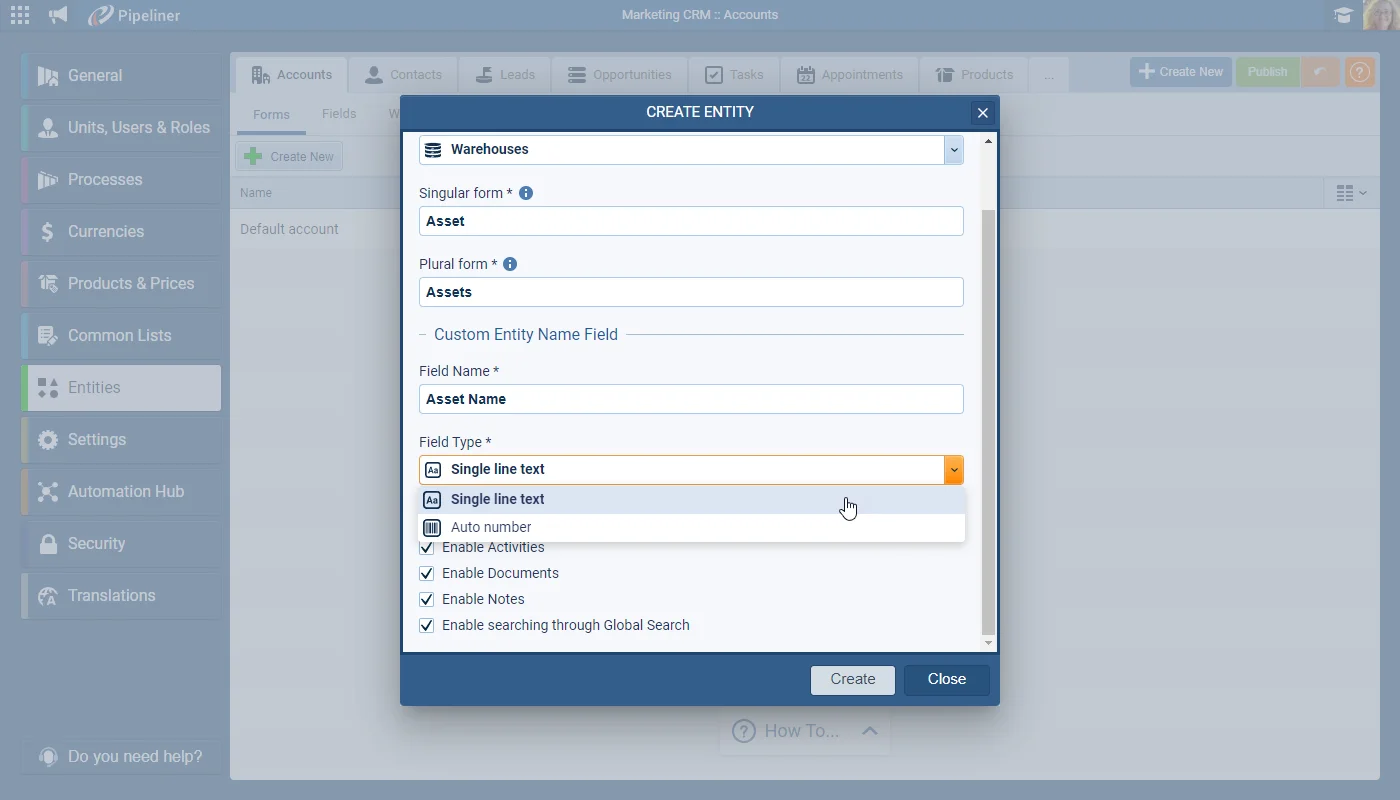
The new Custom Entities module lets you create a completely new type of entity in Coevera, add your own user-defined fields, and link it to existing entities through Lookup fields to model the relationships your business needs. At launch in v5.0 it fully supports permissions, fields and forms, documents, activities, notes, global search, list views, export, and more.

01New · Administration

Brand New Custom Entities

Brand New Custom Entities

The “Custom Entities” module allows you to create — and then work with — a completely new type of entity in Coevera which you can then link to existing entities using Lookup fields to create relationships.

Custom Entities are “stand-alone” when first created. User-defined fields can be added in the same way as they are to out-of-the-box main entities. Linking custom entities to main entities is achieved using Lookup fields.

All screenshots

2
Documentation#brand-new-custom-entities

02New · Reports

Reports and Charts Improvements

Pivot Reports › Resizing columns

You can now resize column widths to help the formatting of wide pivot reports. Resizing is applied to all fields of the same type. All but the “Totals” columns can be resized.

All screenshots

4
Documentation#reports-and-charts-improvements
03New · Email

Email Improvements

Linking emails based on domain

It is now possible to enable an option in a user’s Email Integration Settings to link emails from Contacts whose email address is not yet saved against a record in Coevera based on their company’s domain (as long as the website — the default, system “Home Page” field — has been filled in for the Account).

For example, if a user receives an email from a new Contact (someone@pipelinersales.com), ordinarily that email would not be saved into Coevera as there is no matching email address. If a user has enabled the new option “Link e-mails to Accounts based on Domain”, the integration would look for an Account with a domain/website such as pipelinersales.com (or pipelinersales.co.uk) and, if one is found, the email would be linked to that Account record in Coevera.

The following domains are excluded from this behaviour. Even if an Account has a domain/website that includes one of the following, the email will not be captured by the integration…

All screenshots

3
#email-improvements
04New · Integrations

Online Forms Improvements

Pre-fill parameters

Pre-fill parameters is a new option for developers to allow them to easily configure their embedded form in order to Personalize it via pre-fill parameters. The same approach can be used for link building when you send “Online Forms” via a 3rd party system — for example, by including pre-fill parameters in the URL you can send personalized Online forms via 3rd party tools such as Mailchimp or Hubspot Marketing.

More details of how to use Pre-fill parameters and work with Online forms is provided in this article.

All screenshots

3
#online-forms-improvements

Various Improvements

Various ImprovementsAdministration

Importing

Importing

Imports can now deduplicate on the unique Record ID, or on a Name field, to match enriched data back to the correct existing records.

#importing
Various ImprovementsPipeline

Optimisation of field display when using filters

Optimisation of field display when using filters

If a Coevera space contains lots of custom fields or even system fields with similar names — such as “Name”, it can sometimes be difficult to ensure users are selecting the right field so we’ve optimized the search and the display so that sections which do not contain a field with a similar name to the search term will not display in the flyout and section headers remain static as users scroll downwards through the list.

#optimisation-of-field-display-when-using-filters
Various ImprovementsQuotes & Documents

Printing from Preview

Printing from Preview

From a document preview, it’s now possible to print PDF, IMAGES, DOCX or XLXS files directly or to send the selected file by email. It is not necessary to download first.

#printing-from-preview
Various ImprovementsIntegrations

Automation Hub › Documentation

Automation Hub › Documentation

To help customers to better assess the options in the Automation Hub each app includes a link to the app-specific documentation from the Knowledge-base.

#automation-hub-documentation
Various ImprovementsAdministration

Entity Names Changes

Entity Names Changes

All customers will now have the ability to change the names of System Entities from the Settings tab of the “Entity” in the Admin Module.

#entity-names-changes

Frequently Asked Questions

Custom Entities is a new module that lets you create an entirely new type of entity in Coevera, add user-defined fields to it, and link it to existing entities using Lookup fields to build relationships. New custom entities are stand-alone when first created.

In v5.0 custom entities fully support permissions, fields and forms, documents, activities, notes, global search, favorites, list views, notifications, bulk update, export, and drilldowns. Reports, imports, and filtering are partially supported and will be enhanced in later releases.

Several areas are not yet supported, including Feeds, personalization inside emails and Automatizer, Automatizer processes, online forms, the mobile apps, tags, approval processes, and third-party integrations in the Automation Hub. Custom-entity records can be deleted but not archived.

In a user's Email Integration Settings you can enable "Link e-mails to Accounts based on Domain" so emails from contacts not yet saved in Coevera are linked to the Account whose website domain matches the sender's. Common public domains — gmail.com, yahoo.com, outlook.com, and Hotmail.com — are excluded.

Pivot reports support resizable columns, pivot and standard reports gain a per-field sorting control, charts accept date fields on the Segment (Y) axis and single-line text fields, and scheduled reports can be limited to working days only.

Online Forms add pre-fill parameters so developers can personalise embedded forms — and links sent through third-party tools — plus new formatting options for image header padding and centering the form header text.

Put Custom Entities to work

Start a free trial and explore Custom Entities — and everything else new in Coevera 5.0.0 — in your own space.

Nessuna carta di credito richiesta · Prova gratuita di 14 giorni

groupsTrusted by clients around the globeverified_userISO 27001 CertifiedshieldGDPR CompliantblockData never used to train AI