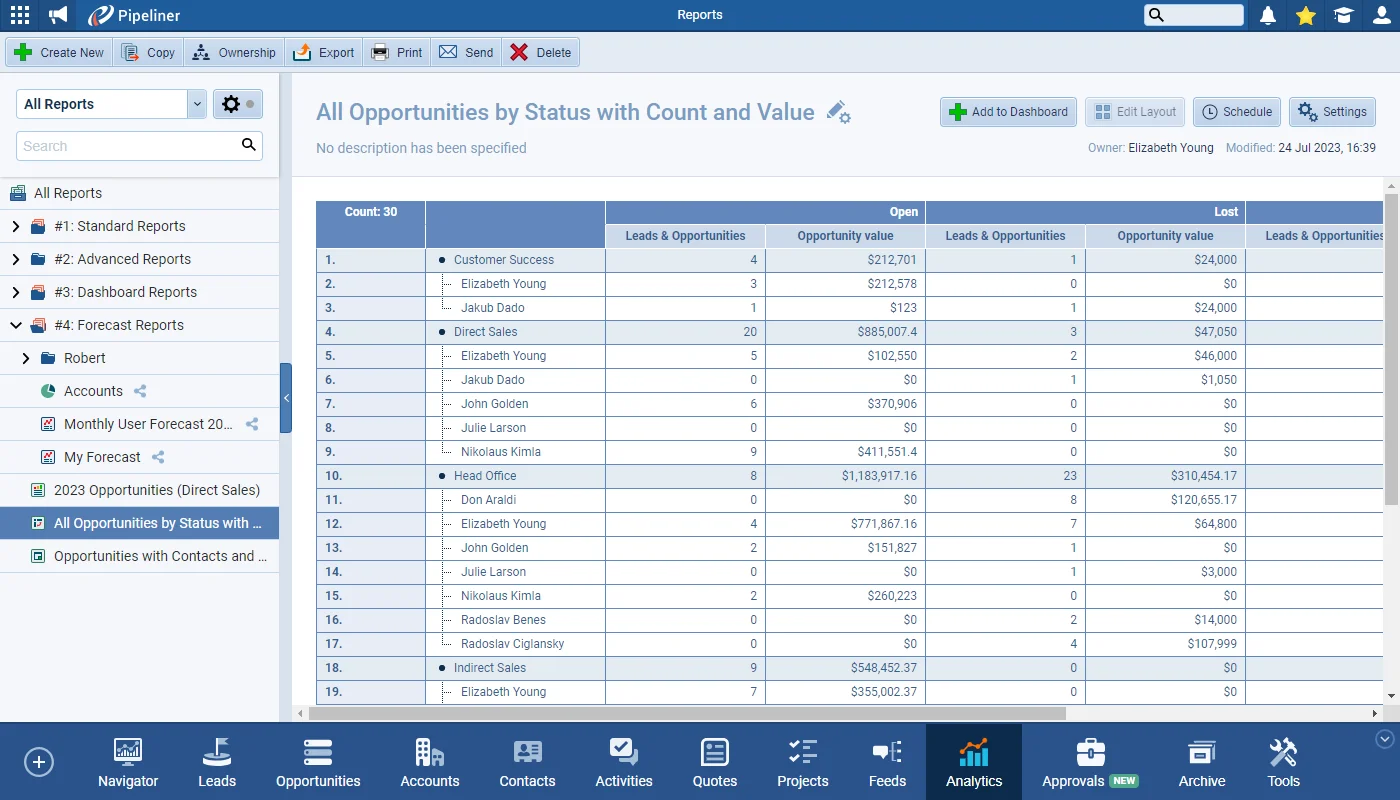
There is a new section available within Pivot tables called “Values“. Users are now able to add several compatible fields to calculate “Values” inside Pivot Tables. So, for example, you can see both the count of opportunities and the sum of their values for each “Status“.
Brand New Pivot Table Features, Window Minimization and more
Coevera 4.19.0 expands Pivot Tables with a new Values section for multi-field calculations and percentage comparisons, adds the ability to minimize Emails and Notes while composing, and links Step Activity tasks to their primary Account and Contact.
- Features
- 2
- Improvements
- 2
- Security
- —
Overview
Coevera 4.19.0's headline change is a substantial upgrade to Pivot Tables. A new Values section lets users add several compatible fields to a single pivot — so a report can show, for example, both the count of opportunities and the sum of their values for each Status. Each value's aggregation function and label can be adjusted directly from the interface, and a new Compare To (as %) option displays a value as a percentage of a selected total — the Row Total, Column Total, Grand Total, or another chosen value.
Beyond reporting, Emails and Notes can now be minimized while being composed. Two smaller refinements round out the release: Tasks and Appointments created from a Step Activity are now automatically linked to the primary Account and Contact alongside the Lead, Opportunity, or Quote, and URL fields added to a List View are clickable directly from the list.
- Pivot Tables gain a new Values section for adding several compatible fields to calculate values.
- A single pivot can show, for example, both the count of opportunities and the sum of their values for each Status.
- Each value's aggregation function can be changed directly from the interface.
- Value names can be renamed via the gear icon beside each field for easier report readability.
- The Value Configuration box controls the Field, Value Label, and Summarize-by function.
- A new Compare To (as %) option displays a value as a percentage of a selected total.
- Values can be compared against the Row Total, Column Total, Grand Total, or another chosen value.
- Emails and Notes can now be minimized while composing them.
- Tasks and Appointments created from a Step Activity now auto-link to the primary Account and Contact alongside the Lead, Opportunity, or Quote.
- URL fields added to a List View are now clickable directly from the List View.

What we're proud of
One pivot, many values
The new Values section lets a single Pivot Table combine several compatible fields at once — showing, for example, both the count of opportunities and the sum of their values for each Status. Every value's aggregation and label can be tuned from the interface, and a Compare To (as %) option expresses any value as a percentage of the Row, Column, or Grand Total — or another value of your choice.
Brand New Pivot Table Features
Window Minimization
Users are now able to minimize Emails and Notes while composing them.
As part of our ongoing usability enhancement program, we’ve updated the following features.
Various Improvements
When creating a “Task” or “Appointment” from a Step Activity associated with a “Lead“, “Opportunity” or “Quote Process“, the activity is now automatically linked to the Primary Account and/or Primary Contact as well as the Lead, Opportunity or Quote itself.
If you add a “URL” field to a List View — website, for example — the field will now be clickable directly from the List View.
Frequently Asked Questions
Related releases
- v5.20.0 · Oct 29, 2025
- Brand New AI Automatizer Agent
- Target Improvements
- New E-Book Library Page
- v5.19.0 · Sep 25, 2025
- Brand New Voyager AI Coach
- Improved Forecasts
- Navigator
- Entities
- Fields
- v5.18.0 · Aug 26, 2025
- Improved Navigator
- New Tags and Enhanced Coloring in Activities
- Users’ Support in Lookup Field
- Improved Reports & Dashboards
See it in your own pipeline
Start a free trial and explore what's new in Coevera 4.19.0 for yourself.
Nessuna carta di credito richiesta · Prova gratuita di 14 giorni
