v3.14.0MinorReleased

New Rollup Field Type and more

Coevera 3.14.0 introduces the Rollup field — a new advanced field type that summarises data from related records and surfaces it across Forms, Preview screens, the Power Panel, Automatizer filters, and Reports.

ReportsAdministration
Share
Features
1
Improvements
Security
Prossimamente

Overview

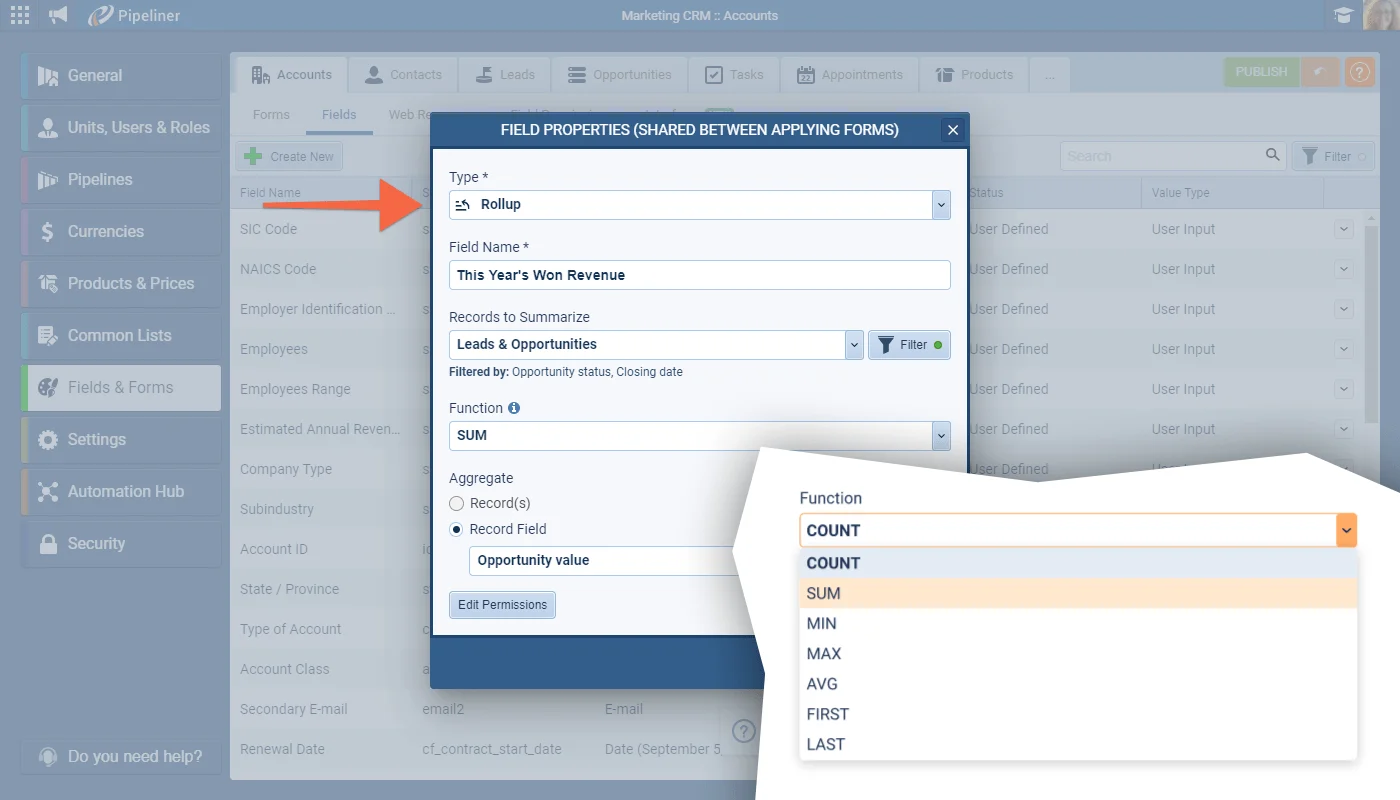
This release adds one headline capability: the Rollup field, a new advanced field type. It summarises data from related records — for example a count of activities of a given type linked to an Account, or the total won Opportunity amount this year for that Account — and displays the result directly on Forms, Preview screens, in the Power Panel, in Automatizer processes when filtering, and in Reports. Rollup fields are created and added to Forms and Preview Screens in the Admin Module in the same way as other field types, and can be added to Accounts, Contacts, Leads, Opportunities, Tasks, and Appointments.

A Rollup field can use seven functions — COUNT, SUM, MIN, MAX, AVG, FIRST, and LAST — where FIRST and LAST can return a clickable record rather than only a field value. Rollup fields are intrinsically read-only, so Field Permissions are used to show or hide them based on User Role, and they can also be added to the Record Preview and QuickView from the Interface tab. They can be used to filter in automated processes and in Power Panel filters and can be added to Reports and used in Charts, but they cannot be used in calculations.

What's in this release
  • The new Rollup field summarises data from related records and displays it on Forms, Preview screens, in the Power Panel, in Automatizer process filters, and in Reports.
  • Rollup fields are created and added to Forms and Preview Screens in the Admin Module, the same as other field types.
  • Rollup fields can be added to Accounts, Contacts, Leads, Opportunities, Tasks, and Appointments.
  • Rollup fields are read-only once added to a Form; Field Permissions are used to show or hide them based on User Role.
  • Rollup fields can be added to the Record Preview and QuickView from the Interface tab.
  • Rollup fields can filter in automated processes and in Power Panel filters, and can be added to Reports and used in Charts.
  • COUNT calculates the number of records matching the specified filter criteria.
  • SUM calculates the sum of any numeric Number, Float, or Currency field.
  • MIN and MAX find the minimum and maximum values for Date and Numeric fields.
  • AVG finds the average of numeric fields.
  • FIRST and LAST display the first or last matching record and can return a clickable record, not only a field value.
  • Rollup fields cannot be used in calculations.
New Field Type › “Rollup Field”

What we're proud of

Related-record data, rolled up onto the record

The Rollup field summarises data from related records — a count, a sum, an average, a minimum or maximum, or the first or last matching record — and surfaces it directly on Forms, Preview screens, in the Power Panel, and in Reports, with FIRST and LAST able to return a clickable record rather than just a value.

01New · Administration

New Field Type › “Rollup Field”

New Field Type › “Rollup Field”

We’ve added another advanced field type in this release. The new Rollup field lets you summarise data from related records and display the information on Forms, Preview screens, in the Power Panel or Automatizer processes when filtering and in Reports. Rollup fields are created and added to Forms and Preview Screens in the Admin Module in the same as other types of fields.

Rollup fields can be added to Accounts, Contacts, Leads, Opportunities, Tasks and Appointments. Field Permissions can be applied to Rollup fields (note that Rollup fields are intrinsically “read-only” so, in reality, you would use Field Permissions to show/hide the field based on User Role). Rollup fields are read-only to your users once added to the Form. They can also be added to the Record Preview and QuickView from the Interface tab.

Rollup fields can be used to filter in automated processes and in the Power Panel filters and can be added to Reports and used in Charts. Rollup fields cannot be used in calculations.

All screenshots

3
Documentation#new-field-type-rollup-field

Frequently Asked Questions

It is a new advanced field type that summarises data from related records and displays the result on Forms, Preview screens, in the Power Panel, in Automatizer processes when filtering, and in Reports.

Rollup fields can be added to Accounts, Contacts, Leads, Opportunities, Tasks, and Appointments, and are created in the Admin Module like other field types.

A Rollup field can use COUNT, SUM, MIN, MAX, AVG, FIRST, and LAST — for example counting linked records, summing a numeric field, or finding the earliest or latest date.

No. Rollup fields are intrinsically read-only once added to a Form. Because of this, Field Permissions are used to show or hide the field based on User Role rather than to control editing.

They can be added to Reports and used in Charts, and can filter in automated processes and in Power Panel filters. They cannot be used in calculations.

Yes. The FIRST and LAST functions can return a clickable record, so it is not only the field value but the record itself that is visible on the form.

See it in your own pipeline

Start a free trial and explore what's new in Coevera 3.14.0 for yourself.

Nessuna carta di credito richiesta · Prova gratuita di 14 giorni

groupsTrusted by clients around the globeverified_userISO 27001 CertifiedshieldGDPR CompliantblockData never used to train AI