v6.1.0MinorReleased

Brand New AI Smart Field, Voyager 2 AI Super Agent, and other Various Improvements…

Coevera 6.1.0 introduces the AI Smart Field for configurable, AI-powered field values and the Voyager 2 AI Super Agent — a single unified assistant that replaces the separate AI widgets — alongside a batch of filter, quote, and integration improvements.

Voyager AIAdministration
Share
Features
2
Improvements
8
Security
Prossimamente

Overview

Two capabilities lead this release. The AI Smart Field adds configurable, AI-powered value generation for supported field types, letting administrators define prompts and data sources, set manual, automatic, or scheduled update triggers, and run updates from record forms, list views, and Automatizer flows, with permission controls, credit-cost previews, and progress feedback. The Voyager 2 AI Super Agent consolidates Coevera's separate AI widgets into one context-aware assistant that draws on CRM data, delegates to specialized sub-agents, and runs live web searches from a persistent chat with Chat History and Saved Prompts.

A set of Various Improvements rounds out the release: the 6.0 'Begins with' and 'Ends with' operators now work in AI flows, Quote filters and approval criteria gain product fields aligned with Opportunity, list-view inline editors scroll internally on smaller screens, integration failures trigger an email alert, and HTML and Markdown documents preview safely.

What's in this release
  • AI Smart Field adds configurable, AI-powered value generation for supported field types including single-line text, long text, integer, float, email, phone, URL, and base currency.
  • AI Smart Field values can update manually, automatically on create or update, or on a weekly or monthly schedule.
  • AI Smart Fields work in record forms, list views (with a 100-record batch limit), and a new Automatizer 'Update AI Fields' action.
  • Voyager 2 AI Super Agent replaces the separate AI widgets with one context-aware assistant opened from the top-right corner.
  • The Super Agent orchestrates CRM data, specialized sub-agents (Record, Report, Automatizer, Online Form), and live web search.
  • Chat History and Saved Prompts are searchable and available in both sidebar and full-screen modes.
  • A Screen Agent surfaces up to five on-demand suggestions — Required Actions, Record News, and Record Updates — from the active screen.
  • AI credit usage is shown below each response, with an email alert to subscription administrators when all credits are used.
  • Administrators control Super Agent and AI Smart Field access through User Roles and the Automation Hub.
  • The 6.0 'Begins with' and 'Ends with' filter operators are now recognized in AI-driven flows.
  • Custom Entity lookup cards now display their configured card view field mappings instead of only the entity name.
  • Quote filters and approval criteria gain product-related fields aligned with Opportunity naming.
  • Integration failures for selected Outlook, Exchange, Google, and other integrations now trigger an email notification with a reactivation link.
  • HTML and Markdown documents can be previewed safely, opening in a separate browser tab.
AI Super Agent

What we're proud of

One AI assistant for the whole CRM

The Voyager 2 AI Super Agent replaces a scattered set of AI widgets with a single context-aware assistant that understands what you're looking at and pulls in your CRM data, specialist agents, and live web search from one persistent chat.

01New · Voyager AI

AI Super Agent

AI Super Agent

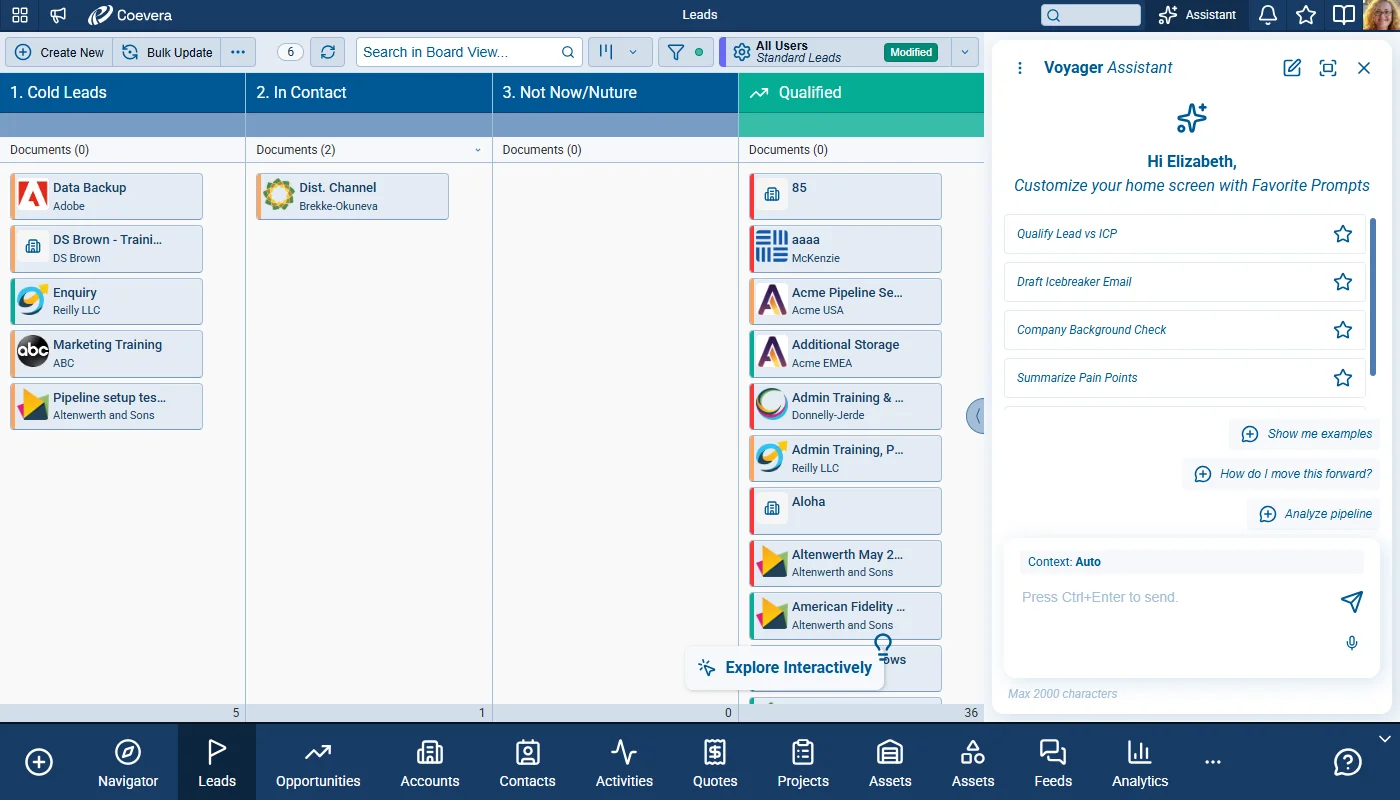
The Voyager 2 AI Super Agent is Coevera’s unified AI assistant, accessible from the top-right corner of the application. It replaces the previous collection of separate AI widgets with a single, context-aware agent that understands what you are looking at, draws on your CRM data, and can delegate to specialized agents for records, reports, automatizer processes, and online forms — all from one persistent chat interface.

Clicking on the AI Assistant icon opens the Super Agent in a sidebar panel on the right side of the screen without covering the main content. It includes a menu for accessing Chat History, Saved Prompts, and starting a new conversation. Previous conversations are automatically saved so users can return to any earlier session. Simply closing the panel preserves the ongoing conversation — reopening it resumes exactly where you left off. A toggle button switches the panel to Full Screen mode for longer working sessions.

All screenshots

13
Documentation#ai-super-agent
02New · Voyager AI

AI Smart Field

Field Configuration

The AI Smart Field adds configurable AI-powered value generation for supported CRM fields. Administrators can enable AI behavior per field, define prompt and data sources, configure update triggers, and expose controlled manual or automated updates in record forms, list views, and Automatizer flows. The experience includes permission controls, credit-awareness messaging, and progress feedback during updates.

AI Smart Field options are available for supported field types which include: single-line text, long text, integer, float, email, phone, URL, and base currency.

The value update flow is defined for both manual and automated execution paths.

All screenshots

16
Documentation#ai-smart-field

Various Improvements

As part of our ongoing usability enhancement program, we’ve updated the following features.

Various ImprovementsVoyager AI

Additional Filter Operators In AI Context

The filter operators “Begins with” and “Ends with” added in release 6.0 are now recognized in AI-related flows. AI-driven components that interpret filter conditions now use these operators consistently with existing filter behavior.

#additional-filter-operators-in-ai-context
Various ImprovementsAdministration

Card View Details For Custom Entity Lookup

Card View Details For Custom Entity Lookup

Custom Entity lookup cards now show their configured card view field mappings instead of only the entity name, including embedded lookup cards in forms.

All screenshots

2
#card-view-details-for-custom-entity-lookup
Various ImprovementsPipeline

Inner Scrolling For Inline Editor In List View

Inner Scrolling For Inline Editor In List View

Inline editors for long text fields in List views now keep action buttons accessible on lower-resolution screens. The inline edit popup stays within the visible application area and provides inner scrolling when content is long.

#inner-scrolling-for-inline-editor-in-list-view
Various ImprovementsPipeline

Product Field Consistency In Quote And Opportunity Filters

Product Field Consistency In Quote And Opportunity Filters

Quote filters now include additional product-related fields that were previously unavailable and Quote product field naming is aligned with Opportunity naming for consistent filter setup across both record types. The same field support is available in mobile filtering and AI-enabled filter interpretation.

#product-field-consistency-in-quote-and-opportunity-filters
Various ImprovementsPipeline

Product Fields In Approval Criteria For Quotes

Product Fields In Approval Criteria For Quotes

Approval Process criteria for Quotes now include product-related fields previously limited to Opportunity criteria. Opportunity and Quote approval condition builders expose a more complete and consistent product field set.

#product-fields-in-approval-criteria-for-quotes
Various ImprovementsPipeline

Product Field Reference Unification In Change Tracking

Product field behavior is standardized so the same product reference is used consistently across filters, grids, and change log scenarios.

Historic and active automation contexts continue to work with aligned product field semantics after the field reference update.

#product-field-reference-unification-in-change-tracking
Various ImprovementsIntegrations

Integration Expiration Failure Notification

Users receive an email when an integration failure is detected and background CRM functionality may be affected. The message includes the integration name, impact warning, and a direct path to the correct settings area for reactivation. The system sends at most one notification per integration failure cycle and allows a new notification after reactivation. The first release scope focuses on selected integrations where users might not directly see immediate UI errors.

This applies to the following integrations:

  1. OutlookEmail
  2. OutlookContacts
  3. OutlookCalendar
  4. OutlookTasks
  5. SharePoint
  6. OneDrive
  7. MicrosoftTeams
  8. ExchangeEmail
  9. ExchangeContacts
  10. ExchangeAppointments
  11. ExchangeTasks
  12. GmailSync
  13. GmailSend
  14. GoogleContacts
  15. GoogleCalendar
  16. GoogleTasks
  17. GoogleDrive
  18. Imap
  19. PandaDoc
  20. SendGrid
  21. Dropbox
  22. Calling
  23. WhatsApp
  24. Zoom
  25. Bcc
#integration-expiration-failure-notification
Various ImprovementsQuotes & Documents

HTML And Markdown Document Preview Safety

Coevera supports safe previewing of HTML and Markdown documents in CRM document flows. Users can open document content in a separate browser tab while preserving a controlled preview behavior.

#html-and-markdown-document-preview-safety

Frequently Asked Questions

It is Coevera's unified AI assistant, opened from the top-right corner, that replaces the previous separate AI widgets with a single context-aware agent drawing on your CRM data, specialized sub-agents, and live web search.

It adds configurable, AI-powered value generation to supported field types, letting administrators define a prompt and data sources and update values manually, automatically on create or update, or on a weekly or monthly schedule.

A coin icon below each AI response shows the AI credits it consumed; when credits run out, requests are blocked and subscription administrators are emailed. Super Agent usage is also tracked in AI Statistics.

Yes. Access to the Super Agent and the AI Smart Field is controlled through User Roles, and Voyager 2 appears as a configurable item in the Automation Hub.

Those standalone AI entry points, and the AI Coach, have been consolidated into the Super Agent, which is now the single entry point for AI assistance across those areas.

This release aligns product fields across Quote and Opportunity filters and approval criteria, improves Custom Entity lookup cards and list-view inline editing, adds integration-failure email alerts, and enables safe HTML and Markdown document previews.

See Coevera's new AI in action

Start a free trial and explore the Voyager 2 AI Super Agent and AI Smart Field in your own CRM.

Nessuna carta di credito richiesta · Prova gratuita di 14 giorni

groupsTrusted by clients around the globeverified_userISO 27001 CertifiedshieldGDPR CompliantblockData never used to train AI