v2.7.0MinorReleased

Ability to Track Emails, Email Personalization & Signatures, Brand New Email Templates and more

Coevera 2.7.0 puts email front and center — track opens and clicks on every sent email, personalize content with record fields and rich-text signatures, and send from shareable HTML templates — plus Product Tables in document templates and bulk CSV user import.

EmailQuotes & DocumentsAdministration
Share
Features
5
Improvements
1
Security
Demnächst verfügbar

Overview

Email leads this release. When you use Create Email, you can now view tracking statistics for every message you send — single Standard emails, Mass emails, and Standard emails sent to multiple recipients. A new eye icon shows whether an email has been opened, and the tracking timeline runs from Sent Date and Time through Open Date and Time and any link Clicks; the tracking statistics report adds total opens and clicks, shows exactly who interacted, and lets you send a follow-up straight from the report, with optional notifications when your emails are opened. You can personalize content by inserting fields from Accounts, Contacts, Leads, Opportunities, and the sending user into emails and templates, and a saved rich-text signature is added automatically to every email sent via Create Email. Brand-new personalized and HTML email templates can be created, shared with colleagues, and selected when sending through Office 365 or Gmail, with the sent email added to each record's Feed.

Beyond email, Products & Services detail now flows into document templates: insert the new Product Table field into a Quote or Contract template in Microsoft Word or Google Docs and, when a user opens an Opportunity and applies the template, the Products & Services grid fills in automatically. Administration Updates add new integrations to Coevera Cloud alongside bulk user import — admins can import users from a CSV file, assign each to multiple sales units with a pipe separator, and review any duplicate or invalid rows in a log file. A bundled improvement rounds things out, letting you save attachments from incoming emails straight to the Documents tab of any record.

What's in this release
  • Email tracking statistics are available for all sent emails — single Standard emails, Mass emails, and Standard emails to multiple recipients.
  • A new eye icon shows whether an email has been opened, with a timeline from Sent Date and Time through Open Date and Time and link Clicks.
  • The tracking statistics report shows how many opens and clicks an email received and exactly who interacted with it.
  • You can send a follow-up email directly from the tracking statistics report.
  • Enable Notifications for Emails in user settings to be notified when your sent emails are opened.
  • Emails and email templates can be personalized with fields from Accounts, Contacts, Leads, Opportunities, and the sending user.
  • A saved rich-text email signature is added automatically to every email sent via Create Email.
  • Personalized and HTML email templates can be created, shared with colleagues, and selected when sending through Office 365 or Gmail.
  • Templates support Bold, Italics, Bullets, Numbering, Links, and Attachments, and the sent email is added to each record's Feed.
  • A new Product Table field pulls Products & Services detail from an Opportunity into Quote or Contract templates in Microsoft Word or Google Docs.
  • Users can be imported in bulk from a CSV file, with a downloadable sample file from Admin Module › Users.
  • Imported users can be assigned to multiple sales units using a pipe (|) separator, with the first entry as the default, and duplicate or invalid rows are shown in a log file.
  • Attachments on incoming emails can be saved directly to the Documents tab of a chosen record via the Save Attachments to Coevera button.
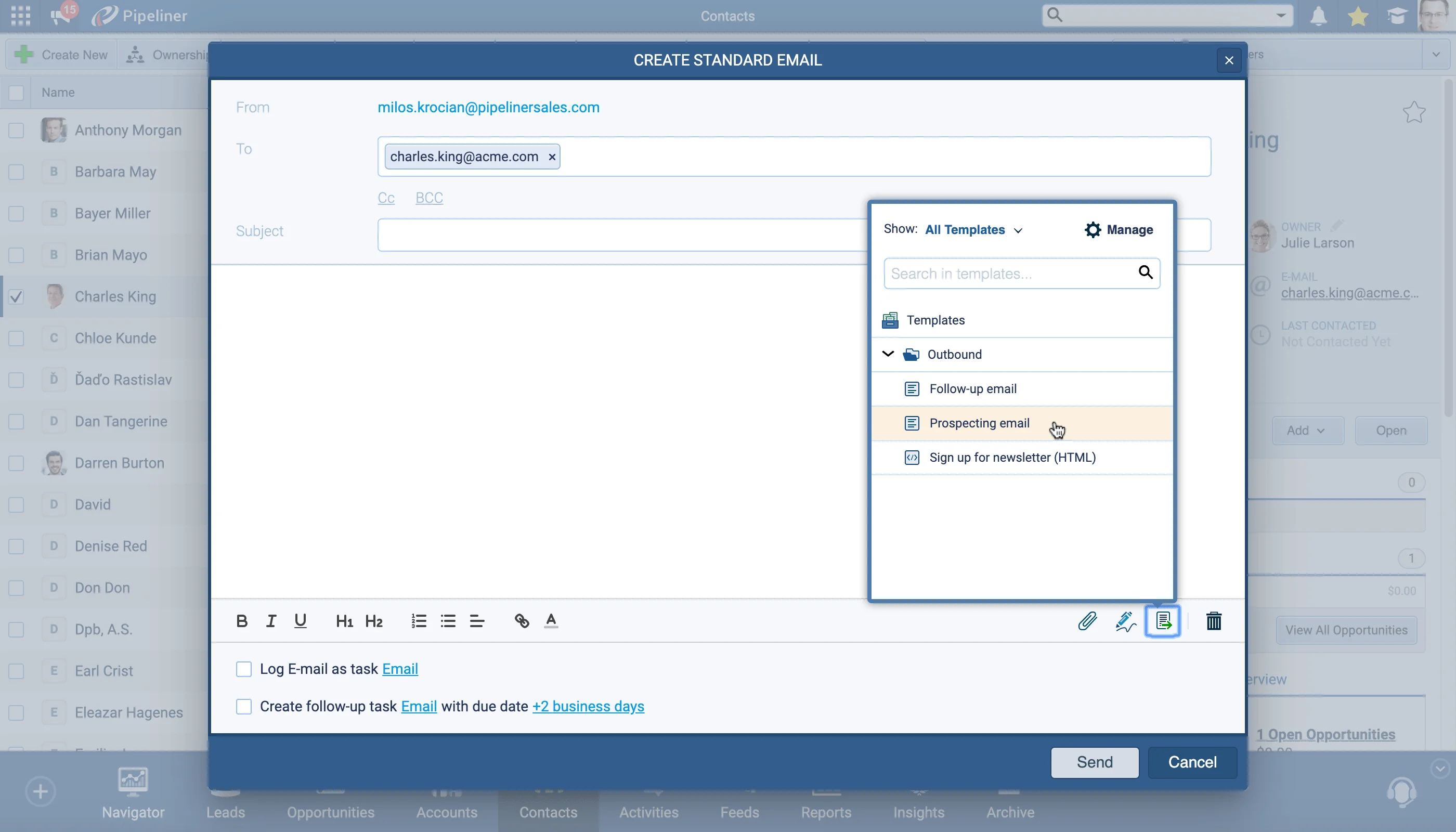
Composing a standard email and logging it as a tracked task

What we're proud of

See when your emails get opened

Every email sent from Create Email now carries tracking. The new eye icon and tracking timeline show the path from Sent to Open to link Clicks, the tracking statistics report reveals how many opens and clicks it earned and exactly who engaged, and you can send a follow-up straight from the report.

01New · Email

Ability to Track Emails

Composing a standard email and logging it as a tracked task

When using our Create Email option, you can now view tracking statistics for all sent emails. This feature applies to single Standard emails as well as Mass emails and Standard emails sent to multiple recipients.

Hover over the tracking icon on a sent email to see a timeline of interactions. The brand new eye icon shows you if the email has been opened or not and, if it has, a timeline of events from Sent Date and Time through Open Date and Time and including Clicks on any links in your email.

Use the “Mass” email feature to send perfectly formatted and personalized emails to multiple recipients and then track the statistics for your email by clicking on your Mass email from the main Feeds tab or from the Contact’s Feed.

All screenshots

2
Documentation#ability-to-track-emails
02New · Email

Email Personalization & Signatures

Inserting personalization fields into an email template

You can leverage data that your users have already entered into Coevera by inserting fields from Accounts, Contacts, Leads, Opportunities as well as details of the user who is sending the email into your emails (including email templates) to personalize the content.

You can create a rich text Email signature and, once saved; it will be added automatically to every email a user sends from Coevera using the Create Email function.

All screenshots

3
Documentation#email-personalization-signatures
03New · Email

Brand New Email Templates

HTML email template with brand styling

You can create and share personalized and HTML email templates. These templates can be selected when using the Send Email option for Office 365 and Gmail to send emails to your Contacts.

You can select from a list of personalized templates — including HTML templates — resulting in perfectly formatted emails with the right message for each situation. Users can create and use their own templates and also share them with colleagues allowing standard responses to be sent quickly and easily.

You can use Bold or Italics, add Bullets or Numbering and insert Links as you would for any other email as well as add Attachments.

All screenshots

5
Documentation#brand-new-email-templates
04New · Quotes & Documents

Products & Services available in Document Templates

  • Quoting made easy!
  • You can easily create Quote or Contract templates that can now include the Products & Services detail from a Coevera Opportunity. Insert the new field “Product Table” into your Opportunity Template in Microsoft Word or Google Docs. When your users open an Opportunity and use the template, product information from the Product & Services grid will be filled in. Select your saved file from the Documents tab of the Opportunity and click on Create Email to send it directly to your prospect.
Documentation#products-services-available-in-document-templates
05New · Administration

Administration Updates

We have added new integrations into Coevera Cloud and included a few enhancements…

Documentation#administration-updates

Various Improvements

Various ImprovementsEmail
Email notification settings and the Email Templates Manager

    Please note that some of these features are only available for our Business or Enterprise Tiers.

    Documentation#various-improvements

    Frequently Asked Questions

    Tracking statistics are available for every email sent through Create Email — single Standard emails, Mass emails, and Standard emails sent to multiple recipients.

    A new eye icon tells you whether an email has been opened, and the tracking timeline runs from Sent Date and Time through Open Date and Time and any link Clicks. The tracking statistics report adds total opens and clicks, shows exactly who interacted, and lets you send a follow-up from the report itself.

    Enable Notifications for Emails in your user settings to receive a notification whenever an email you send is opened.

    Yes. You can insert fields from Accounts, Contacts, Leads, Opportunities, and the sending user into emails and templates, save a rich-text signature that is added automatically to every Create Email message, and create personalized or HTML templates you can share with colleagues and use with Office 365 or Gmail.

    Insert the new Product Table field into an Opportunity template in Microsoft Word or Google Docs; when a user opens an Opportunity and applies the template, data from the Products & Services grid fills in automatically.

    Yes. Admins can import users from a CSV file — download the sample from Admin Module › Users — assign each user to multiple sales units with a pipe (|) separator, and review any duplicate or invalid rows in a log file.

    See it in your own pipeline

    Start a free trial and explore what's new in Coevera 2.7.0 for yourself.

    Keine Kreditkarte erforderlich · 14 Tage kostenlos testen

    groupsTrusted by clients around the globeverified_userISO 27001 CertifiedshieldGDPR CompliantblockData never used to train AI
