v2.8.0MinorReleased

Collapsible Dynamic Forms, Fields & Forms, Power Panel, Feeds, Mobile Application improvements and more

Coevera 2.8.0 upgrades the Power Panel with more flexible Dynamic period filtering, Primary Contact grouping, and multi-owner presets, and rounds out the release with smarter mobile capture, collapsible record forms, a Mass Emails feed, and tighter administrator permissions.

AdministrationMobile
Share
Features
6
Improvements
Security
Demnächst verfügbar

Overview

This release sharpens the everyday filtering and mobile workflows that reps rely on. The Power Panel for Opportunities gains a 'Primary Contact' option in the 'Grouped By' field, a more flexible 'Dynamic period' filter that can now match records inside or outside a date range, and the ability to select multiple owners at once in filter presets. On mobile, the Business Card Scanner maps data more accurately and can create an Account as well as a Contact, emails can be tracked via BCC, SMS messages can be logged, and duplicate checking now runs before you save a new Account or Contact.

Elsewhere, record forms become easier to work with — sections on field-heavy forms can be collapsed to reduce scrolling or hide fields you don't need, and calculated fields are now marked with a '∑' symbol in both the web app and the Admin module. A preset 'Mass Emails' stream in the Feeds menu makes bulk email activity easier to track, new integrations have been added into Coevera Cloud, and new 'Import' and 'Bulk Update' permissions give Administrators finer control over who can run mass data changes.
What's in this release
  • Collapsible Dynamic Forms let you collapse sections on field-heavy forms to make scrolling easier or hide fields you're not interested in.
  • Calculated fields now show a '∑' symbol so they are easier to identify in both the web app and the Admin module.
  • The Power Panel View tab for Opportunities adds a 'Primary Contact' option in 'Grouped By', grouping Opportunities by the main person involved in the deal.
  • The 'Dynamic period' filter now offers two options — 'IS' shows records with dates within your criteria, and 'IS NOT' shows records with dates outside the range you select.
  • Filter presets now let you select multiple owners at once by checking the Owner(s) in the 'Owner' field.
  • A preset 'Mass Emails' stream has been added to the main Feeds menu to make tracking Mass Emails easier.
  • The Mobile App Business Card Scanner maps recognised data more accurately (for example Job Title) and can now scan and create an Account record as well as a Contact.
  • You can now track emails from mobile through BCC.
  • You can now log SMS messages in the Mobile App.
  • Duplicate checking now extends to the Mobile app, prompting you before you save a new Account or Contact if a matching record already exists (exact match on Account name, or First and Last name for Contacts).
  • New 'Import' and 'Bulk Update' user permissions give Administrators more control over who can use mass change features such as importing or bulk updating data.
  • New integrations have been added into Coevera Cloud alongside a few enhancements.
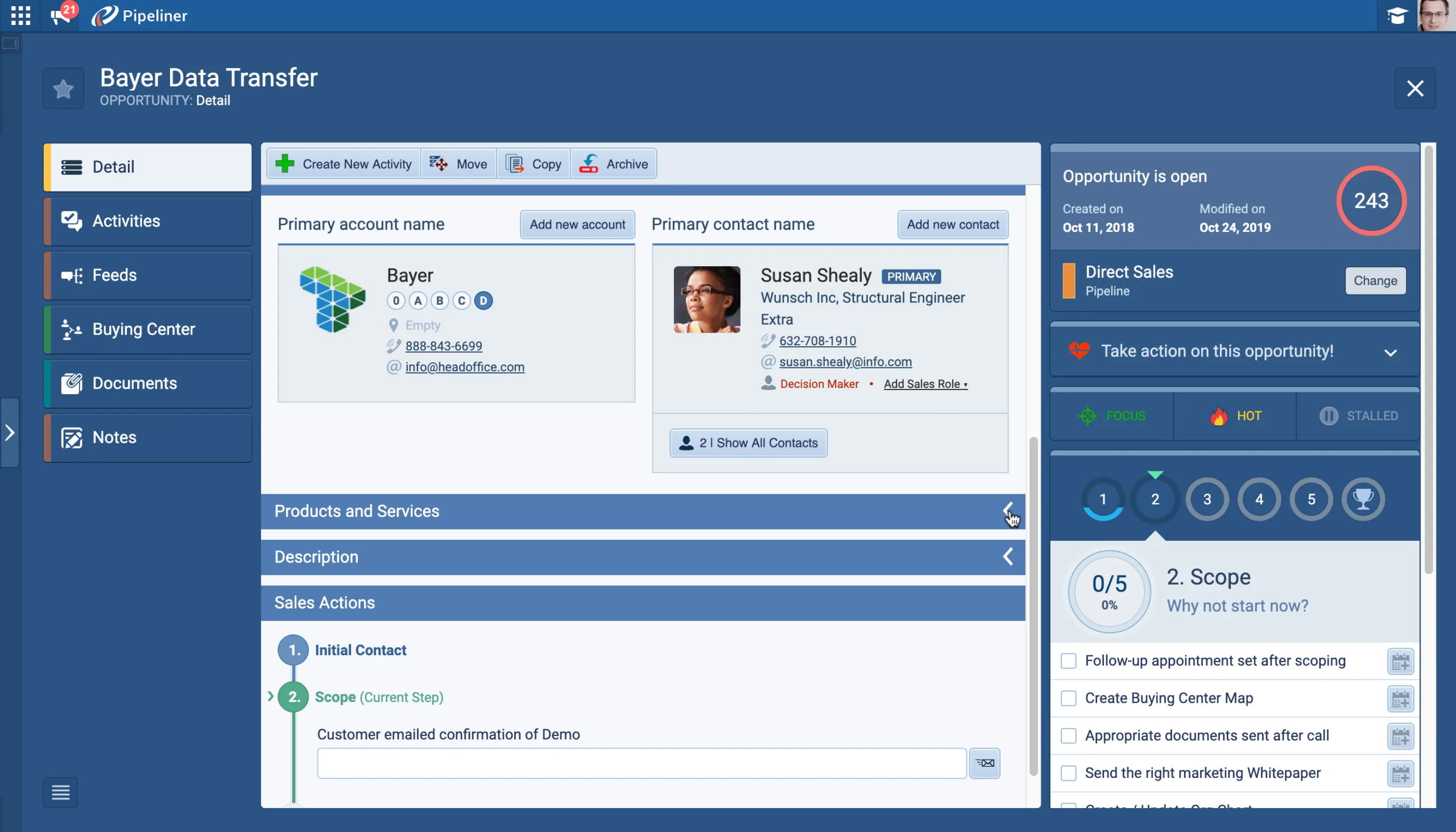
Collapsible sections on an Opportunity detail form

What we're proud of

More flexible filtering in the Power Panel

The Power Panel's 'Dynamic period' filter now works two ways — showing records whose dates fall inside a range or outside it — while Opportunities can be grouped by Primary Contact and filtered by multiple owners at once, giving you sharper answers from your pipeline data.

01New · Pipeline

Collapsible Dynamic Forms

Collapsible sections on an Opportunity detail form
  • When you have lots of fields on a form, you can now collapse sections to make scrolling easier or to hide fields you’re not interested in.
#collapsible-dynamic-forms
02New · Administration

Fields & Forms

  • We’ve added the “∑” symbol to calculated fields so they are easier to identify in both the web app and the Admin module.
#fields-forms
03New · Pipeline

Power Panel

Power Panel Dynamic period filter on the Opportunities view

There’s now an additional option in the “Grouped By” field on the View tab within the Power Panel for Opportunities. You can now select “Primary Contact” to group your Opportunities by the main person involved in the deal.

We’ve enhanced the “Dynamic period” options giving you even more flexibility for filtering and reporting on data using date fields. There are now 2 main Dynamic period options:

Filtering on Ownership is a very common action so we’ve made it even easier for you by enabling the option to select multiple owners in the filter preset screen. Now, when you click into the “Owner” field, you can just check the Owner(s) you want to filter by.

All screenshots

3
#power-panel
04New · Email

Feeds

Mass Emails preset stream in the Feeds menu
  • To make it easier for you to track your Mass Emails, we’ve added a preset “Mass Emails” stream to the main Feeds menu.
#feeds
05New · Mobile

Mobile Application

Mobile app Navigator with weighted target and trend overview

We’ve added several enhancements to the Mobile App Business Card Scanner:

It is now possible to track emails from mobile through BCC

You can now log SMS messages in Mobile App

All screenshots

8
#mobile-application
06New · Administration

Administration Updates

Edit User Role permissions dialog in Units, Users & Roles

We have added new integrations into Coevera Cloud and included a few enhancements…

#administration-updates

Frequently Asked Questions

You can group Opportunities by Primary Contact, use an expanded 'Dynamic period' filter that matches records inside or outside a date range, and select multiple owners at once in filter presets.

It displays records where the date used falls outside the range you select — for example, leads created outside the last 7 days — complementing 'Dynamic period IS', which shows records whose dates are within your criteria.

The Business Card Scanner maps recognised data more accurately and can create an Account as well as a Contact, you can track emails through BCC, log SMS messages, and duplicate checking now warns you before saving a matching Account or Contact.

On forms with lots of fields, you can now collapse sections to make scrolling easier or to hide fields you're not interested in.

Calculated fields now display a '∑' symbol, making them easy to identify in both the web app and the Admin module.

New 'Import' and 'Bulk Update' permissions let Administrators control which users can use the mass change features, such as importing new data or bulk updating existing data.

See it in your own pipeline

Start a free trial and explore what's new in Coevera 2.8.0 for yourself.

Keine Kreditkarte erforderlich · 14 Tage kostenlos testen

groupsTrusted by clients around the globeverified_userISO 27001 CertifiedshieldGDPR CompliantblockData never used to train AI