This release extends Coevera’s Voyager AI Relationship Charts to the Buying Center on Opportunity records. Building on the existing Account Hierarchy and Org Chart capabilities, the AI Relationship Charts Agent now analyzes an opportunity’s contacts, activities, and email communication to propose a complete Buying Center — the set of people involved in a deal, the sales roles and relationships they hold, and the lines of influence between them. Users are able to preview the AI’s proposal, where every suggested change is clearly tagged, and then choose to apply it to the live chart with a single action.
Brand New Emails Preview Screen, Voyager AI Relationship Charts — Buying Center, and other Various Improvements…
Coevera 6.3.0 brings a full inbox into the CRM with the new Emails Preview Screen, extends Voyager AI Relationship Charts to map the Buying Center on every opportunity, and adds a batch of Automatizer, Quotes, and records improvements.
- Features
- 2
- Improvements
- 7
- Security
- —
Overview
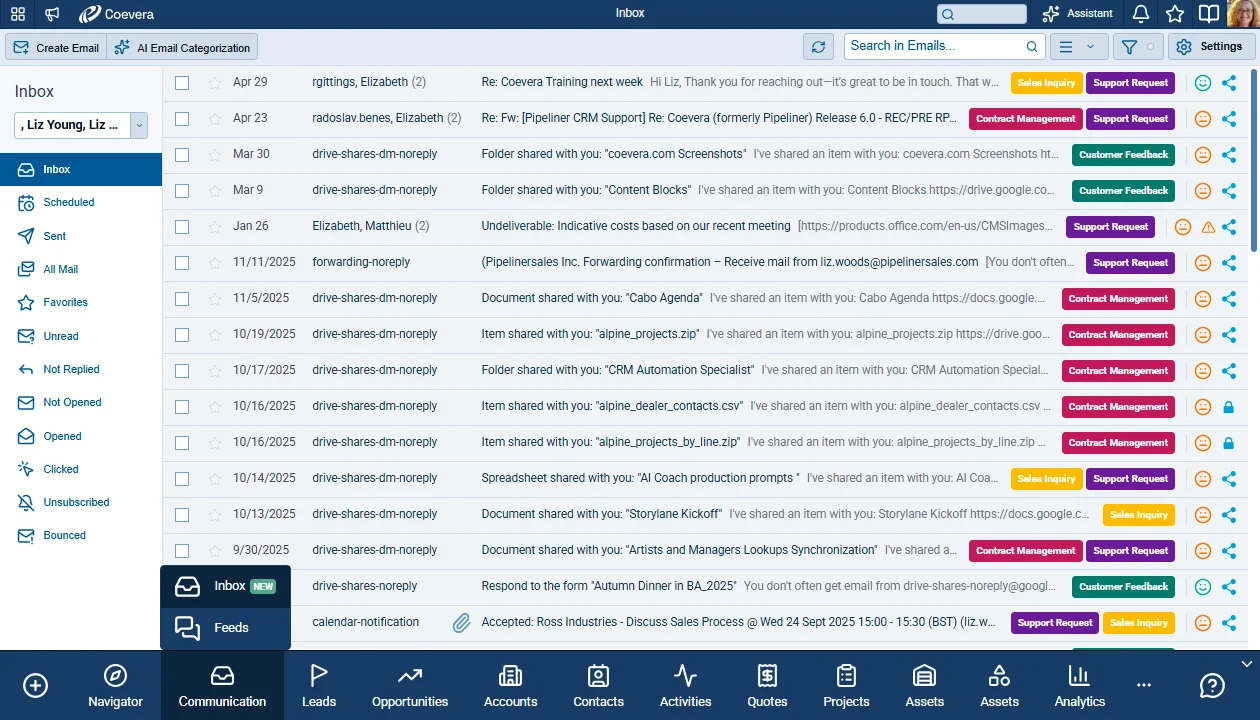
Two capabilities lead this release. The Emails Preview Screen adds a dedicated Inbox to Coevera — multiple email accounts, mailbox views for Inbox, Scheduled, Sent, and All Mail, three layout options, and a linked-records side panel that ties every conversation back to the Accounts, Contacts, Leads, and Opportunities it relates to. Voyager AI Relationship Charts now extend to the Buying Center on Opportunity records, proposing the people involved in a deal, their sales roles, and the lines of influence between them — with every AI change shown in Preview mode before it is applied.
A set of Various Improvements rounds out the release: user lookup fields in Automatizer, a managed Country common list, documents from templates directly on records, tags on quotes and custom entities, a new quote shortcut on the Opportunity sidebar, and more.
- Emails Preview Screen — a dedicated Inbox with multiple accounts and Inbox, Scheduled, Sent, and All Mail views.
- Voyager AI Relationship Charts extended to the Buying Center on Opportunity records, with Preview-mode change tags.
- Linked-records side panel connects each conversation to its related records.
- Inbox Settings with content-density options and a custom-filter tab.
- Horizontal and vertical layout options for the email list.
- User Lookup Fields in Automatizer Filling Options.
- Country field managed as a Common List.
- New Document from Template directly on records.
- Tags on Quotes and Custom Entities.
- Add New Quote from the Opportunity sidebar.
- Quotes as a chart record type on the Opportunity Overview.
- Emails Preview Screen Voyager AI Prefill for new Account and Contact records.

What we're proud of
The inbox, finally inside the CRM
The Emails Preview Screen is the biggest step yet toward running your whole pipeline without leaving Coevera — every conversation, across every connected account, tied back to the records it belongs to.
Voyager AI Relationship Charts — Buying Center
Emails Preview Screen
Coevera gains a dedicated Inbox preview screen that brings full email management directly into the CRM. Users can browse, filter, read, and act on their email conversations across one or more connected email accounts, organized into familiar mailbox views such as Inbox, Scheduled, Sent, and All Mail. The screen supports multiple email accounts, scheduled and mass emails, favorites and a linked-records side panel that ties each conversation back to the Accounts, Contacts, Leads, Opportunities, and other entities it relates to. Three view types are available for Inbox, each with its own icon: List View (the default), Horizontal View (Horizontal Split), and Vertical View (Vertical Split).
All screenshots
19Various Improvements
As part of our ongoing usability enhancement program, we've updated the following features.
User Lookup Fields in Automatizer Filling Options
User lookup fields are now available as a source in the Filling options component for every compatible field. Previously only contact lookups were shown; the system now also surfaces User lookups so values can flow into fields that hold one or more users.
Country Field: Managed Common List
Countries are now a managed list rather than a fixed hardcoded set. Administrators can curate the available countries centrally, and records can optionally be validated against that list to prevent inconsistent values.
All screenshots
2New Document from Template on Records
Users can now create a document from a custom template directly from a record, without needing to open the Documents tab first.
All screenshots
2Quotes as a Chart Record Type on Opportunity Overview
Quotes can now be visualized on the Opportunity Overview interface as their own chart record type.
- The New Chart dialog on the Opportunity Overview now offers Quotes as a Chart Record Type, alongside the existing Account, Activity, Contact, Document, and Note options.
- All chart types are available for Quotes, using the same options as for other entities within Overview settings.
- On a List chart, each Quote row shows the Quote icon, Quote name, expiration date, and product total amount.
Emails Preview Screen — Voyager AI Prefill
New Account and Contact records opened from the Emails Preview Screen can be auto-filled with publicly available data by Voyager AI.
All screenshots
4Frequently Asked Questions
See these changes in your own pipeline
Start a free trial and explore what's new for yourself.
Keine Kreditkarte erforderlich · 14 Tage kostenlos testen
