v2.6.0MinorReleased

Bulk Update Activities, Advanced Global Search, Sending Emails through Gmail and more

Coevera 2.6.0 extends Bulk Update and Ownership to Activity records, adds an Advanced Search to Global Search, lets Gmail users send emails directly from Coevera, and introduces new Last Move Date and Previous Step fields for Opportunities.

EmailIntegrationsPipeline
Share
Features
4
Improvements
4
Security
Demnächst verfügbar

Overview

Two threads run through this release: working with records at scale, and finding them faster. Bulk Update and Ownership now reach Activity records as well as Leads, Opportunities, Accounts, and Contacts — filter the activities you want in the Activities ListView, then reassign their Owner or change fields such as the Activity Date in a single action. Ownership changes can also cascade to related records, so realigning a set of Accounts updates their linked Contacts, open Opportunities, open Leads, open Activities, child Accounts, and Notes at the same time. A new Advanced Search in Global Search gives a clear overview of matched records with direct access to the Search Options, and administrators can add custom single-line text, long text, email, phone, and URL fields to what Global Search looks through.

Email gets two upgrades. Gmail users can now send Standard or Mass emails straight from Coevera with rich-text formatting, attachments, and embedded links, then plan follow-ups and log the sent emails from the same screen. Across the Office 365, Exchange, Gmail, and IMAP integrations, emails now link to matching Contacts and Accounts automatically, so users no longer need to be added as Editors. Two new Opportunity system fields, Last Move Date and Previous Step, open up pipeline-velocity reporting, and rounding out the release, filters can target related-record criteria while Activity Reminders are managed from the Notification Hub, including on mobile.

What's in this release
  • Bulk Update and Ownership now include Activity records, alongside Leads, Opportunities, Accounts, and Contacts — filter activities in the Activities ListView, then change their Owner or fields like the Activity Date.
  • A new Advanced Search option in Global Search gives an immediate overview of matched records with direct access to the Search Options.
  • Administrators can include custom single-line text, long text, email, phone, and URL fields in Global Search via a Use in Global Search checkbox.
  • Gmail users can send emails directly from Coevera to a single recipient or a group.
  • Standard emails send one email to one or more recipients; Mass emails send a single email to each individual recipient.
  • Emails can be composed with rich-text formatting, attachments, and embedded links, with follow-ups planned and sent emails logged from the same screen.
  • New Last Move Date and Previous Step system fields are added to Opportunities.
  • The new Opportunity fields can be added to Filters, Reports, and the Opportunity List View.
  • Activity Reminders can be viewed and managed from the Notification Hub, with Snooze, Dismiss, pop-up, and mobile options.
  • A single Ownership change can update all related records at once — linked Contacts, open Opportunities, open Leads, open Activities, child Accounts, and Notes.
  • Filters can target related-record criteria by choosing Custom and selecting a related record type, in Power Panel and Report filters.
  • Across Office 365, Exchange, Gmail, and IMAP, emails link automatically to Contacts and Accounts with a matching email address, without adding Editors — and admins can block specific domains.
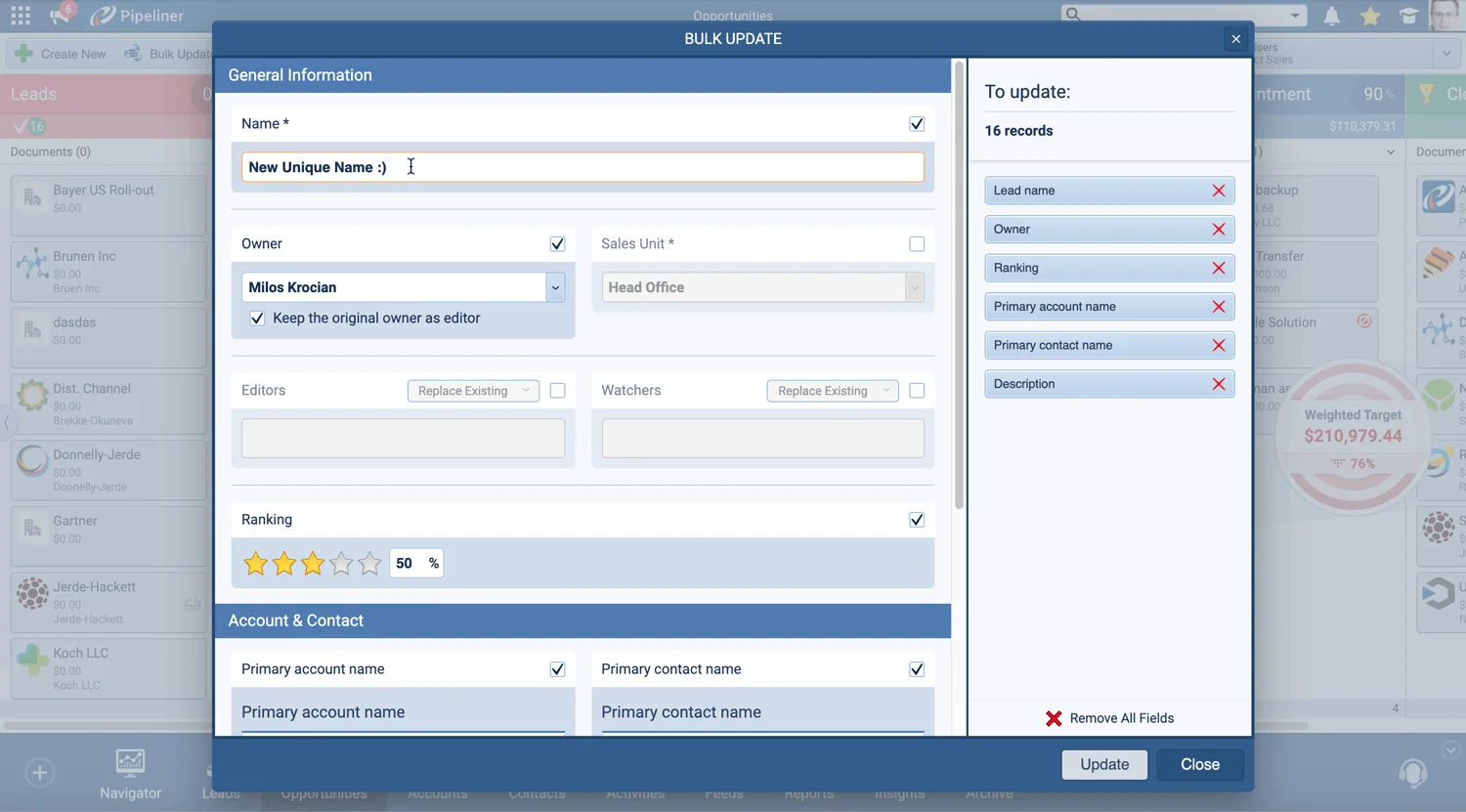
Bulk Update dialog updating 16 records at once

What we're proud of

Manage records in bulk, even Activities

Bulk Update and Ownership now reach Activity records as well, and a single Ownership change can cascade across every related record — linked Contacts, open Opportunities, open Leads, open Activities, child Accounts, and Notes — so realigning territories or reassigning a book of business takes one action instead of dozens.

01New · Pipeline

Bulk Update Activities

Bulk Update dialog updating 16 records at once
  • We’ve updated our incredibly useful Bulk Update and Ownership features to now include the ability to update Activity records as well as Leads, Opportunities, Accounts, and Contacts.
  • Use the ListView in the main Activities menu and then filter the activities you want to update.
  • Select Ownership to change the Owner of the selected Activities or Bulk Update to change any other fields — e.g. to update the Activity Date or to add Editors.
#bulk-update-activities
03New · Email

Sending emails through Gmail

Google integrations in Settings — Gmail for sending emails

Gmail users can now also use our Create Email option to send emails directly from Coevera choosing a single recipient or a group. You can send mass emails to a selected list of contacts as well as single emails:

You can compose your emails using rich text formatting and can attach files and insert embedded links. Once you’ve sent your emails, you can streamline your activity management by planning your follow-ups and logging your sent emails from the same screen.

All screenshots

2
#sending-emails-through-gmail
04New · Pipeline

New “Last move date” and “Previous Step” Fields for Opportunities

Power Panel filter with the new Last move date field

We’ve added 2 additional system fields to Opportunities. “Last Move Date” is the date and time that an Opportunity last moved Sales Stage (Step). “Previous Step” is the last sales step that the Opportunity was in before it moved to its current stage.

These fields support new use cases for reports such as “How many opportunities moved from Scope to Proposal this week”.

You can add these new fields to Filters, Reports and to your Opportunity List View.

All screenshots

2
#new-last-move-date-and-previous-step-fields-for-opportunities

Various Improvements

Various ImprovementsPipeline
Opportunities pipeline with visible leads and opportunities toggle

Reminders move into the Notification Hub with mobile support, Ownership changes cascade to all related records at once, filters can target related-record criteria, and emails link to Contacts and Accounts automatically without adding Editors.

All screenshots

3
#various-improvements

Frequently Asked Questions

They now include Activity records in addition to Leads, Opportunities, Accounts, and Contacts. Filter the activities you want in the Activities ListView, then use Ownership to change their Owner or Bulk Update to change other fields, such as the Activity Date or to add Editors.

It gives a clear, immediate overview of your matched records with direct access to the Search Options, so you find what you need faster. Administrators can also enable custom single-line text, long text, email, phone, and URL fields for Global Search using the Use in Global Search checkbox.

Yes. Gmail users can use Create Email to send emails from Coevera to a single recipient or a group. Standard emails go to one or more recipients, Mass emails send a single email to each individual recipient, and both support rich-text formatting, attachments, and embedded links.

Last Move Date is the date and time an Opportunity last moved sales step, and Previous Step is the step it was in before its current one. Both can be added to Filters, Reports, and the Opportunity List View to support reports such as how many opportunities moved between steps in a given week.

No. For every user who has activated the Office 365, Exchange, Gmail, or IMAP integration, emails link automatically to Contacts and Accounts that have a matching email address, so users no longer need to be added as Editors. Administrators can also block specific domains from the Admin Module Settings tab.

No. Some of the features in this release are available only on the Business or Enterprise tiers.

See it in your own pipeline

Start a free trial and explore what's new in Coevera 2.6.0 for yourself.

Keine Kreditkarte erforderlich · 14 Tage kostenlos testen

groupsTrusted by clients around the globeverified_userISO 27001 CertifiedshieldGDPR CompliantblockData never used to train AI