Overview
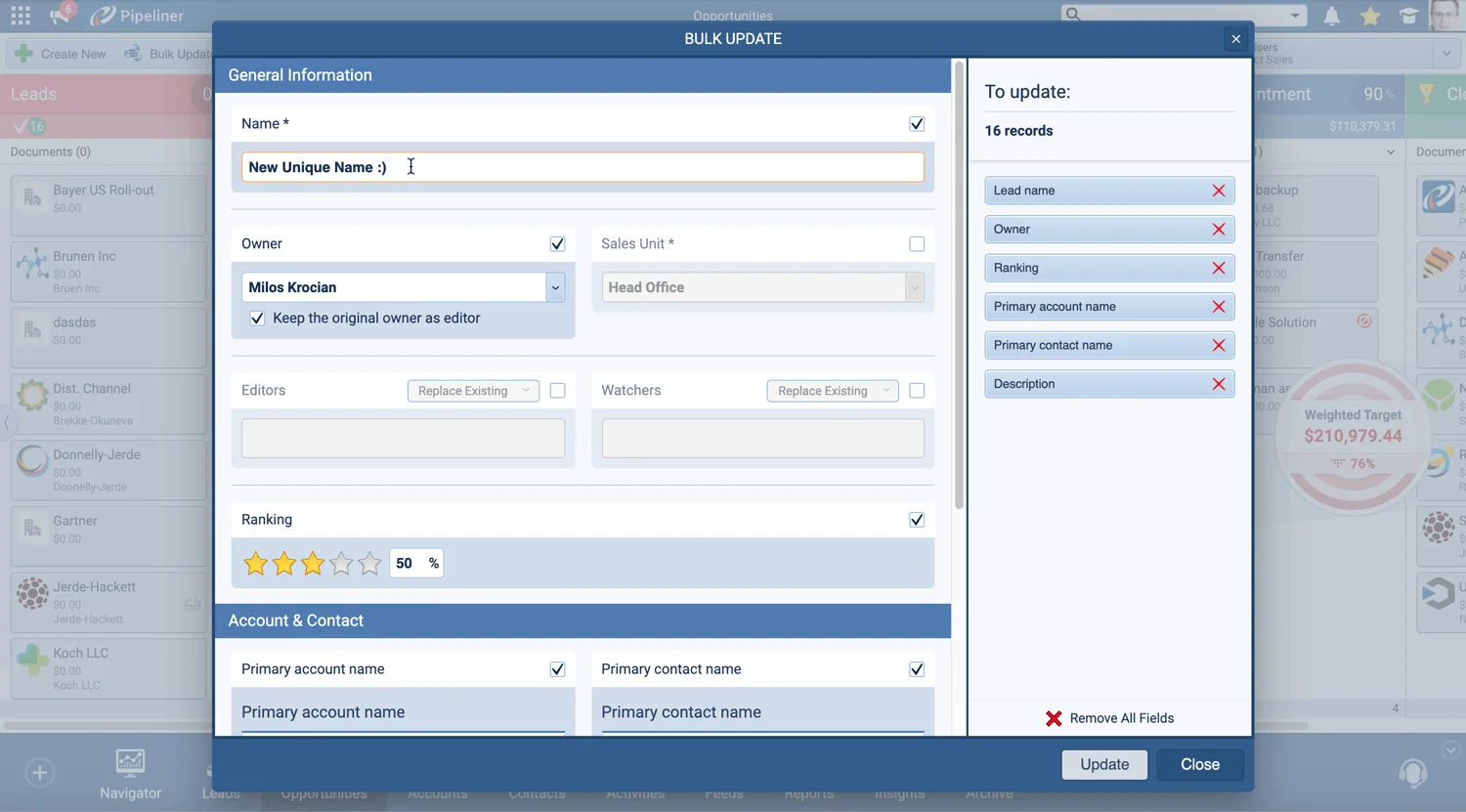
Two threads run through this release: working with records at scale, and finding them faster. Bulk Update and Ownership now reach Activity records as well as Leads, Opportunities, Accounts, and Contacts — filter the activities you want in the Activities ListView, then reassign their Owner or change fields such as the Activity Date in a single action. Ownership changes can also cascade to related records, so realigning a set of Accounts updates their linked Contacts, open Opportunities, open Leads, open Activities, child Accounts, and Notes at the same time. A new Advanced Search in Global Search gives a clear overview of matched records with direct access to the Search Options, and administrators can add custom single-line text, long text, email, phone, and URL fields to what Global Search looks through.
Email gets two upgrades. Gmail users can now send Standard or Mass emails straight from Coevera with rich-text formatting, attachments, and embedded links, then plan follow-ups and log the sent emails from the same screen. Across the Office 365, Exchange, Gmail, and IMAP integrations, emails now link to matching Contacts and Accounts automatically, so users no longer need to be added as Editors. Two new Opportunity system fields, Last Move Date and Previous Step, open up pipeline-velocity reporting, and rounding out the release, filters can target related-record criteria while Activity Reminders are managed from the Notification Hub, including on mobile.
What's in this release- check_circle
Bulk Update and Ownership now include Activity records, alongside Leads, Opportunities, Accounts, and Contacts — filter activities in the Activities ListView, then change their Owner or fields like the Activity Date.
- check_circle
A new Advanced Search option in Global Search gives an immediate overview of matched records with direct access to the Search Options.
- check_circle
Administrators can include custom single-line text, long text, email, phone, and URL fields in Global Search via a Use in Global Search checkbox.
- check_circle
Gmail users can send emails directly from Coevera to a single recipient or a group.
- check_circle
Standard emails send one email to one or more recipients; Mass emails send a single email to each individual recipient.
- check_circle
Emails can be composed with rich-text formatting, attachments, and embedded links, with follow-ups planned and sent emails logged from the same screen.
- check_circle
New Last Move Date and Previous Step system fields are added to Opportunities.
- check_circle
The new Opportunity fields can be added to Filters, Reports, and the Opportunity List View.
- check_circle
Activity Reminders can be viewed and managed from the Notification Hub, with Snooze, Dismiss, pop-up, and mobile options.
- check_circle
A single Ownership change can update all related records at once — linked Contacts, open Opportunities, open Leads, open Activities, child Accounts, and Notes.
- check_circle
Filters can target related-record criteria by choosing Custom and selecting a related record type, in Power Panel and Report filters.
- check_circle
Across Office 365, Exchange, Gmail, and IMAP, emails link automatically to Contacts and Accounts with a matching email address, without adding Editors — and admins can block specific domains.
What we're proud of
Manage records in bulk, even Activities
Bulk Update and Ownership now reach Activity records as well, and a single Ownership change can cascade across every related record — linked Contacts, open Opportunities, open Leads, open Activities, child Accounts, and Notes — so realigning territories or reassigning a book of business takes one action instead of dozens.