v4.15.0MinorReleased

Brand New Step Activities, Improved List Views, Improved Quote Management, Performance Improvements and more

Coevera 4.15.0 introduces Step Activities — a configurable Sales Activities Checklist on every Pipeline step — and pairs it with a List Views update, private-appointment calendar syncing, expanded Quote reporting and archiving, and measurable performance improvements.

PipelineQuotes & DocumentsAdministration
Share
Features
2
Improvements
5
Security
Prossimamente

Overview

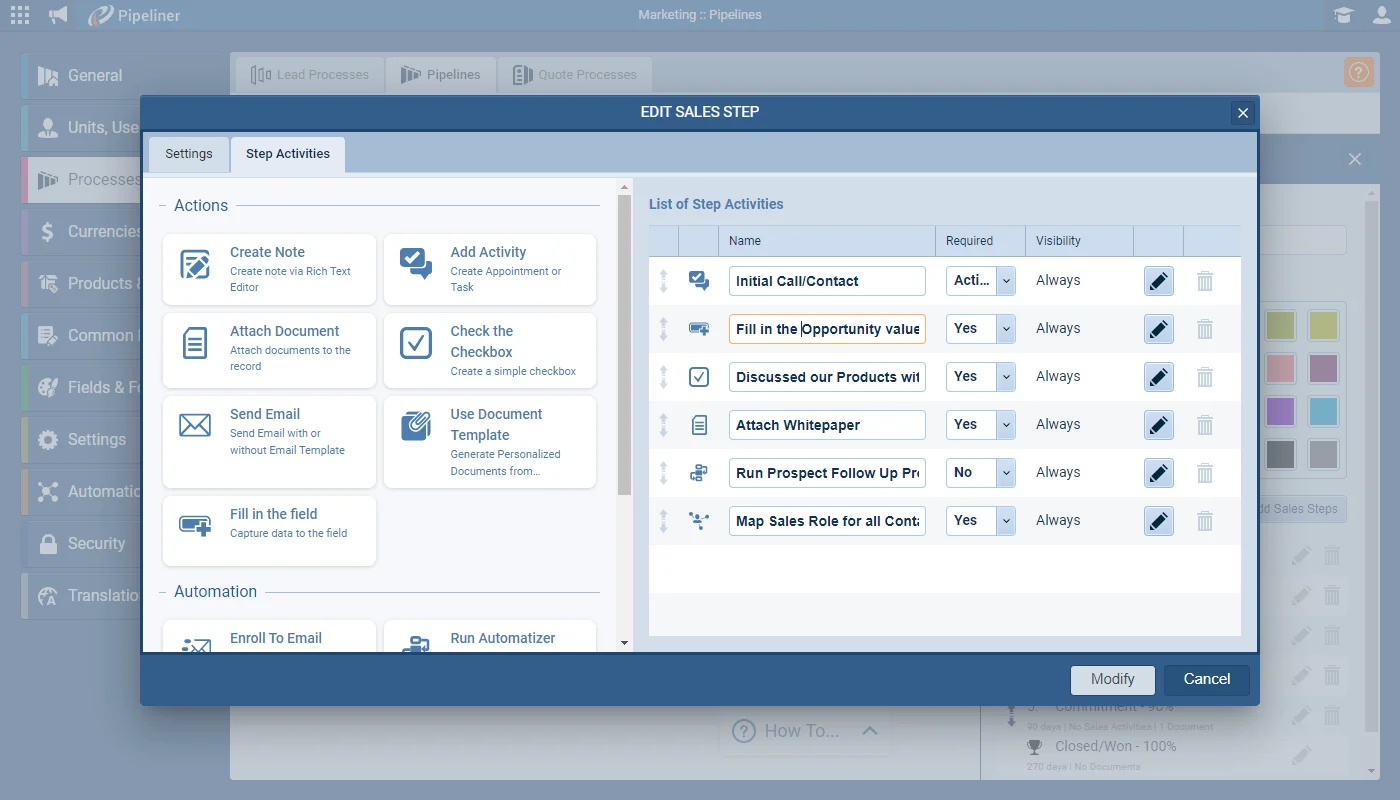
Step Activities lead this release. Admins can attach a Sales Activities Checklist to each step of the Pipeline, guiding teams with contextualized notifications that suggest the exact actions needed to follow the company's established process. There are 11 Step Activity types — from creating notes, tasks, and appointments to sending emails, running an Automatizer process, mapping sales roles, or building an Influence Map — and each can be given a custom name, shown Always or only On Condition, and optionally required before an Opportunity can move to the next step.

Elsewhere, List Views gain column resizing via a Fit Column Widths button, horizontal scrolling, and pinnable columns that freeze while you scroll. Office 365 and Google calendar users can now choose whether to sync private appointments. Quotes can be used in Reports and Dashboards and exported, with prompts to archive or win related Opportunities and Quotes together. Lookup fields add new combinations — including linking Opportunities with Opportunities — Inactive users become accessible in custom and preset filters for ownership changes, and performance gains cut record-creation time in large spaces by 20–40%.

What's in this release
  • Step Activities add a Sales Activities Checklist to each Pipeline step, guiding users with contextualized notifications.
  • There are 11 Step Activity types, including Create Note, Add Activity, Send Email, Run Automatizer, Map Sales Role, and Create Influence Map.
  • Each Step Activity can be given a custom name and set to display Always or only On Condition using filter criteria.
  • Admins can require a Step Activity to be actioned before an Opportunity can move to the next step.
  • List Views add a Fit Column Widths button to resize columns and horizontal scrolling when many fields are selected.
  • List View columns can be pinned to freeze them while scrolling and unpinned by clicking again or dragging away.
  • Office 365 and Google calendar integrations can now choose whether to synchronize private appointments.
  • Quotes can now be used in Reports and Dashboards and their data exported.
  • Winning or archiving a Quote or Opportunity prompts to also archive or win the related record.
  • Lookup fields support additional combinations, including linking Opportunities with Opportunities.
  • Inactive users can be accessed in both custom and preset filters to change ownership without reactivating them.
  • Automatizer processes and Email Sequences no longer fail when they reference an Inactive user.
  • Record creation in large spaces is 20–40% faster, single-record updates drop by about 0.5s, and the Pipeline view loads around 10% faster.
Brand New Step Activities

What we're proud of

Guidance built into every Pipeline step

Step Activities let Admins attach a Sales Activities Checklist to any Pipeline step, so teams get contextualized, step-by-step prompts for exactly what to do next — with 11 activity types and the option to require completion before an Opportunity advances.

01New · Pipeline

Brand New Step Activities

Brand New Step Activities

By adding a Sales Activities Checklist to each step of the Pipeline, Coevera Admins can assist teams by providing step-by-step guidance using contextualized notifications which give specific suggestions on what actions users need to take in order to follow the company’s established process/strategy.

Documentation#brand-new-step-activities

02New · Pipeline

List Views Update

List Views Update

Additional enhancements when using the “List Views” throughout Coevera allows users to easily resize columns by clicking on the “Fit Column Widths” button and allow horizontal scrolling if lots of fields are selected.

All screenshots

2
Documentation#list-views-update

Various Improvements

Various ImprovementsIntegrations

Calendar synchronization of Private Appointments

Calendar synchronization of Private Appointments

Users who rely on our Office 365 or Google calendar integrations now have a new option which allows them to choose whether to sync private appointments or not.

#calendar-synchronization-of-private-appointments
Various ImprovementsPipeline

Quote Management

This release has added the ability to use Quotes in Reports and Dashboards as well as export Quote data.

Additionally, when winning or Archiving a Quote, users will be prompted as to whether they also want to archive or win a related Opportunity and, when winning or Archiving an Opportunity, whether they also want to archive or win any related Quotes.

#quote-management
Various ImprovementsAdministration

Lookup fields

Additional combinations have been added for customers using Lookup fields, notably the ability to link Opportunities with Opportunities.

#lookup-fields
Various ImprovementsAdministration

Working with Inactive users

Working with Inactive users

It is now possible to access Inactive users in both custom and preset filters! So, if a user has been deactivated prior to bulk updating their previous data, you can now filter and change ownership without having to re-activate them.

This also impacts Automatizer processes and Email Sequences which will no longer fail if an Inactive user is referenced.

#working-with-inactive-users
Various ImprovementsPipeline

Ongoing Performance Improvements

We continuously work behind the scenes to improve the performance of the application. For example, for this release, in our tests, we were able to see the following improvements:

  • The time to Create records in large spaces (those customers who have a lot of data) has been improved by 20%-40%
  • The time to update a single record has been decreased on average by 0.5s
  • Loading the Pipeline view when there are lots of Opportunities has improved by around 10%
#ongoing-performance-improvements

Frequently Asked Questions

Step Activities are a Sales Activities Checklist that Admins can add to each step of the Pipeline, giving teams contextualized, step-by-step guidance on the actions needed to follow your established sales process.

There are 11 types, covering actions such as creating a note, adding a task or appointment, attaching a document, sending an email, using a document template, filling in a field, enrolling to an email sequence, running an Automatizer process, mapping sales roles, and creating an Influence Map.

Yes. Admins can name each Step Activity, show it Always or only On Condition using filter criteria, and choose whether it must be actioned before an Opportunity can move to the next step.

Yes. Office 365 and Google calendar users can now choose whether to synchronize private appointments. The option is enabled by default and can be turned off under User Avatar › Settings › Apps › Configure.

Quotes can now be used in Reports and Dashboards and their data exported, and winning or archiving a Quote or an Opportunity prompts you to also archive or win the related record.

Inactive users are now accessible in both custom and preset filters, so you can filter and change ownership without reactivating them, and Automatizer processes and Email Sequences no longer fail when they reference an Inactive user.

See it in your own pipeline

Start a free trial and explore everything new in Coevera 4.15.0 for yourself.

Nessuna carta di credito richiesta · Prova gratuita di 14 giorni

groupsTrusted by clients around the globeverified_userISO 27001 CertifiedshieldGDPR CompliantblockData never used to train AI