v3.3.0MinorReleased

Brand new “Sales POP!” Content Widget, “Automatizer” Enhancements (Manual Trigger), Improved Imports and more

Coevera 3.3.0 introduces a brand-new Sales POP! Content Widget that surfaces curated sales content inside Navigator every day, adds manual triggers and manual processes to Automatizer, and improves data imports for faster migrations from other systems.

AutomatizerAdministration
Share
Features
4
Improvements
5
Security
Prossimamente

Overview

Coevera 3.3.0 leads with the brand-new Sales POP! Content Widget: a different article from the Sales POP! digital magazine appears inside Navigator every day for every user, with a gear icon to choose preferred content categories and the option to unsubscribe at any time. Automatizer also becomes more flexible — users can now manually attach a process to the record they are working on, and Manual Processes arrive as the release's big new ticket item, alongside Country-field personalization, the ability to link the related Primary Account or Contact in actions, new process-related filter fields, and a Trigger Type column in the Process Manager.

Imports get a significant upgrade for anyone migrating in: importing Leads or Opportunities can automatically create the linked Primary Account and/or Contact — with duplicate checking on Name, Primary Phone, and Primary Email — you can map system fields such as Created Date to preserve each record's true timeline, and Won and Lost Opportunities can be imported with their original close dates. A round of smaller improvements rounds out the release, including refreshed Pipeline View sales step statistics with a new Conversion to Next Step metric, a virtual Record URL field for use in Automatizer and the BI Feeder, better document and business card scanning, and creating emails to lost Leads and Opportunities straight from the Archive.

What's in this release
  • The brand-new Sales POP! Content Widget delivers a different Sales POP! article inside Navigator every day.
  • Users can select preferred content categories via the gear icon and unsubscribe from the widget at any time.
  • Automatizer processes can now be manually attached to the record a user is working on and tracked in the Process Manager like any other process.
  • Future scheduled activities in a manual process can be cleared all at once or deleted individually from inside the record.
  • Automatizer actions can personalize the Country field, such as populating a Contact's Country from its related Account.
  • Opportunity and Lead actions can now link the related Primary Account or Contact.
  • Custom filters gain process-related fields, and the Process Manager list view can display each process's Trigger Type.
  • Importing Leads or Opportunities can automatically create the linked Primary Account and/or Contact, with duplicate checking on Name, Primary Phone, and Primary Email.
  • Only Name, Primary Email, and Primary Phone can be mapped to the auto-created Account or Contact records.
  • Imports can map system fields such as Created Date, preserving each record's true timeline instead of defaulting to the import date.
  • Won and Lost Opportunities can be imported with their original created and closed dates, making migrations quicker.
  • Pipeline View sales step statistics now follow your Power Panel Target period and add a new Conversion to Next Step metric.
  • A new virtual Record URL field can be used in Automatizer notifications and the BI Feeder to link back to records.
  • Emails can be created and sent to archived Leads and Opportunities directly from the Archive, including as a mass email.
Automatizer Manual Trigger

What we're proud of

Sales POP! content, delivered daily in Navigator

The brand-new Sales POP! Content Widget surfaces a fresh, expertly curated Sales POP! article inside Navigator every day — pick the categories that match your interests, click straight through to the full piece, and unsubscribe whenever you like.

01New · Integrations

Brand new “Sales POP!” Content Widget

Sales POP! content is now available within Navigator for every Coevera user on a daily basis. As a modern digital magazine, Sales POP! multimedia delivers written content, videos, e-publications and free tools that highlight key topics in today’s sales landscape. Our goal is to provide expertly curated content to empower sales professionals and leaders to achieve new levels of success. Every day, Coevera delivers a different article with a direct link to Sales POP! These articles are aimed at highlighting key issues in sales, in order to inspire and inform the modern sales professional. When you log in to the Navigator, a new article will be accessible every day via this brand new widget.

Users can select preferred categories of content by clicking on the gear icon. Our goal is to provide you with refreshing articles that match your personal interests to help you advance your sales expertise and knowledge. Articles matching the indicated categories will be delivered. This is a great way to start your day and get in the mode for selling!

Also, you can unsubscribe at any time from the Sales POP! widget.

Documentation#brand-new-sales-pop-content-widget
02New · Automatizer

“Automatizer” Enhancements (Manual Trigger)

Automatizer Manual Trigger

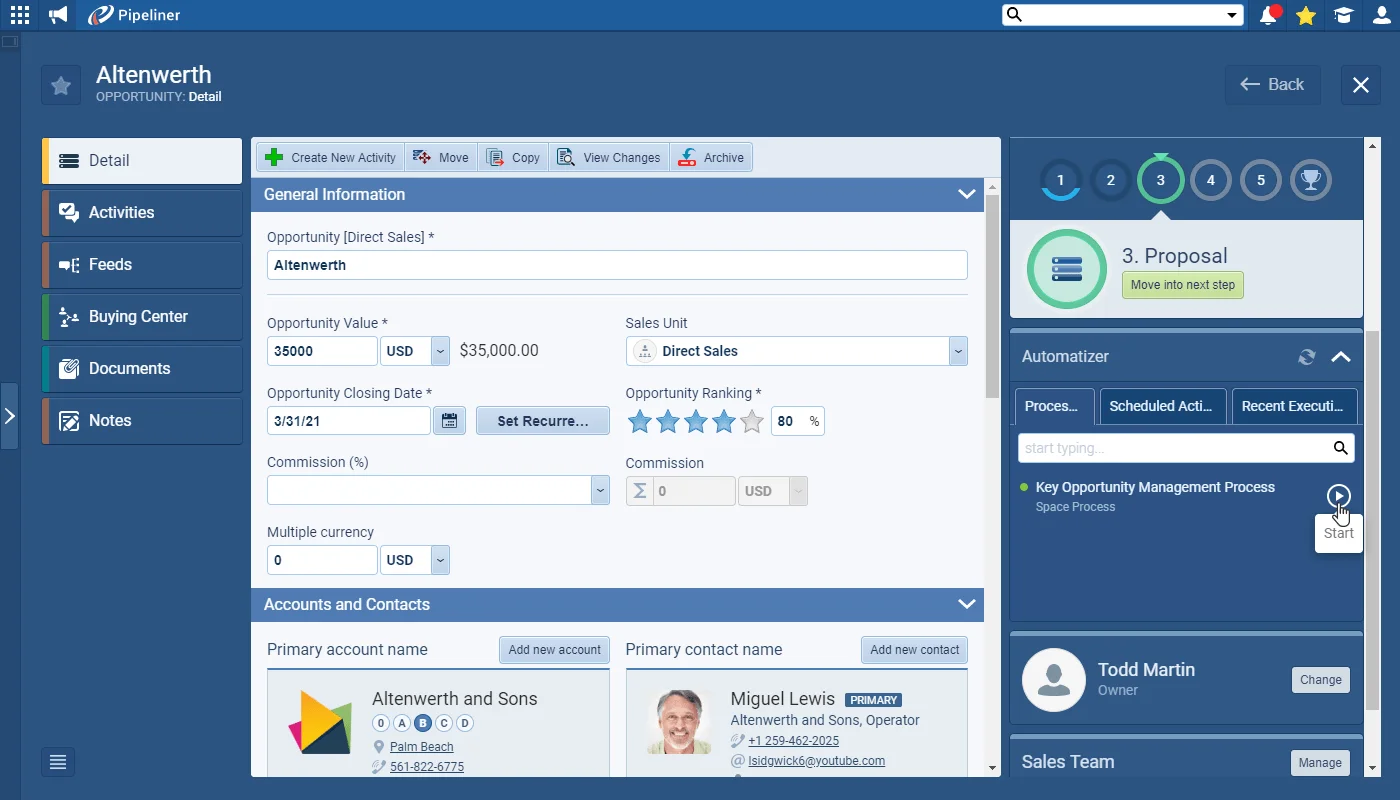
Our customers are loving Automatizer — and with good reason! We’ve now made it even more adaptable and flexible for your business by adding the capability for your users to manually attach processes to records. So, they’re working on a Lead, say, and realize that it needs to be added to a specific follow-up process — they can now add the process to the record they’re working on right now! Or, maybe, an Opportunity is ticking along nicely and suddenly expands — the Key Opportunity Management process can be enabled in seconds! Check out our new article for the Key Opportunity Management example.

Set up and manage your manual processes in the Automatizer in the same way as any other process and use the Process Manager to track them. If your process has future scheduled activities built into it and something changes, simply clear them all or delete individually from inside the record.

All screenshots

3
DocumentationDocumentation#automatizer-enhancements-manual-trigger
03New · Automatizer

“Automatizer” Enhancements (Manual Processes)

Automatizer Enhancements

We’ve been delighted that so many of our customers are blown away by the Automatizer! We’ve been working on incremental improvements as well as the big new ticket item “Manual processes”.

These include the option to personalize values for the Country field — e.g. populate a Contact with the value for Country on the related Account record.

When working with Opportunities and Leads you can now link the related Primary Account or Contact in Automatizer actions. You’d use this, for example, when creating a Task when you want to link it to both the Opportunity itself AND the Primary Account. This would work really well for an Account Credit Limit Check task that needed to be carried out when working with a prospect for the first time.

All screenshots

3
Documentation#automatizer-enhancements-manual-processes
04New · Administration

Improved Imports

Improved Imports

We’ve added multiple improvements to the import tool to make it more useful and flexible.

When you’re importing Leads or Opportunities, you can now enable an option to automatically create the linked (Primary) Account and/or Contact at the same time:

Importing data from other systems has been enhanced as you can map to system fields such as Created Date preserving the true timeline of records. Previously, Creation Date was automatically set to the date the record was imported into Coevera.

All screenshots

3
Documentation#improved-imports

Various Improvements

Various ImprovementsPipeline
Create Email in Archive

A batch of smaller updates: Pipeline View sales step statistics with a new Conversion to Next Step metric, a virtual Record URL field for Automatizer and the BI Feeder, improved document and business card scanning, and creating emails to lost Leads and Opportunities from the Archive.

All screenshots

4
#various-improvements

Frequently Asked Questions

It's a brand-new Navigator widget that delivers a different Sales POP! article every day — expertly curated content from the Sales POP! digital magazine to help sales professionals stay informed. Each article links directly through to the full piece on Sales POP!.

Yes. Click the gear icon to select your preferred content categories so the articles match your interests, and you can unsubscribe from the widget at any time.

You can now manually attach a process to the record you're working on rather than relying only on automatic triggers — enabling, for example, a Key Opportunity Management process in seconds. Manual processes are set up, managed, and tracked in the Process Manager like any other process, and future scheduled activities can be cleared or deleted from inside the record.

Actions can personalize the Country field (for example, populating a Contact's Country from its related Account) and link the related Primary Account or Contact when working with Opportunities and Leads. Custom filters also gain process-related fields, and the Process Manager list view can show each process's Trigger Type.

When importing Leads or Opportunities, Coevera can automatically create the linked Primary Account and/or Contact — checking for duplicates on Name, Primary Phone, and Primary Email — and you can map system fields such as Created Date to preserve each record's true timeline. You can also import Won and Lost Opportunities with their original close dates, making migrations from other systems quicker.

This release also refreshes Pipeline View sales step statistics with a new Conversion to Next Step metric, adds a virtual Record URL field for use in Automatizer notifications and the BI Feeder, improves document and business card scanning, and lets you create emails to lost Leads and Opportunities directly from the Archive.

See it in your own pipeline

Start a free trial and explore the new Sales POP! Content Widget, Automatizer manual processes, and improved imports in Coevera 3.3.0 for yourself.

Nessuna carta di credito richiesta · Prova gratuita di 14 giorni

groupsTrusted by clients around the globeverified_userISO 27001 CertifiedshieldGDPR CompliantblockData never used to train AI