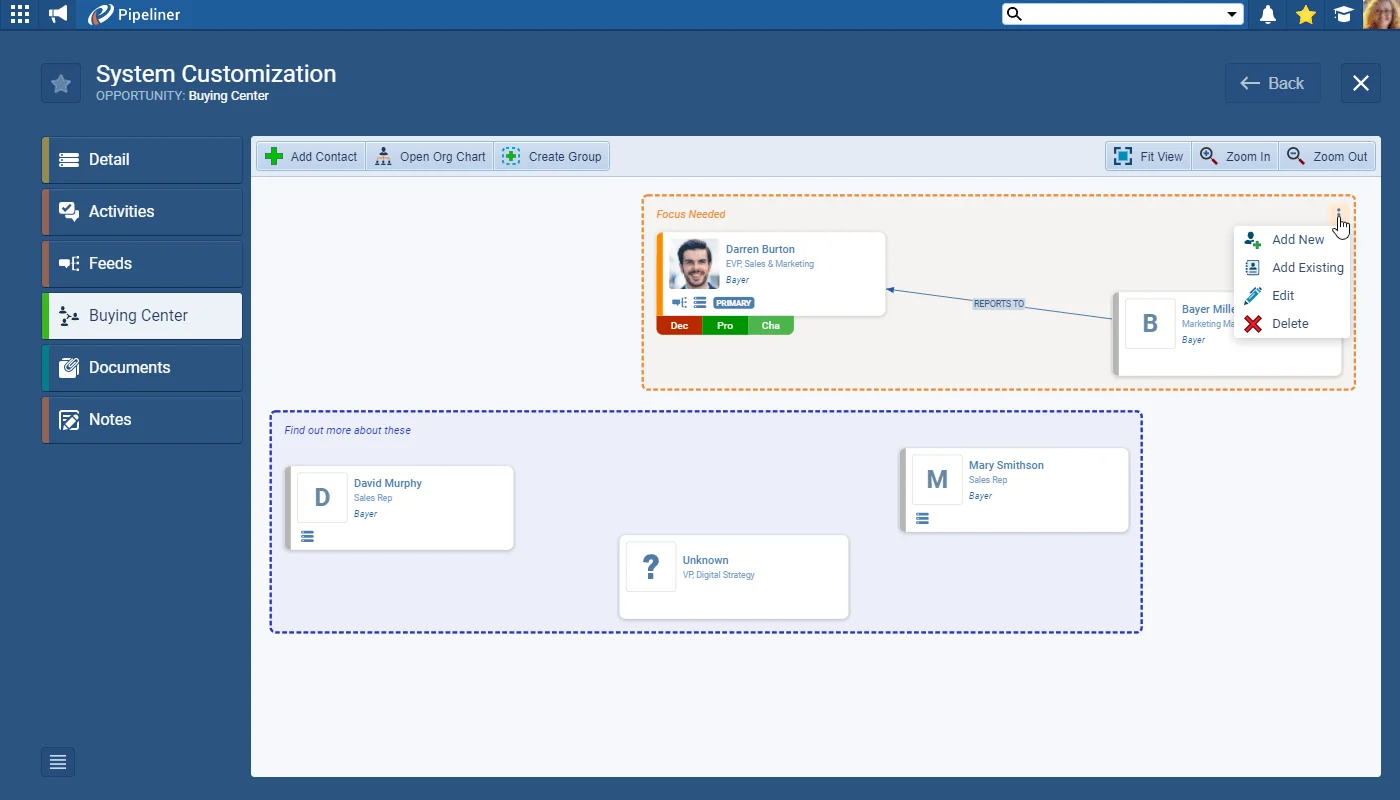
As well as enhancements to the individual Contact cards making it even easier to define and view the types and strengths of the relationships you have, we’ve now added the ability for you to create “on the fly” Groups so you can batch Contacts together. Maybe you want to reflect “political” alignments of Contacts or prioritise sets of Contacts by how you need to activate the relationships — it’s entirely down to you! You can add, and remove, Groups as needed to help you manage your deals.
You can now also access the Account’s Contact Org Chart from your Buying Center and add additional Contacts directly from the Org Chart.
We’ve also covered the frequent situation where you know someone is influencing the progress of your deal but you don’t yet know enough about them to add them as a Contact. Now you can add a “Ghost” Contact card to represent this individual. For example, you could be talking to the Manager but need to find out who the VP is. Once you’ve been able to research and find out more information, the “Ghost” can be promoted to a saved Contact in Coevera. You can also add “Ghost Contacts” to your Org Chart for an Account.
