v1.8.0MinorReleased

Bubble Chart View, SSO, Admin Section, Reports Improvements and more

Coevera 1.8.0 introduces the Automation Hub for integrating best-of-breed systems with Coevera, refreshes Reports with PDF export, sharing indicators, favorites, and per-column alignment, and rolls out a broad batch of pipeline and record usability improvements including SAML 2.0 single sign-on.

ReportsSecurityAdministration
Share
Features
2
Improvements
15
Security
1
Prossimamente

Overview

Coevera 1.8.0 centers on two areas of the app. The Admin section gains a brand-new Automation Hub for integrating best-of-breed systems with Coevera — hover an integration to check whether it is up and running, or open its detail window to read more and activate or deactivate it, with a Request Custom Solution button for anything you can't find. New Admin Hacks help banners sit atop each admin tab and link straight to the support page, and the Users tab now shows each user's image through an Avatar component.

Reports get a parallel refresh — empty and non-empty folders are now visually distinct, any report except a Dashboard Report can be printed to PDF, a share icon marks reports shared with other users, columns can be aligned left, right, or center, and favorite reports open straight from a Favorites List. A wide batch of usability improvements rounds out the release: inline target editing in the Pipeline and Bubble chart views, follow-up activities on completing a task, record creation from Detail pages, drag-and-drop image uploads, a Duplicate Checker, merged User and Space settings, and SAML 2.0 support for single sign-on.

What's in this release
  • The Admin Automation Hub integrates best-of-breed systems with Coevera, showing live status on hover and letting you activate or deactivate each integration from its detail window.
  • Admin Hacks banners at the top of each admin tab link to the support page for contextual help.
  • The Admin Users tab now displays each user's image via a new Avatar component.
  • Reports Folders are now visually differentiated between empty and non-empty.
  • Reports can be printed to PDF from the top panel for all report types except Dashboard Reports.
  • A share icon in the reports sidebar marks reports that are shared with other users.
  • Report columns can be aligned Left, Right, or Center individually via Report Settings.
  • Favorite reports can be opened from the Favorites List using the yellow Star in the top panel.
  • Targets in the Pipeline and Bubble chart views let you switch Target Type and Goal directly on the target.
  • A follow-up Task or Appointment can be created after marking any Activity complete.
  • New Leads, Opportunities, Accounts, and Contacts can be created directly from a record's Detail page.
  • Logos and images can be uploaded by drag-and-drop for Accounts, Contacts, Spaces, Units, and Profiles.
  • A Duplicate Checker flags duplicate records when creating Accounts, Contacts, Leads, or Opportunities.
  • Coevera now supports SAML 2.0 for single sign-on.
Admin Section Improvements

What we're proud of

One hub for your best-of-breed stack

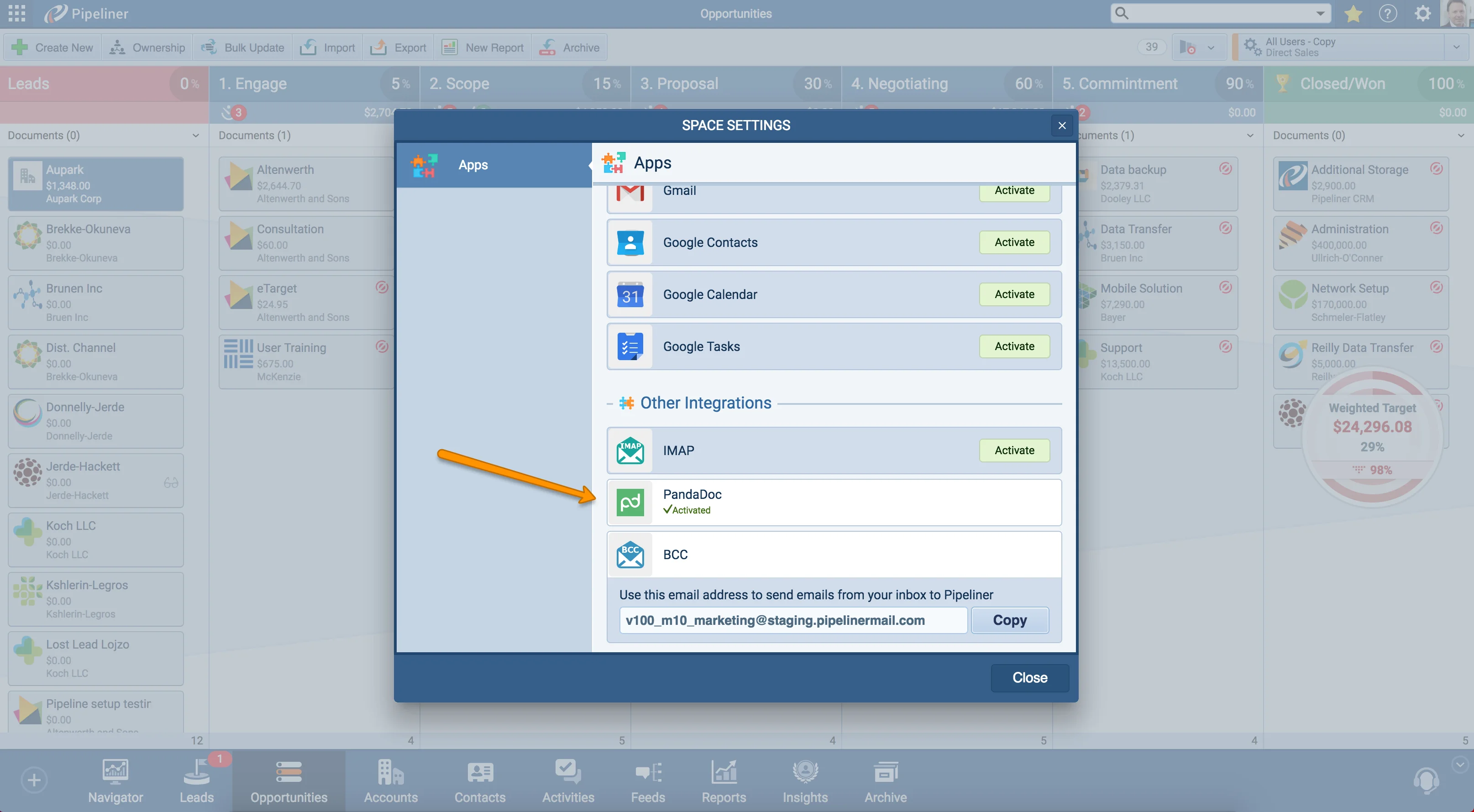
The brand-new Automation Hub in the Admin section lets you integrate any best-of-breed system with Coevera. Hover over an integration to see whether it's up and running, or click it to open a detail window where you can read more and activate or deactivate it — and request a custom solution for anything that isn't there yet.

01New · Administration

Admin Section Improvements

Admin Section Improvements

In Admin section you can now find brand new Automation Hub! Here you can integrate any Best of Breed system with Coevera. Hover over any Integration to see if it´s up and running. If you click on any integration, it will open detail window where you can read more about it and activate/deactivate it. If you can´t find your favorite integration and need more functionality, click on the “Request Custom Solution” button on the bottom. Try our Automation Hub now!

Introducing new explanation help for admin section – Admin Hacks! In each tab of the admin section you will now find a top banner that will take you to our support page. Just click on the “Click Here” button and you will find what you need.

In Admins Users Tab we replaced the top header component with the Avatar component! After you click on the user, you can now see the user image.

All screenshots

3
#admin-section-improvements
02New · Reports

Reports Improvements

Reports Improvements

We have graphically improved the Reports Folders so you can now visually differentiate empty and non empty folders.

Within the Reports you now have the ability to Print reports into PDF format! You can find the Print button in the top panel. NOTE: Applies for all report types except Dashboard Reports

We´ve visually updated reports sidebar list so you can now easily see which reports are shared with other users. Just look for the share icon next to the Report name.

All screenshots

3
#reports-improvements

Various Improvements

Various ImprovementsPipeline
Various Improvements

A batch of pipeline and record usability updates — inline target editing in Pipeline and Bubble chart views, follow-up activities, record creation from Detail pages, drag-and-drop image uploads, a Duplicate Checker, watchers info, collapsible Lead stage, merged User and Space settings, and SAML 2.0 single sign-on.

All screenshots

3
#various-improvements

Frequently Asked Questions

It's a new area in the Admin section for integrating best-of-breed systems with Coevera. Hover over an integration to see whether it's running, or click it to open a detail window where you can read more and activate or deactivate it. A Request Custom Solution button covers integrations you can't find or that need more functionality.

Yes. A Print button in the top panel prints reports to PDF for all report types except Dashboard Reports.

The reports sidebar list now shows a share icon next to the name of any report that is shared with other users.

Yes. From the Detail page of a Lead, Opportunity, Account, or Contact, click the small arrow on the left to open the sidebar, then use the + button at the bottom to create a new record.

Yes. Coevera now supports SAML 2.0 for SSO.

When you create a new Account, Contact, Lead, or Opportunity, the Duplicate Checker flags any duplicate records and lists them on the right side of the detail window.

See it in your own pipeline

Start a free trial and explore what's new in Coevera 1.8.0 for yourself.

Nessuna carta di credito richiesta · Prova gratuita di 14 giorni

groupsTrusted by clients around the globeverified_userISO 27001 CertifiedshieldGDPR CompliantblockData never used to train AI