v5.5.0MinorReleased

Brand New Duplicate Checker and Domain Extractor, Sidebar, Global Search & Advanced Search, Web Clipper, and other Various Improvements…

Coevera 5.5.0 introduces the Duplicate Checker for finding and merging duplicate records across your data, sharpens Global Search and Advanced Search, upgrades the record sidebar and card views, and adds a Domain Extractor that fills in Account website fields automatically.

AccountsAdministration
Share
Features
5
Improvements
Security
Prossimamente

Overview

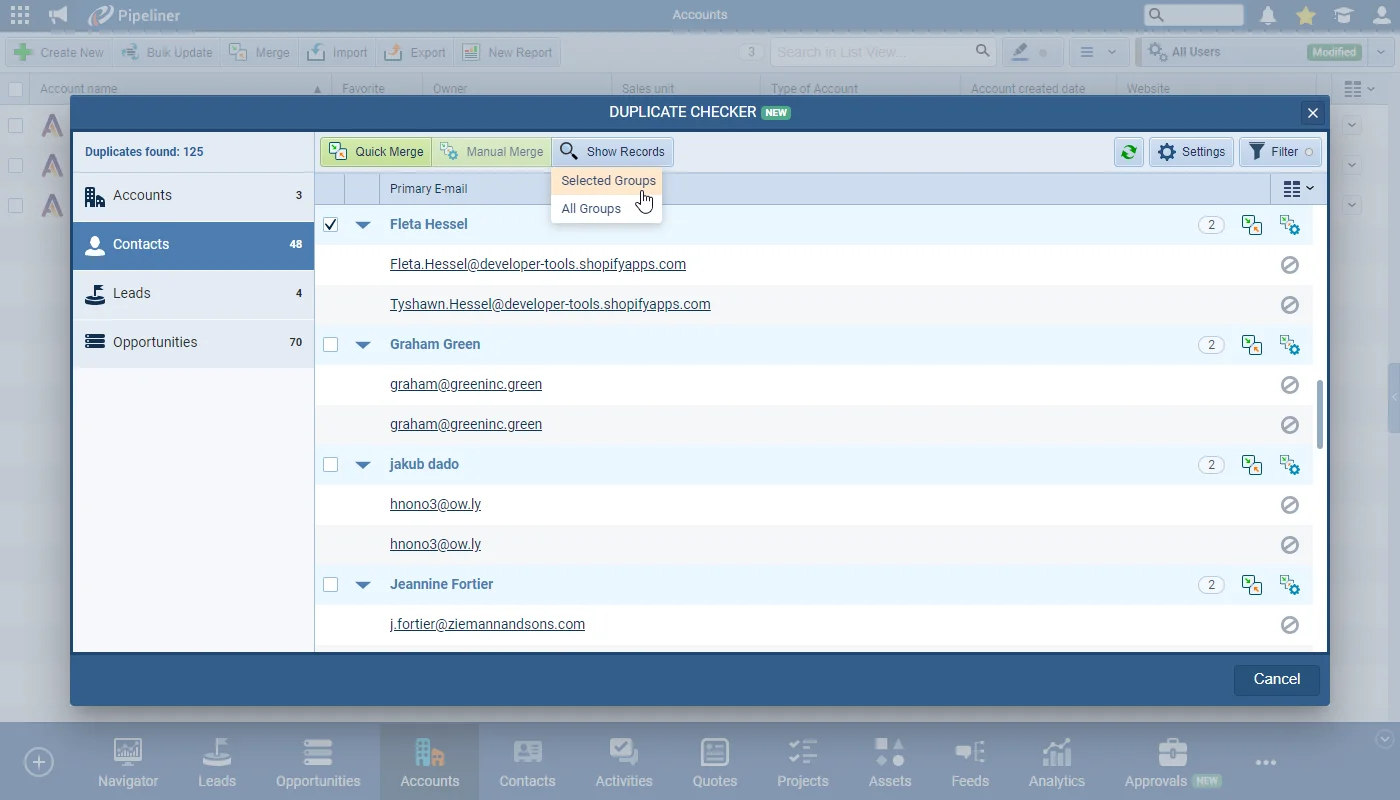
The headline of 5.5.0 is the Duplicate Checker, a new tool for managing the quality of your Coevera data. Admins enable deduplication per entity from the Admin Module — choosing a matching sensitivity level, the match fields, and which record becomes the master — and users with the right permissions can then scan the whole database from the Tools menu to review, Quick Merge, or manually merge duplicate groups. A duplicate-checking widget also surfaces possible matches when you open or create a record, helping avoid duplicates before they enter the system.

The release also refines everyday navigation. Global Search returns more results with a reorganised Recents list and new record-type and sort options, while a full-page Advanced Search groups results by entity with inline editing and filters. The record sidebar gains saved profiles, grouping, and sorting for switching between entities without leaving a record; card and board views can show up to three additional fields, including custom fields, on Opportunity, Lead, Quote, and Activity cards; and a new Domain Extractor automatically populates the website field on Account records from the account's primary email address.

What's in this release
  • The Duplicate Checker finds and merges duplicate records to help manage the quality of your Coevera data.
  • Admins enable deduplication per entity in the Admin Module and set the matching sensitivity level, match fields, and master record.
  • Deduplication applies to the main entities but not to Tasks, Appointments, Products, or Product Line Items.
  • Global Deduplication Settings act as the default matching and merge rules for users.
  • Users with the right permissions can scan the entire database from the Tools menu and Quick Merge or Manual Merge duplicate groups.
  • A duplicate-checking widget flags possible duplicates when a record is opened or created.
  • Global Search returns more results and reorganises the Recents list and search displays and options.
  • Global Search can be narrowed to a specific record type and sorted by Data Grouping, Last Seen, Best Match, Alphabetically, Created Date, or Modified Date.
  • Advanced Search opens a full-page view grouped by entity, with inline editing, filters, and an option to include deleted and archived records.
  • The record sidebar supports saved profiles, grouping, and sorting to switch between entities without leaving a record.
  • Sidebar grouping is available for Opportunities, Leads, and Quotes, with the sort order changing the details shown under each record name.
  • Card and board views can display up to three additional fields, including custom fields, on Opportunity, Lead, Quote, and Activity cards.
  • The Domain Extractor fills an empty Account website field from the account's primary email address.
  • Admins configure the Domain Extractor from the Automation Hub, including a list of excluded domains such as gmail.com or live.com.
Duplicate Checker

What we're proud of

Clean data, built in

The new Duplicate Checker scans your entire database for potential duplicates, groups them by entity, and lets you Quick Merge or manually merge them into a single master record. A duplicate-checking widget also flags possible matches the moment you open or create a record, so duplicates get caught before they pile up.

01New · Administration

Duplicate Checker

Duplicate Checker

The new Duplicate Checker is a game changer in helping you manage the quality of your Coevera data.

Users can:

Enable duplication checks for a particular entity and specify which fields should be used for duplication checks from within the Admin Module.

All screenshots

12
Documentation#duplicate-checker
02New · Pipeline

Global Search & Advanced Search Improvements

Global Search & Advanced Search Improvements

Searching in Coevera is quick and easy using the “Global Search” or by searching within a menu such as “Accounts” and to make it even easier, we’ve updated the search algorithm to return more results and reorganised the “Recents” list and “Global Search” displays and options.

All screenshots

8
Documentation#global-search-advanced-search-improvements
04New · Pipeline

Custom Fields on Cards (Card View)

Custom Fields on Cards (Card View)

Users are now able to add up to 3 additional fields (including custom fields) to the “Opportunity“, “Lead“, “Quote” or “Activities” cards used in views such as the “Pipeline View (in the Opportunities menu and in Forecasts) and the “Board View” for “Leads“, “Quotes” and “Tasks“.

#custom-fields-on-cards-card-view
05New · Accounts

Domain Extractor

The “Web Domain Extractor” is a new tool that will populate the default homepage (website) field on an “Account” record where the homepage field is empty but there is an “Account Primary Email Address” filled in.

Admins can activate and configure the “Domain Extractor” from the Automation Hub in the Admin Module to add a list of excluded domains e.g. gmail.com or live.com.

#domain-extractor

Frequently Asked Questions

It is a new tool that finds duplicate records across your Coevera data and lets you merge them. Admins configure which entities and fields are checked in the Admin Module, and users with permission can review and merge duplicates from the Tools menu or from a widget on each record.

It works on the main entities such as Accounts, Contacts, Leads, and Opportunities, but does not apply to Tasks, Appointments, Products, or Product Line Items.

The Duplicate Checker is enabled for Unlimited Tier customers and is available as a paid add-on for customers on the Enterprise, Business, or Starter Tiers.

A single click in the Global Search box shows your recently opened records, and you can narrow results to a specific record type or change the sort order. The Show Advanced Search link opens a full-page view that groups results by entity, supports inline editing and filters, and can include deleted and archived records.

The sidebar now lets you use saved profiles to switch between entities and apply the grouping and sorting saved in each profile, with grouping available for Opportunities, Leads, and Quotes. Changing the sort order also changes the details shown under each record name.

It automatically fills the website field on an Account record when that field is empty but a primary email address is present, using the email's domain. Admins turn it on from the Automation Hub and can exclude domains such as gmail.com or live.com.

Start with cleaner data

Start a free trial and explore the Duplicate Checker, search improvements, and everything else new in Coevera 5.5.0.

Nessuna carta di credito richiesta · Prova gratuita di 14 giorni

groupsTrusted by clients around the globeverified_userISO 27001 CertifiedshieldGDPR CompliantblockData never used to train AI
