v5.14.0MinorReleased

Improved Voyager AI Online Form Agent,Email Template Manager Redesign and New Visual Email Template Editor, and other Various Improvements…

Coevera 5.14.0 upgrades the Voyager AI Online Form Agent with smarter multi-field layouts and AI-generated headers, redesigns the Email Template Manager, and adds a new drag-and-drop Visual Email Template Editor — plus Field Mapping record conversion and admin list-view defaults.

Voyager AIEmailQuotes & Documents
Share
Features
5
Improvements
5
Security
Demnächst verfügbar

Overview

Three capabilities lead this release. The Voyager AI Online Form Agent (Beta) can now place multiple fields in a single row for more compact, structured forms and generate a header image automatically from a new form's prompt, with added guardrails against harmful or biased output. On the email side, the Email Template Manager has been redesigned for more building room, and a brand-new Visual Email Template Editor lets users design emails by dragging rows, columns, buttons, text, images, spacers, and dividers into place.

Two further features and a set of Various Improvements round out the release: Field Mapping adds Record Conversion between entities, admins can define default list-view columns per entity, and there are updates to Duplicate Checker merging, Office 365 contact sync, rich text and images in Word templates, and in-app new-release notifications.
What's in this release
  • Voyager AI Online Form Agent (Beta) can place multiple fields in a single row for more compact, structured forms.
  • The AI decides field grouping — keeping Name, Email, Phone, and address fields together, or building compact forms on request.
  • New forms get an AI-generated header image from the prompt automatically; existing forms generate one on request.
  • Added guardrails prevent harmful, biased, unauthorized behavior or profanity in the form agent.
  • The Email Template Manager has been redesigned, moving controls to the top and freeing up space for building templates.
  • Conditional comments are now retained in HTML templates for broader email-client compatibility.
  • A new Visual Email Template Editor builds emails by drag-and-drop, fully integrated in the Email Template Manager.
  • Editor templates use rows and columns holding buttons, text, images, spacers, and dividers, with undo/redo support.
  • The visual editor is compatible with the majority of email clients newer than 2013.
  • Field Mapping adds a New Conversion Mapping option to convert a record to any entity except Products and Product Line Items.
  • Admins can set default list-view columns per entity and optionally apply them to existing users.
  • Various Improvements: bulk merging in the Duplicate Checker, Office 365 contact-sync updates, rich text and images in Word templates, and a new-release notification.
Voyager AI › Online Form Agent

What we're proud of

Design emails by drag and drop

The new Visual Email Template Editor lets users design a full email by dragging rows, columns, buttons, text, images, spacers, and dividers into place — compatible with the majority of email clients newer than 2013.

01New · Voyager AI

Voyager AI › Online Form Agent

Voyager AI › Online Form Agent

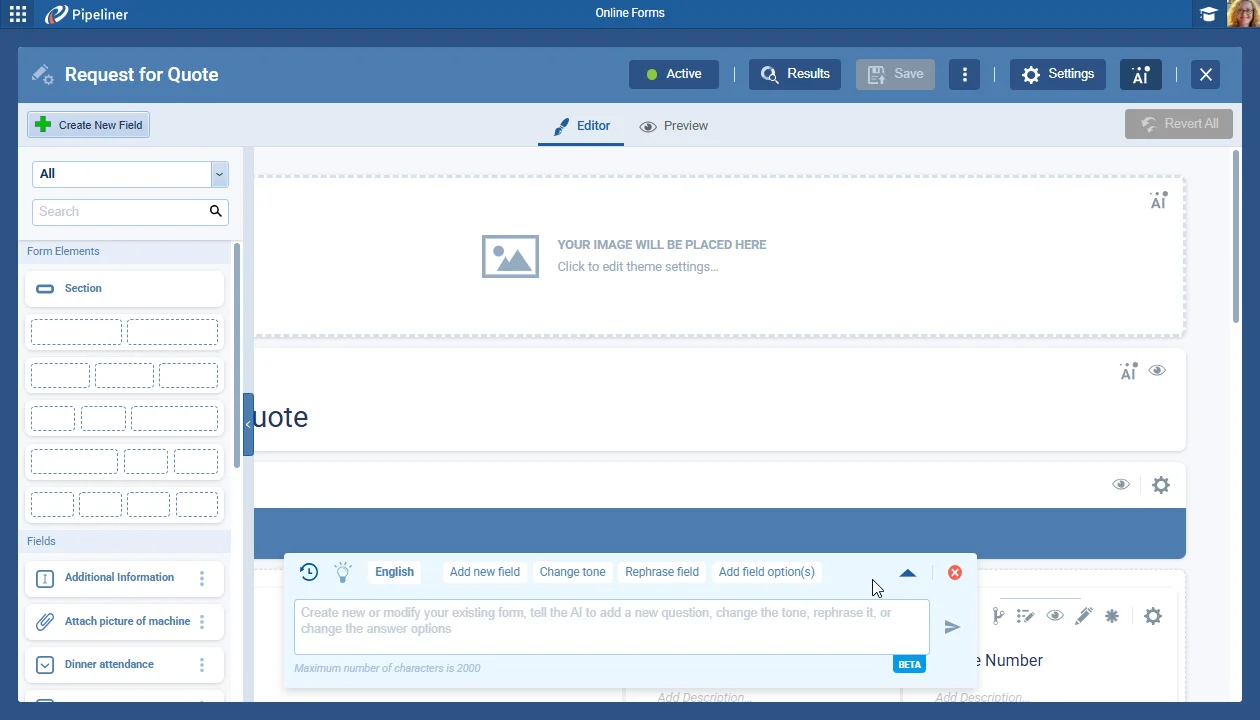
We’ve made several updates and enhancements to our AI Online Form Agent (Beta).

We’ve changed the colors to increase overall visibility.

All screenshots

2
Documentation#voyager-ai-online-form-agent
02New · Email

Email Template Manager Redesign

Email Template Manager Redesign

The email template manager has been redesigned to improve the overall user experience, and allow more space for creating and working with email templates created using the new WYSIWYG email editor.

The Email Template Manager supports:

Text templates

All screenshots

3
Documentation#email-template-manager-redesign
03New · Email

Visual Email Template Editor

Visual Editor Layout

This release includes a comprehensive update to our Email Template Editor by creating a simple, easy-to-use, and easy-to-customize template editor with a wide range of compatibility for email clients. Users can create their desired template using drag-and-drop functionality.

All screenshots

5
Documentation#visual-email-template-editor
04New · Administration

Field Mapping › Record Conversion

Field Mapping › Record Conversion

We've enhanced the Field Mapping feature introduced in version 5.13 by adding an option to map data from fields on an existing entity to a new entity using the option to create a "New Conversion Mapping" as well as the existing "New Relation Mapping" option.

All screenshots

6
Documentation#field-mapping-record-conversion
05New · Administration

Admin › Default List Views for Entities

Admin › Default List Views for Entities

In Admin › Entities, for every entity where Interface settings are available, there is a new option “List View Columns

All screenshots

3
Documentation#admin-default-list-views-for-entities

Various Improvements

As part of our ongoing usability enhancement program, we’ve updated the following features.

Various ImprovementsAdministration

Improvements to merging records using the Duplicate Checker

Improvements to merging records using the Duplicate Checker

Select all duplicates at once and quick-merge them as an async operation with live progress.

#improvements-to-merging-records-using-the-duplicate-checker
Various ImprovementsIntegrations

Office 365 Contact Integration

Office 365 Contact Integration

Updated one-way and two-way contact sync, with owner or owner-and-editor scope options.

#office-365-contact-integration
Various ImprovementsQuotes & Documents

Rich Text formatting and images from fields to Word templates

All rich-text fields used in the template will be converted into docx format and retain rich-text formatting as well as images in the document template. Occasionally, there can be some compatibility fallbacks – if an invalid url is supplied, there will be no image or if the conversion fails, the user will get unformatted text without images.

#rich-text-formatting-and-images-from-fields-to-word-templates
Various ImprovementsAdministration

New release notification

New release notification

With every release, valuable new features often go unnoticed. Users often miss new features, especially if they skip the release notes or haven’t logged in for a while. This can reduce feature adoption and our users may lose opportunities to benefit from these improvements.

#new-release-notification
Various ImprovementsAdministration

What’s New?

  • A one-time overlay screen that includes a “What’s new in Coevera?” promotion box linked to the bullhorn icon appears after login or reload when a new release is served.
  • Clicking the bullhorn or the arrow opens the release notes sidebar.
  • Admins can disable this feature per space inside the Customer Portal if needed
#what-s-new

Frequently Asked Questions

The Online Form Agent (Beta) can now place multiple fields in a single row for more compact, structured forms, and it generates a header image from the form's prompt — automatically for new forms, or on request for existing ones.

Yes. Guardrails have been added to prevent harmful, biased, unauthorized behavior or profanity.

It has been redesigned to give more space for building templates, with the controls moved to the top of the manager. Conditional comments are now retained in HTML templates for broader email-client compatibility.

Click Create New and select Editor Template, then drag rows, columns, buttons, text, images, spacers, and dividers onto the canvas. Undo and redo are supported, and you can save, send a test, or use the template to create an email.

The editor is compatible with the majority of email clients newer than 2013.

It adds a New Conversion Mapping option that maps data from an existing record to a newly created one, converting a record to any entity except Products and Product Line Items. After the new record is created, the existing one can be deleted, archived, or left unchanged.

See these updates in your own pipeline

Start a free trial and explore the new form agent and email editor for yourself.

Keine Kreditkarte erforderlich · 14 Tage kostenlos testen

groupsTrusted by clients around the globeverified_userISO 27001 CertifiedshieldGDPR CompliantblockData never used to train AI