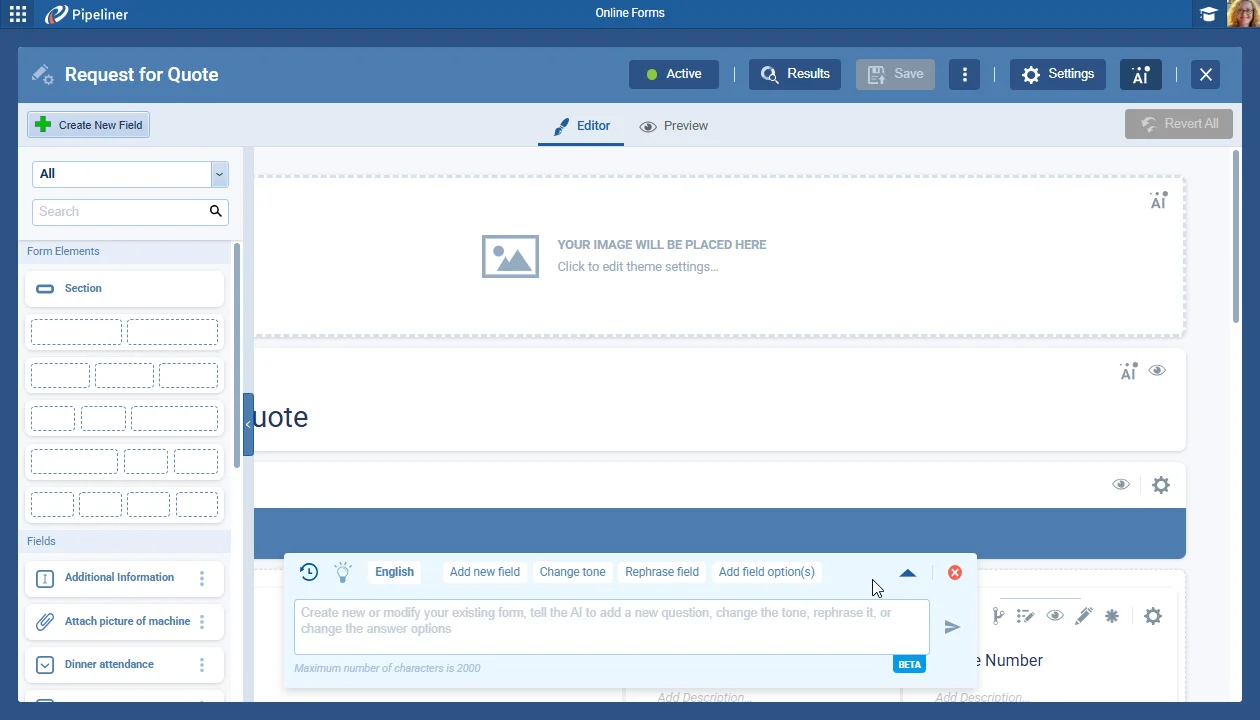
We’ve made several updates and enhancements to our AI Online Form Agent (Beta).
We’ve changed the colors to increase overall visibility.
All screenshots
2Documentation#voyager-ai-online-form-agent
Coevera 5.14.0 upgrades the Voyager AI Online Form Agent with smarter multi-field layouts and AI-generated headers, redesigns the Email Template Manager, and adds a new drag-and-drop Visual Email Template Editor — plus Field Mapping record conversion and admin list-view defaults.
Three capabilities lead this release. The Voyager AI Online Form Agent (Beta) can now place multiple fields in a single row for more compact, structured forms and generate a header image automatically from a new form's prompt, with added guardrails against harmful or biased output. On the email side, the Email Template Manager has been redesigned for more building room, and a brand-new Visual Email Template Editor lets users design emails by dragging rows, columns, buttons, text, images, spacers, and dividers into place.
Two further features and a set of Various Improvements round out the release: Field Mapping adds Record Conversion between entities, admins can define default list-view columns per entity, and there are updates to Duplicate Checker merging, Office 365 contact sync, rich text and images in Word templates, and in-app new-release notifications.
What we're proud of
The new Visual Email Template Editor lets users design a full email by dragging rows, columns, buttons, text, images, spacers, and dividers into place — compatible with the majority of email clients newer than 2013.
We’ve made several updates and enhancements to our AI Online Form Agent (Beta).
We’ve changed the colors to increase overall visibility.
The email template manager has been redesigned to improve the overall user experience, and allow more space for creating and working with email templates created using the new WYSIWYG email editor.
The Email Template Manager supports:
Text templates
This release includes a comprehensive update to our Email Template Editor by creating a simple, easy-to-use, and easy-to-customize template editor with a wide range of compatibility for email clients. Users can create their desired template using drag-and-drop functionality.
We've enhanced the Field Mapping feature introduced in version 5.13 by adding an option to map data from fields on an existing entity to a new entity using the option to create a "New Conversion Mapping" as well as the existing "New Relation Mapping" option.
In Admin › Entities, for every entity where Interface settings are available, there is a new option “List View Columns”
As part of our ongoing usability enhancement program, we’ve updated the following features.
Select all duplicates at once and quick-merge them as an async operation with live progress.
Updated one-way and two-way contact sync, with owner or owner-and-editor scope options.
All rich-text fields used in the template will be converted into docx format and retain rich-text formatting as well as images in the document template. Occasionally, there can be some compatibility fallbacks – if an invalid url is supplied, there will be no image or if the conversion fails, the user will get unformatted text without images.
With every release, valuable new features often go unnoticed. Users often miss new features, especially if they skip the release notes or haven’t logged in for a while. This can reduce feature adoption and our users may lose opportunities to benefit from these improvements.
Start a free trial and explore the new form agent and email editor for yourself.
No se requiere tarjeta de crédito · Prueba gratuita de 14 días
