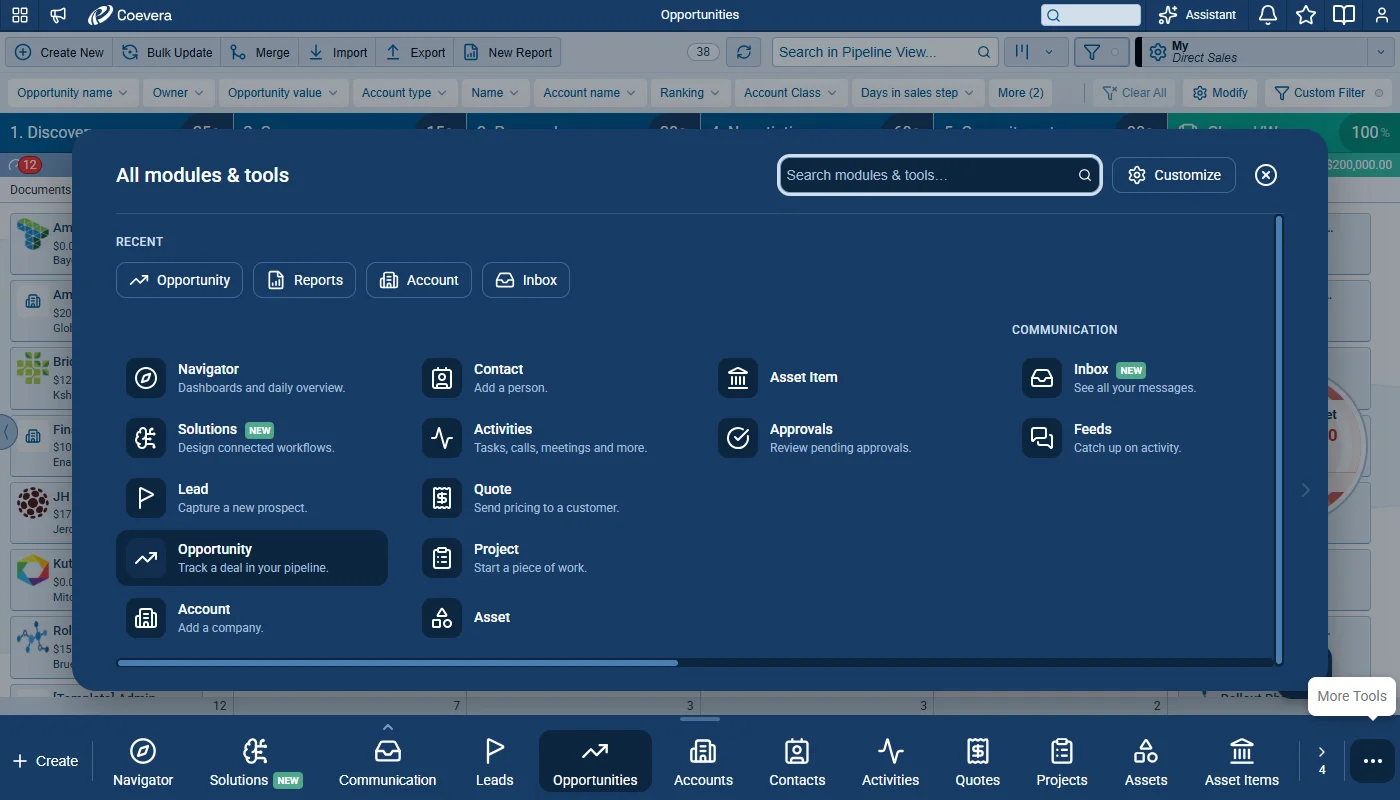
The bottom menu is now a sticky, customizable bar. Each user pins and orders the modules and tools they use most, grouped as their role defines, with everything else one click away. Administrators decide per role which items are offered, in which default order and grouping, and whether users can rearrange their own bar. How To, Explore Interactively, and minimized emails and notes move out of the bar so they never take space from it.
Customizable Bottom Main Menu, Email Inbox Archive, Email Access in Feeds per User Role, and other Various Improvements…
Coevera 6.6.0 turns the bottom menu into a sticky, customizable bar, adds a Detailed view and an Archive folder to the Email Inbox, lets administrators decide per user role which emails users see in Feeds, introduces the Coevera MCP Server for AI assistants, and lands nine improvements across the product.
Overview
Four changes lead this release. The bottom menu becomes a sticky, customizable bar: each user pins and orders the modules and tools they use most, grouped as their role defines, while searchable Create and More Tools sheets keep everything else one click away. Administrators decide per role in Role › Features › Navigation which items are offered, in which default order and grouping, and whether users can rearrange their own bar, and custom entities gain an optional navigation description. Explore Interactively and minimized emails and notes move out of the bar so they never take space from it, and How To becomes an icon on the bar, shown only on screens with How-To content.
The Email Inbox gains a Detailed content density that shows attachments directly in the email list and a dedicated Archive folder. Email integrations can now sync past emails on demand, from the last three days up to the last year, and IMAP and Exchange accounts open their configuration without asking for the password each time, and being able to see an email template no longer gives access to the emails sent with it. With Email Access in Feeds per User Role, administrators can limit a role to emails owned by or shared with selected users and sales units and set the email linking settings for the whole role. The new Coevera MCP Server makes Coevera CRM data and operations available as tools for AI assistants such as Claude and ChatGPT, always within the permissions of the signed-in user, covering search, reports, exports, record changes, and bulk business operations on Opportunities and Leads. Among the improvements, with automatic value update turned on, the Opportunity value is now recalculated when product line items change through background processes, Opportunity import can match products by SKU, User Lookup fields find users by email, and Google Tasks sync no longer deletes lists.
- A sticky, customizable bottom bar — Create first, then one tab per pinned module or tool in each user’s own order, with groups shown as a single tab that opens a submenu.
- Create for new records and More Tools for every module and tool the role offers — two sheets, each with a search field and recently used items.
- Customize bottom menu — drag rows to reorder, pin or unpin items, or drag an item straight onto the bar; Reset to default restores the role’s default order and pins.
- Role Navigation Settings in Role › Features › Navigation — the items a role offers, their default order and grouping, custom sections, and whether users can customize their bar.
- An optional Navigation description of up to 30 characters for custom entities, shown in More Tools and Create New.
- How To as an icon on the bar, Explore Interactively as a small button above it, and minimized emails and notes as Emails and Notes pills that never take space from the bar.
- A Detailed content density that shows up to three attachments of a conversation directly in the email list, with the rest one click away.
- A dedicated Archive folder, with an Archive action in the Inbox and Unarchive to send a conversation back.
- Sync Past Emails on demand for O365, Gmail for Email Sync, IMAP, and MS Exchange, from the last three days up to the last year.
- IMAP and Exchange configuration opens directly, without asking for the password each time.
- No email access through email templates — being able to see a template no longer gives access to the emails sent with it.
- An email Access Level per user role — Granted by Linked records, the default, or Granted by Users and Sales Units to narrow which emails the role sees in Feeds.
- Email linking settings per role — Link e-mails to Accounts, Link e-mails to Contacts, and Link emails to Accounts based on Domain can be set to On or Off for everyone in the role.
- The Coevera MCP Server — Coevera CRM data and operations as tools for AI assistants such as Claude and ChatGPT, always within the signed-in user’s permissions: search, reports, CSV exports, record changes, and bulk operations on Opportunities and Leads.
- Nine improvements, including Opportunity value recalculation for background product changes, product matching by SKU in Opportunity import, search by email in User Lookup fields, and Google Tasks sync that no longer wipes lists.

What we're proud of
Your modules and tools, one click away
The bottom menu is now a sticky bar that holds the modules and tools a role uses most, in the order and groups its administrator sets, with everything else one click away in More Tools. Where the role allows it, each user can pin and reorder their own bar.
Email Inboxes Improvements
This release adds new ways to organize and review conversations in the Inbox: a Detailed view that shows attachments directly in the list and a dedicated Archive folder. Email integrations can now sync past emails on demand, IMAP and Exchange accounts can be configured without retyping the password, and access to emails is no longer granted through email templates.
All screenshots
3Email Access in Feeds per User Role
Administrators can now control, per user role, which emails users see in Feeds, on records, and in other places where emails are shown. Instead of every user seeing all emails linked to records they can access, a role can be limited to emails owned by or shared with selected users and sales units. Administrators can also set the email linking settings for a whole role, so account history no longer depends on each user’s individual configuration.
All screenshots
3Coevera MCP Server
The Coevera MCP Server makes Coevera CRM data and operations available as tools for AI assistants, such as Claude, ChatGPT, and any other MCP-compatible client. The assistant discovers the available tools and calls them to read, search, and change records directly, always under the signed-in user’s permissions. This is the first published release, and it covers everything delivered from version 1.1.3 to version 2.1.0.
The server uses the Streamable HTTP MCP transport. Tool calls are sent to the /mcp endpoint with an Authorization: Bearer token, and sessions are stateless.
Sign-in uses the OAuth 2 Authorization Code flow against the Coevera OAuth server, with PKCE (S256). The server publishes the OAuth discovery documents with its own origin as issuer (RFC 8414), and a 401 response carries a WWW-Authenticate challenge with resource_metadata (RFC 9728), so clients such as ChatGPT can register the connector by themselves.
Various Improvements
As part of our ongoing usability enhancement program, we've updated the following features.
Opportunity Value Recalculation for Background Product Changes
When automatic value update is turned on, the Opportunity value is now recalculated whenever product line items change through Automatizer, the API, Online Forms, sequences, or any other background process.
- Adding or removing a product line item triggers the recalculation.
- Updating a product line item triggers it when a field that affects the amount is changed, such as Price or Amount.
- The same behavior applies when the Update or Create Opportunity action in Automatizer changes product line items.
- The value is recalculated only once, even when many product line items change at the same time.
Automatizer: Clearer Messages About Deactivated Users
Automatizer log messages about deactivated users are now clearer and easier to understand.
- Messages now show the name of the affected record.
- An orange message is a warning: the action was executed, but the process or record should be reviewed. A red message means the action was not executed.
Opportunity Import: Match Product Line Items by SKU
The Product SKU field can be mapped alongside Product Name in Opportunities › Import › Map CSV Fields › Products and Services › Products.
- Either field, or both, can be mapped. At least one is required, so Product Name is no longer required on its own.
- Product SKU is saved with the Mapping Template like every other mapped field. In existing templates, it is unmapped.
- When the SKU matches a product, that product is used and the name is not checked for that row.
- When the SKU matches no product, the row is matched by Product Name if a name column is mapped. Otherwise, the product is unmatched.
- Without a SKU column, imports work exactly as before.
- In the Non-existing Product(s) found dialogue, unmatched products are listed under Missing Products by SKU when the row has one, otherwise by name.
User Lookup: Search by Email
User Lookup fields and filters now find users by any part of their email address as well as by name, and show each user’s sign-in email in the results.
Protected and System Auto Number Fields: Editing Disabled
- In Admin › Fields, the Add, Pattern - Edit, and Pattern - Delete actions are disabled for protected and system Auto number fields, such as Quote Number.
- Pattern editing no longer appears available when it cannot be saved.
Reports: Email Templates in Send and Schedule
Send Report and Schedule Report gain an Email Templates button, and a new Report field category fills in the report’s name, type, owner, and URL.
Step Activities: Send Email Recipients From Lookup Fields
In the Send Email step activity of Lead Processes, Pipelines, and Quote Processes, the Recipients list now offers a new group for each Contact or Account lookup field that has Enable Primary Record turned on.
- Groups are labeled <Entity> - <Lookup field name> (Primary) — for example, Opportunity - Billing Contact (Primary) — and offer the email fields of the Contact or Account.
- Search filters the new groups in the same way as the existing ones.
- In the sales step checklist, the Send Email item opens an email with To set to the chosen email field of the primary record in that lookup field.
- If the lookup is empty, no record is primary, or the email is blank, To stays empty.
- Existing step activities keep their recipient. If the lookup field is deleted, Recipients shows Unknown.
Dashboards: Report Sharing Update From the Power Panel
When the sharing settings of a dashboard are changed from the Power panel, a pop-up now offers to update the sharing of all reports in the dashboard, in the same way as when sharing is changed from the dashboard sharing setting.
Google Tasks Sync: Lists Are No Longer Wiped
Changing the list or the Sync tasks setting no longer deletes a Google Tasks list: tasks are merged into the chosen list, and the previous list stays in Google.
Frequently Asked Questions
Coevera MCP Server
Connect Coevera to your AI assistant and let it do real work across your CRM — always within your permissions, never beyond them.
Related releases
- v6.4.0 · Aug 27, 2026
- Emails Preview Screen with Drafts and Scheduled Conversations
- Voyager AI Assistant Improvements
- Modified By on All Entities
- v6.3.0 · Jul 1, 2026
- Brand New Emails Preview Screen
- Voyager AI Relationship Charts — Buying Center
- v6.2.0 · May 28, 2026
- Brand New Voyager AI Relationship Charts
- AI Smart Field Updates
See these changes in your own pipeline
Start a free trial and explore what's new for yourself.
No se requiere tarjeta de crédito · Prueba gratuita de 14 días
