v6.2.0MinorReleased

Brand New Voyager AI Relationship Charts, AI Smart Field Updates, and other Various Improvements…

Coevera 6.2.0 introduces Voyager AI Relationship Charts — the AI now builds and maintains Account Hierarchies and Org Charts directly on Account records — and refines AI Smart Field with status indicators, live bulk progress, and finer scheduling control.

Voyager AIAccountsAdministration
Share
Features
3
Improvements
9
Security
1
Próximamente

Overview

Two headline capabilities lead this release. Voyager AI Relationship Charts bring Account Hierarchy and Org Chart views to the Account record: Voyager 2 AI runs a Quick Check, detects missing parent or subsidiary companies and leadership gaps, and proposes the structure — including Ghost Accounts and Ghost Contacts you can promote to real records — with every change shown in Preview mode before it is applied. AI Smart Field is refined with status indicators, inline editing, rich-text output, live bulk-update progress, related notes as a data source, and a filter on scheduled triggers.

A set of Various Improvements rounds out the release: email notification settings governed by user role, hiding archived records when linking, new active and inactive user filters with AI assistant support, fiscal-year options on the Revenue Trend, independent comparison-line colors in Reports, related-record type mapping in Import, advance sign-out notices, and a new in-product Use Case Library.

What's in this release
  • Voyager AI Relationship ChartsAccount Hierarchy: Voyager 2 AI detects missing parent or subsidiary companies and proposes the corporate structure on the Account record.
  • Ghost Accounts stand in for suggested companies until promoted to real Account records via Create Records.
  • Voyager AI Relationship Charts — Org Chart: the AI proposes a company's leadership structure, matches it against existing Contacts, and suggests new people as Ghost Contacts.
  • Org Chart changes are reviewed in Preview mode with No Tag, Updated, Added, and New legends before being applied.
  • AI Smart Field now shows each field's last-update status with Error and Warning states and hover tooltips.
  • AI Smart Field bulk updates report live progress as each record completes.
  • AI Smart Field returns rich text when the Long Text field has Rich Text enabled, and can now use related notes as a data source.
  • AI Smart Field scheduled triggers gain a filter that controls which records the scheduled update runs against.
  • Automatizer skips the AI value-update action, with a logged message, when AI Smart Field is disabled in the Automation Hub or for a user role, or when the AI credit overage limit is reached.
  • Administrators can set and enforce email notification settings per user role.
  • Archived records can be hidden from the 'Add existing' selector when linking records to a parent entity.
  • New 'is active' and 'is not active' operators on every Owner field filter records by owner status, with conversational AI assistant support.
  • Revenue Trend adds Current and Last Financial Year periods, Reports gains a separate Comparison Line Color, and Import adds related Account and Contact type mapping.
  • Users get an advance notice before an automatic sign-out configured under Advanced Sign-In Security, and a new in-product Use Case Library offers feature walkthroughs from the help menu.
Voyager AI Relationship Charts — Account Hierarchy

What we're proud of

Relationship charts, built by Voyager AI

Voyager 2 AI now builds and maintains Account Hierarchies and Org Charts directly on the Account record — detecting the companies and people that are missing, proposing the structure, and letting you review every change in Preview mode before it goes live.

01New · Voyager AI

Voyager AI Relationship Charts — Account Hierarchy

Voyager AI Relationship Charts — Account Hierarchy

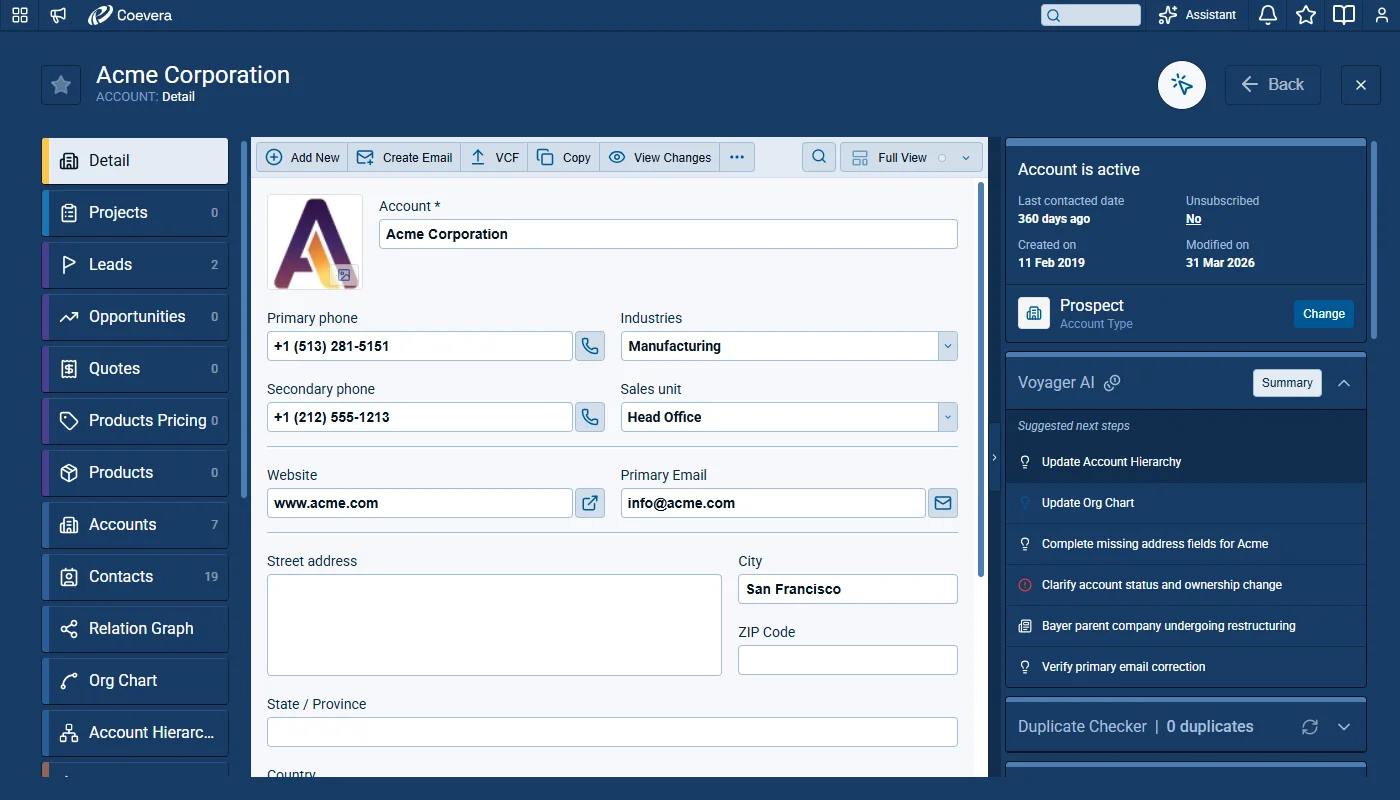
Voyager II AI now builds and maintains Account Hierarchies. From any Account record, Voyager AI can detect missing parent or subsidiary companies, suggest the correct corporate structure, and let users apply those changes to the Org Chart in a guided preview-and-confirm flow.

Existing companies are linked through Parent Account relations, and unknown companies can be added as Ghost Accounts that can be promoted to real Account records when the user is ready.

When the AI Record Assistant and the AI Relationship Charts Agent are enabled in the Automation Hub and the user’s Role gives them access to Voyager II features, and both the Record Detail Widget and Org Charts are visible for the selected Account Type, Voyager II AI runs a Quick Check on the Account.

All screenshots

6
Documentation#voyager-ai-relationship-charts-account-hierarchy
02New · Voyager AI

Voyager AI Relationship Charts — Org Chart

Update Org Chart suggestion

Voyager 2 AI now builds and maintains organizational charts directly on the Account record. The new Org Chart view proposes the company’s leadership structure, matches it against existing Contacts, suggests new people to add, and lets users review and apply changes in a single guided flow.

All screenshots

4
Documentation#voyager-ai-relationship-charts-org-chart
03New · Voyager AI

AI Smart Field

Rich Text Output in Long Text Fields

Updates to the Voyager 2 Smart Field feature deliver refinements to make the fields more reliable, transparent, and easier to work with in everyday use. Users now see clear status indicators on each AI Smart Field, can edit values inline without unnecessary confirmation steps, get rich-text output when the underlying field supports it, and have finer control over scheduled updates through filtering. Bulk updates now display real progress, related notes are available as a data source, and Automatizer behaves predictably when the feature is disabled at the Automation Hub or User Role level.

All screenshots

6
Documentation#ai-smart-field

Various Improvements

As part of our ongoing usability enhancement program, we've updated the following features.

Various ImprovementsAdministration

Setting Email Notification Settings by User Role

Setting Email Notification Settings by User Role

Administrators can globally manage email notification settings for all users in a role, and enforce them so individuals cannot override their own.

All screenshots

2
#setting-email-notification-settings-by-user-role
Various ImprovementsAccounts

Hide Archived Records When Linking Records

Hide Archived Records When Linking Records

The option to exclude archived records, previously available on card fields, now also applies to the "Add existing" action when linking records to a parent entity. When the option is OFF, archived records are filtered out of the selector so users only see active records available for linking.

#hide-archived-records-when-linking-records
Various ImprovementsReports

Filter Records by Inactive Users

Filter Records by Inactive Users

Users can now filter records of inactive owners dynamically, without having to pick each user individually. Two new operators are available on every Owner field in Custom Filters:

  • "is active" — returns records owned by currently active users.
  • "is not active" — returns records owned by inactive users.
#filter-records-by-inactive-users
Various ImprovementsVoyager AI

AI Support for Inactive User Filtering

The conversational AI assistant understands the new "is active" and "is not active" operators on Owner fields, so users can phrase requests such as filtering records owned by inactive users in natural language and have the assistant build the matching filter.

#ai-support-for-inactive-user-filtering
Various ImprovementsReports

Fiscal Year Options for the Revenue Trend Component

Fiscal Year Options for the Revenue Trend Component

The Period setting of the Revenue Trend component on the Navigator screen now offers two additional values under Year Period: Current Financial Year and Last Financial Year. Selecting one of these values renders the trend using the customer's configured financial year rather than the calendar year.

#fiscal-year-options-for-the-revenue-trend-component
Various ImprovementsReports

Separate Color Control for Comparison Lines in Reports

Separate Color Control for Comparison Lines in Reports

The Show Comparison section in Reports now includes a new Comparison Line Color option with its own color selector. Changing the main line color no longer affects the comparison line — each line is controlled independently, making it easier to distinguish the two series visually.

#separate-color-control-for-comparison-lines-in-reports
Various ImprovementsSecurity

Advance Notice Messages for Automatic Sign-Out

Advance Notice Messages for Automatic Sign-Out

When automatic sign-out is configured under Advanced Sign-In Security, users now receive a notification roughly five minutes before the session ends.

All screenshots

2
#advance-notice-messages-for-automatic-sign-out
Various ImprovementsQuotes & Documents

Use Case Library in Coevera

Use Case Library in Coevera

A new in-product Use Case Library in the help menu offers curated, feature-level walkthroughs, with the first content set covering AI Smart Field.

All screenshots

2
#use-case-library-in-coevera

Frequently Asked Questions

Voyager AI Relationship Charts. Voyager 2 AI now builds and maintains Account Hierarchies and Org Charts directly on the Account record, proposing the corporate and organizational structure for you to review and apply.

The AI Record Assistant and the AI Relationship Charts Agent must be enabled in the Automation Hub, the user's Role must grant access to Voyager II features, and both the Record Detail Widget and Org Charts must be visible for the selected Account Type. The AI Relationship Charts Agent is turned off by default.

They are placeholder records the AI suggests that do not yet exist in your database. They live only inside the proposed structure and are not accessible elsewhere in the application until you promote them by creating a real Account or Contact record.

No. Proposed changes are shown in Preview mode, tagged Added, Updated, or New, and are applied only when you choose Create Records or Apply Changes. Hide Changes returns to the normal view and caches the proposal until the record is reloaded.

Each field now shows the status of its last AI update with Error and Warning states and tooltips, values can be edited inline without an extra confirmation step, Long Text fields can return rich text, bulk updates show live progress, related notes can be used as a data source, and scheduled triggers gain a record filter.

The AI value-update action is removed from the action list, and any existing process that still references it skips the action during evaluation and logs a message. The same skip-and-log behavior applies when AI Smart Field is disabled for a user's role or when the AI credit overage limit has been reached.

See what's new in your own pipeline

Start a free trial and explore Voyager AI Relationship Charts and the AI Smart Field updates for yourself.

No se requiere tarjeta de crédito · Prueba gratuita de 14 días

groupsTrusted by clients around the globeverified_userISO 27001 CertifiedshieldGDPR CompliantblockData never used to train AI
