v5.13.0MinorReleased

Brand New Voyager AI Media Files Transcription and Voyager AI Online Forms Agent, New Field Mapping, and other Various Improvements…

Coevera 5.13.0 brings Voyager AI Media Files Transcription to Appointments, adds a Beta Voyager AI Online Form Agent that builds forms from natural language, and introduces a Field Mapping add-on for admins — alongside Automatizer and usability improvements.

Voyager AIAutomatizerQuotes & Documents
Share
Features
3
Improvements
6
Security
Demnächst verfügbar

Overview

Three features lead this release. Voyager AI Media Files Transcription brings the ease of the Call Recording feature to Appointments: users upload a meeting recording by URL or MP4 file, and Coevera transcribes and summarizes it into a field, notifying the user when processing is done. The Voyager AI Online Form Agent, released in Beta, lets users create and update Online Forms with natural-language prompts. The new Field Mapping add-on lets admins override system prefill mappings and create new mappings for lookup relations.

A set of Various Improvements rounds out the release: Automatizer can now map validated field values between entities, Opportunities gain a Total Quantity summary on the Products & Services table, recurrence dialogs handle validation errors more reliably, dialog buttons get a clearer focus state, section arrows follow a consistent direction, and the Appointment Scheduler now sends a single email with a calendar invite.

What's in this release
  • Voyager AI Media Files Transcription — upload a meeting recording by URL or MP4 to an Appointment for automatic transcription and summarization.
  • Media Transcription requires credits, managed from the Communication tab in the Customer Portal and shared with Calling & Messaging.
  • Voyager AI Online Form Agent (Beta) creates and updates Online Forms from natural-language prompts.
  • The Online Form Agent can create new fields, reuse existing fields, and map to related Coevera entity fields.
  • Field Mapping add-on lets admins override the system mapping (prefill) settings and create new mappings for lookup relations.
  • Field Mapping is available as a sub-tab for all entities except Product and Product Line Items.
  • Automatizer can map validated dropdown, radio, and multi-select values to compatible fields on the same or another entity.
  • Product Line Items in Opportunities now show a Total Quantity summary under Total Amount in the table footer.
  • Recurrence dialogs now display and position validation errors correctly for Opportunities and Tasks.
  • Dialog buttons gain a clearer focus state for better keyboard navigation and accessibility.
  • Section expand/collapse arrows now follow a consistent direction across the app.
  • The Appointment Scheduler now sends a single email that includes the invite.ics file plus cancel and reschedule options.
Voyager AI › Media Files Transcription

What we're proud of

AI that builds your forms

The Voyager AI Online Form Agent lets users describe a form in plain language and have Voyager AI create it — building the fields, mapping to related Coevera entities, and reusing existing fields. It ships in Beta in 5.13, with more planned for future releases.

01New · Voyager AI

Voyager AI › Media Files Transcription

Voyager AI › Media Files Transcription

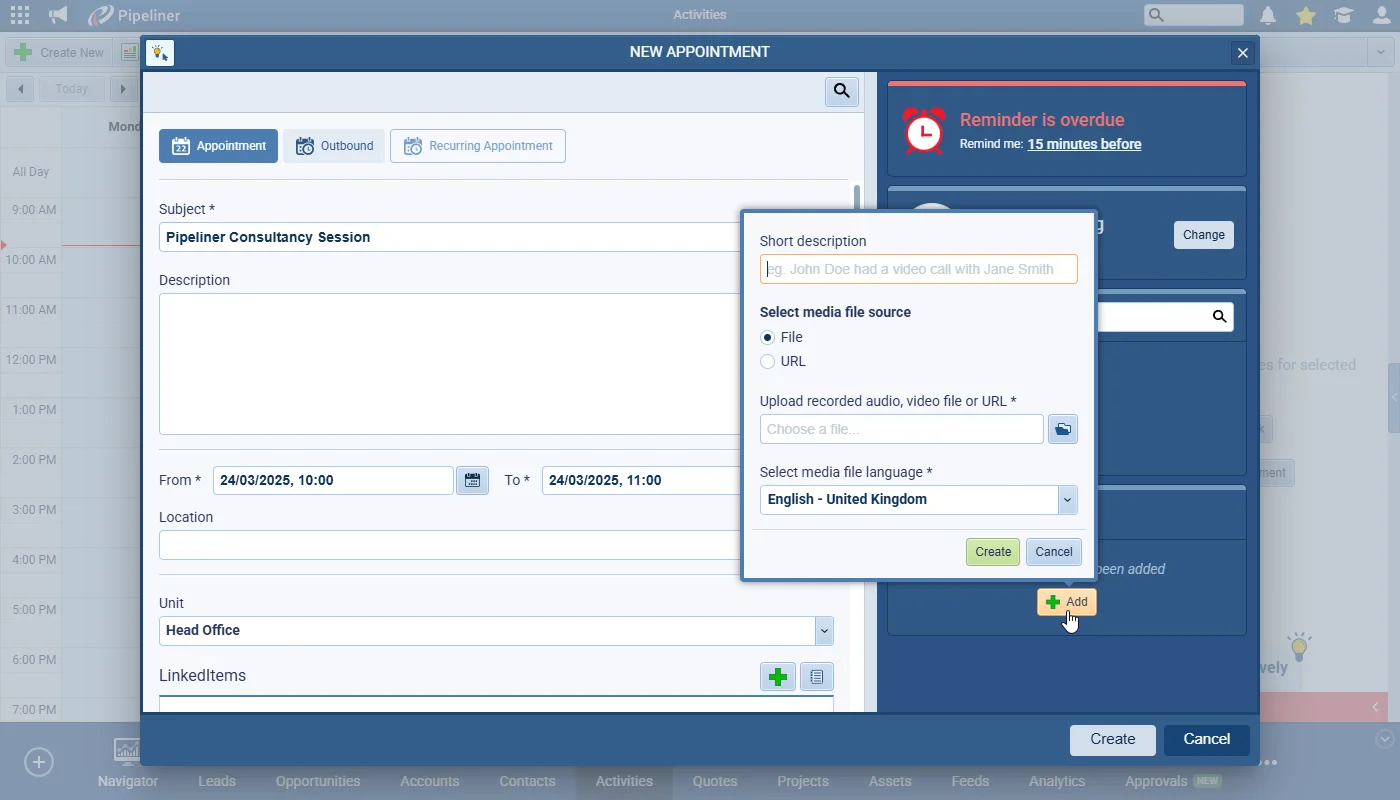
Voyager AI Media Transcription now brings the ease and efficiency of working with our “Call Recording” feature to Appointments. Users can upload a recording of a meeting to an Appointment in Coevera by adding the URL of the recorded meeting or by uploading an MP4 file. The Media Transcription will then process the video/audio and will create a transcription and summarization which the user can then copy to a field (e.g. Appointment Description) as required. This feature requires the purchase of credits which is managed from the “Communication” tab within the “Customer Portal“.

Once enabled in the Voyager AI configuration in the “Automation Hub“, the “Media Transcription” widget will display in all activities except Calls.

All screenshots

7
Documentation#voyager-ai-media-files-transcription

02New · Voyager AI

Voyager AI › Online Form Agent (BETA)

Voyager AI › Online Form Agent (BETA)

The Voyager AI Online Form Agent is the next huge leap forward in using the power of AI to streamline how users work in Coevera. Online Forms is used by the majority of our customers but it can take time to create the form, add each field and to then adjust the layout. Now though, Voyager AI will do the heavy lifting for users who can instruct the agent to create the form using natural language.

Please note that we are releasing this feature in Beta in 5.13 (additional features and updates are planned for future releases).

All screenshots

10
Documentation#voyager-ai-online-form-agent-beta
03New · Administration

Field Mapping

Field Mapping

The new Field Mapping Add-on enables Admins to:

Override the system mapping (prefill) settings

Create new mappings for lookup relations

All screenshots

4
Documentation#field-mapping

Various Improvements

As part of our ongoing usability enhancement program, we’ve updated the following features.

Various ImprovementsAutomatizer

Automatizer – mapping validated field values from one entity to another

Automatizer – mapping validated field values from one entity to another

Map validated dropdown, radio, and multi-select values to compatible fields on the same or another entity within a process.

All screenshots

2
#automatizer-mapping-validated-field-values-from-one-entity-to-another
Various ImprovementsPipeline

Product Line Items in Opportunities

Product Line Items in Opportunities

Based on customer feedback, we’ve added a “Total Quantity” summary to the “Products & Services” table for better visibility when managing Opportunities.

  • Total Quantity” value now appears under “Total Amount” in the table footer.
  • If multiple unit types are used, all quantities are included.
  • An ellipsis keeps the layout clean when multiple quantities are present.
  • Hover to view details – a tooltip shows a full breakdown of product quantities.
#product-line-items-in-opportunities
Various ImprovementsPipeline

Recurrence Settings

Recurrence dialogs now display and position validation errors correctly for Opportunities and Tasks.

#recurrence-settings
Various ImprovementsAdministration

Focus State for Dialog Buttons

Focus State for Dialog Buttons

A clearer focus state on dialog buttons improves keyboard navigation and accessibility.

#focus-state-for-dialog-buttons
Various ImprovementsAdministration

Adjust Arrow Direction inside sections in the app

Adjust Arrow Direction inside sections in the app

Section arrows now follow a consistent direction — up when open, down when closed — across the app.

#adjust-arrow-direction-inside-sections-in-the-app
Various ImprovementsEmail

Appointment Scheduler – Email with ability to automatically add appointment to calendar

We’ve consolidated the emails sent to the respondent who books an appointment using the Appointment Scheduler so that the “invite.ics” file is now included in a single notification email which also offers the respondent options to cancel or reschedule the meeting. Previously 2 separate emails were sent.

#appointment-scheduler-email-with-ability-to-automatically-add-appointment-to-calendar

Frequently Asked Questions

You can upload a meeting recording to an Appointment by URL or MP4 file, and Voyager AI creates a transcription and summarization you can copy into a field such as the Appointment Description.

Yes. It requires purchased credits managed from the Communication tab in the Customer Portal, and those credits are shared with Calling & Messaging.

No — it ships in Beta in 5.13, with additional features and updates planned for future releases.

It lets admins override the system mapping (prefill) settings and create new mappings for lookup relations, available as a sub-tab for all entities except Product and Product Line Items.

Field Mapping is a chargeable add-on for all tiers except Unlimited.

Automatizer can now map validated values from dropdown, radio, or multi-select fields to the same or compatible fields on the same or another entity, automatically mapping matching values between compatible fields.

See these changes in your own pipeline

Start a free trial and explore Voyager AI, Field Mapping, and the latest improvements for yourself.

Keine Kreditkarte erforderlich · 14 Tage kostenlos testen

groupsTrusted by clients around the globeverified_userISO 27001 CertifiedshieldGDPR CompliantblockData never used to train AI