v5.15.0MinorReleased

Brand New Scheduled Emails, Improved Triggering of Processes in Automatizer, New Activity Coloring in Calendar, Improved Reports and other Various Improvements…

Coevera 5.15.0 introduces Activity Coloring in Calendar, scheduled email sending, and email-triggered Automatizer processes, alongside Revenue Recognition reporting, a round-robin ownership action, WYSIWYG email editor upgrades, and eight further usability improvements.

EmailAutomatizerReports
Share
Features
6
Improvements
8
Security
Demnächst verfügbar

Overview

This release brings custom Activity Coloring to the Calendar, letting users assign colors by activity ownership and set rule-based color badges — including a default Overdue rule — from a new Calendar tab in User Settings. Emails gain a Schedule Send option for manually sent messages, and Automatizer can now be triggered by email — received, sent, updated, deleted, or manual — with a new round-robin Change Ownership action. Reports add Revenue Recognition as a related entity, and the WYSIWYG email editor gains clickable images and form links.

A set of Various Improvements rounds out the release: report folder structure and filter fixes, Online Form links from records, Project lookups on all entities, deleted fields surfaced in Automatizer mapping, a grouped Sales Step dropdown, an unsaved-changes warning, week numbers in date pickers, and more Online Forms theme options.

What's in this release
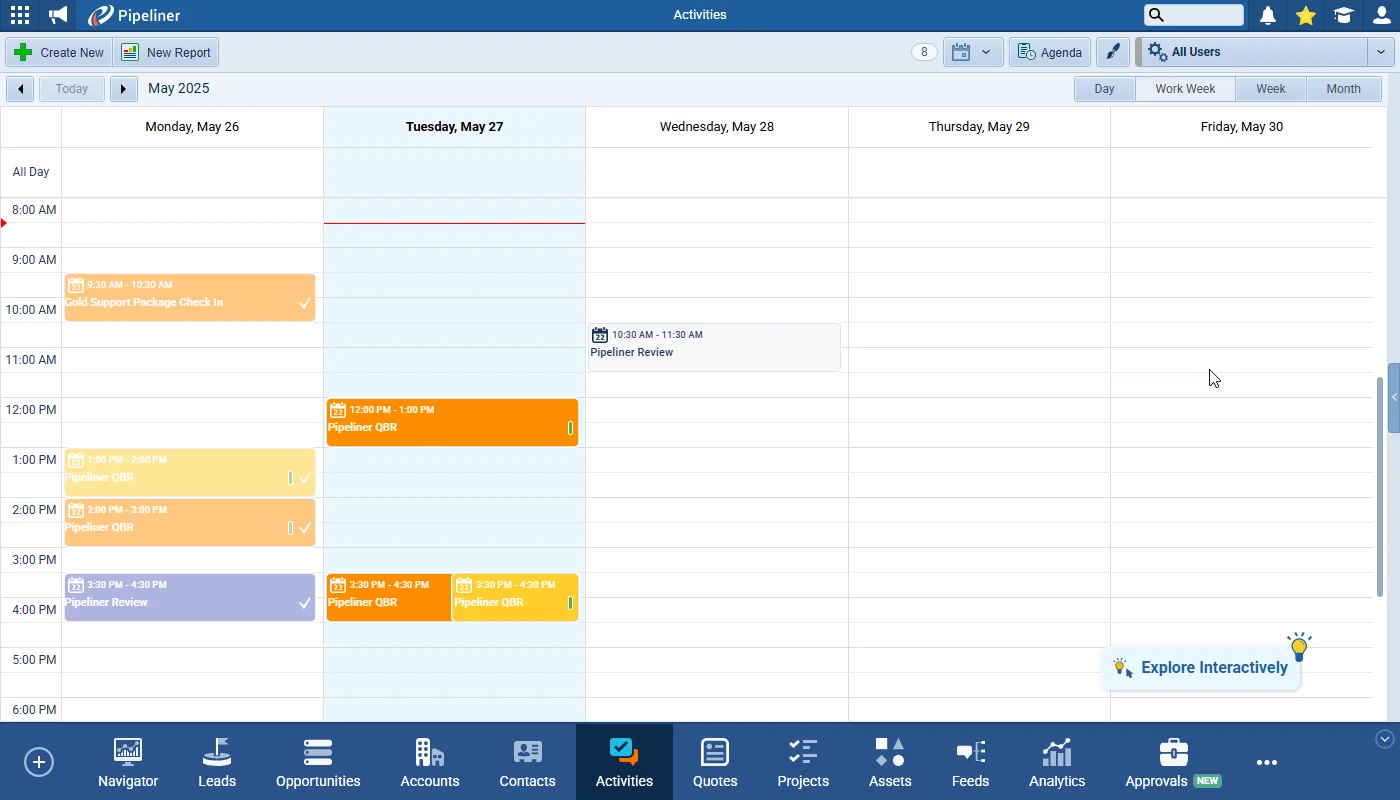
  • Activity Coloring in Calendar — set custom colors by activity ownership from a new Calendar tab in User Settings.
  • Rule-based color badges on calendar activities, with a default Overdue Activity rule for all users.
  • Emails › Scheduled Send — choose a date and time to send a manually composed email later.
  • Scheduled emails appear in the Scheduled Emails thread of the General Feed and in linked-record feeds, where they can be edited or removed.
  • Revenue Recognition added as a related entity in Opportunity reports, with Date, Value, and Is Scheduled fields.
  • WYSIWYG email editor removes the last-12-images restriction and adds image sorting and full-text search.
  • Email template images can now carry URL links, and buttons or images can link to Online Forms or Appointment Scheduler pages.
  • Automatizer › Email as a Process Trigger — run processes when an email is received, sent, updated, deleted, or triggered manually.
  • Automatizer › Change Ownership (Round Robin) reassigns records across selected users in a round-robin pattern, available on all entities.
  • Report folder structure now expands and scrolls to reports opened from Recently Viewed or Favorites.
  • Personalized Online Form links can now be copied directly from an open record's Detail page.
  • Project lookup fields can now be created on all entities, and deleted fields are surfaced in Automatizer mapping forms.
  • Sales Step dropdown grouped by Pipeline/Process, an unsaved-changes browser warning, week numbers in pop-up date pickers, and more Online Forms theme customization.
Activity Coloring in Calendar

What we're proud of

Send emails on your own schedule

When sending an email manually, users can now choose the exact date and time it goes out with Schedule Send, and see every pending message in the Scheduled Emails thread of the General Feed. It applies to manually sent emails only — not those sent via Automatizer or an Email Sequence.

01New · Pipeline

Activity Coloring in Calendar

Activity Coloring in Calendar

From a new Calendar tab in User › Settings, users can now set custom colors for themselves and their colleagues which will visually differentiate the ownership of tasks and appointments in the Calendar view. Users can also create custom colour “badges” that will display on activities in the calendar when the specified conditions are met. Activity preference settings have also moved to the new Calendar tab.

All screenshots

2
Documentation#activity-coloring-in-calendar

02New · Email

Emails › Scheduled Send

Emails › Scheduled Send

When a user is manually sending an email, there is now an option for them to send the email later using “Schedule Send

All screenshots

4
Documentation#emails-scheduled-send
03New · Reports

Revenue Recognition Support for Reports & Dashboards

Revenue Recognition Support for Reports & Dashboards

We’ve improved the reporting on Opportunities using Revenue Recognition. Users can select a new related entity – Revenue Recognition – when adding columns to their Opportunity report. The available fields for this linked entity are Date, Value and Is Scheduled and these fields can be used in all types of reports and dashboards.

Linking fields from this entity will add a row to the report for every revenue recognition period. For example, when revenue of $240,000 is scheduled over the following 12 months, there will be 12 displayed linked recognition records each with a value of $20,000.

Documentation#revenue-recognition-support-for-reports-dashboards
04New · Email

WYSIWYG Email Editor

Clickable Image

Improvements to WYSIWYG Email Editor

All screenshots

3
Documentation#wysiwyg-email-editor
05New · Automatizer

Automatizer › Email as a Process Trigger

Automatizer › Email as a Process Trigger

Automatizer processes can now be triggered by an email.

Users now have the option to select Email as the process trigger.

Users can specify when the process should by triggered with email by selecting one of the options

All screenshots

3
Documentation#automatizer-email-as-a-process-trigger
06New · Automatizer

Automatizer › Change Ownership Action (Round Robin)

Automatizer › Change Ownership Action (Round Robin)

We’ve added a new Change Ownership action in Automatizer which is available for all entities.

Users

Sales Unit Members

Documentation#automatizer-change-ownership-action-round-robin

Various Improvements

As part of our ongoing usability enhancement program, we’ve updated the following features.

Various ImprovementsReports

Report Folder Structure improvement

When a report was opened from “Recently Viewed” or “Favorites” the report itself opened but it did not reflect in the folder structure in the left hand panel. Now, the folder structure where the report is located expands and scrolls the user to the opened record. Also, the report filter is now reset when a report is opened from “Recently Viewed” or “Favorites” and it does not meet the currently active filter conditions.

#report-folder-structure-improvement
Various ImprovementsAdministration

Missing Project Lookup field on some entities

Users can now create a Project lookup on all entities.

#missing-project-lookup-field-on-some-entities
Various ImprovementsAutomatizer

Deleted fields made visible in Automatizer mapping forms

Previously, if a field was used in an Automatizer mapping form and was subsequently deleted, it was not possible to see the issue on the form which could lead to errors. This has been fixed and from now on, mapped deleted fields will be visible and the user can unselect such fields and fix the form.

#deleted-fields-made-visible-in-automatizer-mapping-forms
Various ImprovementsAutomatizer

Improving the Sales Step dropdown in Automatizer and Filters

Improving the Sales Step dropdown in Automatizer and Filters

When using multiple processes, it was sometimes difficult to select the correct Sales Step in Filters, especially if different processes used the same step name. The dropdown has been reorganised so that Sales Steps are grouped by Pipeline/Process and clearly separated with a section name giving the name of the process. Sections are sorted alphabetically.

#improving-the-sales-step-dropdown-in-automatizer-and-filters
Various ImprovementsPipeline

Warning to prevent data loss

If a users start filling out a form (e.g. creating or editing an entity), the system tracks the changes and, if the user tries to close, refresh, or navigate away with unsaved changes, the browser will show a warning “Leave site? Changes you made may not be saved.”

The warning only appears after you make a change and applies only to dynamic forms (e.g. create/modify entities).

#warning-to-prevent-data-loss
Various ImprovementsPipeline

Add Week Number to the pop-up date picker

Add Week Number to the pop-up date picker

The week number is now visible in all pop-up calendars. This small but useful addition helps you plan more efficiently when working with week-based timelines.

#add-week-number-to-the-pop-up-date-picker
Various ImprovementsIntegrations

Additional Options to customise Theme Settings in Online Forms

We’ve added additional customisation options to help users better match online forms to your website style. This update gives more flexibility when embedding forms and helps create a more consistent look.

Users can now:

  • Adjust spacing for different parts of the form, such as:
    • Form columns
    • Header and section titles
    • Questions and input fields
    • Buttons and labels
  • Tweak padding and margins to get the layout just right.
  • Easily go back to the original settings with the new “Reset to default” button.
#additional-options-to-customise-theme-settings-in-online-forms

Frequently Asked Questions

From a new Calendar tab in User Settings, where you can assign colors by activity ownership and create color badges that appear on activities when your rules are met. The chosen colors display only for the logged-in user and are not system-wide.

No. Schedule Send applies only to emails sent manually — it does not apply to emails sent via Automatizer or from an Email Sequence.

A process can be triggered when an email is received, sent, deleted, or has a property updated (such as sentiment, tag, or linked records), or it can be triggered manually. Scheduled triggers are not currently supported.

The new Change Ownership action assigns the triggered record to a new owner, and when multiple users are selected it distributes new owners across them in a round-robin pattern. It is available for all entities.

You can select Revenue Recognition as a related entity when adding columns to an Opportunity report, exposing its Date, Value, and Is Scheduled fields across all report and dashboard types. Each recognition period adds its own row — for example, $240,000 scheduled over 12 months shows 12 rows of $20,000.

The editor removes the previous restriction of showing only the last 12 images and adds sorting and full-text image search. Images can be made clickable with a URL, and buttons or images can link to Online Forms or Appointment Scheduler pages.

See what's new in your pipeline

Start a free trial and explore Coevera 5.15.0 for yourself.

Keine Kreditkarte erforderlich · 14 Tage kostenlos testen

groupsTrusted by clients around the globeverified_userISO 27001 CertifiedshieldGDPR CompliantblockData never used to train AI