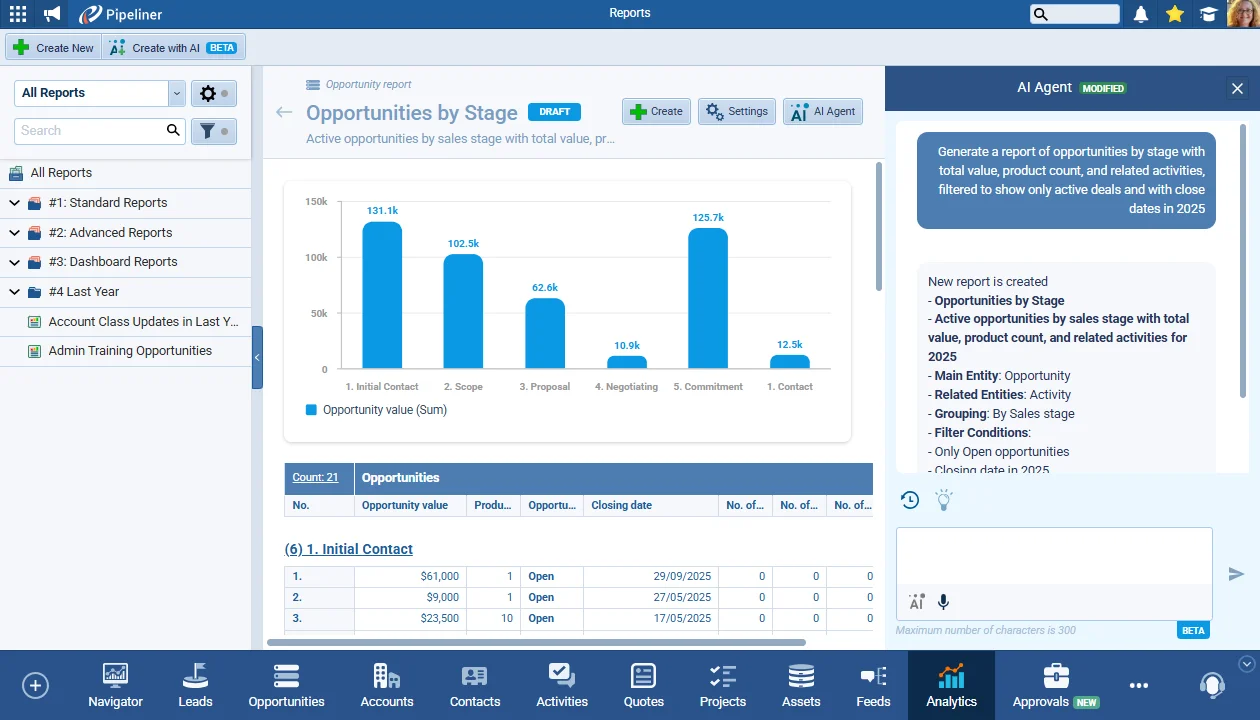
The Voyager AI Report Agent is our next powerful enhancement to leverage AI capabilities to streamline how users work in Coevera. Users can now use natural language prompts and Voyager AI will create reports based on the requirements.
Brand New Voyager AI Report Agent, Improved Visual Email Template Editor, Improved Triggering Processes by Email in Automatizer, Improved Online Forms and other Various Improvements…
Coevera 5.16.0 introduces the Voyager AI Report Agent — build reports from natural-language prompts — alongside a richer Visual Email Template Editor, new email-triggered Automatizer actions, and reusable custom style presets for Online Forms.
- Features
- 4
- Improvements
- 4
- Security
- —
Overview
This release leads with AI in analytics: the new Voyager AI Report Agent lets users create standard spreadsheet reports from natural-language prompts, recommends and automatically adapts the chart type, and refines a draft in a chat panel before it is saved. The Visual Email Template Editor adds predefined layouts — Newsletter, Announcement, and Services, plus an Empty layout — along with a new Hero Image block, a Socials block, and finer formatting control. Automatizer extends email-triggered processes with new Update Record and Link Record as Related actions, and Online Forms gains custom style presets for consistent form design.
A set of usability improvements rounds out the release: scheduled reports and dashboards can now drop the generated attachment to respect recipient permissions, list-view columns align the way report columns do, scheduled emails become cancel-only rather than editable, and deleted items are clearly flagged across form tables and filters.
- Voyager AI Report Agent creates standard spreadsheet reports from natural-language prompts.
- The agent recommends the most suitable chart type and adapts it as groupings or filters change.
- Reports begin in draft mode, with chat history saved after the first successful generation.
- Create with AI (Beta) is available from Analytics › Reports, with suggested prompts on tap.
- Visual Email Template Editor adds Newsletter, Announcement, Services, and Empty starting layouts.
- New Hero Image and Socials blocks add promotional banners and validated social icons to emails.
- The email color picker adds brand hex, black and white defaults, and up to 10 recent colors.
- Automatizer email triggers gain Update Record and Link Record as Related actions.
- Custom Entities can now be selected in related-record Automatizer actions for Tasks, Appointments, and Emails.
- Online Forms adds saved custom style presets you can preview, rename, copy, delete, and apply.
- Shared styles automatically update every form that uses them, with a warning before confirming.
- Online Forms can hide the footer logo, adjust submit-button padding, and tighten spacing between questions.

What we're proud of
Reports written in plain English
The Voyager AI Report Agent turns natural-language prompts into standard reports — recommending the right chart type, refining the draft in chat, and leaving you in control of when it is finalized and saved.
Voyager AI › Report Agent
Visual Email Template Editor
The Visual (WYSIWYG) email editor now allows users to select from pre-defined layouts — Newsletter, Announcement or Services — as well as an Empty layout.
All screenshots
3Automatizer › Triggering Processes by Email
In the 5.15 previous release, we implemented the option to use Emails as the trigger for Automatizer processes. In this release, we are improving the functionality by adding additional actions…
All screenshots
2Online Forms › Custom Style Presets
Users can now create, save, and manage custom style presets for Online Forms, making it faster and easier to maintain visual consistency across forms.
All screenshots
2Various Improvements
As part of our ongoing usability enhancement program, we’ve updated the following features.
Scheduled Reports/Dashboards – ability to remove the attachment
When scheduling a report, the report attachment is generated based on the permission levels of the user scheduling the report. This is often an admin-level user who could potentially have more data permissions than the Coevera users that the report is being sent to and this could have resulted in users seeing data in the attachment that they did not have permissions to view in Coevera.
It is now possible to remove the attachment from a scheduled report/dashboard. The system will check if there is a URL link to the report in the email body at least; otherwise, it will show a warning message (either send an attachment or the report URL is required).
List View › column alignments
Columns in list view will be aligned in the same way as they are in reports. This mostly affects numeric and date columns.
Scheduled Emails › no modification of existing scheduled emails
Scheduled emails are no longer editable. The user can only “Cancel” the scheduled email, which will enable them to send the email right away or to schedule it at a different time.
Indicate deleted objects in form tables
To help users better understand data when filtering, we’ve added visual indicators for deleted items across form tables. This improvement makes it easier to avoid confusion when selecting from lists that include removed activity types or sales roles.
Deleted items are now clearly labeled with a (Deleted) suffix and are color-coded in red to clearly distinguish them from active entries. This applies to all relevant filters across the application.
Frequently Asked Questions
See 5.16.0 in your own pipeline
Start a free trial and explore the Voyager AI Report Agent and the rest of this release for yourself.
Keine Kreditkarte erforderlich · 14 Tage kostenlos testen
