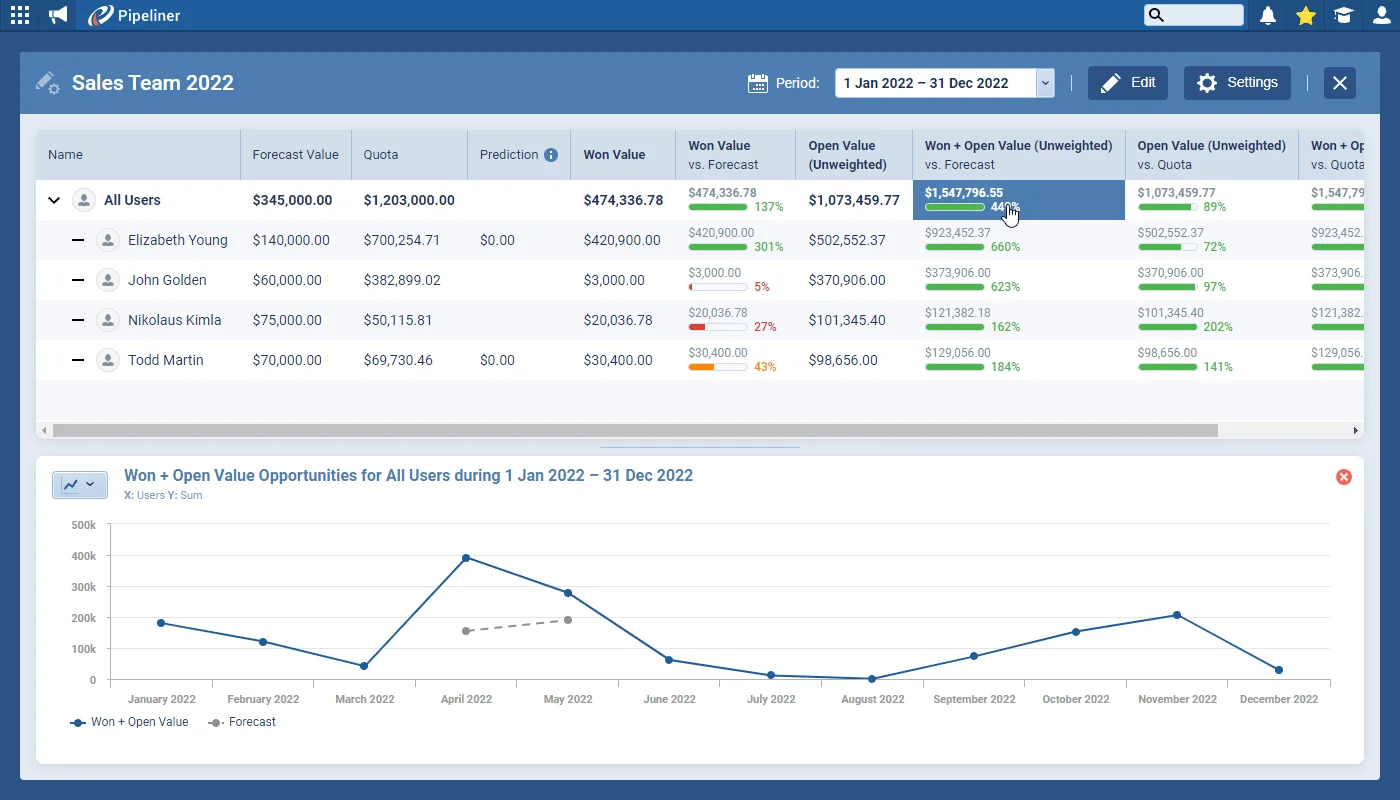
Our enhanced Forecasts allow you to plan and review revenue gained and projected for Users, Units, Products and Product Categories for whichever date period you select.
All screenshots
8Documentation#brand-new-forecasts
Coevera 4.7.0 rebuilds Forecasts to plan and review revenue by Users, Units, Products, and Product Categories across List, Chart, and Pipeline views, and adds Opportunity Fitness — at-a-glance health indicators — alongside Automatizer, Projects, and Products enhancements.
Two features lead this release. Brand new Forecasts let you plan and review revenue gained and projected for Users, Units, Products, and Product Categories over any date period: set Quotas on the Quota Tab from splits, previous performance, or manual custom values, compare values across time periods, and drill into a customisable List View with inline editing, a Chart View of line and column charts, and a Pipeline View where Opportunities can be moved directly — all updating in real time. New Opportunity Fitness gives an at-a-glance view of each Opportunity's health using 11 pre-defined system indicators plus custom ones based on Opportunity fields, each with its own configurable rules and urgency levels that can be scoped to all pipelines, a single pipeline, or an individual stage.
Beyond the headline features, Fitness is supported in the Archive and can be used in Filters, Reports, and Automatizer processes, with a selection of system indicators available for Leads. The Profile selector now surfaces Recently Used Profiles in a wider panel, the Documents tab of any record lets you close or resize the Folder Panel, admins can create a new Account or Contact form from an existing one, Automatizer gains add-to-existing values for Multi-Select Checkbox fields and Owner values from related records, Projects gain a Bulk Update option, and adding Products to an Opportunity now shows the price from the selected Price List.
What we're proud of
Brand new Forecasts let you plan and review revenue gained and projected for Users, Units, Products, and Product Categories across whichever date period you choose. See and compare values across time periods and drill into the data through a customisable List View, a Chart View, and a Pipeline View — each updating in real time. In the List View the data is fully actionable, so you can update Ownership, send Emails, run an Automatizer process, or create a new Opportunity without leaving the Forecast.
Our enhanced Forecasts allow you to plan and review revenue gained and projected for Users, Units, Products and Product Categories for whichever date period you select.
Our new and enhanced Opportunity Fitness gives you an “at-a-glance” view of the current health of any Opportunity using indicators — both pre-defined and custom — that you can configure to meet your own organisation’s specific business needs.
You can now choose from Recently Used Profiles in the Profile selector and we’ve expanded the panel to better display longer profile names.
It’s now possible to close or re-size the Folder Panel when in the Documents tab of any record.
Admins can now be more efficient when managing multiple Account and Contact forms. You now have the option to create a new form from an existing one.
When updating values in Multiselect Checkbox fields via an Automatizer process, you can now choose to Add to existing values.
Previously, in Automatizer you were able use the Owner value from the Triggered Record to update a record. We’ve now added the option to use the Owner value from related records such as Triggered record Opportunity — Primary Account owner.
We’ve added a Bulk Update option to Projects.
In another really useful enhancement to using Products, you can see the price from the Price List you’ve selected for this Opportunity when you add Products via the Product selector.
Connect Coevera to your AI assistant and let it do real work across your CRM — always within your permissions, never beyond them.
Start a free trial and explore what's new in Coevera 4.7.0 for yourself.
Nessuna carta di credito richiesta · Prova gratuita di 14 giorni
