v3.7.0MinorReleased

Import Templates, Email Conversations, New PandaDoc Tokens on Opportunity and more

Coevera 3.7.0 overhauls data import — reusable Import Templates, product line items on Opportunities, and multi-entity Lead, Account and Contact imports in a single pass — threads captured emails into conversations, and extends PandaDoc tokens with Primary Account and Contact details.

IntegrationsEmailQuotes & Documents
Share
Features
5
Improvements
Security
Próximamente

Overview

Data import leads this release. Import Templates let anyone who regularly imports from the same source save their CSV File Settings, Import Settings, and field mappings once and reuse them on the next import. Opportunities can now receive Product Line Items on import — Product Name, Quantity, and Unit Price, one per CSV row and grouped by the Opportunity they belong to — and a single import can create Leads, Accounts, and Contacts together via the More Fields mapping option, replacing what used to take three separate imports.

Beyond import, emails captured by the email integration(s) are now grouped into conversations, so threads stay together with a tracked Reply Status and a reply count on the Feed item, and users can reply or forward without leaving the conversation. The PandaDoc integration also gains new Tokens, letting you pull Primary Account and Primary Contact details — alongside Opportunity and Product information — into PandaDoc templates built in the context of an Opportunity.

What's in this release
  • Import Templates save your CSV File Settings, Import Settings, and field mappings so the same import can be reused each time from the same source.
  • CSV File Settings cover encoding, date format, and whether the file has a header row; Import Settings cover the grouping or de-duplication field and whether to auto-create related records.
  • Opportunities can now receive Product Line Items on import — Product Name (which must match an existing Product), Quantity, and Unit Price.
  • Each Product Line Item goes on its own CSV row, grouped by the field that identifies the Opportunity to avoid creating duplicate opportunities.
  • A single import can now create Leads, Accounts, and Contacts together via the More Fields mapping option, replacing three separate imports.
  • Fields can be mapped more than once — for example, one Owner column mapped to an Account, a Contact, and a Lead.
  • Emails captured by the email integration(s) are combined into conversations, with Reply Status tracked and a reply count shown in the bottom-right of the Feed item.
  • You can reply or forward from within a conversation, and the thread is kept in the reply.
  • New PandaDoc Tokens add Primary Account and Primary Contact details — alongside Opportunity and Product information — to templates built in the context of an Opportunity.
Import Templates

What we're proud of

Data import gets a lot smarter

Save your CSV and import settings as reusable Import Templates, bring Product Line Items onto Opportunities, and create Leads, Accounts, and Contacts from a single file — instead of three separate imports.

01New · Pipeline

Import Templates

Import Templates

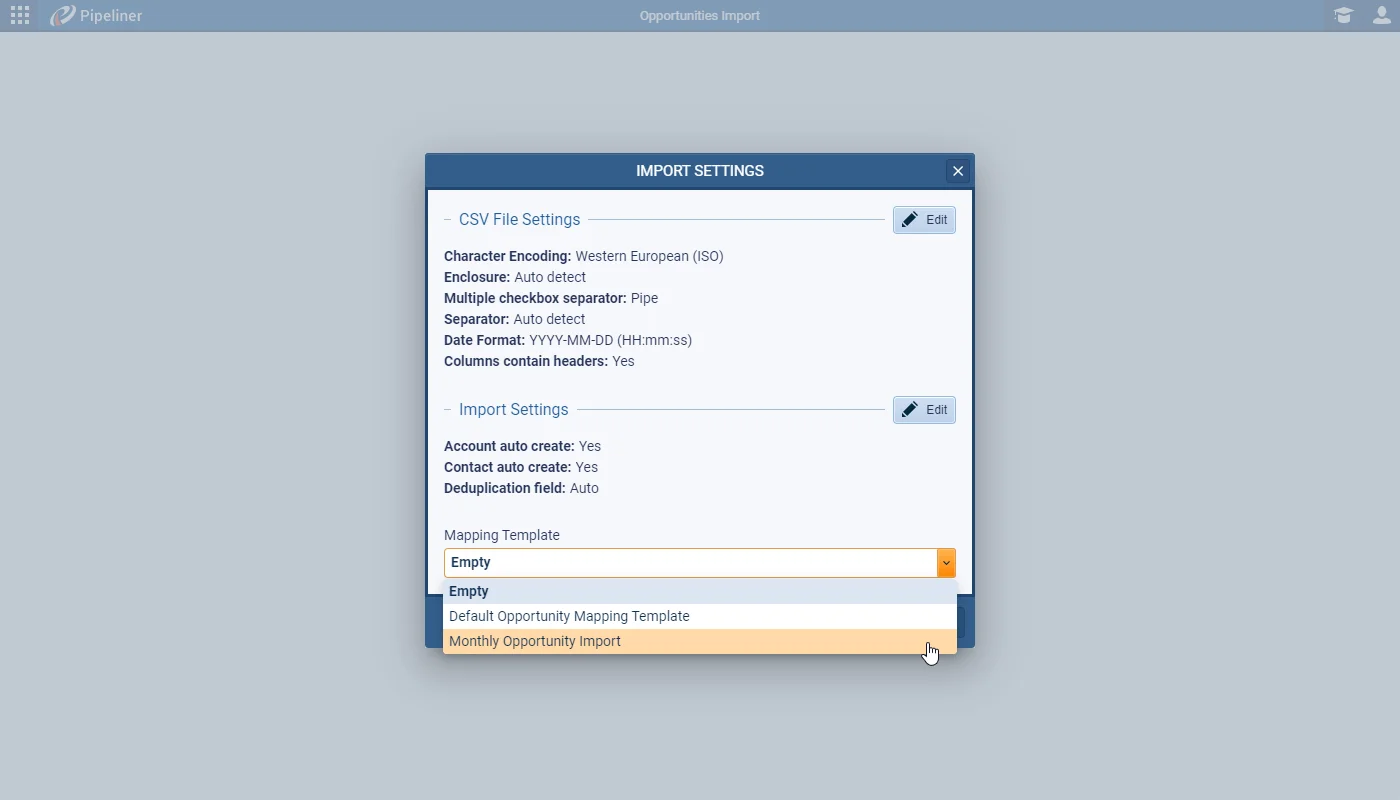
Users who are regularly importing data can now save their import settings as a Template that can be reused each time when importing data from the same source. You can save the CSV File Settings — encoding, date format, that the file contains a header row etc. — as well as Import Settings — preferences including which field to use to group or de-duplicate the incoming data as well as whether to auto-create related records.

Finally, you can then save the field mappings and select your saved template next time you’re importing.

All screenshots

4
Documentation#import-templates
02New · Pipeline

Importing Product Line Items

Importing Product Line Items

When importing — or updating existing — Opportunities, it’s now possible to import Product Line Items. You can import Product Name (this must match an existing Product), Quantity and the Unit Price that the product was sold for.

Your import CSV file will need to be prepared following the template format exactly with each Product Line Item on a separate row. You can select the field that identifies the Opportunity that the Products should be added to in the Import Settings option under the “Grouped by” field. For example, if your file contains a row per Product and each row has an identical Opportunity name, you would group by Opportunity name to avoid creating duplicate opportunities and to ensure all products are added to the same opportunity.

Documentation#importing-product-line-items
03New · Accounts

Importing Multiple Fields

Importing Multiple Fields

Previously, when importing Leads, if your list contained company and contact information in any more detail than name, phone number and email address, you needed to separately import Accounts and then Contacts and finally your Leads. Now, instead of 3 separate imports, you can do it all in a single import from the Leads (also from the Opportunity, Contacts or Accounts menu).

Use the More Fields option on the Field Mappings screen to map website, address, more phone numbers, contact job title etc. You can map fields more than once — so you just need a single column for Owner, for example, and can map it to an Account and a Contact and a Lead or you could map the same address fields to both an Account and a Contact.

All screenshots

2
Documentation#importing-multiple-fields
04New · Email

Email Conversations

Email Conversations

From this 3.7 release forward, emails captured by the email integration(s) will be combined into conversations to allow users to keep a better track of their email threads. This will also allow Reply Status to be tracked and you’ll see the number of replies in the bottom right-hand corner of the Feed item.

You’ll be able to reply or forward from within the conversation and the thread will be kept in the reply.

Documentation#email-conversations
05New · Integrations

New PandaDoc Tokens on Opportunity

New Pandadoc Tokens on Opportunity

We’ve enhanced the Tokens available when using our PandaDoc integration to allow even more personalisation of PandaDoc templates when you’re working in the context of Opportunities. You can now add details of both the Primary Account and Primary Contact to your PandaDoc template along with Opportunity and Product information.

Documentation#new-pandadoc-tokens-on-opportunity

Frequently Asked Questions

Three things — reusable Import Templates that save your CSV and import settings plus field mappings, the ability to import Product Line Items onto Opportunities, and importing Leads, Accounts, and Contacts together in a single import.

CSV File Settings (encoding, date format, whether the file has a header row), Import Settings (the field used to group or de-duplicate incoming data and whether to auto-create related records), and your field mappings — then select the template next time you import from the same source.

When importing or updating Opportunities, prepare a CSV with each Product Line Item on its own row and group by the field that identifies the Opportunity; you can import Product Name (which must match an existing Product), Quantity, and Unit Price.

No. Using the More Fields option on the Field Mappings screen you can map company and contact detail — website, address, more phone numbers, job title — and create Leads, Accounts, and Contacts in a single import; fields can even be mapped more than once.

Emails captured by the email integration(s) are now combined into conversations so you can track threads, Reply Status is tracked with a reply count shown on the Feed item, and you can reply or forward from within the conversation with the thread kept in the reply.

New Tokens let you add Primary Account and Primary Contact details — alongside Opportunity and Product information — to your PandaDoc templates when working in the context of an Opportunity.

See it in your own pipeline

Start a free trial and explore what's new in Coevera 3.7.0 for yourself.

No se requiere tarjeta de crédito · Prueba gratuita de 14 días

groupsTrusted by clients around the globeverified_userISO 27001 CertifiedshieldGDPR CompliantblockData never used to train AI
