v4.5.0MinorReleased

New Multiple Account & Contact Forms, Customization of Record Detail, HubSpot Integration and more

Coevera 4.5.0 introduces multiple Account & Contact forms so admins can tailor fields per record type, adds a customizable Record Detail layout and a native Hubspot integration, and refines list views, price lists, reports, and global search across the Web App.

AccountsIntegrationsQuotes & Documents
Share
Features
2
Improvements
11
Security
Próximamente

Overview

The headline change is multiple Account & Contact forms. From the Admin Module › Fields & Forms, admins can now build a separate form for each type of Account or Contact, making specific fields required only for certain types, and the system Account Type field can be added to List Views, Reports, and Filters. Record Detail becomes customizable too — admins choose which tabs and widgets appear and set a default order, while users can reorder tabs and widgets to their own preference and each tab shows a live count of its linked records. The native Hubspot integration also gains an option to sync all existing records on demand, automatic related-record linking, and matching on up to three fields to avoid duplicates.

Around these, 4.5.0 sharpens everyday work across the Web App. Existing price lists can be updated by import and mapped on SKU or name, with a prompt to update open opportunities; product line items support decimal quantities and template selection; and list views gain inline editing of custom fields and column-scoped export. Numbers now follow each user's regional settings, report drilldowns can open all records in detail for easy scrolling, and Global Search shows an account's location and a contact's job title with click-to-call and email. Rounding out the release, admins can set a starting value for Autonumber fields, contacts gain a Non-Binary gender option, and the API adds custom-field creation and Account/Contact merging.

What's in this release
  • Admins can create a separate data-entry form for each type of Account or Contact in the Admin Module › Fields & Forms.
  • Specific fields can be made required only for certain Account or Contact types.
  • The system Account Type field can be added to List Views, Reports, and Filters.
  • Record Detail is now customizable — admins choose which tabs and widgets appear and set a default order.
  • Users can reorder Record Detail tabs and widgets to their own preference, and each tab shows a count of its linked records.
  • The native Hubspot integration can sync all existing records on demand and match on up to three fields to avoid duplicates.
  • Existing price lists can be updated by import, mapping on SKU or name, with a prompt to update open opportunities.
  • Product line items support decimal quantities and template selection of specific products.
  • Custom fields can now be edited inline in List Views and Compact Views.
  • Exporting from a List View now includes only the fields shown as columns in that view.
  • Numeric values in the Web App follow each user's regional settings.
  • Report drilldowns add an Open All in Detail option to scroll from record to record.
  • Global Search shows an Account's location and a Contact's job title, with interactive phone and email.
  • Autonumber fields can be given a starting value, contacts gain a Non-Binary gender option, and the API adds custom-field creation and Account/Contact merging.
Brand new Multiple Account & Contact Forms

What we're proud of

A form for every type of Account and Contact

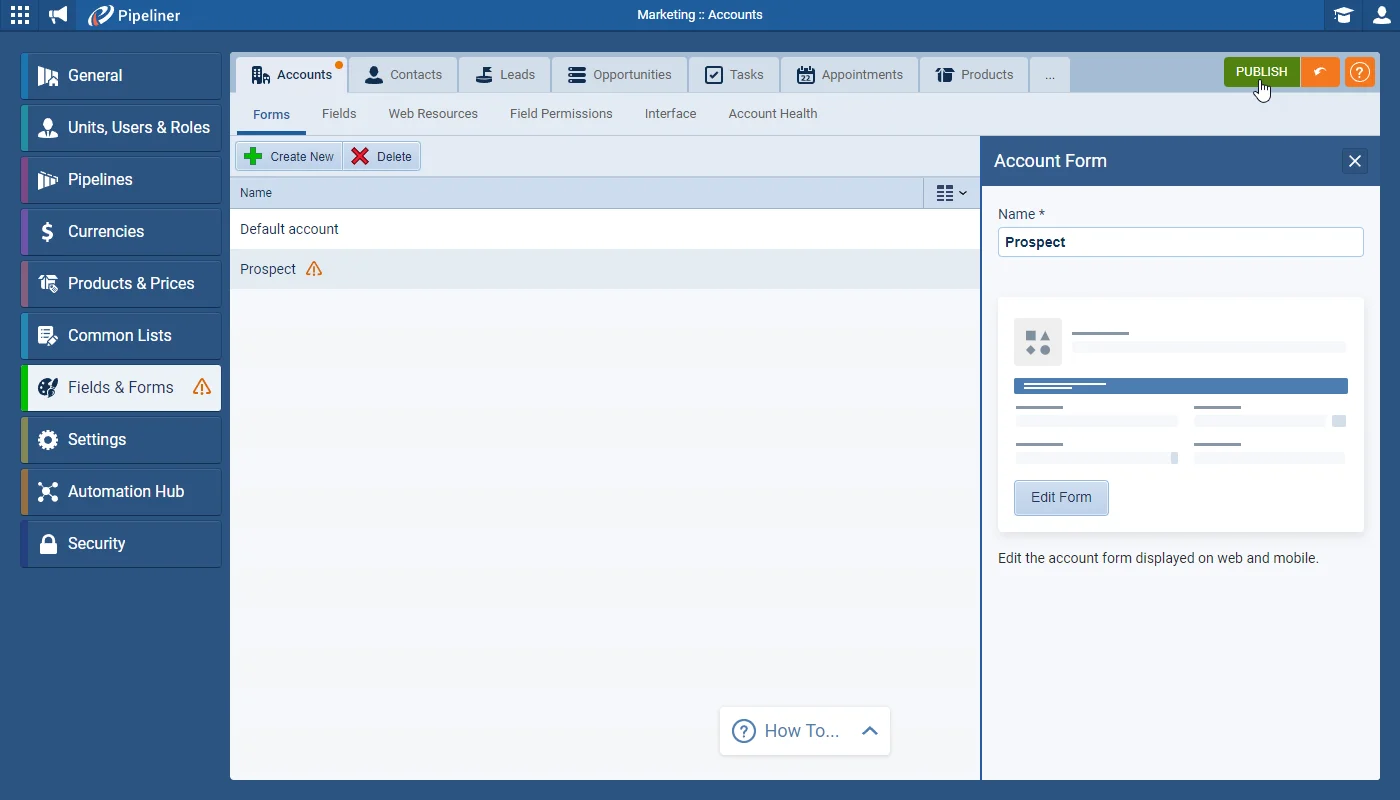
From the Admin Module › Fields & Forms, admins can now build a distinct form for each type of Account or Contact — making certain fields required only for the types that need them. Users are prompted to pick a type when creating a record and can switch between types on the fly, and the system Account Type field can be surfaced in List Views, Reports, and Filters.

01New · Accounts

Brand new Multiple Account & Contact Forms

Brand new Multiple Account & Contact Forms

If your organisation adds records for different types of company (Accounts) or different types of Contact into Coevera, Admins can now manage these different scenarios by creating different Forms for each type of Account or Contact in the “Admin Module › Fields & Forms

All screenshots

4
Documentation#brand-new-multiple-account-contact-forms

02New · Administration

Customization of Record Detail

Customization of Record Detail

Admins can select which “Tabs” should be available and which Widgets should be displayed in the sidebar. From the “Admin Module › Fields and Forms“, Admins select the “Interface” tab and then “Account Detail › Edit Detail“. Remove a Tab or Widget from view by clicking on the “eye” icon. You can also set a default sort order — Drag & Drop a Tab or Widget to the desired position. “Save” and “Publish” any changes.

All screenshots

3
Documentation#customization-of-record-detail

Various Improvements

Various ImprovementsIntegrations

Brand new Hubspot Integration

Brand new Hubspot Integration

We’ve already enhanced our new native Hubspot integration!! First we’ve added an additional synchronization option to allow you to sync all existing records from Hubspot without needing to update them. Once you’ve saved your configuration, click on the “Synchronize” button to trigger this initial sync (or to manually sync data on demand).

Relationships are now also supported. When syncing data via Hubspot, Coevera can automatically link related records — e.g. when creating a Contact from Hubspot, “Primary Account” can be linked automatically. Every relationship can have its own setup and you can select what fields in the related entity should be synchronized.

All screenshots

4
#brand-new-hubspot-integration
Various ImprovementsPipeline

Updating Existing Price Lists

Updating Existing Price Lists

It is now possible to update an existing Price List with new prices for some, or all, Products. Open your Price List and click on “Import”, choose your Settings and then map your fields matching to existing products on SKU or name. Only the Products included in your Price List update will have their pricing changed.

If existing Open Opportunities are using the current pricing prior to the update, you’ll be prompted whether you want to update them with the new pricing or leave them “as is”

All screenshots

2
#updating-existing-price-lists
Various ImprovementsAccounts

Inline Editing of Custom Fields

Inline Editing of Custom Fields

We’ve added the “inline editing” feature to custom fields in List Views and Compact Views etc.

#inline-editing-of-custom-fields
Various ImprovementsAccounts

Exporting Data From List View

Exporting Data From List View

Previously, when exporting from the main menu – e.g. Accounts, Contacts, Opportunities etc – all fields on the Form for that type of record were included in the export. Now, when exporting from the List View, only the fields included as columns in the view will be exported.

#exporting-data-from-list-view
Various ImprovementsPipeline

Working with Product Line Items within Opportunities

Product line items

Users can now update the Quantity field to include decimal places e.g. 1.5 Hours, 3.5kg. The Product Amount is also automatically rounded to 2 decimal places.

Your Opportunity might have several Products linked to it but when you come to create a quote, for example, you may only want specific Products to be included in your proposal. You can now select specific Products from the Opportunity and select the Use Template option from the “Actions” dropdown and only the selected Products will be included.

All screenshots

3
#working-with-product-line-items-within-opportunities
Various ImprovementsAdministration

Number Formats now support User’s Regional Settings

Number Formats now support User’s Regional Settings

All numeric values (currencies, multi currencies, floats, number) in the Web App are now formatted in line with the user’s regional settings.

#number-formats-now-support-user-s-regional-settings
Various ImprovementsReports

Report Drilldown › Opening All Records in Detail

Report Drilldown › Opening All Records in Detail

When using the drilldown into data from a report chart, for example, there’s a new option to “Open All in Detail” to allow easy scrolling from record to record after making the required updates or actions.

Clicking on the button, opens the Detail of the first record with the left hand pane already open to allow easy navigation from one to another.

All screenshots

2
#report-drilldown-opening-all-records-in-detail
Various ImprovementsAdministration

Fields & Forms › Set starting value for Autonumber fields

Fields & Forms › Set starting value for Autonumber fields

It’s now possible to specify the starting number for a new Autonumber field in Coevera. This is really useful if you’ve already been using a number in another system and want to continue from the next value when you start using Coevera.

#fields-forms-set-starting-value-for-autonumber-fields
Various ImprovementsAccounts

Contact Gender

Contact Gender

For customers using the Gender field, we’ve added a new gender option for contacts “Non-Binary”

#contact-gender
Various ImprovementsIntegrations

API improvements

Developers can create custom Fields Via API and can merge Two Accounts/Contacts using the API.

Look out for our updated API documentation which is coming soon which will have more details of these options.

#api-improvements

Frequently Asked Questions

From the Admin Module › Fields & Forms, admins can create a separate form for each type of Account or Contact, with different fields per form and fields made required only for certain types. When creating a record in the Web App, users choose the type and are prompted for any additional mandatory fields.

The system Account Type field can be added to List Views, Reports, and Filters.

From Admin Module › Fields and Forms › Interface, admins choose which tabs and widgets appear and set a default order by drag and drop. Users can then reorder tabs and widgets to their own preference or return to the admin defaults, and each tab shows a count of its linked records.

A new synchronization option syncs all existing Hubspot records on demand without updating them, related records can be linked automatically during sync, and records can be matched on up to three fields — by exact or partial match — to avoid duplicates.

Yes. Open the price list and use Import to map new prices to existing products by SKU or name; only the products included in the update change, and if open opportunities use the current pricing you're prompted whether to update them or leave them as is.

Custom fields can be edited inline in List Views and Compact Views, List View exports include only the visible columns, numbers follow each user's regional settings, report drilldowns can Open All in Detail, Global Search shows account locations and contact job titles with click-to-call and email, Autonumber fields can start from a set value, contacts gain a Non-Binary option, and the API adds custom-field creation and Account/Contact merging.

See it in your own pipeline

Start a free trial and explore what's new in Coevera 4.5.0 for yourself.

No se requiere tarjeta de crédito · Prueba gratuita de 14 días

groupsTrusted by clients around the globeverified_userISO 27001 CertifiedshieldGDPR CompliantblockData never used to train AI