v4.6.0MinorReleased

Document Management, Custom Entity Names, 2FA Authentication and more

Coevera 4.6.0 introduces brand-new Document Management — a central hub for company and record files up to 200 MB — alongside Custom Entity Names, two-factor authentication with Microsoft and Google single sign-on, and an Automatizer action that qualifies Leads to Opportunities.

Quotes & DocumentsSecurityAdministration
Share
Features
3
Improvements
5
Security
1
Próximamente

Overview

Document Management leads this release: a single, visual hub for every file in Coevera, split into Company Documents shared across the whole organisation and Record Documents attached to specific accounts, contacts, leads, opportunities, and projects. Files can be uploaded from local or network drives, pasted in as a URL, or pulled in through integrations like PandaDoc, Google Drive, or SharePoint, can be as large as 200 MB, and can be attached to standard, mass, Email Template, and Automatizer emails. Directory views can be shown as thumbnails or lists, and User Roles control who can set up folders and upload company files.

Beyond documents, Unlimited-tier customers can now rename Coevera's core entities — turning Opportunities into Deals or Accounts into Practices — while Subscription Admins can require 2-Step Verification and enable single sign-on via Microsoft or Google (OIDC), with a custom SAML IDP still available for Active Directory. Automatizer gains a Qualify Record action that promotes Leads to Opportunities when they meet your conditions, the Appointment Scheduler now emails you the moment a meeting is booked, and admin work gets easier with a hierarchical Sales Unit selector and a clearer Units, Users & Roles view.

What's in this release
  • Document Management provides a central hub for managing all company and record files, viewable as thumbnails or lists.
  • Company Documents are shared across the whole company; Record Documents attach to specific accounts, contacts, leads, opportunities, and projects.
  • Documents can be uploaded from local or network drives, pasted in as a URL, or added via PandaDoc, Google Drive, or SharePoint integrations.
  • Files can be as large as 200 MB, and company files can be attached to standard, mass, Email Template, and Automatizer emails.
  • User Roles control which users can access Document Management to set up folders and upload company files.
  • Custom Entity Names let Unlimited-tier customers rename Accounts, Contacts, Leads, Opportunities, and Projects across the web app, mobile app, and add-ins.
  • Two-factor authentication (2-Step Verification) adds Email, Text, and Authenticator App verification codes at login.
  • Single sign-on now supports OIDC via Microsoft or Google accounts, with a custom SAML IDP still available for Active Directory customers.
  • Files can now be attached by pasting in a URL, and multiple downloaded files are zipped automatically.
  • MS Word, Excel, and PowerPoint files can be previewed by double-clicking, without downloading.
  • Automatizer's new Qualify Record action promotes Leads to Opportunities when triggers and conditions are met.
  • The Appointment Scheduler now emails you immediately when someone books a meeting.
  • The Sales Unit selector gains a hierarchy view for faster, more intuitive selection.
  • Units, Users & Roles now shows all users assigned to a role, and new Activity Types can be copied from existing forms.
Key features:

What we're proud of

One home for every document

Document Management gives Coevera a single, visual hub for every file — Company Documents shared across the organisation and Record Documents tied to individual accounts, contacts, leads, opportunities, and projects. Files up to 200 MB can arrive from a local drive, a URL, or integrations like PandaDoc, Google Drive, and SharePoint, and User Roles keep the folder structure consistent across teams.

01New · Quotes & Documents

Brand new Document Management

Key features:

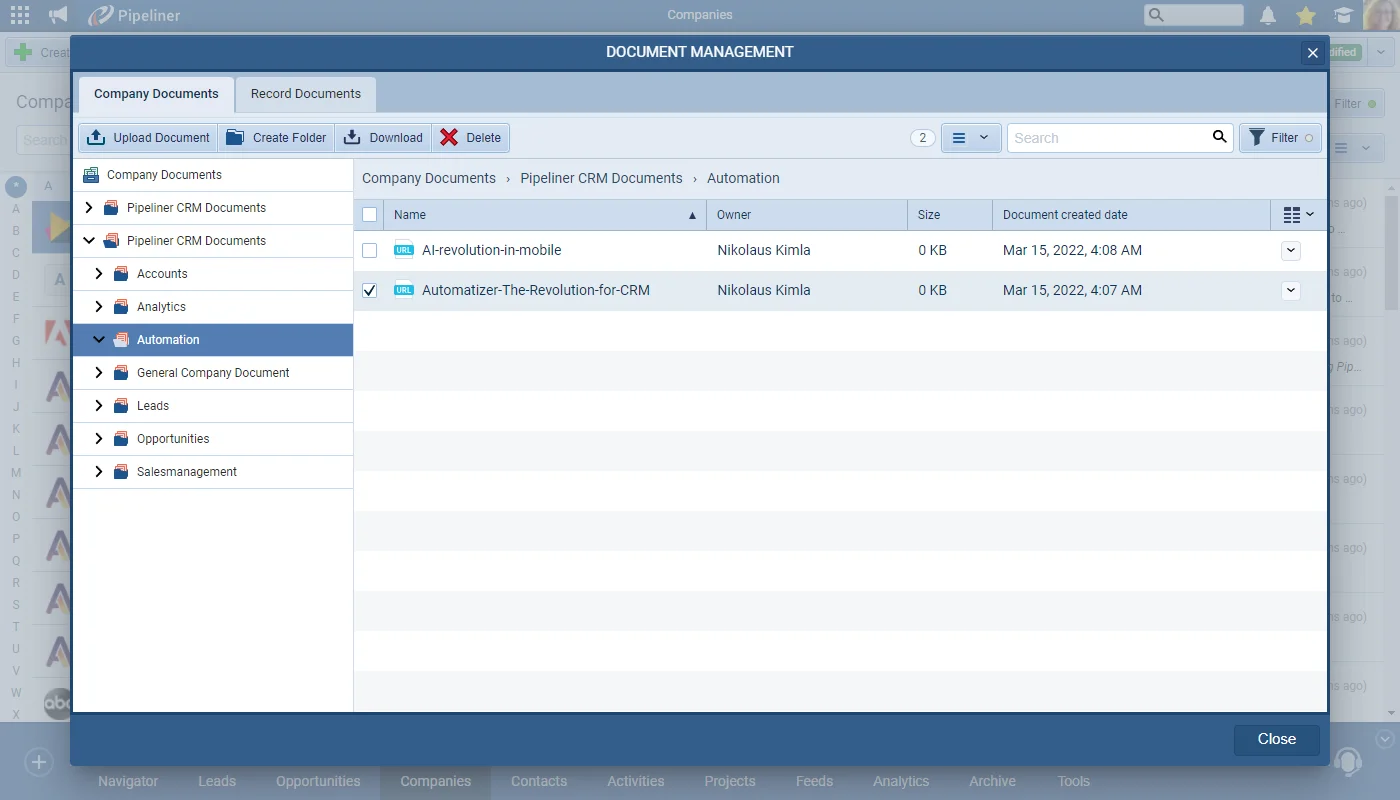
The Document Management tool is an easy and intuitive to use hub for managing all files and documents.

The system is structured so that there are into two primary types of documents:

We took the dynamic visual approach we take with all of the other elements in Coevera, so that anyone using the system can instantly understand it. Directory views can be set up in thumbnails or list views.

All screenshots

9
Documentation#brand-new-document-management

02New · Administration

Custom Entity Names

Custom Entity Names

For some businesses, the use of specific terminology is extremely important for consistency across the organisation as well as user adoption.

Unlimited Tier customers are now able to change the names of the main Entities in Coevera to reflect this business need. For example, "Opportunities" can now be changed to "Deals" if that's the terminology you always use.

All screenshots

3
Documentation#custom-entity-names
03New · Security

Two factor authentication + Using Microsoft/Google for authorization

Two factor authentication + Using Microsoft/Google for authorization

We’ve added a 2-Step Verification authentication option so that Coevera Subscription Administrators can choose to enhance the security around logging in to Coevera by ensuring users need to enter a verification code in addition to their username and password. Users can also choose to enable this option for themselves in their “Account Settings“. Verification methods include “Email“, “Text” and “Authenticator Apps” via Android or iOS phones.

We’ve also enabled new options for Single Sign On using OIDC via Microsoft or Google accounts. For customers using Active Directory, it’s still possible to enable a custom SAML IDP.

Both 2-Step Verification and Single Sign On are managed by Subscription Admins from customer-portal.pipelinersales.com using the Sign In tab and apply to all Coevera users for all spaces within the subscription.

All screenshots

6
Documentation#two-factor-authentication-using-microsoft-google-for-authorization

Various Improvements

Various ImprovementsQuotes & Documents

Working with Documents

Working with Documents

We’ve added some useful improvements to working with documents as part of our headline Document Management feature in this release.

You can now attach files by pasting in a “URL

All screenshots

2
#working-with-documents
Various ImprovementsAutomatizer

Automatizer

Automatizer

For “Lead” processes, we’ve added an incredibly useful new action “Qualify Record” which will qualify “Leads” to “Opportunities” if they meet your triggers and conditions.

#automatizer
Various ImprovementsPipeline

Appointment Scheduler › Notification

Appointment Scheduler › Notification

When somebody books a meeting with you via an Appointment Scheduler page, you are immediately notified via “Email” that a meeting has been booked.

#appointment-scheduler-notification
Various ImprovementsAdministration

Sales Unit Selector

Sales Unit Selector

Our customers with lots of sales units will love this one! Selecting a sales unit has been made much easier and more intuitive by adding a hierarchy view to the dropdown.

#sales-unit-selector
Various ImprovementsAdministration

Units, Users & Roles

Units, Users & Roles

When updating “User Roles“, you can now see all users currently based on that Role in the right hand panel and can click on each user to check their “Sales Unit” assignment and default “Unit (and even to change the role they are based on).

When creating new custom “Activity Types“, you can easily copy an existing form so you don’t have to set them up from scratch every time.

All screenshots

2
#units-users-roles

Frequently Asked Questions

It's a central, visual hub for managing all files in Coevera, split into Company Documents shared across the whole organisation and Record Documents attached to specific accounts, contacts, leads, opportunities, and projects. Directory views can be shown as thumbnails or lists.

Documents can be as large as 200 MB and can be uploaded from local or network drives, added by pasting in a URL, or pulled in through integrations such as PandaDoc, Google Drive, or SharePoint.

Custom Entity Names is available free of charge to Unlimited-tier customers, who can rename Accounts, Contacts, Leads, Opportunities, and Projects — for example changing Opportunities to Deals. Customers on other tiers can contact their Account Manager to discuss options.

Subscription Administrators can require 2-Step Verification for all users, and individuals can enable it themselves in Account Settings. Verification methods include Email, Text, and Authenticator Apps on Android or iOS.

Yes. Single sign-on now supports OIDC via Microsoft or Google accounts, and customers using Active Directory can still enable a custom SAML IDP. Both 2-Step Verification and single sign-on are managed by Subscription Admins.

For Lead processes, the new Qualify Record action automatically qualifies Leads to Opportunities when they meet your triggers and conditions.

See it in your own pipeline

Start a free trial and explore everything new in Coevera 4.6.0 for yourself.

No se requiere tarjeta de crédito · Prueba gratuita de 14 días

groupsTrusted by clients around the globeverified_userISO 27001 CertifiedshieldGDPR CompliantblockData never used to train AI