v5.6.0MinorReleased

Vastly Enhanced Online Forms, Email Tracking, Feeds Filter & Streams Panel, and other Various Improvements…

Coevera 5.6.0 vastly enhances Online Forms — with conditional fields, multi-page sections, and automatic response limits — adds bounced-email tracking across Standard and Mass Emails, and refreshes the Feeds filter and Streams panel alongside a batch of usability improvements.

Quotes & DocumentsEmail
Share
Features
7
Improvements
8
Security
1
Demnächst verfügbar

Overview

Online Forms lead this release with a wave of builder enhancements. Conditional Fields display a field only when another field is answered with a matching value; new Form Sections group fields and can split a form across multiple pages; and forms can be automatically disabled once responses pass a date, a count, or a summed field-value limit. Visual customization adds theme sections for Form, Button, and Inputs, submit-button positioning, and multi-page navigation buttons.

Beyond forms, Email Tracking gains the ability to track bounced emails for Standard and Mass Emails — including those sent by Email Sequences — with indicators across Mass Email statistics, email detail, Feeds, in-app notifications, and Email Template statistics. The Feeds filter and Streams panel are redesigned with new email filter options and streams, and a batch of usability improvements spans automatic Opportunity value updates, Opportunity form-step colors, Power Panel view labels, activity filtering, list-view columns, the recurrence dialog, and mass-email follow-ups.

What's in this release
  • Online Forms › Conditional Fields show a field only when another field is completed with a matching value.
  • Online Forms can be automatically disabled after a specific date and time, once responses reach a count, or once a summed field-value threshold is reached.
  • Form Sections group fields into blocks and can keep a form on a single page or span it across multiple pages.
  • On multi-page forms, the Form Header can be shown on the first page only or on every page.
  • Customize Theme now groups options into Form, Button, and Inputs sections and adds submit-button positioning (Left, Middle, or Right).
  • Multi-page forms display Next and Back buttons, with the Submit button on the final page.
  • A new Responded To filter lets you filter Accounts, Contacts, Leads, and Opportunities by their Online Form responses.
  • Online Forms can require identification, rejecting responses that cannot be matched to an existing Coevera record.
  • Email Tracking now captures bounced emails for Standard and Mass Emails, including those sent by Email Sequences.
  • Bounced-email indicators appear in Mass Email statistics, email detail, Feeds, in-app notifications, and Email Template statistics.
  • The Feeds filter adds Incoming, Outgoing, Automated, and Bounced email options, and the Streams panel adds Recent Mass Emails, Emails, Recent Emails, Online Form Responses, and Documents streams.
  • Administrators can apply role-permission recalculation sequentially, so users are only locked out during their own recalculation.
  • Administrators can enable Automatic Opportunity Value Update so the Opportunity value is populated from the total of all its products.
  • The Recurrence dialog for Opportunities and Tasks is overhauled with clearer labels, icons, and a Preview footer.
Online Forms › Conditional Fields

What we're proud of

Online Forms, vastly enhanced

This release turns Online Forms into a far more capable builder. Conditional fields reveal themselves on cue, forms split into multi-page sections, responses can be capped automatically by date, count, or summed value, and Customize Theme gives finer control over form, button, and input styling.

01New · Integrations

Online Forms › Conditional Fields

Online Forms › Conditional Fields

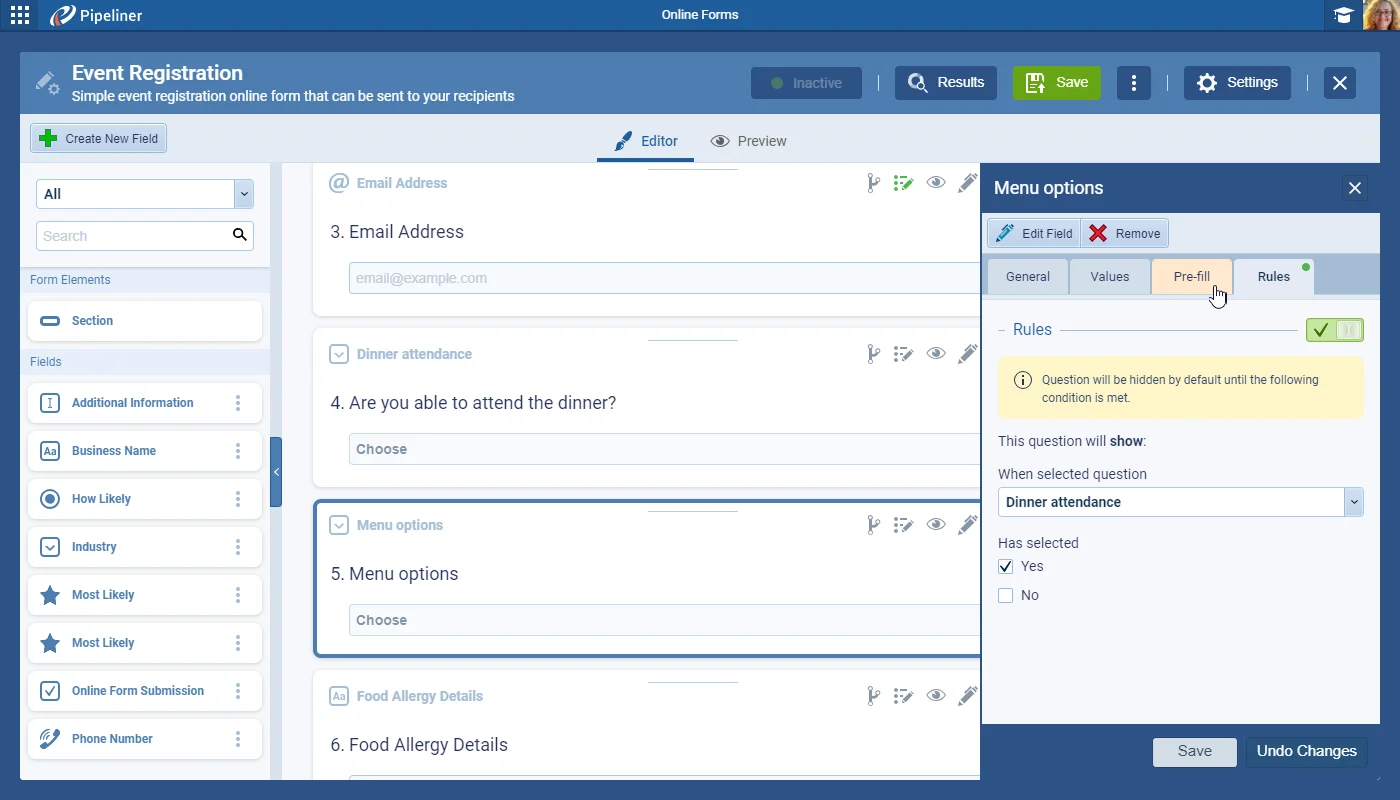
It is now possible to create fields on Online Forms that only display when another field has been completed with an appropriate value. For example, a field listing “Menu Options” will only display when a “Yes” has been selected in a field named “Attending Dinner?”.

These Conditional Rules are available for all fields on the Online Form.

Rules are enabled from the “Rules Tab“. Toggle the Rule “ON” or “OFF“. When the Rule is ON, the field/question is “HIDDEN” by default. When the form is completed, if the condition is met, the question will appear, or will remain hidden if not.

All screenshots

5
Documentation#online-forms-conditional-fields

02New · Integrations

Online Forms › “Disable” form by a specific limit

Response Acceptance Date Limit

For those customers using Online Forms to help organise Events, in particular, it is now possible to automatically disable the “Online Form” so that no further responses can be submitted:

This features covers the following types of use case:

Set these options from “Online Form settings › General tab › Responses“.

All screenshots

4
Documentation#online-forms-disable-form-by-a-specific-limit
03New · Integrations

Online Forms › Form Sections

Online Forms › Form Sections

It is possible now to add sections to online forms and divide the content / fields into groups. Users also gain the ability to change how the form is displayed — it can be kept as a single page or change it to span multiple pages with each section being on a new page.

All screenshots

5
Documentation#online-forms-form-sections
04New · Integrations

Online Forms › Visual Customization

Online Forms › Visual Customization

This release includes enhancement to the visual formatting of “Online Forms“.

In “Customize Theme” settings, options are now sorted into sections for:

Form

All screenshots

4
Documentation#online-forms-visual-customization
05New · Integrations

Online Forms › Small Improvements

Get Link options

The “Get link” button now always provides a link with static prefill parameters (if they are available). If “Personalize link by record” is enabled and a record is selected, “Get Link” will automatically provide a fully personalized link.

All screenshots

4
Documentation#online-forms-small-improvements
06New · Email

Email Tracking

Email Tracking

We wanted to enhance tracking of email events by adding the ability to track bounced emails for “Standard” or “Mass Emails(including emails sent by Email Sequences). As emails can be sent from “Personal Email” addresses or “Company Emails“, we’ve also added the option to synchronise bounced emails. For all existing email accounts (Personal or Company Email), Users or Admins will need to “upgrade” their existing settings.

All screenshots

7
Documentation#email-tracking
07New · Pipeline

Feeds Filter & Streams Panel Improvements

Feeds Filter & Streams Panel Improvements

We’ve updated the design of the Feeds filter option to include section headers and have also enabled additional filter options for Emails to include:

Incoming email” › incoming emails captured by the email integration.

Outgoing emails” › sent emails or outgoing emails captured by the email integration.

All screenshots

2
Documentation#feeds-filter-streams-panel-improvements

Various Improvements

As part of our ongoing usability enhancement program, we’ve updated the following features.

Various ImprovementsPipeline

Enable Automatic Opportunity Value Update for all Opportunities

Enable Automatic Opportunity Value Update for all Opportunities

Admins can enable Automatic Opportunity Value Update so the Opportunity value is populated from the total of all its products.

All screenshots

2
#enable-automatic-opportunity-value-update-for-all-opportunities
Various ImprovementsPipeline

Color for Opportunity Form Steps

Color for Opportunity Form Steps

Within an Opportunity, the form step activities & sales actions now use the same color scheme and reflect their respective sales step progress & completion status.

#color-for-opportunity-form-steps
Various ImprovementsPipeline

Power Panel: View Tabs Labels

Power Panel: View Tabs Labels

We have renamed and rearranged “View tab” settings to better reflect their functionality:

  • Cards grouped by” › updated text so it’s clear that it does not affect records in the list view.
  • Records sort by” › updated text to show how all records are sorted.
  • Show in All Views” › changes made in this section affect which records display in all views.
  • New section: Card Fields” › fields that only show on the card view of the entity.
  • New section: Bubble Chart” › this setting only affects the size of the bubble on the bubble chart view.
#power-panel-view-tabs-labels
Various ImprovementsPipeline

Activity Filter

Activity Filter

Activity sorting is now “Alphabetical(rather than by created date as previously) and there is also a search option to enable users to easily find the type of activity they want to filter by.

#activity-filter
Various ImprovementsPipeline

Adding columns in List View

Adding columns in List View

We introduced scrolling to the currently added column as a new behavior while working with list views when the column selector is enabled.

#adding-columns-in-list-view
Various ImprovementsPipeline

Task & Opportunity Recurrence Setting Update

Task & Opportunity Recurrence Setting Update

The Recurrence dialog for Opportunities and Tasks is overhauled with clearer labels, icons, and a Preview footer.

#task-opportunity-recurrence-setting-update
Various ImprovementsEmail

Mass Email: Follow-up Emails

Mass Email: Follow-up Emails

When sending a follow up “Standard” or “Mass” email from the “Mass Emails Statistics“, users can now see the body of the original email (regardless of whether it was composed manually or used a template) that has been sent so they do not need to compose the email from the beginning but can customize the original email.

#mass-email-follow-up-emails
Various ImprovementsAdministration

Administration Updates

Delayed role permissions recalculation

When Units, Users or User Roles are updated, affected data in Coevera needs to be updated. This can prevent all users from using Coevera for a significant period for our large customers with lots of data and large numbers of active users (>250 active users or >25 active users in a single sales unit).

Administrators can now apply the recalculation sequentially over a period of time so rather than all users being locked out waiting for the whole recalculation to complete, each individual user will only be locked out when their individual recalculation is being processed.

#administration-updates

Frequently Asked Questions

Online Forms gain conditional fields, form sections with an optional multi-page layout, automatic response limits, expanded theme and layout customization, and smaller improvements such as filtering records by form responses and required identification.

A field can be set to display only when another field is completed with a matching value — for example, showing a menu-options field only when an 'Attending Dinner?' field is answered 'Yes'. Rules are managed from the Rules tab, and by default the conditional field stays hidden until its condition is met.

Yes. From the form's General tab, you can disable it after a specific date and time, once the number of responses reaches a limit, or once the sum of field values across all responses reaches a limit.

It adds tracking of bounced emails for Standard and Mass Emails, including emails sent by Email Sequences. Existing Personal or Company email accounts need to be upgraded to enable it, though Microsoft Office 365 accounts do not require upgrading.

The Feeds filter is redesigned with section headers and new email options for incoming, outgoing, automated, and bounced emails, and the Streams panel adds Recent Mass Emails, Emails, Recent Emails, Online Form Responses, and Documents.

When units, users, or user roles change, administrators can apply the recalculation sequentially over time, so each user is only locked out during their own recalculation rather than all users waiting for the entire process to finish.

See 5.6.0 in your own pipeline

Start a free trial and explore the enhanced Online Forms and everything else new in Coevera 5.6.0.

Keine Kreditkarte erforderlich · 14 Tage kostenlos testen

groupsTrusted by clients around the globeverified_userISO 27001 CertifiedshieldGDPR CompliantblockData never used to train AI