v4.4.0MinorReleased

New Appointment Scheduler, New Video Calling, Outlook Add-in Improvements and more

Coevera 4.4.0 introduces a brand-new Appointment Scheduler that lets contacts book meetings from a shareable Booking Page, adds Zoom and Microsoft Teams video calling to appointments, and gives administrators Advanced Permissions over profiles, reports, and dashboards.

IntegrationsEmailAdministration
Share
Features
3
Improvements
4
Security
1
Demnächst verfügbar

Overview

The headline of this release is the brand-new Appointment Scheduler. Users share their availability through an external Booking Page link, and attendees pick a time that suits them — no back-and-forth email. Scheduler pages are managed from the Tools menu, support one-on-one or group meetings, and calculate availability from existing Coevera appointments and synced O365 or Google calendars. Booking links can be embedded directly into emails sent from Coevera, and every field on the booking confirmation form is available to Automatizer for personalisation. Alongside it, new Video Calling adds Zoom and Microsoft Teams meeting links directly to appointments.

Beyond scheduling, the Outlook add-in gains admin-configurable Other Fields, Recent Records in search, and one-click jump-to-record; emails sent from Coevera can now use any of a user's addresses rather than only the primary one; and additional products can be added to an Opportunity by copying an existing one. For administrators, Advanced Permissions bring access control to Profiles, Reports, Dashboards, Email Templates, and Form Views through a new Common Records tab on the User Role screen.

What's in this release
  • The brand-new Appointment Scheduler lets contacts book meetings from a shareable external Booking Page, without back-and-forth email.
  • Appointment Scheduler supports one-on-one meetings (owner's availability) and group meetings (owner plus selected attendees).
  • Availability is calculated from existing Coevera appointments and synced O365 or Google calendars to avoid double booking.
  • Booking confirmation form fields — including three new Invitee fields — can be used in Automatizer for personalisation.
  • Appointment Scheduler links can be embedded directly in emails sent from Coevera.
  • New Video Calling adds Zoom and Microsoft Teams meeting links to appointments via the Automation Hub.
  • The Outlook add-in lets admins expose extra custom fields in a new Other Fields section of the new-record panel.
  • The Outlook add-in now shows Recent Records in search and can jump straight to a newly created record in Coevera.
  • Emails sent from Coevera can now use any of a user's email addresses, not just the primary one.
  • Additional products can be added to an Opportunity by copying an existing product.
  • Advanced Permissions let administrators control access to Profiles, Reports, Dashboards, Email Templates, and Form Views.
  • Advanced Permissions add a new Common Records tab and a SuperAdmin "allow deleting not owned" right on the User Role screen.
Brand new Appointment Scheduler

What we're proud of

Book meetings without the back-and-forth

The brand-new Appointment Scheduler lets you share your availability through an external Booking Page so contacts can pick a time that works for them. It handles one-on-one and group meetings, calculates availability from your Coevera appointments and synced O365 or Google calendars, and drops the booking link straight into your emails. Every field on the confirmation form is available to Automatizer for follow-up.

01New · Pipeline

Brand new Appointment Scheduler

Brand new Appointment Scheduler

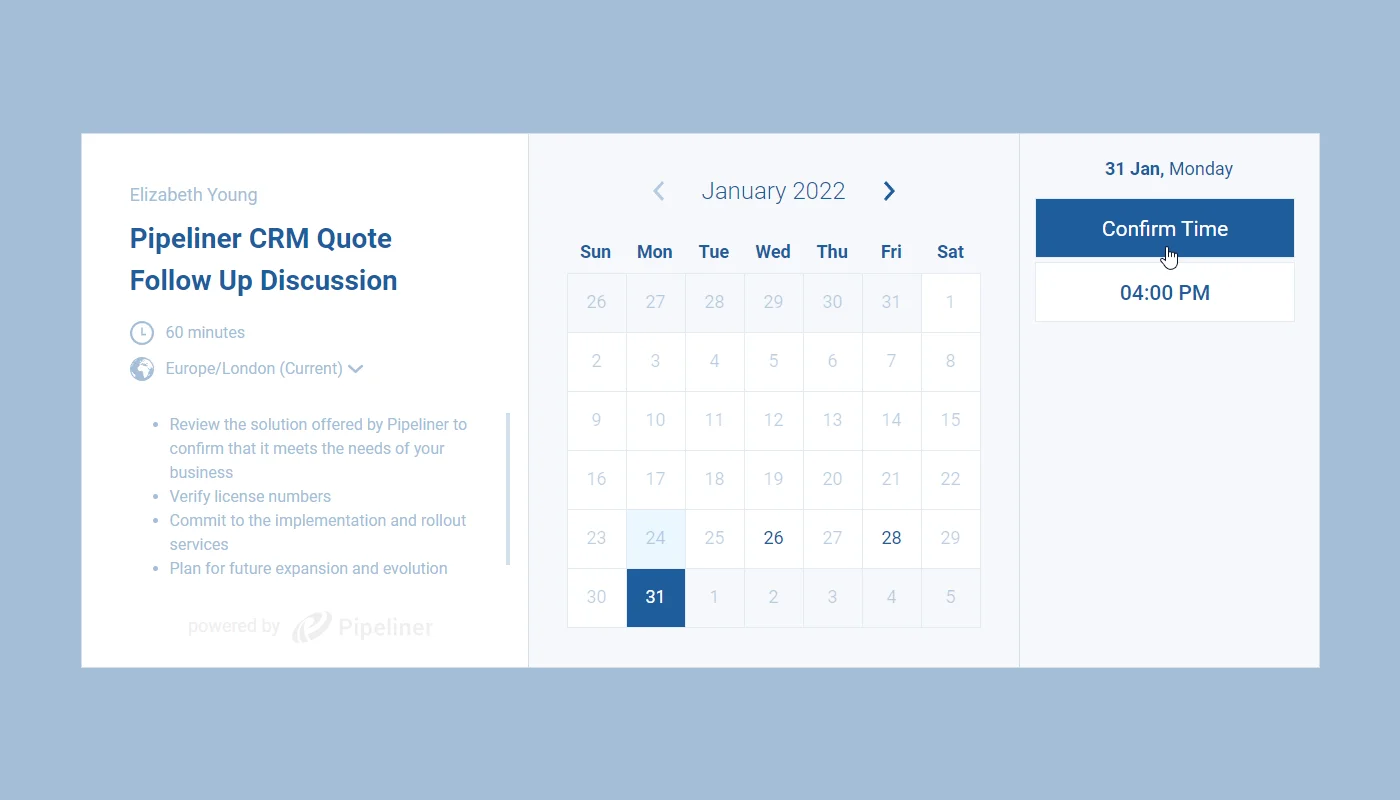
The Appointment Scheduler allows users to schedule meetings without the back-and-forth emails by sharing availability with one, or more, contacts/attendees via a link to an external Booking Page. Attendees can select from the displayed available times based on their preference(s).

All screenshots

7
Documentation#brand-new-appointment-scheduler

02New · Integrations

New Video Calling

New Video Calling

There are two new Automation Hub items that can be enabled to activate Video Calling for Zoom Meetings.

When each user has activated the integration for their own Account in Settings › Apps, a new “Video Calling” widget will be visible on all Appointments in Coevera (NOTE that both will be automatically enabled in the Automation Hub for all customers on all tiers) .

All screenshots

2
Documentation#new-video-calling
03New · Integrations

Outlook Add-in Improvements

In the Outlook Add-in, Admins can add additional fields to the form that displays in the right hand panel when creating new records. Most types of custom field can be enabled for addition to the Outlook Add-in when they’re created and then added to the bottom of the new record panel in the Add-in in a new “Other Fields” section.

The Outlook Add-in now also supports “Recent Records” when searching. Click into the “Search” bar and you’ll be able to easily access records you’ve recently opened when in Coevera itself.

Finally, when you create a record — a new Lead, for example — users can jump directly to that new record in Coevera to work on.

#outlook-add-in-improvements

Various Improvements

Various ImprovementsEmail

Sending emails

Sending emails

When sending emails from inside Coevera, you can now select which email address you want to use (not just primary email address).

#sending-emails
Various ImprovementsPipeline

Working with Products

Working with Products

You can now add additional products to an Opportunity by copying an existing Product rather than selecting “Add New Product” each time.

#working-with-products
Various ImprovementsAdministration

Advanced Permissions

Advanced Permissions

Advanced Permissions allows Administrators to manage access to Profiles, Reports, Dashboards, Email Templates and Form Views. These permission settings are accessed from a new Tab “Common Records” on the “User Role” set up screen.

Access rights“write access” allows the user to create whereas “read only access to records” will prevent the user from creating but will allow them to see defaults and items shared with them. “Allow deleting owned records” lets the user delete what they created.

All screenshots

2
#advanced-permissions
Various Improvements

New access rights

  • Profiles
  • Reports
  • Dashboards
  • Email templates
  • Form Views
Documentation#new-access-rights

Frequently Asked Questions

It's a new tool that lets you share your availability through an external Booking Page link so contacts or attendees can book a meeting at a time that suits them, without back-and-forth email.

One-on-one meetings consider only the appointment owner's availability, while group meetings consider the availability of the owner plus the other Coevera users added as attendees.

It uses the settings on the Availability tab and looks at all appointments already scheduled for you in Coevera; activating calendar integration with O365 or Google keeps external meetings in sync to avoid double booking (recurring appointments are currently supported only for O365).

New Video Calling adds Zoom and Microsoft Teams meeting links directly to appointments once each user activates the integration in Settings › Apps, with both enabled in the Automation Hub for all customers on all tiers.

Advanced Permissions let administrators manage access to Profiles, Reports, Dashboards, Email Templates, and Form Views from a new Common Records tab on the User Role setup screen.

Yes — when sending emails from inside Coevera you can now select which of your email addresses to use, rather than always sending from the primary address.

Put the new scheduler to work

Start a free trial and explore the Appointment Scheduler, Video Calling, and everything else new in Coevera 4.4.0.

Keine Kreditkarte erforderlich · 14 Tage kostenlos testen

groupsTrusted by clients around the globeverified_userISO 27001 CertifiedshieldGDPR CompliantblockData never used to train AI