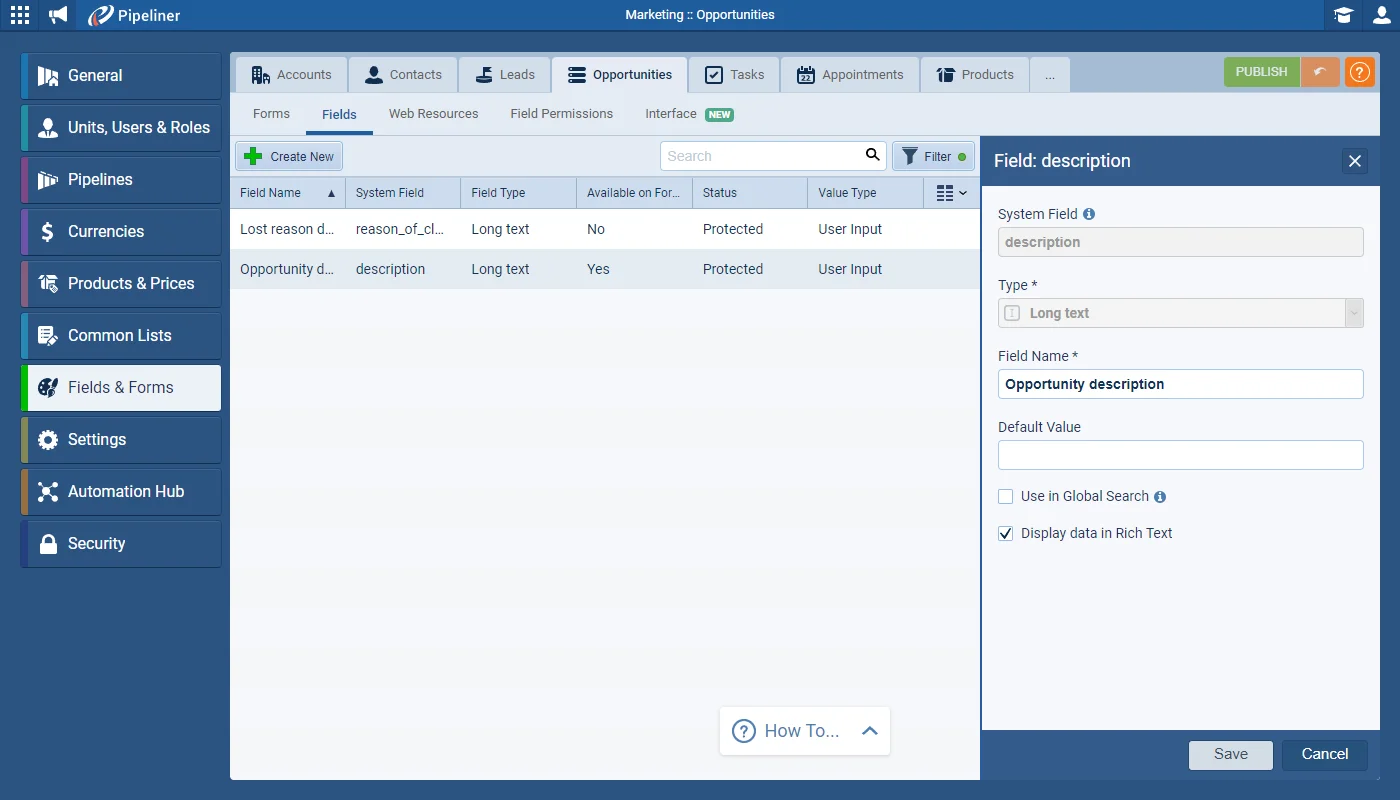
Coevera Admins can enable “Display data in Rich Text” for Long Text fields on any form including Activities. This feature is automatically enabled for Appointments.
All screenshots
2Documentation#brand-new-rich-text-field
Coevera 4.3.0 adds a brand-new Rich Text field for long-text fields, syncs Recurring Appointments from Office 365, and lands a wave of Reports and Charts enhancements — plus Automatizer support for Projects and a batch of admin and product-management improvements.
Two features lead this release. The brand-new Rich Text field lets Coevera Admins enable "Display data in Rich Text" for Long Text fields on any form, including Activities, and it is automatically enabled for Appointments — so users can add bullets, numbered lists, bold, italics, and inserted images to fields such as Description. Recurring Appointments for Office 365 lets users who have activated the Office 365 Calendar integration sync recurring Outlook events into Coevera as a new, read-only "Recurring Appointment" activity type; amendments are made in Outlook, and future appointments in the series are visible in the Calendar view and Agenda panel.
Reports and Charts pick up several upgrades: Shared Dashboards now warn when a Dashboard's sharing options don't match the reports it uses, charts show the Sum and Average on hover, pie charts display a percentage on each slice, and Column and Line charts add a "Show Comparison" option for previous or custom periods. Elsewhere, Automatizer now supports Projects, mass emails reach up to 2000 recipients, List View gains inline search, email personalization greys out fields it can't validate, and the Last Contacted Date appears in the record panel for Accounts and Contacts. Administrators can copy a pipeline's configuration, bulk-update and drill down into Products by Category, and drag and drop Contacts into Buying Center groups.
What we're proud of
Admins can switch on "Display data in Rich Text" for Long Text fields on any form — including Activities, and automatically for Appointments — so users can format descriptions with bullets, numbered lists, bold, italics, and inserted images.
Coevera Admins can enable “Display data in Rich Text” for Long Text fields on any form including Activities. This feature is automatically enabled for Appointments.
For those users who have activated the Office 365 Calendar integration, we now support syncing Recurring Appointments from Outlook to Coevera. These recurring events will be synced into Coevera as a new activity type “Recurring Appointment” which will be read-only.
You can now send to up to 2000 recipients in a single mass email.
Projects are now supported in Automatizer.
You can now search directly within any “List View“. All searchable fields are highlighted with the search icon.
When sending an email, we’ve made it easier to see whether your personalized fields can be correctly personalized from your selected record in Coevera. Any field that is not able to be validated from your current context will display as greyed out. You’ll see this if, for example, your email has been personalized with Opportunity fields but you’re sending it from a Contact and it is not able to correctly pick up the Opportunity information.
The “Last Contacted Date” for an Account or a Contact is now included in the right hand panel when you open the record.
When hovering over a graph, you can now see the Sum (and also Average, if using the Average line). This is a really quick and easy way of viewing the total opportunity value for all owners when using a stacked column, for example.
We’ve added the percentage to each slice of pie in a pie chart so it’s easier to compare values.
When using a Column or Line Chart, you can enable “Show Comparison” and choose to see just the Previous period or select custom options to compare your current results against. This is an easy way to visualise current performance vs previous periods.
When using Groups within the Buying Center, you can drag & drop Contacts into a group.
When creating additional pipelines, Coevera Administrators can now copy the configuration of an existing pipeline rather than start from scratch. Copying will include all steps, documents, sales activities and form fields.
Coevera Administrators now have access to the Bulk update function with the Products tab. This will be extremely useful when moving Products from one Category to another, for example.
Note that it’s not possible to bulk update product images.
From the Categories tab, there’s now an easy drilldown to display all Products assigned to the selected Category or all Products assigned to the selected Category or any sub Categories.
The new Bulk update feature is also available from the drilldown list.
Connect Coevera to your AI assistant and let it do real work across your CRM — always within your permissions, never beyond them.
Start a free trial and explore what's new in Coevera 4.3.0 for yourself.
Keine Kreditkarte erforderlich · 14 Tage kostenlos testen
