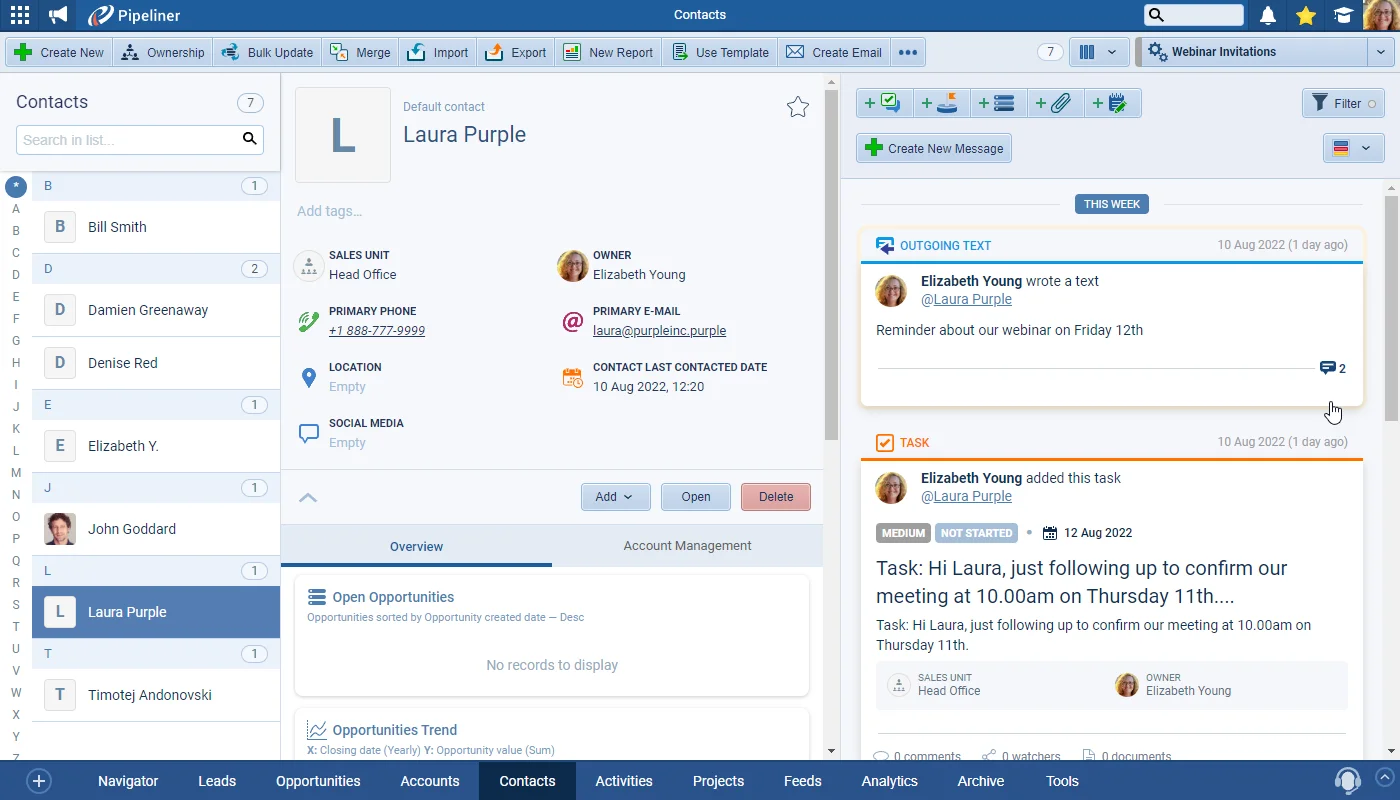
Using the Coevera Calling & Messaging feature, users can initiate a call directly from your Coevera cloud web application using a personal phone number and then log the call as a completed task. They can also send one-off or mass text messages directly from within the web app — using a purchased Coevera VOIP number — making keeping in touch with your company’s customers and prospects even more seamless and efficient. Text conversations will be stored in the Feeds in the app.
New Calling & Text Messaging, Lead Scoring, Automatizer updates and more
Coevera 4.10.0 introduces Calling & Text Messaging directly from the web app, adds a Lead Scoring add-on that prioritises your best Leads, lets Automatizer processes trigger other processes, and brings a batch of Product Management, Key Account Management, and admin enhancements.
- Features
- 3
- Improvements
- 5
- Security
- —
Overview
Two capabilities lead this release. Calling & Text Messaging lets users place calls from the Coevera web app using a personal phone number and log each call as a completed task, and send one-off or mass text messages from a purchased Coevera VOIP number, with text conversations stored in the Feeds. The Lead Scoring add-on lets Business Development users prioritise the best Leads to work on, using pre-defined and custom Scoring Rules built from field values, activities, or emails, with a widget showing each Lead's overall score and its percentile.
Beyond the headline features, Automatizer processes can now trigger other processes to chain scaled-down workflows together, and Product Management gains calculation formulas on the Amount and custom Line Item fields, inline editing and drag-and-drop reordering in the Product Grid, and custom Line Item field imports. Key Account Management adds Relationship and Account Role filtering with inline editing, Record Forms highlight and let you revert changed fields, and admins get a direct link to edit User Roles from the Users list.
- Calling & Text Messaging lets users place calls from the Coevera web app using a personal phone number and log each call as a completed task.
- Users can send one-off or mass text messages from within the web app using a purchased Coevera VOIP number, with text conversations stored in the Feeds.
- VOIP numbers can be assigned to individual users or enabled as Company Phone numbers, with access controlled by User Role.
- Coevera Admins request Calling & Text Messaging from the Admin Module › Automation Hub; Subscription Admins manage Call Credits and VOIP numbers in the customer portal.
- The Lead Scoring add-on lets Business Development users prioritise the best Leads using pre-defined and custom scoring criteria.
- Lead Scoring Rules can be based on field values, activities, or emails, with positive or negative scores and optional points expiration.
- Leads are ranked with a percentage from 0 to 100% and assigned to percentile brackets that default to Cold, Warm, and Hot and can be renamed.
- Lead Scoring is a paid add-on for Starter and Business tier customers and included for new Enterprise and Unlimited customers.
- Automatizer processes can now trigger another process, letting you chain scaled-down processes into a unified workflow.
- Product Management adds calculation formulas on the Amount field and on custom Product Line Item fields.
- The Product Grid supports inline editing, an expansion icon, and drag-and-drop reordering of Product Sections.
- Opportunity imports can now map to custom Product Line Item fields, not just Quantity and Price, and a new Automatizer action updates all Related Product Line Items.
- Key Account Management adds Relationship and Account Role filtering with inline editing of Account Roles and Relationships.
- Record Forms highlight changed fields and add a revert option, and admins can jump straight to editing a User Role from the Users list.

What we're proud of
Calling and texting, built into the app
Calling & Text Messaging lets your team place calls directly from the Coevera web app using a personal phone number and log each one as a completed task. One-off and mass text messages go out from a purchased Coevera VOIP number, with every text conversation stored in the Feeds. Admins request the feature from the Automation Hub and manage Call Credits and VOIP numbers from the customer portal.
Brand New Calling & Text Messaging
Lead Scoring
The “Lead Scoring” add-on allows you to use both pre-defined and custom scoring criteria so that Business Development users can prioritise the best Leads to work on. Coevera Admins can set up “Scoring Rules” based on field values, activities or emails for different types of Lead. The Lead Scoring widget shows both the overall score for each Lead and also how it is tracking against your Lead Scoring rules.
All screenshots
5Automatizer › Triggering process
Coevera has now made it even easier to leverage the power of Automatizer by triggering processes from within other Automatizer processes. No longer is there the need to create a single, complex process, but rather users can now enjoy creating more scaled-down processes and then chain them together into a unified workflow. This makes the creation, management and troubleshooting of complex Automatizer processes much easier.
Various Improvements
Product Management
4.10 includes further improvements as part of our ongoing enhancements for the majority of our customers who are using Products and Product Line Items.
It’s now possible to enable a calculation formula on the system Amount field (so it no longer is fixed as Price x Quantity) and we’ve extended that idea to custom Product Line Item fields too. A great use case here is a Product Line Item custom field “Margin” which you would calculate as the difference between the Cost (which would live at the Product level) and Amount (which lives on the Line Item)!
All screenshots
3Key Account Management
Building and maintaining relationships with the Contacts at your key prospects and customers is an important function for all of your users. To this end, we’ve made it even easier to see and understand the status of those relationships. Along with an overview panel that can be used to filter Contacts based on “Relationship” or “Account Role“, inline editing for Account Roles and Account Relationships is also supported in the “Contact List View” as well as in the sidebar. Users can also access in Automatizer processes and update using “Bulk Update“.
Record Forms
When you make an update to a field on the Detail tab of an existing record, the changed field is highlighted in yellow and we’ve added a useful “revert” option so users can undo the last change that was made to that field. Make sure you hit revert to undo your changes before saving!
Managing User Roles
And for Coevera Admins, we’ve added a link in the “User Role” column in the “Users” list so you can immediately jump to the “Role” and edit it or select the user and choose “Edit Role” from the sidebar.
Frequently Asked Questions
Related releases
See it in your own pipeline
Start a free trial and explore what's new in Coevera 4.10.0 for yourself.
Keine Kreditkarte erforderlich · 14 Tage kostenlos testen
