v6.0.0MajorReleased

Brand New Voyager AI Record Assistant, Automatizer Log Download Controls, Additional Text Field Filters, and other Various Improvements…

Coevera 6.0.0 introduces the Voyager AI Record Assistant — in-context summaries, suggestions, and record-aware chat for Leads, Accounts, Contacts, and Opportunities — alongside Automatizer log download period controls, new begins-with and ends-with text filters, and a batch of Various Improvements.

Voyager AIAutomatizerAdministration
Share
Features
1
Improvements
7
Security
Demnächst verfügbar

Overview

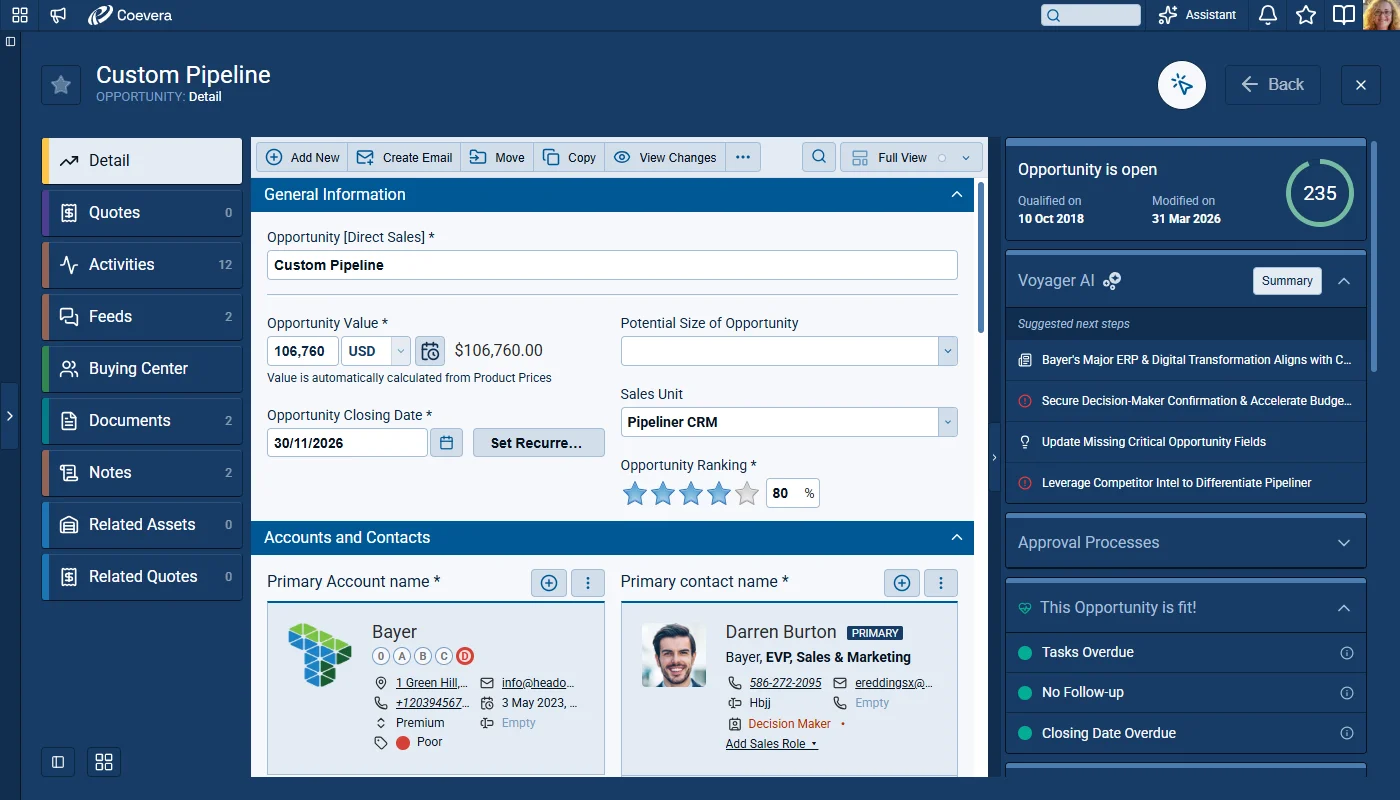
One capability leads this major release. The new Voyager AI Record Assistant adds an in-context assistant to the right-hand panel of every Lead, Account, Contact, and Opportunity record. It combines a comprehensive Record Summary — which users can listen to, copy, download, or turn into an email — with prioritized suggestions that can open tasks, appointments, notes, and emails, plus a record-aware AI Chat with reusable prompt templates and Chat History. Voyager 2 is a credit-based add-on enabled from the Automation Hub.

A set of Various Improvements rounds out the release: new begins-with and ends-with text filter operators, richer WebClipper prefill from LinkedIn, rollup fields for emails and text messages, AI credit-consumption visibility, period controls for Automatizer log downloads, price-list assignment during product creation and import, and online-forms record-identification safeguards.

What's in this release
  • Voyager AI Record Assistant — an in-context assistant in the right-hand panel for Leads, Accounts, Contacts, and Opportunities.
  • Record Summary combines CRM context with external information, with Listen, Copy, Download, and Create an Email actions.
  • Prioritized suggestions can open in AI chat and create tasks, appointments, notes, and emails pre-filled from the suggestion.
  • Record-aware AI Chat that supports both free and suggestion-driven prompts and stays aligned to the record's context.
  • Reusable prompt templates, a Chat home experience with topic starters, and access to previous prompts via Chat History.
  • Voyager 2 is a credit-based chargeable add-on for all Tiers, enabled from the Automation Hub.
  • New begins with and ends with operators for text-based fields, including Auto Number, Email, Phone, URL, Simple Text, and Text Area.
  • WebClipper now pre-fills primary email, primary phone, and — for Accounts — Home Page website from LinkedIn contact info.
  • Rollup fields can now summarize Emails and Text Messages, covering sent messages plus received SMS and WhatsApp.
  • AI responses and summaries show a credit indicator with the exact credits consumed, and a clear message when all AI credits are used.
  • Automatizer and related log downloads can be scoped to a period — Last 3, 7 (default), 14, 30, 60, or 180 days, or All — up to 100k records.
  • Products can be assigned to price lists during creation and CSV import — none, all active, or selected price lists.
  • Online Forms configuration now safeguards record identification, auto-enabling Link Record to prevent conflicting setups.
Voyager AI Record Assistant

What we're proud of

AI guidance, right inside the record

The Voyager AI Record Assistant brings summaries, suggestions, and record-aware chat into the right-hand panel of every Lead, Account, Contact, and Opportunity — so users move from record review to next action without switching screens.

01New · Voyager AI

Voyager AI Record Assistant

Voyager AI Record Assistant

Voyager 2’s AI Record Assistant adds an in-context assistant inside individual CRM records so users and teams can understand situations more quickly, decide next actions with higher confidence, and move directly from insight to execution. The Record Assistant combines guided summaries, actionable suggestions, and record-aware chat in one continuous workflow.

Voyager 2 is a credit-based chargeable add-on for all Tiers.

The Record Assistant is available directly in the right hand panel of the record detail so users can move from record review to AI guidance without switching screens. The tool works for Leads, Accounts, Contacts and Opportunities and is designed to provide an in-depth overview of each type of record, increasing knowledge and reducing preparation time before customer interactions.

All screenshots

10
Documentation#voyager-ai-record-assistant

Various Improvements

As part of our ongoing usability enhancement program, we've updated the following features.

Various ImprovementsPipeline

Filters: Additional Operators for Text Fields

Filters: Additional Operators for Text Fields

Users can now filter text-based fields with two additional operators: begins with and ends with. You'll find these between the is not empty and contains in the filter condition lists. This addition enables precise prefix and suffix filtering scenarios, including structured values such as postal-code patterns.

These new operators apply to text-based custom fields, including Auto Number, Email, Phone, URL, Simple Text, and Text Area. The behavior is also available for supported system and virtual fields, including comments-related fields. Users get consistent filter logic in all areas where these text field types are available.

#filters-additional-operators-for-text-fields
Various ImprovementsIntegrations

WebClipper LinkedIn Contact Info Prefill Improvements

WebClipper LinkedIn Contact Info Prefill Improvements

When a user opens LinkedIn contact information and starts creating a new account or contact from the WebClipper extension, additional contact data is now prefilled.

For Contacts, WebClipper pre-fills Primary email and Primary phone when available from LinkedIn contact information.

For Accounts, WebClipper pre-fills Primary email, Primary phone, and Home Page website. When multiple websites are available, company website is preferred; otherwise, the first available website is used.

This useful enhancement means that users can capture more complete data during create flows without manually retyping values shown only in LinkedIn's contact-info popup and the improved prefill reduces missed details in cases where key fields are hidden until the contact-info panel is opened.

#webclipper-linkedin-contact-info-prefill-improvements
Various ImprovementsAdministration

Rollup Field Expansion for Emails and Text Messages

Rollup Field Expansion for Emails and Text Messages

Rollup fields can now summarize Emails and Text Messages, covering sent messages plus received SMS and WhatsApp.

#rollup-field-expansion-for-emails-and-text-messages
Various ImprovementsVoyager AI

AI Record Widget Credit Visibility and Credit-Limit Messaging

AI Record Widget Credit Visibility and Credit-Limit Messaging

AI responses and summaries now show the exact credits consumed, with a clear message when all AI credits are used.

All screenshots

5
#ai-record-widget-credit-visibility-and-credit-limit-messaging
Various ImprovementsPipeline

Product Creation and Import with Immediate Price List Assignment

Product Creation and Import with Immediate Price List Assignment

When creating a new product, users can define price-list assignment as part of the creation workflow. The setting provides three explicit choices: Don't add to Price Lists, Add to all Active Price Lists, and Add to selected Price Lists.

Choosing Add to selected Price Lists option enables a grouped multi-select experience across categories such as active, scheduled, expired, and inactive price lists. After the product is saved, the system immediately links the product to price lists according to the selected option.

The same price-list assignment setting is available in the first step of a product import from a csv file. The import dialog uses a clear Import Products label and applies selected assignment behavior to all accepted imported records.

#product-creation-and-import-with-immediate-price-list-assignment
Various ImprovementsAdministration

Online Forms Submission Safeguards for Record Identification

Online Forms Submission Safeguards for Record Identification

Form configuration now safeguards record identification, auto-enabling Link Record to prevent conflicting setups.

All screenshots

2
#online-forms-submission-safeguards-for-record-identification

Frequently Asked Questions

It's an in-context AI assistant in the right-hand panel of Lead, Account, Contact, and Opportunity records, combining record summaries, prioritized suggestions, and record-aware chat in one continuous workflow.

Voyager 2 is a credit-based chargeable add-on available for all Tiers, and it is enabled from the Automation Hub.

AI responses and summaries show a credit indicator with a tooltip displaying the exact credits consumed; when all credits are used, a clear message explains the request cannot be processed.

Two new operators — begins with and ends with — are available for text-based fields such as Auto Number, Email, Phone, URL, Simple Text, and Text Area, enabling precise prefix and suffix filtering.

Yes. The download dialog lets you pick a period — Last 3, 7 (default), 14, 30, 60, or 180 days, or All — and exports only activities within it, up to a maximum of 100k records.

Yes. When creating or importing a product you can choose not to add it to any price list, add it to all active price lists, or add it to selected price lists, and the assignment is applied immediately after saving.

See it inside your own records

Start a free trial and explore the Voyager AI Record Assistant and everything new in Coevera 6.0.0.

Keine Kreditkarte erforderlich · 14 Tage kostenlos testen

groupsTrusted by clients around the globeverified_userISO 27001 CertifiedshieldGDPR CompliantblockData never used to train AI