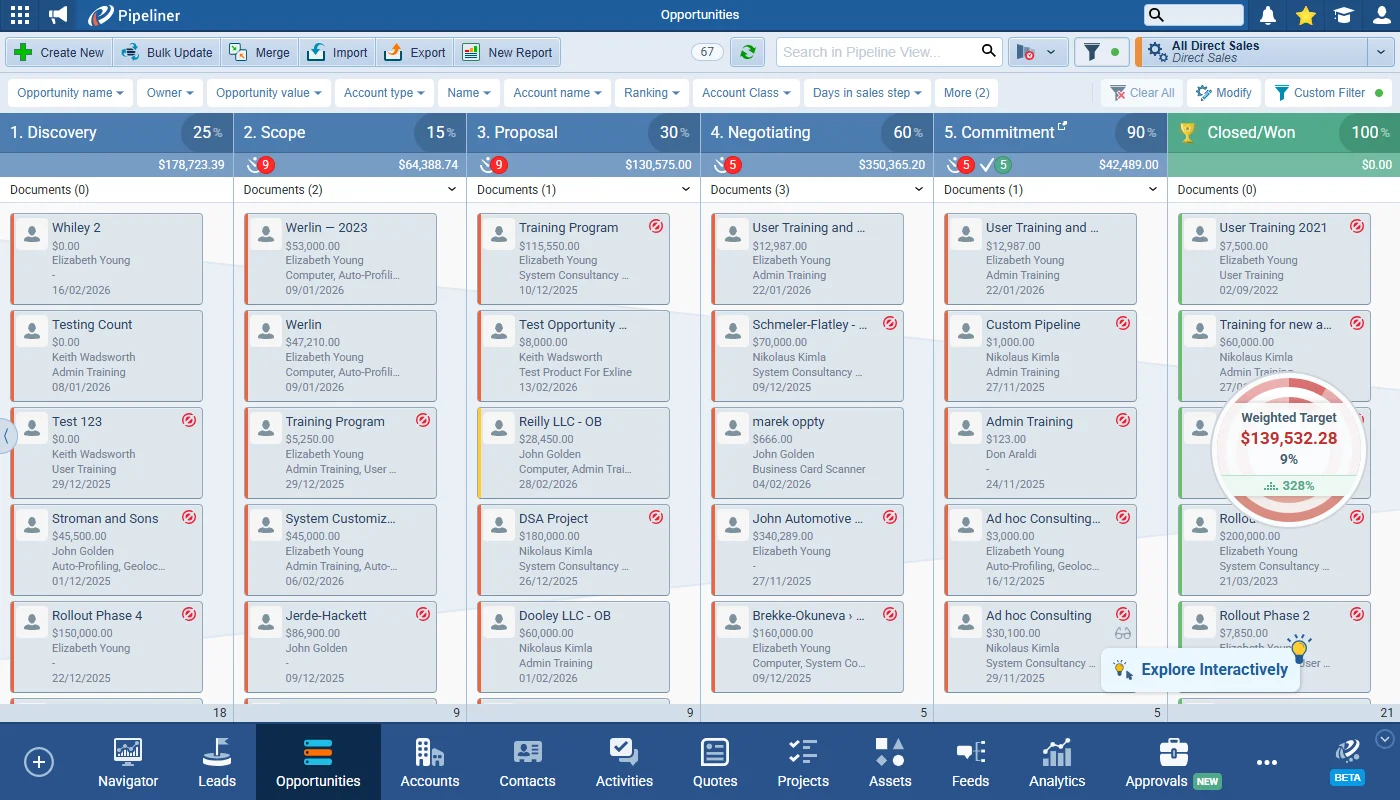
This release introduces the new Quick Filter feature. This makes filtering and segmenting your Coevera data even easier by giving users a customisable toolbar allowing them to set any field for quick filtering right there on screen. The Custom Filter tab still exists in the Power Panel for complex filter criteria and Quick Filters and Custom Filters operate in conjunction with each other.
Brand New Quick Filter, Grid Improvements, and other Various Improvements…
Coevera 5.23.0 introduces Quick Filter, a customisable filtering toolbar that works alongside the Custom Filter across preview screens, reports, and forecasts, brings the same unified filtering to the mobile app, and adds a pair of form and layout refinements.
- Features
- 1
- Improvements
- 3
- Security
- —
Overview
Quick Filter leads this release. A new customisable toolbar lets users set any field for quick filtering right on screen, with fields shown as clickable buttons that can be reordered by drag-and-drop, up to twelve at a time. It operates alongside the renamed Custom Filter — the two are separate tools combined with an AND operator — and appears across preview screens, static profiles, Navigator dashboards, Insights, Forecasts, and Reports, remembering its settings as you switch views. The mobile app gains the same Quick Filter, replacing the previous Presets with a single scrollable page that holds both Quick and Custom filters.
A pair of Various Improvements rounds out the release: the Sales Actions section on the Opportunity Form can now be moved anywhere in the layout, and a new admin toggle lets teams prevent users from customising their record detail layout to keep the interface consistent.
- Quick Filter — a customisable toolbar for setting any field for quick filtering right on the preview screen.
- Quick Filter and the renamed Custom Filter operate as separate tools, combined with the AND operator.
- Up to 12 Quick Filter fields, shown as clickable buttons and reorderable by dragging and dropping.
- Quick Filter appears across preview screens, static profiles, Navigator dashboards, Insights, Forecasts, and Reports.
- New "unselected state" for always-populated system fields such as Ranking and Account Class so they can be used in Quick Filters.
- Coevera Mobile replaces Presets with Quick Filter, placing Quick and Custom filters on one scrollable page.
- Mobile adds collapsible, sticky section headers and a sticky Clear Filter button to clear Quick, Custom, or both in one tap.
- Opportunity Form Sales Actions section is now movable anywhere in the form layout (web app only).
- New admin toggle in Entity Type › Interface › Detail prevents users from customising their record detail layout.

What we're proud of
Filtering that lives on the toolbar
Quick Filter brings segmenting your Coevera data out of the Power Panel and onto a customisable toolbar that follows you across preview screens, reports, forecasts, and the mobile app — while the Custom Filter stays available for more complex criteria.
Quick Filter
Various Improvements
As part of our ongoing usability enhancement program, we’ve updated the following features.
Opportunity Form Sales Actions section is now movable
The Sales Action section within an Opportunity Form can now be moved and placed anywhere within the Form Layout.
When the Sales Actions toggle is ON, the Sales Actions section can be moved like any other section. If the toggle is switched OFF, the Sales Actions section is removed from the form. If the toggle is then switched ON again, the section reappears and its position is reset to the default which is at the end of the form.
The Sales Actions section cannot be deleted, only toggled OFF.
Changes made to the placement of the Sales Actions section only apply in the web app, not in the Mobile app — Sales Actions remain at the bottom of the form on the Mobile app.
Record Detail Layout Amendments Prevention
A new admin toggle in Entity Type › Interface › Detail lets admins stop users from customising their record detail layout for a consistent interface.
All screenshots
2Coevera Mobile
As part of our continuous mobile experience improvements, we’ve updated the following features.
In the Mobile App, the Quick Filter feature enhances existing filtering capabilities by replacing the previous Presets with a unified filtering experience. Users can now configure a Quick Filter (of up to 12 fields) directly on a single screen, alongside using the existing Custom Filter. Both filtering options operate in conjunction, providing greater flexibility and control when refining data views.
All screenshots
5Frequently Asked Questions
See these changes in your own pipeline
Start a free trial and explore what's new for yourself.
Keine Kreditkarte erforderlich · 14 Tage kostenlos testen
