Pipedrive earns its fans by being simple. The visual pipeline is easy to read, deals move with a drag, and a new rep can find their way around in an afternoon. The trouble starts when a B2B team grows past that simplicity. Reps want AI that does real work, not just suggestions. Managers want forecasting and coaching inside the tool. Finance wants one predictable bill, not a stack of add-ons. When those needs pile up, it is worth looking at what else is out there.
The best Pipedrive alternatives for B2B sales teams in 2026 are Coevera, HubSpot Sales Hub, Close, Salesflare, Nutshell, Monday CRM, Zoho CRM, Freshsales, Copper, and Salesforce. Coevera leads for mid-market teams that want Pipedrive's visual simplicity plus agentic AI and built-in coaching. This guide ranks all 10 by who each fits best, so you can shortlist three and run a real pilot.
Best Pipedrive alternatives at a glance
The table compares each tool's pricing model, whether a free plan exists, the kind of AI on offer, and the team each one fits best. Pricing changes often, so we link the model rather than quote numbers; always confirm on the vendor's live pricing page before you sign.
| CRM | Pricing model | Free plan | AI | Best for |
|---|---|---|---|---|
| Coevera | Per user, tiered (see pricing page) | No (14-day trial) | Voyager: free assistive plus agentic add-on | Mid-market B2B wanting visual pipeline plus agentic AI |
| HubSpot Sales Hub | Per seat, four tiers | Yes | Breeze: assistant (all plans) plus agents (paid tiers) | Teams wanting sales and marketing in one suite |
| Close | Per user, four tiers (Solo to Scale) | No | Chloe: AI sales agent | Outbound, high-velocity calling teams |
| Salesflare | Per user, tiered | No | Assistive AI; MCP server lets AI assistants update CRM | Small B2B teams that hate manual data entry |
| Nutshell | Per user, tiered | No | Metered AI outcomes on all tiers plus unlimited assists | Affordable CRM with built-in email marketing |
| Monday CRM | Per seat, 3-seat minimum | No | AI blocks and Sidekick (Standard up), plus AI sales agents | Teams wanting CRM and project work in one OS |
| Zoho CRM | Per user, tiered | Yes (3 users) | Zia: assistant plus agent studio (paid tiers) | Budget-conscious teams in the Zoho ecosystem |
| Freshsales | Per user, tiered | Yes (3 users) | Freddy: AI assistant (Pro tier up) plus paid agent add-on | SMBs wanting built-in phone and ease of use |
| Copper | Per seat, tiered | No | Assistive email AI plus read-only ChatGPT integration | Google Workspace-native, relationship-led teams |
| Salesforce | Per user; free entry tier plus paid suites | Yes (Free Suite, 2 users) | Assistive AI (Free Suite) plus Agentforce agents (usage-based) | Teams planning for future enterprise scale |
How we evaluated these alternatives
We scored each tool on five things that predict whether a B2B sales team will succeed with it, not just sign up for it.
- Pipeline clarity. Can reps read deal status at a glance and move work without forms and reloads?
- AI depth. Is the AI assistive (drafts, summaries), agentic (multi-step actions with approval), or both?
- Total cost of ownership. Sticker price plus admin time, add-ons, and AI that may sit behind a higher tier.
- Time to value. How fast a team can be live and selling, not just provisioned.
- Fit for B2B. Multi-stakeholder deals, account relationships, and forecasting, not just single-contact sales.
Order reflects fit for mid-market B2B teams leaving Pipedrive. The right pick still depends on your sales motion and team size, so use the list to build a shortlist, then test.
1. Coevera: best for mid-market B2B and agentic AI
Coevera keeps the part of Pipedrive that works, a visual drag-and-drop pipeline, and adds the depth growing B2B teams ask for next. You can read deals in multiple pipeline views, including Kanban, list, compact, chart, bubble, and map, and move opportunities between stages without page reloads. Custom stages, fields, and multiple pipelines adapt to how you actually sell.
The bigger difference is AI. Voyager 1 is a set of free assistive tools for tasks like email drafting and opportunity and call summaries. Voyager 2 is a paid add-on, available on any tier, that adds agentic help: call preparation, contextual guidance, report and form creation, and a Super Agent that coordinates across records. Voyager is built on approval-based autonomy. It shows its reasoning, asks before it acts, and learns when a rep corrects it. Plenty of vendors now ship agents, so the question to test is how much control you keep, not whether agents exist.
Two more things separate Coevera from a simple pipeline tool. Coevera says a pipeline can be running in about 30 minutes with no full-time admin, which keeps total cost down because you are not paying for a full-time administrator or per-feature upgrades to reach core functionality. And coaching is built in: Voyager draws on more than 1,600 Sales POP! episodes (evolving into The Collaborator) to deliver sales guidance at the moment a rep needs it.
Where it fits: B2B sales organizations of 15 to 2,500 sellers that want visual simplicity plus agentic AI and coaching in one platform. Watch-outs: there is no permanently free plan, and Voyager 2 is a paid add-on rather than included, so price it into your plan. Current per-user pricing is published on the pricing page, with a 14-day free trial and no credit card required. For a direct comparison, see our Coevera vs Pipedrive head-to-head.
2. HubSpot Sales Hub: best for a sales and marketing bundle
HubSpot is the strongest pick when sales and marketing want to live in the same system. It pairs a clean deal pipeline with marketing, service, and content tools, and its Breeze AI spans an assistant (Breeze Assistant, formerly Copilot) and more autonomous agents for tasks like prospecting. There is a free CRM tier with real (if capped) functionality, which makes it easy to start.
Where it fits: teams that need marketing automation alongside sales and want one vendor for both. Watch-outs: cost climbs fast. Core sales features like sequences and forecasting sit at the Professional tier, which also carries a mandatory one-time onboarding fee; check HubSpot's pricing page for current rates. If you only need sales, you may pay for hubs you will not use.
3. Close: best for outbound calling teams
Close is built for high-velocity inside sales. Calling, SMS, and email sit in one screen, so reps work a list without tool-switching. Its Chloe AI (Close's own pages call her an AI sales agent) calls and qualifies leads, sends emails, enriches contacts, takes notes, books meetings, and updates the CRM, which puts it firmly at the agentic end of the scale.
Where it fits: outbound and SDR-heavy teams that live on the phone. Watch-outs: there is no free plan. Pricing spans four tiers, from a low-cost Solo plan up to Scale (see Close's pricing page), so the value depends on how much you use the built-in communication tools.
4. Salesflare: best for automated B2B data entry
Salesflare's hook is that it logs the busywork for you. It pulls in emails, meetings, and contact details automatically, so reps spend less time updating records. It works well for small B2B teams that live inside Gmail or Outlook, and it includes an AI writing assist and automated email sequences.
Where it fits: small B2B teams that want a low-admin CRM tied to email. Watch-outs: no free plan; current rates are on Salesflare's pricing page. Its built-in AI is assistive, though Salesflare now offers an MCP server that lets AI assistants like ChatGPT create and update CRM records, an early step toward agentic use.
5. Nutshell: best for affordable all-in-one
Nutshell packs a usable CRM and built-in email marketing into a low price, with a reputation for friendly support. It suits teams that want pipeline management and simple outbound campaigns without buying a separate marketing tool. AI features cover call and meeting transcription, logging, and writing help.
Where it fits: cost-aware SMB teams that want CRM plus email marketing in one. Watch-outs: no permanently free plan, and the AI is assistive. Every tier includes a metered monthly allowance of "AI outcomes" (like meeting summaries and email generation) plus unlimited lighter "AI assists" (like transcription); larger allowances come with higher tiers. Current rates are on Nutshell's pricing page.
6. Monday CRM: best for work-OS integration
Monday CRM sits on top of monday.com's flexible work platform, so CRM data and project work share one colorful, customizable workspace. Teams that already run projects in monday can manage deals beside the rest of their operations, with AI blocks that draft emails and help build automations.
Where it fits: teams that want CRM and project workflows in a single OS. Watch-outs: the popular free tier belongs to monday Work Management, not the CRM product; paid CRM plans have a three-seat minimum, and AI features start at the Standard tier, not the entry tier; see monday's CRM pricing page. The core AI is assistive (AI blocks, an AI Sidekick, and an email generator), monday now also offers AI Sales and Lead Agents, and the AI Notetaker is a paid add-on on higher tiers.
7. Zoho CRM: best for budget
Zoho CRM offers a deep feature set for the money, especially if you already use other Zoho apps. Its Zia AI pairs an assistant with an agent studio (Zia Agent Studio) and predictive scoring on paid tiers, and a free plan covers up to three users for the CRM basics; Zia's AI features are not included on the free plan. For teams that want a lot of CRM at a low price, it is hard to beat on value.
Where it fits: budget-conscious teams, and anyone invested in the Zoho ecosystem. Watch-outs: the breadth can feel busy, and getting the most out of it often means configuration time. Current rates are on Zoho's pricing page.
8. Freshsales: best for ease of use
Freshsales, from Freshworks, is known for a clean interface with built-in phone and email and AI lead scoring at a low entry price. Its Freddy AI adds contact scoring, sales-email writing help, and deal insights on the Pro tier and up, and a customer-facing Freddy AI Agent is available as a usage-based add-on on any paid tier. A free tier covers the basics, though Freddy's AI features start on paid plans.
Where it fits: SMBs that want communication tools inside an easy-to-learn CRM. Watch-outs: Freddy's assistant features require the Pro tier or higher, and the Freddy AI Agent is metered per session; check Freshsales' pricing page for current rates.
9. Copper: best for Gmail-native teams
Copper is built to live inside Google Workspace. It works in Gmail and Calendar, so relationship-led teams like agencies and consultancies can manage contacts and deals without leaving their inbox. If your day runs through Google, Copper feels native in a way most CRMs do not.
Where it fits: Google Workspace-first teams that value relationships over high-volume outbound. Watch-outs: AI is assistive (email drafting and rewriting, plus a read-only ChatGPT integration) and there is no free plan. Check Copper's pricing page for current tiers; a lower-cost Starter tier also exists in Copper's help center beyond the three tiers shown on the pricing page.
10. Salesforce: best for future enterprise scale
Salesforce is the enterprise standard, with near-unlimited customization, a vast app ecosystem, and Agentforce for autonomous AI agents. A free entry tier (Free Suite, up to two users) and the paid Starter and Pro Suites give smaller teams an on-ramp to that ecosystem if you expect to scale into complex, multi-team selling; see Salesforce's pricing.
Where it fits: teams that want a clear path to enterprise scale and will invest in setup. Watch-outs: cost and complexity rise quickly above the entry suites, real mid-market rollouts often need admin support, and the most advanced agent capabilities are priced on usage and credits or as per-user agent add-ons. Most mid-market teams adopt only a fraction of what they pay for.
See a visual pipeline with agentic AI built in
Try Coevera free for 14 days. No credit card required.
Start free trial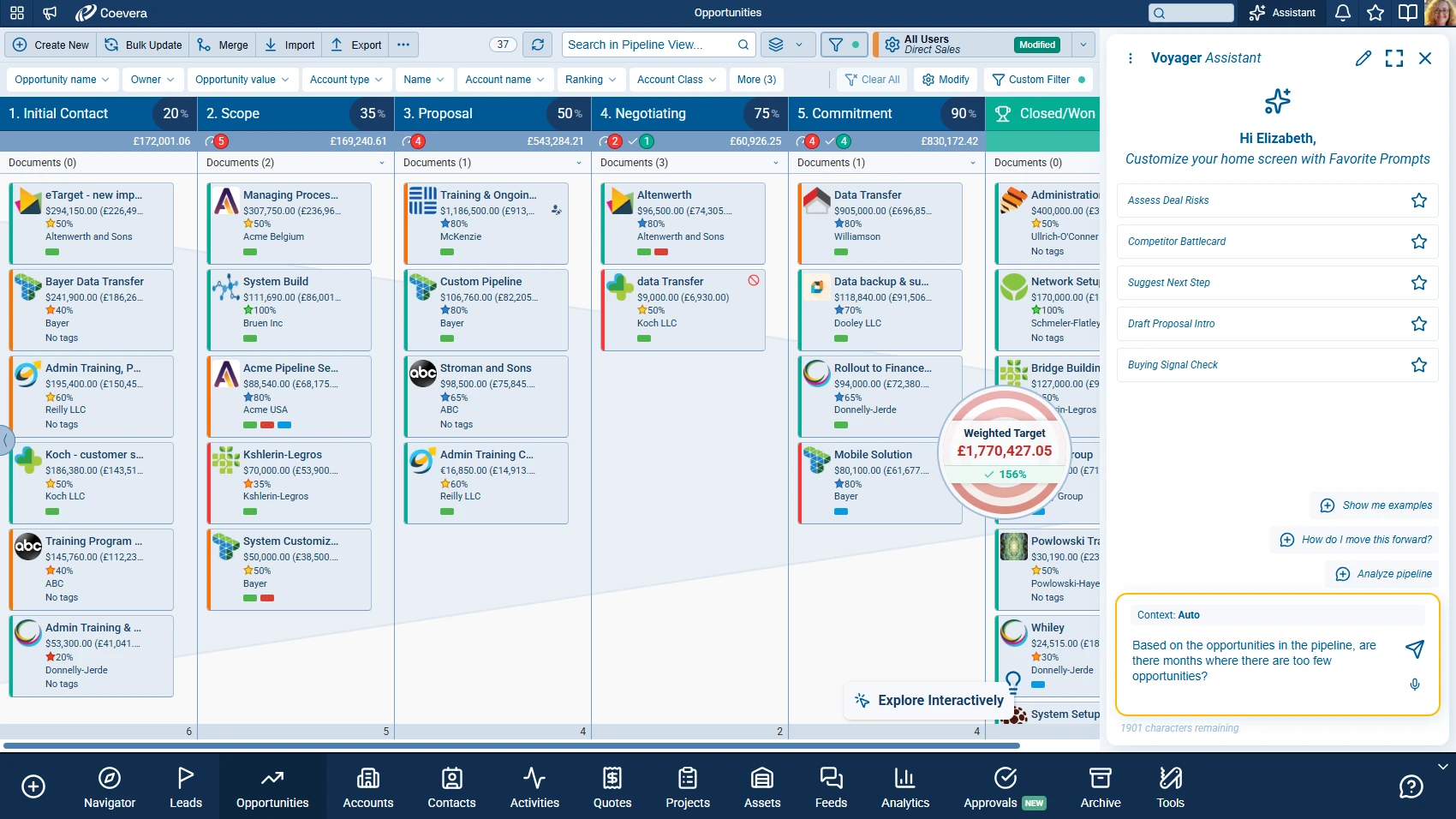
How to migrate from Pipedrive
Switching CRMs sounds risky, but a clean Pipedrive export plus a short pilot keeps it low-stress. The goal is to move data once, prove the new tool with real deals, and only then move the whole team.
- Export your data
Pull deals, contacts, organizations, and activities out of Pipedrive as CSV files. Clean obvious duplicates before you import.
- Rebuild your pipeline
Recreate your stages and required fields in the new CRM so the layout matches how your team already sells.
- Run a 14-day pilot
Move a few active deals and a small group of reps first. Watch whether they update deals without being asked, the best signal of adoption.
- Roll out and measure
Once the pilot group is comfortable, migrate everyone, then track adoption weekly for the first 90 days.
Need a hand planning the move? Talk to the Coevera team through the contact page.