v5.4.0MinorReleased

Brand New History Reports, Calculated Formulas, Card View Customizations & Support for Lookup Fields, Tracking Activities Based on the Location, Various Improvements, and more…

Coevera 5.4.0 expands the Report Engine with History Reports for tracking value changes over time, delivers a major upgrade to calculation fields with a new Formula Editor and Formula field type, and adds card view customization plus location tracking for activities.

ReportsAdministrationIntegrations
Share
Features
4
Improvements
3
Security
Próximamente

Overview

Two features lead this release. History Reports adds a new report type built on historical data, letting users track how field values change over time using comparison dates or historical trends — drawing on fields recorded in the Change Log — and visualise the results as Dashboard charts, including a new Sankey chart type. Calculated Formulas is a major upgrade to calculation fields: a new Formula Editor, a brand-new Formula field type carrying all-new functions, Calculated Report Values, and refreshed editors for web resource fields and calculated validations.

Elsewhere, admins can customise which fields appear on card views, including support for lookup fields, and a new Automation Hub option lets teams track the location where activities take place via the Coevera Mobile app, storing coordinates in a read-only Geolocation field. Smaller improvements let admins invite multiple users at once, expose user and sales unit IDs for the open API, and prompt for follow-up activities when notes are created.

What's in this release
  • History Reports introduces a new "Report with Historical Data" report type in the Report Engine.
  • History Reports track value changes over time using comparison dates or historical trends.
  • Tracked columns draw on fields that are visible in the Change Log via the View Changes button.
  • Users can choose from four pre-defined report structures or build a custom one.
  • Comparison dates can be fixed or dynamic relative to the current date, and more than one can be defined.
  • Historical trends generate a series of comparison dates at a chosen frequency, supporting numeric fields only.
  • History Reports can be visualised as Dashboard charts, including a new Sankey chart type.
  • Calculated Formulas adds a new Formula Editor and a brand-new Formula field type with all-new functions.
  • The new Formula field recalculates in real time and supports rollup, formula, and simple calculated fields across the entity.
  • Calculated Report Values work like Formula fields inside a report and can be used in charts and filters.
  • Web resource fields and calculated validations gain the new editor for easier setup.
  • Admins can customise which fields appear on card views, including for lookup fields.
  • A new Automation Hub "Location Tracking" option stores activity coordinates in a read-only Geolocation field via the Coevera Mobile app.
  • Admins can invite multiple users at once by pasting comma-separated email addresses.
History Reports

What we're proud of

Track how your data changes over time

History Reports add a new report type to the Report Engine, built specifically to track how field values change over a period of time. Users compare values across fixed or dynamic dates, follow historical trends at a chosen frequency, and visualise the flow of time with a new Sankey chart type. Any field recorded in the Change Log can feed a historical report.

01New · Reports

History Reports

History Reports

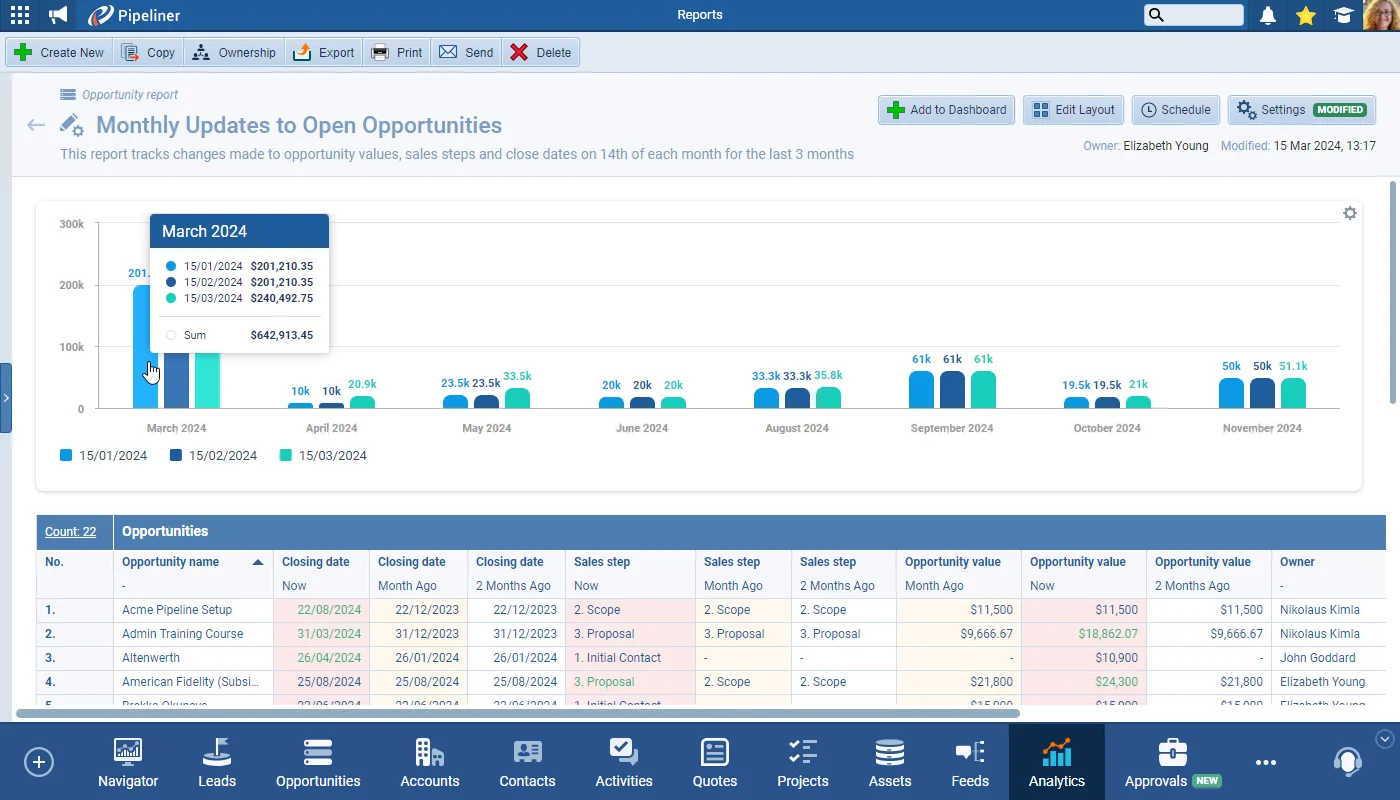
This release includes another major enhancement to our Report Engine. Users can now create a new type of report: “Report with Historical Data“. Creating these reports is fundamentally the same as any other type but they are designed to allow users to track changes made to values over a period of time using date comparisons or historical trends. Fields that are tracked in the “Change Log(accessed via the “View Changes” button on an open record) can also be used to track historical data in a report.

Use this type of report to answer such questions as “What’s the current value of our open opportunities as compared to their value last month › is it increasing or decreasing?

All screenshots

4
Documentation#history-reports
02New · Administration

Calculated Formulas

Calculated Formulas

Customers have been asking for the option to use more advanced calculations in fields in Coevera so that calculations work not only with numbers, but also with text, dates etc, plus the ability to use the same sort of functions that they are familiar with using in Excel, for example.

We’ve taken this feedback on board and, in this major upgrade of calculation fields, we bring a whole new experience of working with calculations and formulas to meet most expectations and needs.

This enhancement is composed of:

All screenshots

8
Documentation#calculated-formulas
03New · Administration

Card View Customizations / Card View Support for Lookup Fields

Card View Customizations / Card View Support for Lookup Fields

Admins can now update the fields that are visible on the card fields such as “Primary Account“, or “Primary Contact“,on “Opportunity” or on “Lookup” fields.

All screenshots

2
Documentation#card-view-customizations-card-view-support-for-lookup-fields
04New · Mobile

Tracking Activities Based on the Location

Tracking Activities Based on the Location

We’ve added a new Automation Hub option “Location Tracking” to give customers who need it the ability to track the location where appointments or other activities take place. Once active in the Automation Hub, users will need to enable the new “Location Tracking” for Activities option in the Mobile App settings and will then will create “Appointments“, or other activities, using the Coevera Mobile app when they are at the meeting location and the coordinates will be stored to the activities in a new, read only “Geolocation” field.

Once all Activities are synced from the Mobile App to the web app, it will be possible to add the Geolocation field to the “Activities List View” and clicking on the “Geolocation” field will show a map view with the location of where that Activity was created.

#tracking-activities-based-on-the-location

Various Improvements

Various ImprovementsAdministration

Inviting Multiple Users

When creating users, admins can now copy and paste multiple email addresses, separated by commas, in order to invite multiple new users at once.

#inviting-multiple-users
Various ImprovementsIntegrations

API › User and Sales Unit IDs

API › User and Sales Unit IDs

It’s easier for Developers working with our open API to access the ID for users and sales units. Coevera Admin Users can now add “ID” as a visible column for sales units and for users in the Admin Module for ease of access.

#api-user-and-sales-unit-ids
Various ImprovementsPipeline

Notes › Follow Up Activities

Notes › Follow Up Activities

When “Notes” are created, users are now prompted to create follow up activities.

#notes-follow-up-activities

Frequently Asked Questions

History Reports are a new report type in the Report Engine that track how field values change over time. They use comparison dates or historical trends and draw on fields recorded in the Change Log.

A comparison date represents a single day in a record's history — fixed or relative to the current date — and you can define more than one. Historical trends generate a series of dates at a chosen frequency, such as quarterly over the last year, and support numeric fields only.

Comparison-date reports support Scorecard, Column, Bar, and the new Sankey chart type, while historical-trend reports support Line, Column, and Bar charts.

This release brings a major upgrade to calculation fields: a new Formula Editor, a brand-new Formula field type with all-new functions, Calculated Report Values, and updated editors for web resource fields and calculated validations. Existing calculated fields remain fully compatible and need no changes.

The Formula field is a virtual field that recalculates in real time and supports every field in the entity, including rollup and formula fields. Because its value isn't stored, it isn't recorded in the change log and can't trigger Automatizer, unlike simple calculations.

Once the Location Tracking option is enabled in the Automation Hub and in the Mobile App settings, activities created in the Coevera Mobile app store their coordinates in a read-only Geolocation field, which can be added to the Activities List View and opened as a map.

See it in your own pipeline

Start a free trial and see what History Reports, Calculated Formulas, and the rest of Coevera 5.4.0 can do with your own data.

No se requiere tarjeta de crédito · Prueba gratuita de 14 días

groupsTrusted by clients around the globeverified_userISO 27001 CertifiedshieldGDPR CompliantblockData never used to train AI
