v5.3.0MinorReleased

New & Enhanced Summary Value in Reports, Primary Record in Lookup Fields, brand-new Spanish localisation, API improvements, SSO support for Azure AD, Various Improvements, and more…

Coevera 5.3.0 lets users summarise related data on the fly with Summary Value fields in Reports, adds a Primary record option to Lookup fields, introduces Spanish as an application language, and brings SSO support for Azure AD (Microsoft Entra ID).

ReportsSecurityIntegrations
Share
Features
5
Improvements
8
Security
1
Próximamente

Overview

The lead of 5.3.0 is a set of data and reporting enhancements. A new Summary Value field can be created directly within a report to aggregate related data on the fly — summing open opportunities for an account or counting activities linked to won opportunities — without an admin first creating a Rollup field and placing it on every record's form. Lookup fields can now designate a Primary (main) record, extending how those relationships work in Filters, Personalization, Document Templates, Automatizer, and when sending emails.

Spanish joins the web application as a selectable language, with matching Translation markers configurable in the Admin Module. On the platform side, SSO support arrives for Azure AD (Microsoft Entra ID), and the API gains webhooks for Custom Entities and Product Catalog products alongside new methods for custom lookup fields. Usability improvements span Editor access to shared Reports, Email Templates and form views, easier email recipient selection, a Replace action for product line items, a recently-viewed home screen for Reports, new Record Detail and Feeds actions, Lead import enhancements, Opportunity activity-date fields, and HubSpot synchronization filters.

What's in this release
  • Summary Value fields can be created directly within a report to summarise related data on the fly, without an admin building a Rollup field.
  • A Summary Value field can sum all open opportunities for an account or count activities linked to won opportunities, and supports custom entities.
  • Summary Value fields use the same aggregations as Rollup fields.
  • Lookup fields can now have a Primary (main) record, set when the field is created or by enabling it on an existing field — an irreversible change.
  • The Primary record can be changed manually with Set as Primary, and is reassigned automatically when the current primary record is removed.
  • Primary relationships are accessible in Filters, Reports, Personalization markers, Automatizer processes, Email Sequences, and when sending emails.
  • Spanish is now available as a main application language, selectable from the Language option in User Account settings.
  • Admins can define new Spanish Translation markers from the Translations tab in the Admin Module.
  • The API now supports webhooks for Custom Entities and for Products inside the Product Catalog, plus new methods for custom lookup fields.
  • SSO support is added for Azure AD (Microsoft Entra ID), enabling seamless single sign-on for Coevera users.
  • Owners of Reports, Email Templates, and Multiple Form Views can grant Editor access to other users or sales units.
  • Product line items gain a Replace action that swaps a product while preserving the line item information already entered.
  • With no report selected, Reports show a home page of the last 10 recently opened reports and dashboards, plus favourites.
  • The HubSpot integration adds synchronization filters to control which data syncs in each direction.
Summary Value in Reports

What we're proud of

Summarise related data on the fly

Summary Value fields let users aggregate related data directly inside a report — summing every open opportunity for an account, or counting the activities on won opportunities — without waiting for an admin to build a Rollup field and add it to each record's form. Custom entities are supported, and Summary Value fields use the same aggregations as Rollup fields.

01New · Reports

Summary Value in Reports

Summary Value in Reports

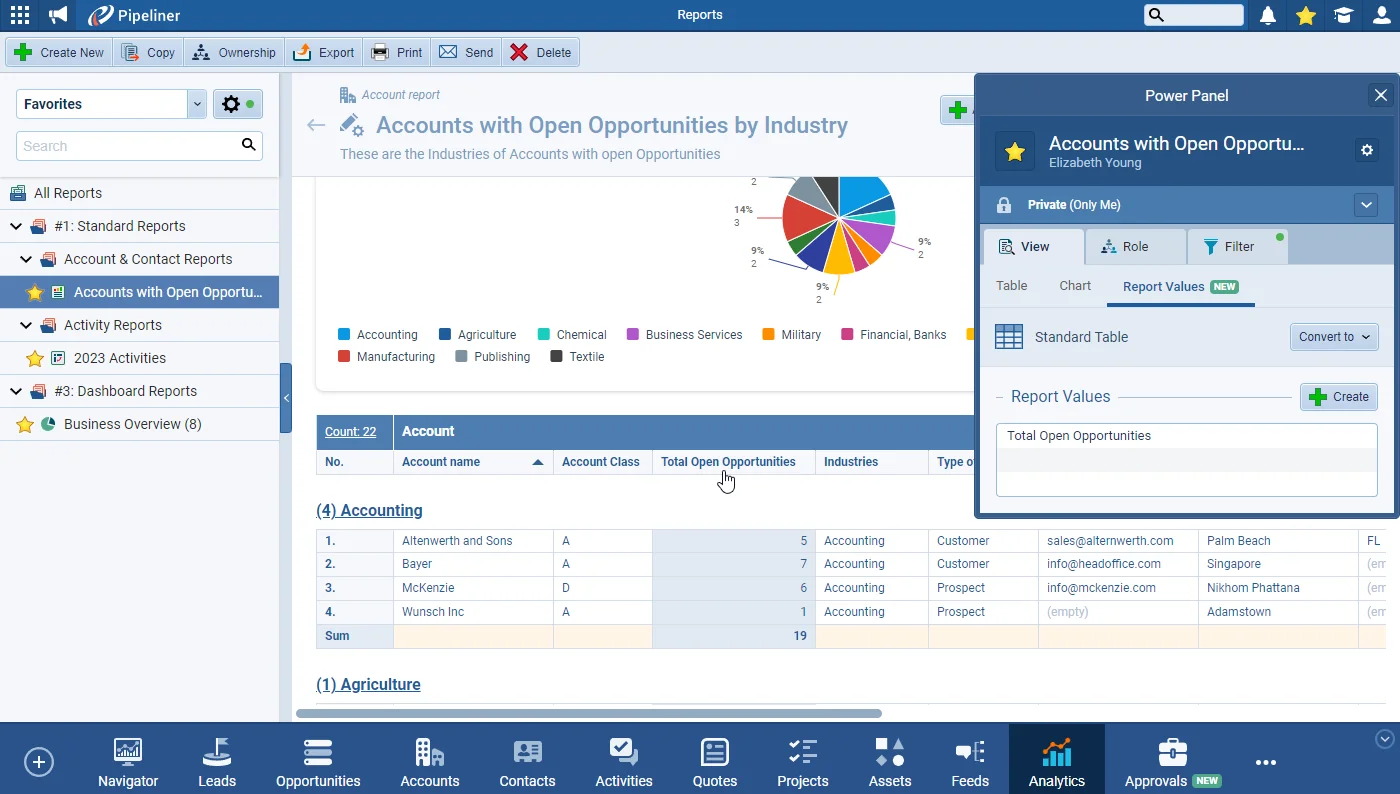
In the latest of our ongoing Reports enhancements, users can now summarise related data “on the fly” by creating a “Summary Value” field directly within a report rather than needing an Admin to create a “Rollup” field and place it on the Form for every record.

A “Summary Value” field could be used to sum all “Open Opportunities” for an “Account(as shown below) or count the number of activities linked to “Won Opportunities“.

Documentation#summary-value-in-reports

02New · Administration

Primary Record in Lookup Fields

Primary Record in Lookup Fields

Lookup” fields allow you to create custom relationships between different types of record. To further extend the usefulness of these relationships, we’ve added the option to create “Lookup” fields (or update existing fields) to have a “Primary(or main) record. The aim of this change is to offer even more possibilities when using “Filtering“, “Personalization“, “Document Templates“, “Automatizer“, or “Sending Emails“.

All screenshots

4
Documentation#primary-record-in-lookup-fields
03New · Administration

Spanish in Application

Spanish in Application

Spanish has been added as a main language for the web application. Users can select “Spanish” from the “Language” option in their “User Account” settings.

All screenshots

2
#spanish-in-application
04New · Integrations

API improvements

05New · Security

SSO support for Azure AD (Microsoft Entra ID)

Companies that use Azure Active directory (Microsoft Entra ID) for managing their employees can connect this system with Coevera to provide a seamless single sign-on option for their Coevera users.

As part of our ongoing usability enhancement program, we’ve updated the following features.

#sso-support-for-azure-ad-microsoft-entra-id

Various Improvements

Various ImprovementsAdministration

Editors now supported in Common records (Reports, Email Templates, Multiple form views)

Editors now supported in Common records (Reports, Email Templates, Multiple form views)

Owners of “Reports“, “Email Templates” & “Multiple Form Views” can now grant “Editor” access to other users/sales units. Editors have the option to modify a common record and save the changes. Editors can’t delete a record or change ownership of the record, only the “Owner(creator).

#editors-now-supported-in-common-records-reports-email-templates-multiple-form-views
Various ImprovementsEmail

Easier selection of recipients when creating an Email

We’ve added sections to the sidebar when adding recipients to an Email to make it easier to find the right recipient. Users can now search within “Accounts“, “Contacts” or “Users“.

#easier-selection-of-recipients-when-creating-an-email
Various ImprovementsPipeline

Product Line items

Product Line items

Replace action — we’ve added a “Replace” action to allow users to replace a selected Product without losing any additional line item information that they have entered. When using “Replace“, only the “Price(if using a Price List) will be updated for the newly selected product.

Section header visual updates — the color of “Sections” in the “Product” line item grid has been updated so it stands out better.

#product-line-items
Various ImprovementsPipeline

New actions in Record Detail & Feeds tab

New actions in Record Detail & Feeds tab

Additional options are now available directly from the “Record Detail” and “Feeds” tab. “Create Email” as well as additional selections under the “Create New” button have been added to improve useability.

#new-actions-in-record-detail-feeds-tab
Various ImprovementsAdministration

Imports

Leads can be imported to a specific process and step, Lost Leads can carry a Lost Reason and Description, and fields set to No Access or Read-only are excluded from the Import Mapping window.

#imports
Various ImprovementsReports

Reports

Reports

With no report or dashboard selected, a home page surfaces the last 10 recently opened reports and dashboards or favourites, with recent reports also available from the search bar.

All screenshots

2
#reports
Various ImprovementsPipeline

Opportunities

In the “Opportunity Quick View“, there were previously 2 date fields previously only visible when hovering over an Opportunity. These 2 fields — “Upcoming Activity” and “Last Activity” — have been added as regular fields which means they are available for use in “Filters“, “Reports” and the “Opportunity List View“.

#opportunities
Various ImprovementsIntegrations

Hubspot integration › Synchronization Filters

Hubspot integration › Synchronization Filters

We’ve added an option to allow users to filter the data they want to synchronize from “Coevera” to “Hubspot” and vice versa. Depending on the type of sync routine (unidirectional or bidirectional), these filters can be applied on either side.

#hubspot-integration-synchronization-filters

Frequently Asked Questions

It lets users summarise related data directly within a report — for example, summing all open opportunities for an account or counting activities linked to won opportunities — without an admin creating a Rollup field and placing it on every record's form. Custom entities are supported.

Lookup fields can be given a Primary (main) record, set when the field is created or by enabling it on an existing field. The primary relationship can then be used in Filters, Reports, Personalization, Document Templates, Automatizer, Email Sequences, and when sending emails.

Yes, but the change is irreversible. When enabling it, you choose which existing record becomes the current Primary; by default the first record added is treated as the Primary, and it can be changed later with Set as Primary.

Yes. Spanish has been added as a main language for the web application and can be selected from the Language option in User Account settings. Admins can also define new Spanish Translation markers from the Translations tab in the Admin Module.

Yes. Companies that use Azure Active Directory (Microsoft Entra ID) can connect it to Coevera to provide seamless single sign-on for their Coevera users.

Webhooks are now supported for Custom Entities and for Products inside the Product Catalog, and developers can use new methods to work with custom lookup fields.

See 5.3.0 in your own pipeline

Start a free trial and explore what's new in Coevera 5.3.0 for yourself — from Summary Value reports to Azure AD single sign-on.

No se requiere tarjeta de crédito · Prueba gratuita de 14 días

groupsTrusted by clients around the globeverified_userISO 27001 CertifiedshieldGDPR CompliantblockData never used to train AI