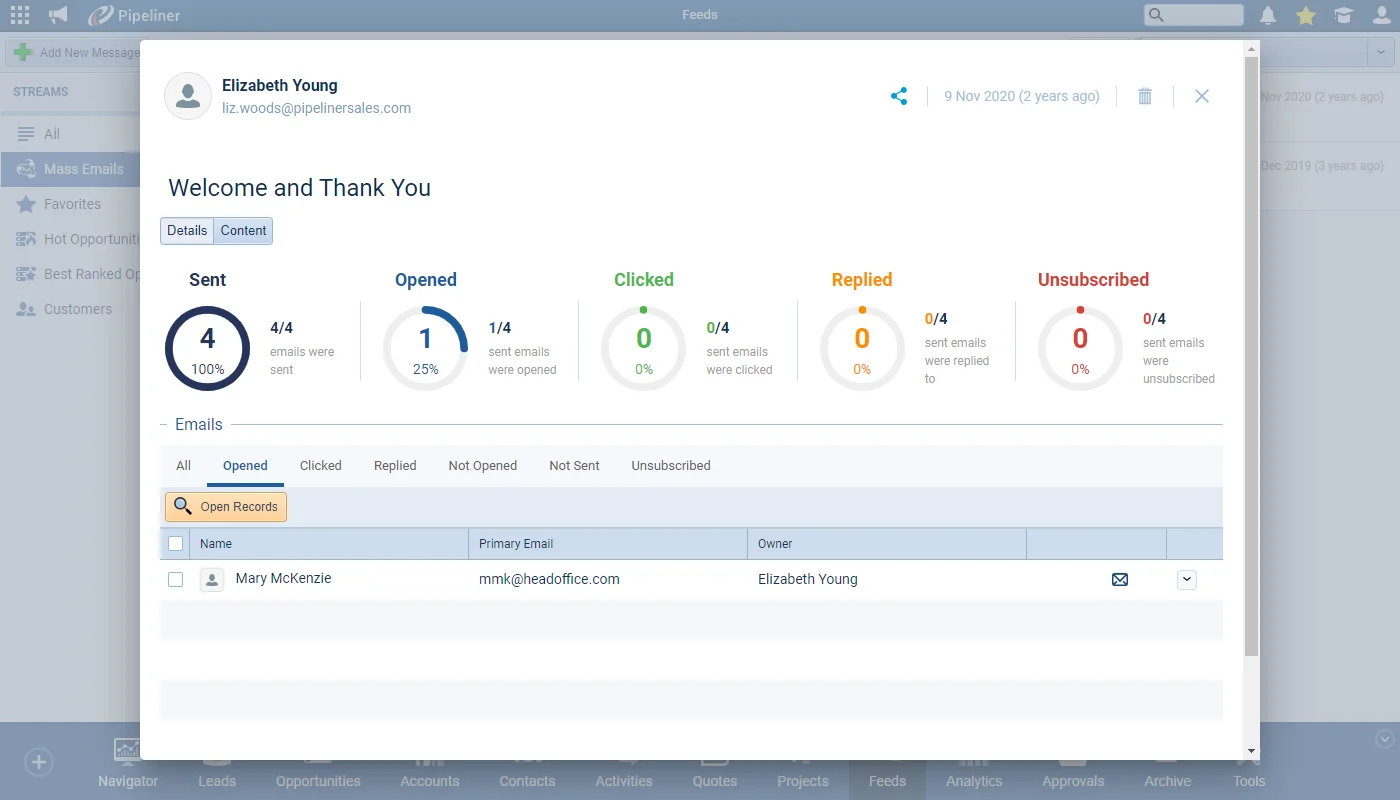
We’ve added a drilldown option to the Mass Email Statistics report tabs. You can now use “Drilldown” to open a list of those recipients who have opened, clicked or unsubscribed from a Mass Email. From the list, you can select the columns to view as well as export, bulk update, tag or trigger an Automatizer process.
Brand New Voyager AI Email Assistant, Mass Email Recipients and Personalization Enhancement, Additional Activity Notification Options, Document Notifications and more
Coevera 4.17.0 introduces role-based permissions for Account and Contact Types, adds a Drilldown to Mass Email Statistics reports, and improves email personalization, activity and document notifications, and Opportunity and Quote fields.
- Features
- —
- Improvements
- 5
- Security
- 1
Overview
This release leads with role-based access control for Account and Contact Types. For customers using multiple Account or Contact types, admins can now grant a User Role access to only specific Account and Contact Types. Alongside it, the Mass Email Statistics report gains a Drilldown option that opens the list of recipients who opened, clicked, or unsubscribed from a Mass Email — from which you can choose columns and then export, bulk update, tag, or trigger an Automatizer process.
Email personalization is clearer too: every personalization field's status is shown, so a fully personalized email can be sent without a prompt while missing values are flagged to fix first. Activity notifications expand to cover changes in Ownership and Status, Invitations, and Comments across both In-App and Email, a new Document Notification links straight to documents added to records you own or watch, and two new fields — Product Price List and Product Currency — become available for Opportunities and Quotes in List Views, Reports, Filters, Exports, and Document Templates.
- Admins can grant a User Role access to only specific Account and Contact Types, for customers using multiple Account or Contact types.
- The Mass Email Statistics report tabs gain a Drilldown option that opens the list of recipients who opened, clicked, or unsubscribed from a Mass Email.
- From the recipient drilldown you can choose which columns to view and then export, bulk update, tag, or trigger an Automatizer process.
- Email personalization now displays the status of all personalization fields within an email.
- A fully personalized email can be sent immediately without a prompt, while missing personalization values are flagged for the user to fix before sending.
- Users can change which record is used to personalize an email.
- In-App and Email Notifications can now be triggered when an Activity is scheduled for a user or updated by another user.
- Activity notifications can be triggered by a change of Ownership or Status, an Invitation, or a new Comment on an Activity the user owns or is watching.
- A new Document Notification, with a direct link, alerts users when a document is linked to a record they own or are watching.
- Two new fields — Product Price List and Product Currency — are now available and can be used in List Views, Reports, Filters, Exports, and Document Templates.

What we're proud of
Access control down to Account and Contact Type
For customers using multiple Account or Contact types, admins can now grant a User Role access to only specific Account and Contact Types, tightening who can see and work with each type.
Various Improvements
Working with Mass Email Recipients
Email Personalization Enhancement
We’ve made some additional improvements to display the status of all personalization fields within any email. As well as being able to change which record to use to personalize an email, when an email is fully personalized, the user sees that all values are valid and the email can be immediately sent without a prompt whereas, when a record is missing a field value for personalization, the user can immediately see the problem field(s) and and will also get a prompt to fix before sending.
Notifications
In-App and Email Notifications can now be triggered by Activity changes — ownership, status, invitations, or comments — and a new Document Notification links directly to documents added to records you own or watch.
Opportunity and Quote › New Fields
Two new fields — “Product Price List” and “Product Currency” — are now available and can be used in List Views, Reports, Filters, Exports and Document Templates.
Administration / Backend
For customers using the multiple Account or Contact types, Admins can now add access to only specific Accounts & Contact Types by User Role.
Frequently Asked Questions
Related releases
- v6.4.0 · Aug 27, 2026
- Emails Preview Screen with Drafts and Scheduled Conversations
- Voyager AI Assistant Improvements
- Modified By on All Entities
- v6.3.0 · Jul 1, 2026
- Brand New Emails Preview Screen
- Voyager AI Relationship Charts — Buying Center
- v6.2.0 · May 28, 2026
- Brand New Voyager AI Relationship Charts
- AI Smart Field Updates
See it in your own pipeline
Start a free trial and explore what's new in Coevera 4.17.0 for yourself.
No se requiere tarjeta de crédito · Prueba gratuita de 14 días
