v4.16.0MinorReleased

Brand New Approval Processes, Form Quick Jump and Search, Links in Cards Reports, Grids and more

Coevera 4.16.0 introduces brand-new Approval Processes for Accounts, Contacts, Leads, Opportunities, and Quotes, alongside usability enhancements including Form Quick Jump and Search, links that open records in a new tab, step selection when creating records, and thousand separators on numeric fields.

AutomatizerReportsPipeline
Share
Features
1
Improvements
4
Security
Próximamente

Overview

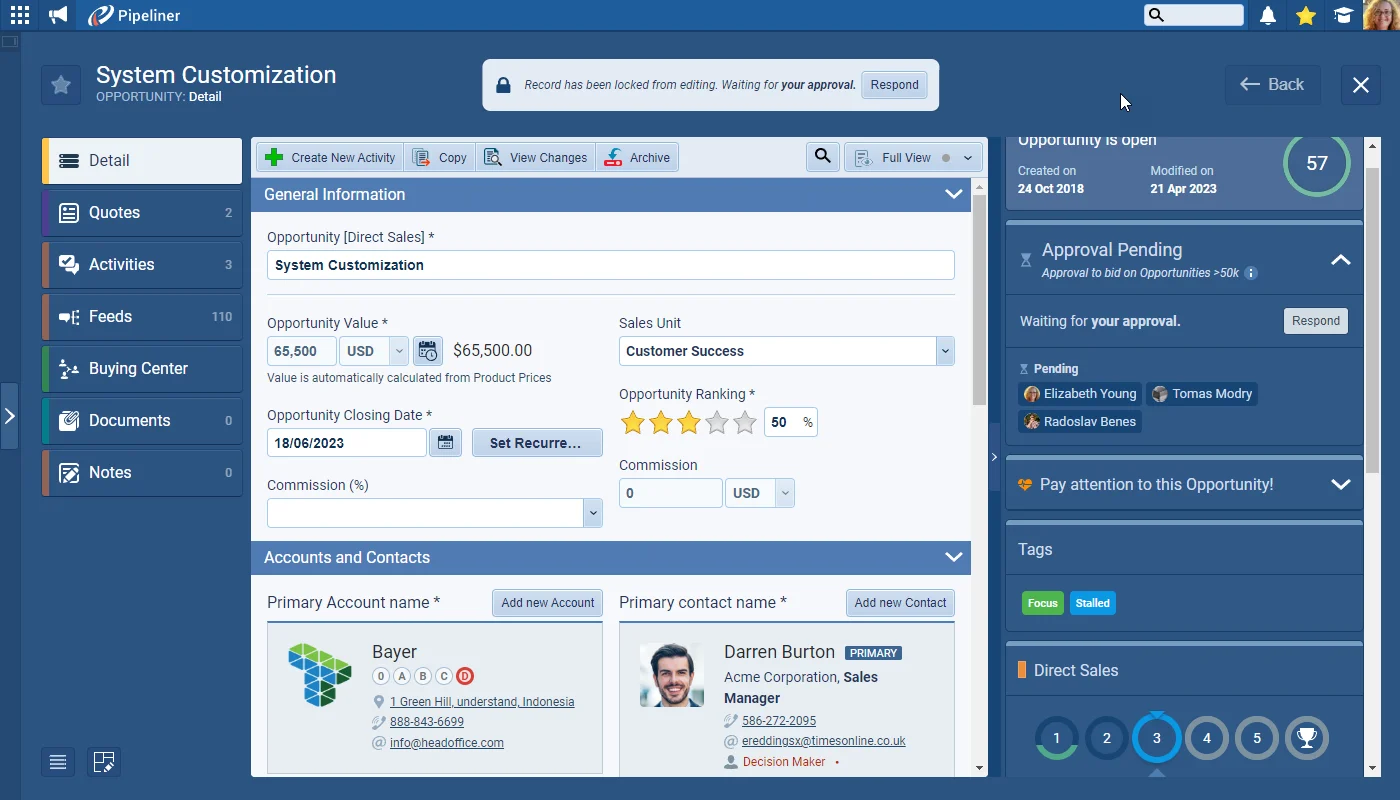
Approval Processes lead this release. When a decision needs sign-off — pursuing an Opportunity, upgrading an Account's credit status, or adding a Contact to a list — you can now route it through an Approval Process. Processes are created by individuals based on their User Role and can be applied to Accounts, Contacts, Leads, Opportunities, and Quotes. When setting one up, you choose which colleagues approve or reject records, a timescale, and an automatic fallback if that timescale is exceeded. Approvers receive both email and in-app notifications, and can review everything requiring their input — or pending for records they own — in a new Approvals menu.

Much like Automatizer, approving or rejecting a record can trigger multiple Actions, and options let you lock records while approval is pending or tie approvals to your Lead, Opportunity, or Quote process so an unapproved Opportunity cannot be Won. Beyond approvals, a batch of usability enhancements lands: Form Quick Jump and Search jumps to any field or section (Ctrl+Shift+F), Ctrl or Command plus click opens records in a new tab from cards, linked items, and quick record previews, a new option lets you select the step when creating Leads, Opportunities, or Quotes, and Float and Integer fields now display a thousand separator.

What's in this release
  • Approval Processes can be applied to Accounts, Contacts, Leads, Opportunities, and Quotes.
  • Approvals are created by individuals based on their User Role.
  • Each process defines who approves or rejects records, a timescale, and an automatic fallback if that timescale is exceeded.
  • Approvers receive both email and in-app notifications.
  • A new Approvals menu shows approvals requiring your input or pending for records you own.
  • Approving or rejecting a record can trigger multiple Actions, much like Automatizer.
  • Records can be locked while approval is pending, and approvals can be tied to the Lead, Opportunity, or Quote process so an unapproved Opportunity cannot be Won.
  • Form Quick Jump and Search jumps to any field or section, opened with Ctrl+Shift+F on both Mac and PC.
  • Ctrl or Command plus click opens a record in a new tab from cards, linked items, and quick record previews.
  • When creating Leads, Opportunities, or Quotes, you can select the step the record is created in.
  • Float and Integer fields now display values with a thousand separator.
Brand New Approval Processes

What we're proud of

Approval Processes, built in

Approval Processes let you require sign-off across Accounts, Contacts, Leads, Opportunities, and Quotes — with chosen approvers, a timescale, an automatic fallback, and Actions triggered on approving or rejecting — so, for example, an unapproved Opportunity cannot be marked Won.

01New · Pipeline

Brand New Approval Processes

Brand New Approval Processes

There are so many different occasions when Approval is required from different areas of a business to determine whether it is viable to pursue an Opportunity, to decide if the credit status of an Account should be upgraded, or even whether to add a Contact to a Christmas Gift list!

It’s for these many and varied use cases that we’ve created Approval Processes. Approvals can be created by individuals based on their User Role and can be applied to Accounts, Contacts, Leads, Opportunities, and Quotes.

All screenshots

5
Documentation#brand-new-approval-processes

Various Improvements

Various ImprovementsPipeline

Creating Leads, Opportunities or Quotes — Select Step

Creating Leads, Opportunities or Quotes — Select Step

When creating new records for Leads, Opportunities, Quotes, users have a new option to select the step in which the record will be created.

#creating-leads-opportunities-or-quotes-select-step
Various ImprovementsPipeline

Thousand Separator

Thousand Separator

When using “Float” or “Integer” fields, values will now include the thousand separator.

#thousand-separator

Frequently Asked Questions

Approval Processes can be applied to Accounts, Contacts, Leads, Opportunities, and Quotes, and are created by individuals based on their User Role.

Approvers receive both email and in-app notifications, and can view all approvals requiring their input — or pending for records they own — in the new Approvals menu.

When setting up the process, you define a timescale and an automatic fallback that applies if that timescale is exceeded.

Yes. Much like in Automatizer, you can create multiple Actions triggered by approving or rejecting a record, lock records while approval is pending, and tie approvals to your Lead, Opportunity, or Quote process so an unapproved Opportunity cannot be Won.

Click the Search icon next to Form Views, or press Ctrl+Shift+F on Mac or PC, then type a field name or choose a section to jump straight to it. It is available for all record forms, from the toolbar in the record detail or create form dialog.

Press Ctrl (or Command on Mac) and click a record card link. This works throughout the application in cards, linked items, and quick record previews for all record types, or you can click a name or link to open the record in your current session.

See it in your own pipeline

Start a free trial and explore what's new in Coevera 4.16.0 for yourself.

No se requiere tarjeta de crédito · Prueba gratuita de 14 días

groupsTrusted by clients around the globeverified_userISO 27001 CertifiedshieldGDPR CompliantblockData never used to train AI