v1.9.0MinorReleased

Contact Cards Enhancements, Preview/Extract, Navigator, Profiles, Dialog windows Improvements and more

Coevera 1.9.0 introduces Charts for Reports, adds one-click Gmail activation with faster Google and MS Exchange sync, switchable Activities views, and a wide batch of usability improvements led by Notes 2.0.

AccountsReportsAdministration
Share
Features
4
Improvements
11
Security
Próximamente

Overview

Reports Improvements leads the release: reports can now be rendered as a Line chart or Column chart from the Power Panel, and the report sidebar is adjustable and collapsible. In the Automation Hub, Gmail can be activated through a Google OAuth screen instead of standard IMAP configuration, and the sync logic for Google and MS Exchange integration is significantly improved for Tasks, Appointments, and Contacts. The Activities tab gains switchable List View, Task Board, and Calendar View across Leads, Opportunities, Account, and Contact details, with task status moved from a dropdown to colored tabs. Admin gets its own tab icons and faster form and field customization.

A broad set of usability improvements rounds out the release. Notes 2.0 introduces a rich text editor with headers, bold, italic, underline, and bullet points; new Contacts created from an Account (and Accounts from a Contact) can be auto-populated, and existing contacts can be linked to accounts directly. The Contact card now carries job title and account information, Preview and Extract show the Unit logo, user picture, status, and priority labels, and Bubble Chart View can expand stacked opportunities. Rounding it out are clickable Business Overview icons in Navigator, persistent Profiles, a University Ideas and Knowledge base section, and new save, discard, or cancel options on the record-update dialog.
What's in this release
  • Reports now offer two chart types — Line chart and Column chart — enabled from the Power Panel via the Show Graph button, with the chart shown above the data table.
  • Reports have an adjustable sidebar you can drag to your preferred width or collapse completely.
  • Gmail integration can be activated through a Google OAuth screen instead of standard IMAP configuration — just log in with your Google account.
  • The sync logic for Google and MS Exchange integration is improved for syncing Tasks, Appointments, and Contacts.
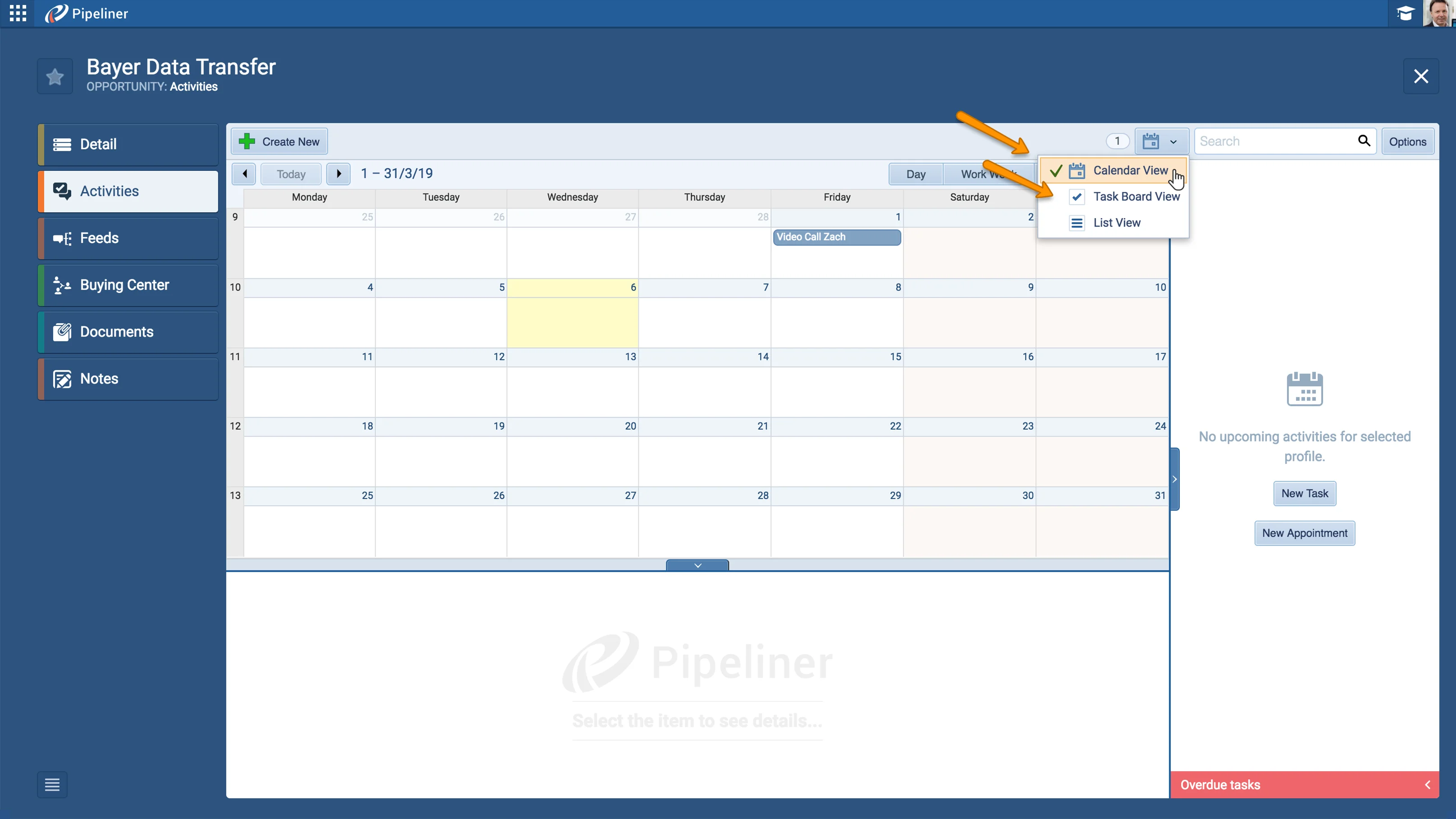
  • The Activities tab switches between List View, Task Board, and Calendar View in Leads, Opportunities, Account, and Contact details.
  • Activity task status is chosen from colored tabs instead of a dropdown.
  • Customizing forms and fields in Admin is faster, and Admin section tabs now have their own icons.
  • Notes 2.0 adds a rich text editor with headers, bold, italic, underline, and bullet points.
  • New Contacts created from an Account, and new Accounts created from a Contact, can be auto-populated with data.
  • Existing contacts can be linked to accounts directly.
  • The Contact card now shows job title and account information in Opportunity details.
  • Preview and Extract show the Unit logo, user picture, status label, and priority label for Leads, Opportunities, Accounts, Contacts, and Activities.
  • Navigator's Business Overview icons are now clickable to open their details.
  • The record-update dialog adds save-and-continue, discard-and-continue, and cancel options.
Activities Views

What we're proud of

Charts come to Reports

Reports Improvements introduces Charts for Report — turn any report into a Line chart or Column chart by enabling Show Graph in the Power Panel and choosing the columns to plot, with the chart rendered above the data table.

01New · Administration

Admin

  • We optimized the speed of the application when customizing forms and fields.
  • We´ve made design updates in the Admin sectionTabs now have their own icons!
#admin
02New · Integrations

Automation Hub

  • We bring simple way to activate Gmail Integration with Coevera from Standard IMAP configuration to the easy-to-use Google Oauth Screen. Just click to activate Gmail Integration, enter your Google account login data and you are done.
  • We massively improved the sync logic for Google and MS Exchange Integration for Syncing Tasks, Appointments and Contacts.
#automation-hub
03New · Pipeline

Activities Improvements

  • You now have the ability to switch between List View, Task Board and Calendar View in the Activities tab in Leads, Opportunities, Account and Contact details.
  • We have improved the design for choosing Status inside the Activities Tasks. We´ve replaced the dropdown with Tabs and also added the colors to different status tabs for better visualisation.
#activities-improvements
04New · Reports

Reports Improvements

Activities Views

Coevera introducing Charts for Report! Make your Reports more visual with two new Chart types: Line chart and Column chart. To enable the Chart feature click on Power Panel › enable “Show Graph” button › specify the columns to be shown in chart. After that the Chart will be shown above the data table. Try it now!

Reports now have adjustable sidebar! You can click on the sidebar line and drag it to your preferred width or click on the small arrow to hide it completely.

All screenshots

2
#reports-improvements

Various Improvements

Various ImprovementsPipeline
Notes 2.0

A bundle of usability upgrades across the app — Notes 2.0 rich text editor, auto-populated and linkable Account and Contact records, an enriched Contact card, richer Preview and Extract, expandable Bubble Chart opportunities, University Ideas and Knowledge base, clickable Navigator Business Overview, persistent Profiles, and new save, discard, and cancel dialog options.

All screenshots

4
#various-improvements

Frequently Asked Questions

Reports gain two new chart types — Line chart and Column chart — and an adjustable sidebar you can drag to your preferred width or hide completely.

Open the Power Panel, enable the Show Graph button, and specify the columns to be shown in the chart. The chart is then displayed above the data table.

Gmail can now be activated from a Google OAuth screen instead of standard IMAP configuration — click to activate, enter your Google account login, and you're done.

The sync logic for Google and MS Exchange integration has been significantly improved for syncing Tasks, Appointments, and Contacts.

You can switch between List View, Task Board, and Calendar View in the Activities tab across Leads, Opportunities, Account, and Contact details, and choose task status from colored tabs instead of a dropdown.

Notes 2.0 adds a rich text editor, so you can format notes with headers, bold, italic, and underlined text, as well as bullet points.

See it in your own pipeline

Start a free trial and explore what's new in Coevera 1.9.0 for yourself.

No se requiere tarjeta de crédito · Prueba gratuita de 14 días

groupsTrusted by clients around the globeverified_userISO 27001 CertifiedshieldGDPR CompliantblockData never used to train AI