v5.11.0MinorReleased

Brand New Voyager AI Document Summary & Chat, Free Trial Email Verification, Improved Online Forms & Reports, Task Activities and other Various Improvements…

Coevera 5.11.0 brings AI to your documents with Voyager AI › Document Summary & Chat, overhauls Online Forms to create and update multiple related records at once, and adds email-based reporting alongside a batch of Reports and Activities improvements.

Voyager AIQuotes & DocumentsReports
Share
Features
7
Improvements
7
Security
Próximamente

Overview

Two themes lead this release. Voyager AI › Document Summary & Chat brings AI to documents stored in Coevera: users can summarise selected documents, or ask the Document AI questions across them with contextual chat history, and save the result as a PDF, Task, Appointment, Note, or email. Online Forms gets a major update — a single submission can now create or update a primary record and one or more related records without Automatizer, file upload links straight to records, and Custom Entities and Quotes can serve as the primary record type.

Beyond the headline features, emails become a reportable entity, admins can set default tags and default task and appointment types per entity form type, and improvements land across Reports — comments on activities, a Values grouping mode, and conditional formatting on Pivot reports — plus optional attendees in the Outlook add-in and an expandable, editable calendar all-day section.

What's in this release
  • Voyager AI › Document Summary & Chat creates AI summaries of selected documents, saved as a PDF, Task, Appointment, Note, or email.
  • Ask Documents lets you query selected documents with contextual chat history, speech-to-text, and a clearable chat.
  • The AI Tools for Documents button is available from the Record Detail Documents tab, Document Manager, Documents drill-downs, and the Email Detail AI menu (document summary only).
  • Online Forms can create or update a primary record and one or more related records from a single submission, without Automatizer.
  • The On Form Submit tab is reorganised into Primary Records, Related Records, and Options sub-tabs.
  • Online Forms file uploads link to records via Attach Files to Record, one-click Quick Attach, or automatic attachment.
  • Custom Entities and Quotes can now be used as the primary record type for an Online Form.
  • Reporting on Emails adds spreadsheet and pivot table reports from a newly accessible Email entity.
  • Email spreadsheet reports can include related Lead, Opportunity, Account, Contact, Project, Quote, and Custom Entity data.
  • Default Tags per Entity Form Type lets admins control which tags are available for each form type.
  • Default Task Activity per Entity Form Type associates specific task and appointment types with selected entity form types.
  • Activity Reports can now show the last comment or all comments in the report table.
  • Report tables gain a Values grouping mode alongside the default Combination mode.
  • Pivot table reports support conditional formatting on values used in Rows, Columns, and Values.
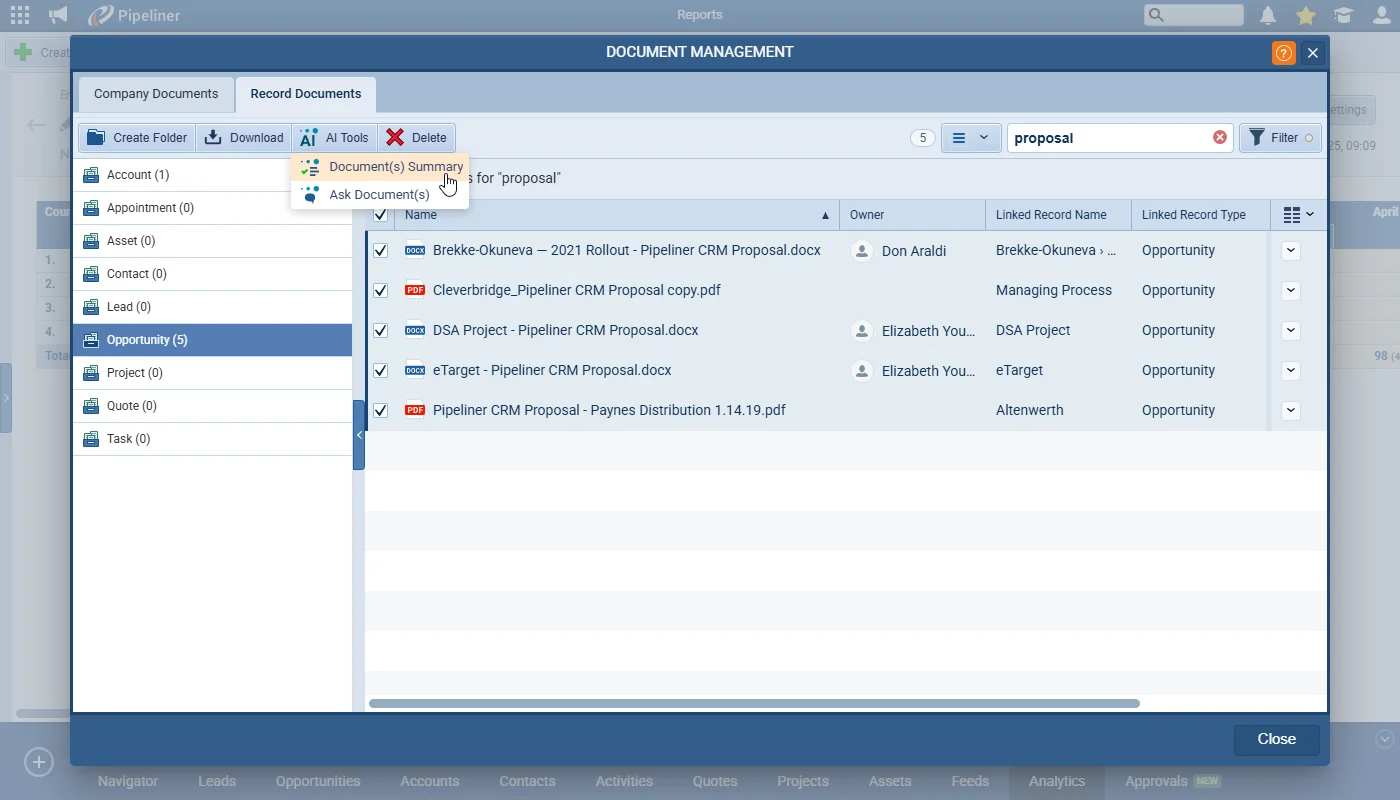
Document(s) Summary

What we're proud of

AI comes to your documents

Voyager AI › Document Summary & Chat can summarise any number of documents stored in Coevera — saving the result as a PDF, Task, Appointment, Note, or email — or answer questions across them in a contextual chat.

01New · Voyager AI

Voyager AI › Document Summary & Chat

Document(s) Summary

This release brings the power of AI to documents stored in Coevera. Users can now summarise the content of selected documents or, for example, ask the Document AI to sum the total of several selected invoices.

The AI Tools for Documents button is available from:

Record Detail › Documents Tab

All screenshots

5
Documentation#voyager-ai-document-summary-chat

03New · Quotes & Documents

Online Forms › File Upload (Enhanced)

Manual File Attachment

This release brings enhancements to the document upload feature via “Online Forms“. We’ve made it easier for users to link uploaded files directly to records in Coevera.

All screenshots

6
Documentation#online-forms-file-upload-enhanced
04New · Integrations

Online Forms › Custom Entities & Quotes as Primary Record Type

Online Forms › Custom Entities & Quotes as Primary Record Type

In another major enhancement to “Online Forms“, it is now possible to base Forms on both “Custom Entities” and “Quotes(as well as Accounts, Contacts, Leads or Opportunities).

When creating the “Online Form“, users can now select “Custom Entities” or “Quotes” as the “Primary” record type.

All screenshots

3
Documentation#online-forms-custom-entities-quotes-as-primary-record-type
05New · Reports

Reporting on Emails

Reporting on Emails

We are adding the ability to create spreadsheet and pivot table reports based on a newly accessible “Email” entity. Previously it was necessary to report on emails linked to “Contacts(or “Accounts”) but now you can start a report based on Emails regardless of where they are linked. This now gives you the option to produce reports to analyse how many emails sent to or received by each user.

For spreadsheet reports, you can also add available related entities to your email report. Choose from:

  • Lead
  • Opportunity
  • Account
  • Contact
  • Project
  • Quote
  • Custom Entities

It is highly recommended for spaces with a lot of email communication to use filter settings to reduce loading time.

Documentation#reporting-on-emails
06New · Administration

Default Tags per Entity Form Type

Default Tags per Entity Form Type

This release makes it possible to specify which tags should be available for selection by users when using specific forms. For example, some tags might only be relevant when using a “Customer” type of “Account” and not when using a “Prospect” type.

All screenshots

3
Documentation#default-tags-per-entity-form-type
07New · Administration

Default Task Activity per Entity Form Type

Default Task Activity per Entity Form Type

In order to streamline activity management, Admins can now associate specific task and/or appointment types with selected “Entity Form Type(s)“.

The enabled activity types apply across all relations including in “Lookup” fields. A record must be selected or opened in order to create the tasks. Should there be no activity types enabled for an entity form, the user will receive a message that “No activity types allowed for this record type”.

Documentation#default-task-activity-per-entity-form-type

Various Improvements

As part of our ongoing usability enhancement program, we've updated the following features.

Various ImprovementsAdministration

Admin › Record Detail Interface Setting for Custom Entities

Admin › Record Detail Interface Setting for Custom Entities

The interface for "Custom Entities" can now be customised in the same way as the system entities. Admins can hide "Tabs" or "Widgets" from "Entities › › Interface › Detail".

#admin-record-detail-interface-setting-for-custom-entities
Various ImprovementsReports

Reports › Ability to show comments on Activities

Reports › Ability to show comments on Activities

We have added "Comments" to "Activity Reports", so now the user can see the last comment or all comments in the report table (standard table).

Comments are available in:

  • Visible columns
  • Group by columns
  • Charts
  • Filter
#reports-ability-to-show-comments-on-activities
Various ImprovementsReports

Reports › Grouping Mode in Tables

Reports › Grouping Mode in Tables

Table reports can switch grouping from Combination to Values, as charts already can.

All screenshots

2
#reports-grouping-mode-in-tables
Various ImprovementsReports

Conditional Formatting › Pivot Report

Conditional Formatting › Pivot Report

Users can now add conditional formatting to the values in "Pivot" table reports. Note that only fields used in "Rows", "Columns" and "Values" in the report can be used.

#conditional-formatting-pivot-report
Various ImprovementsIntegrations

Outlook Add-in › Optional Attendees Support

Outlook Add-in › Optional Attendees Support

Optional attendees are now supported by the Outlook addin.

#outlook-add-in-optional-attendees-support
Various ImprovementsPipeline

Activities › Calendar View › Editable All-Day section in Activities

Activities › Calendar View › Editable All-Day section in Activities

These improvements enhance user navigation and ensure all activities are easily accessible:

  • Expanded All-Day Section › The default size now shows more events for better visibility.
  • "Show More" Indicator › A clear "Show More" button appears when activities exceed the visible limit and clicking opens a popover with all hidden activities for the day.
  • All-Day Popover › Displays all activities for the selected day, auto-adjusts to fit the number of activities, with scrolling enabled for longer lists and includes a header, close button, and drag-and-drop functionality for easier management.
#activities-calendar-view-editable-all-day-section-in-activities
Various ImprovementsPipeline

Approval Process › Comments Bubble Improvement

Approval Process › Comments Bubble Improvement

With this update we tried to simplify access to approval process comments, making them easier to manage and respond to, improving efficiency across approval workflows.

  • Interactive Comment Icon › the comment icon now features hover and click functionality, providing a clearer and more intuitive interaction.
  • Detailed Comments Popover › clicking the icon opens a popover, allowing users to easily view, read, and interact with rejection comments.
  • Improved Accessibility and Usability › the popover supports scrolling, formatted text, and copying, making it seamless to handle longer, detailed comments.
  • Consistent Design and Clarity › clear commenter attribution and cohesive styling ensure a more user-friendly and professional experience.
#approval-process-comments-bubble-improvement

Frequently Asked Questions

It brings AI to documents stored in Coevera — you can summarise selected documents or ask the Document AI questions across them, and save the output as a PDF, Task, Appointment, Note, or email.

The summarise feature works on PDF, CSV, DOC, DOCX, XLS, XLSX, HTML, TXT, and MD files, up to 4.5 MB per document and 3.75 MB per image (maximum resolution 8000px by 8000px).

No. Online Forms can now identify, update, and link related records directly, so a single submission can create a primary record and one or more related records without Automatizer.

In addition to Accounts, Contacts, Leads, and Opportunities, Online Forms can now use Custom Entities and Quotes as the primary record type.

You can build spreadsheet and pivot table reports from a newly accessible Email entity regardless of where the emails are linked, and spreadsheet reports can add related Lead, Opportunity, Account, Contact, Project, Quote, and Custom Entity data.

Admins can set which tags are available for each form type, and associate specific task and appointment types with selected entity form types.

See it in your own pipeline

Start a free trial and explore what's new in Coevera 5.11.0 for yourself.

No se requiere tarjeta de crédito · Prueba gratuita de 14 días

groupsTrusted by clients around the globeverified_userISO 27001 CertifiedshieldGDPR CompliantblockData never used to train AI